
A human model generator is software that creates realistic images of people wearing your clothes, without a photoshoot. For a small clothing brand, it answers a long-standing problem: shoppers want to see garments worn, but booking models, photographers and studios for every product has been out of reach for many small teams. A generator produces the person, places your garment on them and returns an image that looks like a product photograph.
That description is accurate, and it also leaves out the parts that decide whether the images can be trusted. The person in the image is invented. The garment in the image is reconstructed from your photos. The picture shows how the garment looks, not how it fits. Understanding those points is what separates a brand that uses generated images well from one that runs into returns, complaints or awkward questions.
This guide explains what a human model generator actually does, what you need before you start, what it can and cannot do for a small brand and how to decide whether it suits your products.
| Question a small brand asks | Short answer |
|---|---|
| What goes in? | Clear photos of your garments, usually flat-lays, plus choices about the model |
| What comes out? | Realistic images of a generated person wearing your garments |
| Is the person real? | No. The person is generated and does not exist |
| Is the garment real? | It is reconstructed from your photos and has to be checked against them |
| Does it show fit? | No. It shows appearance; fit comes from measurements and samples |
| Does it replace all photography? | No. Some fabrics and products are still better photographed |
What a Human Model Generator Actually Does
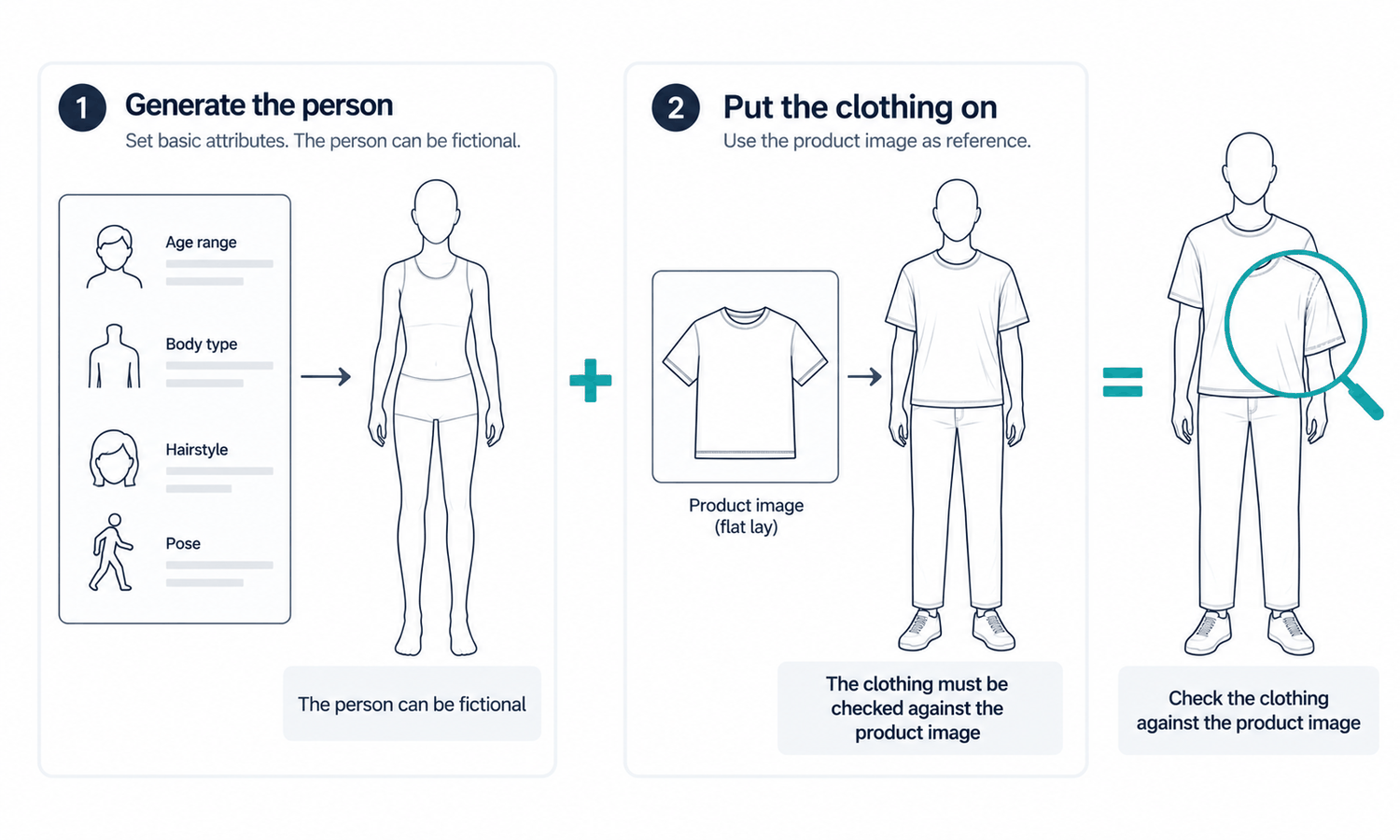
A human model generator does two jobs that are easy to mistake for one.
The first is creating the person. The software produces a realistic face and body from settings you choose, such as age range, build, hair, expression and pose. The person does not exist; no real individual was photographed. That is what allows a small brand to show products on a model without booking one, and it is why the same model can appear across every product in the store.
The second is putting your garment on that person. The software starts from a photo of your garment, usually a flat-lay, and places it on the generated body so that it follows the pose and the light. This is the part that matters most to your customers, because the garment is what they are buying.
The two jobs carry different standards. The person can be invented freely, as long as the face does not closely resemble a real, identifiable individual. The garment cannot be invented. It is reconstructed from your photos, and reconstructed detail tends to come back almost right: a trim slightly different, a label with a letter off, a pocket moved a little. Every image has to be compared with the garment before it is used.
A human model generator is also different from two things it is sometimes confused with. It is not a photograph of a real model with a different face added; that raises questions about the original model's agreement. And it is not a 3D avatar built for fit simulation, which works from digital patterns and fabric data and answers different questions.
Seen together, the two jobs explain why the output looks the way it does. The person looks natural because the software is free to produce a plausible face and body. The garment looks convincing because the software fits your photo to that body and fills in whatever the photo did not show, such as the side of a sleeve in a turned pose or the fabric pressed under a hand. The first freedom is harmless. The second is exactly why every image is checked against its garment photo before it goes on sale.
What You Need Before You Start
A human model generator produces better images when it is given better inputs. A small brand needs only a few things in place.
-
Clear garment photos. A flat-lay for each product, pressed, evenly lit and photographed straight on, with close-ups of trims, labels and prints, and a back view when the back matters. This is the single biggest factor in the quality of the results.
-
A picture of your customer. Decide who the model should represent, described in plain, neutral terms such as age range and build. One approved model is usually enough to start.
-
Your channel's requirements. Know what your store or marketplace expects from product images, including background, framing and any rules about AI-generated imagery.
-
Time to check. Set aside time to compare every finished image with its garment photo. It is the step that keeps generated images honest.
With those in place, the generator becomes a routine tool rather than an experiment.
What It Can Do for a Small Brand
For a small brand, the main benefit is access. Products can be shown on a person without a photoshoot, which is often the difference between on-model images for every product and on-model images for none.
It also brings consistency. The same approved model, in the same pose and scene, can carry every product, so the store looks coherent. New products can be added to that look as they arrive, rather than waiting for the next shoot.
It makes range practical. Showing garments on models of different ages or builds, described neutrally, becomes a matter of settings rather than extra bookings, which helps a brand show the customers it actually serves.
And it makes updates quick. A new colorway captured as a flat-lay, a replacement background or a crop for a new channel can be produced without organizing a studio day.
None of these benefits removes the need to check each image against the garment. They change where the effort goes: less into organizing shoots, more into capturing good garment photos and reviewing the results.
What It Cannot Do
Knowing the limits is what lets a small brand use generated images with confidence.
It cannot show fit. A generated image shows how a garment looks on a body in a picture. It does not predict fit or determine sizing. Measurements, a size chart and the garment itself answer those questions, and a generated model did not wear the garment in any size, so size-worn captions do not belong on generated images.
It cannot show how a fabric behaves. The drape in the image is rendered, not calculated, so it suggests how a fabric might fall rather than showing how it actually moves.
It cannot settle color on its own. Screen color is not a physical reference, and generated imagery does not promise an exact color-code match. Color is judged against the real garment.
It handles some fabrics less well. Complex prints, lace and openwork, sheer fabrics and layered styling remain current weak areas for generated imagery. Products built on those are usually better photographed.
It is built for garments. Footwear and structured items such as hats take their shape from a last or block, and they are better photographed as well.
Is It Right for Your Brand?
A human model generator suits some small brands better than others, and the answer usually comes down to the products and how often they change.
It tends to suit brands whose products are garments that photograph clearly as flat-lays, whose range changes often enough that regular shoots are impractical and who value a consistent look across the store. It tends to suit them less when much of the range is built on the weak-area fabrics above, when the products are mostly footwear or structured accessories, or when the brand's story depends on real people and real places that generated imagery cannot provide.
The simplest way to find out is to test it. Take a few typical styles, capture good flat-lays, generate the images, check every one against its garment and look at the results as a customer would. That small test answers the question more reliably than any general advice.
For small brands testing generated models, Lightchain AI (apparel AI) covers both jobs a human model generator does.
-
Model Studio creates the model from neutral settings and adjusts face, body, size, pose, scene and angle.
-
AI Virtual Try-On places each garment on that model from its flat-lay, including on a saved model set, so every product appears on the same person.
-
An AI Compliance Mark watermark control is available for channels where generated images need to be labeled.
For brands producing on-model images with generated models across their range, Scale E-commerce is the Lightchain AI solution built for that work.
Frequently Asked Questions
What is a human model generator?
It is software that creates realistic images of generated people wearing your garments, without a photoshoot. It creates the person and places your garment, from its photo, on that person.
Is the person in the image a real model?
No. The person is generated and does not exist. Check the face before approval to make sure it does not closely resemble a real, identifiable individual.
Does a human model generator show how clothes fit?
No. It shows how a garment looks in an image. Fit and size guidance come from measurements and the size chart.
What does a small brand need to get started?
Clear flat-lay photos of each garment, a neutral description of the customer the model should represent, the channel's image requirements and time to check every image against its garment. One approved model is usually enough to begin.
Which products are not a good fit for generated images?
Styles with complex prints, lace and openwork, sheer fabrics or layered styling, and products such as footwear and structured hats. Those are usually better photographed.
How can a brand tell whether it is worth using?
Test it on a few typical styles: capture good flat-lays, generate the images, check each one against its garment and judge the results as a customer would. A small test answers the question more reliably than general advice.
Which Lightchain AI solution suits a small brand exploring generated models?
Scale E-commerce is the one to use. It brings Model Studio and AI Virtual Try-On together so a brand can create an approved model and place each garment on it from a flat-lay, keeping every product on the same person.
In Closing
A human model generator creates a person who does not exist and places your garment on them, reconstructed from your photos. For a small brand, that opens up on-model images for every product, a consistent look and quick updates without a studio. It does not show fit, fabric behavior or exact color, it handles some fabrics less well and it is built for garments. Give it clear flat-lays, check every image against the garment and test it on a few styles before relying on it.
Start Here
If your small brand wants on-model images for its range without organizing photoshoots, Scale E-commerce is the solution to use. It is built for producing on-model imagery with generated models: you create an approved model, place each garment on it from a flat-lay and keep a consistent look as new products arrive. Start with a few typical styles, check every image against its garment and judge the results as a customer would.
**Explore Scale E-commerce → **https://www.lightchainai.com/global/solutions/scaleECommerce