
Sketch to photo turns a garment drawing into a realistic image: a line sketch becomes something that looks like a photographed flat-lay, or a fashion illustration becomes something that looks like a model wearing the finished piece. For a design team, it is a fast way to see an idea as it might look made, long before a sample exists.
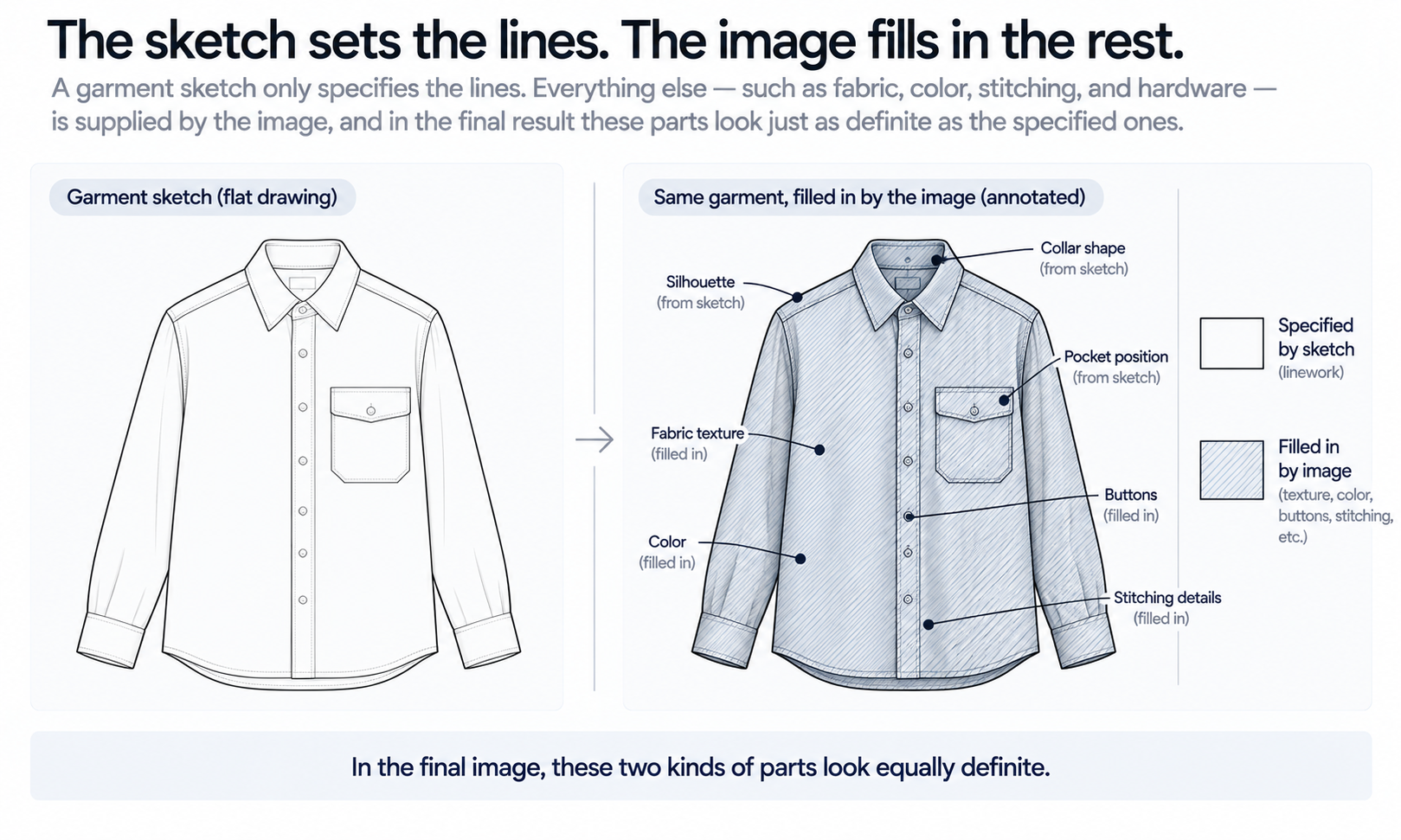
The result looks like a photograph, and that is exactly why it needs to be understood. A sketch contains lines. A photograph contains fabric, color, weight, texture, trims, stitching and light. Everything the sketch did not specify, the image had to supply. Some of what it supplies will match what the designer intended. Some of it will be a plausible guess that nobody decided.
This article explains how sketch to photo works: the two kinds of sketch and what each becomes, what the drawing actually specifies and what the image fills in, how to give the process more than lines to work from, and what the resulting image is and is not fit to be used for.
| Element | Specified by a line sketch? | Filled in by the image unless you add it | Confirmed by |
|---|---|---|---|
| Silhouette and seam lines | Yes | — | The sketch and the pattern |
| Pockets, collars, closures | Mostly, if drawn clearly | Their exact size and finish | The tech pack |
| Fabric and texture | No | Yes | A swatch or fabric reference |
| Color | No, unless noted | Yes | The lab dip or approved sample |
| Weight and drape | No | Yes | A physical sample |
| Trims and hardware | Rarely in detail | Yes | The trim specification |
| Whether it can be made | No | Not shown at all | The pattern maker and sample room |
Two Kinds of Sketch, Two Kinds of Result
The phrase covers two different starting points, and it helps to keep them apart.
A flat sketch, sometimes called a technical flat, draws the garment on its own, laid out as if on a table, with no body inside it. Its natural result is a realistic flat-lay: the same garment shown as if it had been made, pressed and photographed from above. This is the most direct form of sketch to photo, because the drawing and the result show the garment in the same position.
A fashion illustration draws the garment on a figure, usually stylized, often in motion, with proportions exaggerated for effect. Its natural result is an on-model image. That is a larger step, because the process has to reinterpret the garment from a stylized body onto a realistic one, and the illustration rarely shows the garment's construction as clearly as a flat does. A practical route is often two steps: turn the garment into a realistic flat-lay first, review it, then put it on a model. Each step can be checked on its own, and an error in the garment is caught before it is carried onto a body.
What the Sketch Specifies and What the Image Fills In
Sketch-to-image tools generally use the drawing as a structural guide. The lines constrain where edges, seams and openings go, and the generation process produces an image that respects those constraints while supplying everything else. How a particular tool does this internally varies; the principle is common across them.
The important word is supplying. Where the sketch is silent, the image does not leave a blank. It fills the gap with whatever is most plausible for a garment of that shape. A shirt with no fabric note becomes a shirt in some fabric. A jacket with no color becomes a jacket in some color. A pocket drawn as a rectangle becomes a pocket with some flap, some stitching and some depth. Each choice looks deliberate in the finished image, because the image has no way to show which parts were decided and which were invented.
Sketches are also ambiguous in ways designers stop noticing. A single line can mean a seam, a fold, a dart, a pleat or a shadow. A curve at a hem can mean a shaped edge or a garment moving. The image has to choose, and it will choose confidently. That is why a sketch-to-photo result should be read against the sketch line by line, asking of each feature whether it was drawn or interpreted.
Plausible is not the same as intended. The most common disappointment with sketch to photo is not an obvious error. It is an image that looks entirely convincing and shows a garment slightly different from the one the designer had in mind: a heavier fabric, a different collar roll, a trim that was never specified. Knowing what the image filled in is the difference between using that image well and being misled by it.
Feeding the Sketch More Than Lines
The more the inputs specify, the less the image has to invent. A few additions narrow the gap considerably.
-
Clean line work. Close gaps in outlines, remove stray construction lines and keep seams distinct from shading. The process reads every mark as intent.
-
A fabric reference. An image of the actual swatch, photographed flat in even light, tells the process what surface and texture to use instead of guessing.
-
A color reference. A color note or code gives the process a target. Treat it as a reference control rather than a promise of exact reproduction, and settle the final color physically.
-
Trim and detail references. Buttons, zippers, labels and hardware are usually too small in a sketch to specify. A reference image for each one keeps the image from inventing them.
-
Written notes for ambiguous lines. A short note such as "center-front line is a seam, not a fold" or "hem is shaped, not moving" resolves the ambiguities before the image has to.
Even with every reference supplied, read the result against the inputs. Details that are reconstructed rather than copied tend to come back almost right, such as a button with the wrong number of holes or a zipper pull of a slightly different shape. Almost right is what passes a quick look, so check each image against its references rather than a sample of them.
Some materials remain harder for generated imagery. Complex prints, lace and openwork, sheer fabrics and layered garments are current weak areas. For those designs, a sketch-to-photo image can still help with silhouette and proportion, but it should not be relied on to show the fabric itself.
What a Sketch-to-Photo Image Is For
A realistic image of an unmade garment is useful in specific places, and misleading in others.
It is useful for design review. Seeing a sketch as a realistic garment helps a team judge proportion, balance and detail placement faster than reading a flat. It is useful for line review, where a range of styles can be compared side by side before any are sampled. It is useful for early conversations with buyers, provided the images are clearly presented as concepts. And it is useful alongside technical documents, where a realistic view helps factories and development teams understand the intent of a flat.
It is not a product photograph. Until the garment has been made and checked against the image, a sketch-to-photo result shows what the garment might look like, not what it does look like. Using it as listing imagery for customers before the garment exists and has been verified risks showing them something the finished product will not match. Label concept images as concepts wherever they are shown outside the design team.
It is not proof that the garment can be made. The image respects the sketch's lines, but it does not know whether the pattern will close, whether the seam allowances work or whether the construction is feasible at the target cost. That remains the pattern maker's and sample room's judgment.
It is not evidence of how the fabric behaves. The drape in the image is rendered, not calculated, so it is evidence about the picture rather than about the fabric. It does not model how a fabric moves or predict fit. And its color is a screen rendering: screen color is not a physical reference, there is no promise of an exact color-code match, and the colorway is settled by the lab dip or sample against the agreed standard.
From Sketch to Sample in Practice
The strongest use of sketch to photo is as one step in a loop that runs from drawing to sample and back.
In Lightchain AI (apparel AI), that loop is built around the Design & Production Workbench and a few connected tools.
-
Line Sketch to Flat Lay turns a clean sketch into a realistic flat-lay with fabric texture, folds and shadow, and Flat Lay to Line Sketch runs the other way when a sample or reference needs to become a drawing, as described on the Production-Marketing Synergy page.
-
When a detail needs to change without redrawing the whole garment, Target Revision edits a defined area using a reference or a written instruction, as described on the Partial Redraw page.
-
When the concept needs to be seen on a body, AI Virtual Try-On puts the reviewed flat-lay on a model, keeping garment review and model imagery as separate steps.
-
Technical-document drafts can be prepared from the selected design for the development team to review, as production-related support rather than a finished specification.
For teams that move designs from sketch to sample and on to marketing, Production-Marketing Synergy is the Lightchain AI solution built to connect those steps.
Whatever tools you use, keep a record of what each image was made from: the sketch, the references and the notes. When the sample arrives, that record makes it possible to tell whether a difference between image and sample came from the design, from the references or from something the image filled in.
Frequently Asked Questions
What is sketch to photo?
It is the process of turning a garment drawing into a realistic image. A flat sketch usually becomes a realistic flat-lay, and a fashion illustration can become an on-model image, often by way of a flat-lay first.
Why does the result look different from what I drew?
The sketch specifies lines, and the image fills in everything else, including fabric, color, weight and trims. Where the sketch is silent or ambiguous, the image chooses what is plausible, which is not always what you intended.
How can I make the result closer to my design?
Supply more than lines: clean line work, a fabric reference, a color reference, trim references and short notes on any ambiguous lines. Then check the result against those inputs detail by detail.
Can sketch-to-photo images be used as product photos?
Not before the garment has been made and checked against the image. Until then, they show a concept, and they should be labeled as concepts wherever they are shown outside the design team.
Does the image show how the fabric will drape?
No. The drape is rendered to look plausible, not calculated from the fabric's properties. A physical sample shows how the fabric actually hangs and moves.
Is the result ready for production?
No. It can support design review and technical documentation, but whether the garment can be made is decided by the pattern maker and the sample room.
Which Lightchain AI solution handles sketch to photo?
Production-Marketing Synergy is the one to use. It turns line sketches into realistic flat-lays, turns samples back into sketches and prepares technical-document drafts for development review. Supply fabric and color references with each sketch to reduce what the image has to fill in.
In Closing
Sketch to photo is a translation from lines to a picture, and the picture always contains more than the lines did. Silhouette and seams come from the sketch. Fabric, color, weight, trims and much of the detail are filled in, unless you supply them. Give the process references and notes, read every result against its inputs, and use the image for what it is: a fast, realistic view of a concept that helps a team decide, not a photograph of a garment that has not yet been made.
Start Here
If your team works from sketches and wants to see designs as realistic garments before sampling, Production-Marketing Synergy is the solution to use. It connects sketches, realistic flat-lays and technical-document drafts in one workflow: you turn line sketches into flat-lays, turn samples back into sketches and prepare drafts for development review. Start with a few sketches, supply a fabric and color reference for each, compare every result against its inputs, and extend to the full range once the results hold.
**Explore Production-Marketing Synergy → **https://www.lightchainai.com/global/solutions/productionMarketing