
Virtual Try-On Explained: How It Works and What It Costs Apparel Brands
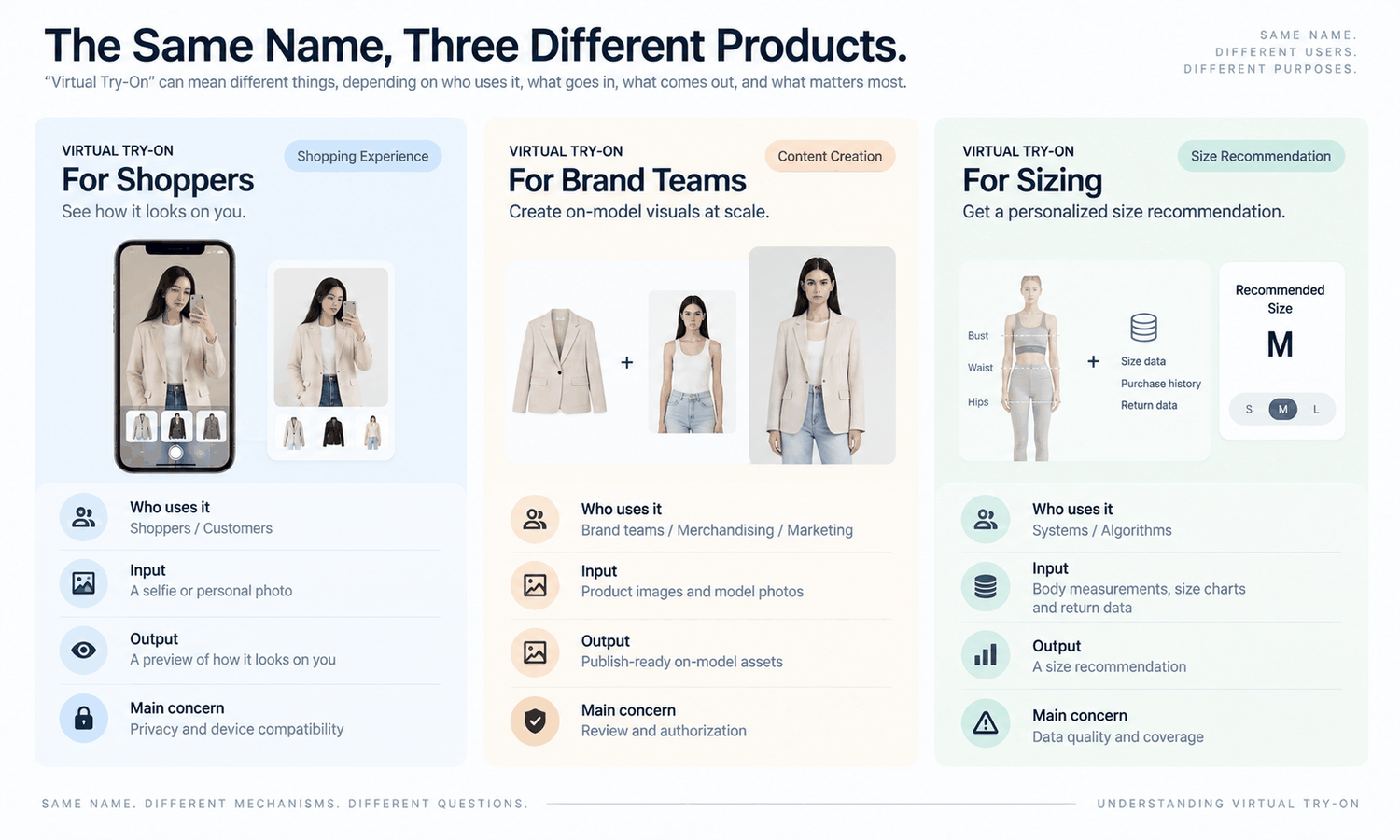
The phrase covers at least three different products, and most confused conversations about virtual try-on are two people describing different ones. Before any question about cost or accuracy is answerable, it helps to establish which of the three is on the table.
Three things share the name
The first is shopper-facing try-on: a customer uploads a photo or uses a camera, and sees themselves in a garment. This one lives on a storefront, involves the customer directly, and raises questions about privacy, consent, and device support. It also exists as its own product rather than as a mode of the imagery tool — for Shopify stores it ships as a storefront app — which is why those questions have an owner and a set of settings rather than being caveats.
The second is brand-side try-on imagery: a garment is placed onto a model image to produce assets for listings, lookbooks and campaigns. No customer is involved. The output is a photograph-like file that goes into the same slots a shoot would have filled.
The third is fit technology, which uses measurements, body scans, or return histories to recommend a size. It shares no mechanism with the first two and answers a different question entirely.
Most of what follows concerns the second, because that is where most apparel brands spend their imagery budget and where the operational questions are concrete. The first is a separate product with its own setup, not a different name for the same thing.
Getting the distinction stated early also prevents a specific and expensive form of confusion. A board approving investment in virtual try-on after hearing about conversion improvements is frequently picturing the shopper-facing version, while the team about to build it is planning an imagery workflow. Both are legitimate projects with different budgets, timelines and owners, and the mismatch tends to surface at the first review. Naming which of the three the budget was approved for takes one line in the brief, and it is cheaper than discovering the mismatch at the first review.
How it works, functionally
A garment image goes in, usually a flat-lay or a product shot, optionally with references for the model, face, pose or background — or with a written description instead of a photograph. It can be run as description mode, reference-image mode, model-set mode or multi-task mode, and a flat-lay can be converted to a worn view automatically. What comes out is a composite where the garment appears worn.
What matters for planning is how the system treats detail. It reproduces what the garment image resolves clearly and constructs what it cannot see — a hidden back panel, stitching below the resolution of the source, a detail behind an arm. Both arrive in the output looking equally finished, which is why review exists.
The rendering follows the pose rather than simulating the material. A garment appears to hang in a way consistent with the body position, and that appearance is generated rather than calculated from fabric weight or structure. This distinction becomes important later.
Speed is no longer the constraint. Lightchain AI (apparel AI) states a sixty-second try-on flow for its module, and comparable steps across the category run in a similar range. The bottleneck moved to input quality and review capacity.
What decides whether it works on your products
Results vary more between photographs than between tools, which surprises teams expecting the opposite.
The favorable case is a front or three-quarter pose with the arms clear of the torso, even lighting that shows fabric texture, clean garment edges against the background, and enough resolution for the size the asset will be displayed at. Under those conditions, output is usually usable on the first attempt.
The difficult case is occlusion — arms folded, a bag strap crossing the body, hair over a shoulder — along with strong highlights that have lost detail, and any substantial change in silhouette between the original garment and the target one. None of these are permanent barriers. They convert into more attempts and more checking, which is a cost rather than a wall.
Sorting your existing photography into those two groups before running anything is the single most useful preparatory step available.
It also produces a second finding worth having. Most brands discover that their difficult group is concentrated in a particular photographer, season, or shooting style rather than spread evenly, which turns a vague quality problem into a specific and fixable one.
The costs that are not the license
| Cost | Why it is easy to miss | Who absorbs it |
|---|---|---|
| Input preparation | Feels like normal photo work | The studio or whoever sources images |
| Attempts that fail | No invoice arrives for a retry | The operator's time |
| Review of every output | Looks like a quick glance | Someone with product knowledge |
| Assets rejected after production | Counted as production, not loss | The schedule |
| A new checkpoint in the process | Nobody scheduled it | Whoever owns the calendar |
| Rights and disclosure review | Sits outside the workflow entirely | Compliance, per market and platform |
Fill this table with your own figures rather than looking for benchmarks. The ratios differ enough by category and by photography standard that borrowed numbers mislead in both directions.
Review is the row that scales. The others can be reduced with better inputs, clearer acceptance criteria and practice; the requirement that someone looks at each asset before it goes live grows with volume, and no setting removes it.
Where the cost lands in an organization
The license is visible and small. The rest is distributed across people who already have jobs, which is what makes the arrangement look cheaper than it is for the first quarter.
A studio absorbs the input preparation. An operator absorbs the failed attempts. A merchandiser absorbs the review, usually in the evening, and the calendar absorbs the new dependency. None of these produce an invoice, and none of them appear in the business case. A shared company account and library move some of that absorption onto a budget line, where it at least becomes visible.
Naming them at the outset is the difference between an honest plan and a surprise in month four. It also determines whether the arrangement can scale, since a workflow that depends on one person's spare evenings has a hard ceiling regardless of how fast generation becomes.
There is a version of this that goes well, and it involves saying the quiet part in the business case. A proposal that states plainly that this will require a named reviewer for a defined number of hours per week is more likely to succeed than one promising savings with no operational cost attached, because the second kind gets contradicted by experience and loses credibility for everything that follows.
What it does not do
This is where expectation and capability diverge most often, and it is worth stating without hedging.
The output is a visual asset. It does not predict fit. It does not determine sizing. It does not model how a fabric behaves in motion. It does not forecast returns. Those answers come from measurements, a graded pattern, a physical sample, and your own returns data.
The confusion is understandable because the output looks like photographic evidence. A convincing image of a jacket on a model invites conclusions about sleeve length and how the fabric falls, and the image itself gives no signal that those conclusions are unsupported.
Anyone circulating the assets should say this once, plainly, to whoever receives them. Buyers and merchandisers reading a persuasive image will otherwise treat it as information about the garment rather than a picture of it.
The sentence to use is short enough to survive being forwarded. This image shows how the garment reads, not how it fits. Attached to a delivery message or written into a file name, it travels further than any briefing, and it costs nothing to include.
Where it earns its place first
Start where the alternative was weak rather than where it was strong.
Colorway repeats are the clearest case: a style already photographed well, needing the same treatment across variants that would each have required a reshoot. Long-tail listings are the second, since those are the products that never justified a session and were previously represented by a flat-lay or nothing. Late additions are the third, where the alternative was a second shoot day or a listing going live without on-model imagery.
Hero campaign images and close fabric crops are where a camera still belongs, and a brand that generates those because it can will notice the loss before its customers can articulate it. The AI Virtual Try-On module in Lightchain AI (apparel AI) covers the first three cases from an existing product photo — see AI Virtual Try-On, and Scale E-commerce for how the output is used across a catalog.
Questions apparel teams ask
Is this the same as the try-on feature customers use on a website?
They are different products, and both exist. Shopper-facing try-on runs inside a storefront — for Shopify stores it ships as an app — and carries privacy, consent and device considerations. Brand-side try-on imagery produces assets for listings and campaigns, and no customer is involved.
How accurate is it?
Accurate about what the source photograph recorded, and generated where it did not. Details clearly resolved in the input carry through; details that were small, shadowed or hidden are produced to look plausible, and the output does not distinguish the two.
Will it show whether a garment fits?
No. Fit, sizing, fabric behavior in motion and returns are outside what the output can support, and they come from measurements, a pattern, a sample and your own data.
What does it cost?
Beyond any license, the real costs are input preparation, failed attempts, review of every asset, rejected output, and a new dependency in the calendar. Review is the one that scales with volume.
Do we need to disclose that images are generated?
Requirements vary by market and by platform and they change. Route it to whoever owns compliance and check per channel rather than settling it once.
Where should a first project start?
Colorway repeats on a style you have already photographed well. High approval rate, obvious value, and a clean comparison against the reshoot it replaces.
What the term should mean in a planning conversation
Brand-side try-on imagery is a way of producing photographic-looking assets from a garment image and a body image, quickly, with quality determined mostly by the input and cost determined mostly by review. It is not a fit tool, not a sizing tool, and not the same product as the try-on experience a shopper uses on a storefront. Define which one you mean, sort your photography before you start, and staff the review step rather than the generation step. Those three moves resolve most of the disappointment this category produces.
Say which of the three you mean before the next discussion.
Write one line stating whether you are planning shopper-facing try-on, brand-side imagery, or fit recommendation, and circulate it before the meeting. Then sort a hundred existing product photos into favorable and difficult, and name the person who will review output and how many hours a week they have for it. Those three steps take an afternoon and prevent most of the misalignment that shows up later as disappointment. → AI virtual try-on