
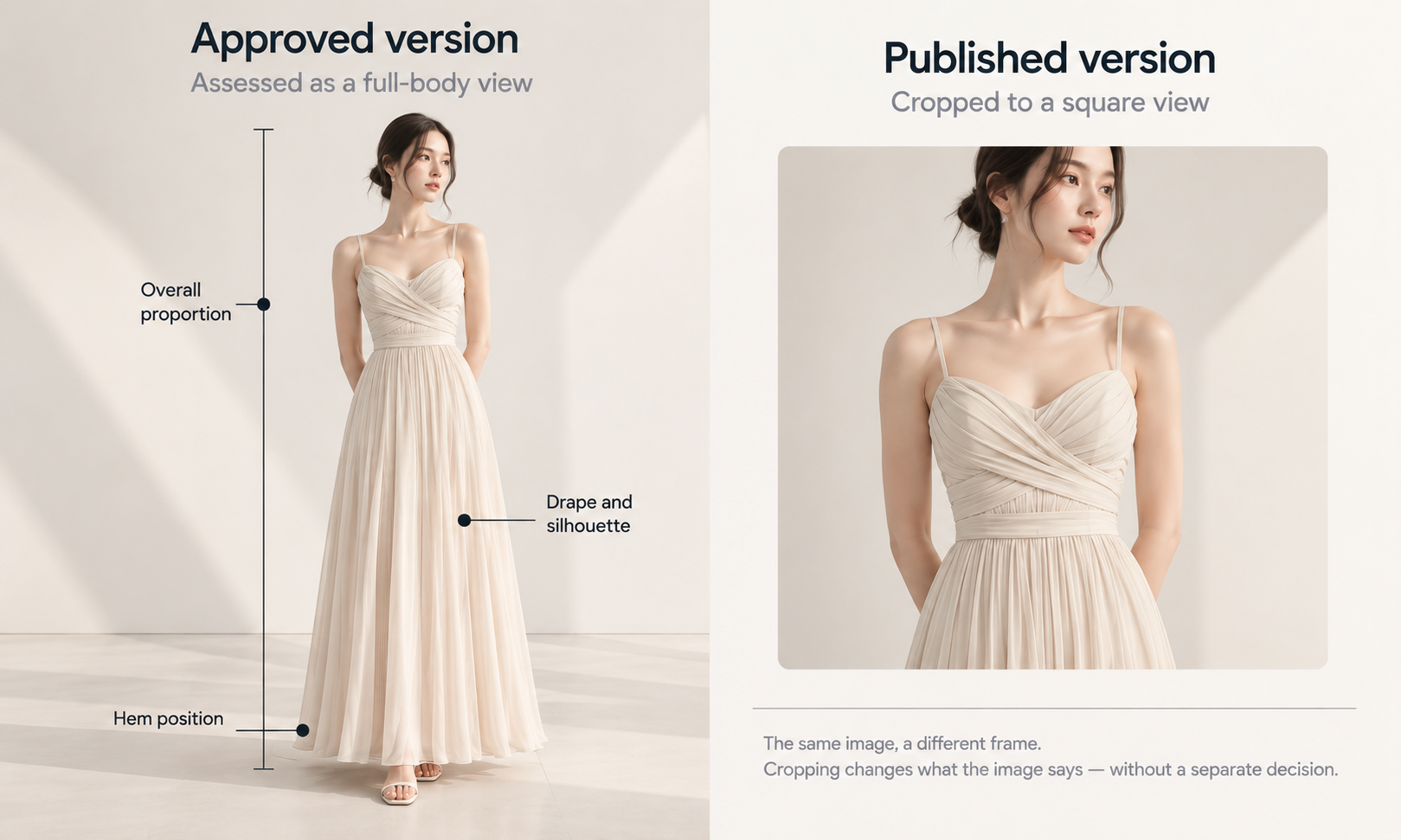
Sign-off is treated as the end of an asset's editable life. It is closer to the middle.
After a virtual try on dresses image is approved, it gets cropped for a channel that wants a different ratio, compressed on the way to a page, normalized by a marketplace's processing, retouched by whoever needed a version without the background, and swapped during a launch by somebody working late. Each of those is an edit. None of them went back through the person who approved the original, and most of them happen inside systems that person cannot see.
The useful question is therefore not whether the file changes after approval, because it does. It is which changes leave the approval intact and which quietly unwind it.
Approval covers a file, and the file keeps moving
An approval is a statement about a specific image at a specific moment. It travels with a filename, and filenames survive about one handoff.
What makes this worse than ordinary version drift is that the changes are usually made by people acting sensibly within their own remit. A channel manager crops to fit a grid. A developer compresses to hit a page weight target. A marketplace applies its own background and color handling on ingest. Nobody is going around the process; there is simply no point in the process where any of them would think to ask.
For dresses this bites harder than for most categories, because the things a crop removes are frequently the things that were being judged: the hem, the fall of the skirt, the proportion between bodice and length. An image approved as a full-length shot and published as a square crop is a different assertion about the garment, made without anybody deciding to make it.
What actually gets changed after approval
| The change | Who usually makes it | Does the approval survive it |
|---|---|---|
| Resize within the same aspect ratio | Whoever prepares channel versions | Yes. Nothing the check verified has moved |
| Crop to a different ratio | A channel owner fitting a grid | Not if it removes a garment feature, which for a dress is most crops |
| Compression to hit a page weight target | Whoever owns page performance | Only above a stated quality floor. Below it, the checked details stop being legible |
| Color handling applied on ingest | A marketplace or channel, automatically | No, and it adds a second gap on top of the one between screen and cloth |
| Retouch for a background-free or cleaned-up version | Whoever needed that version that day | No. It is a new image and nothing compared it against the source |
| Regeneration or a composite with another image | The originating team | No, and everybody already knows this one, which is why it is not the problem |
Read the third column and a pattern emerges: the edits that invalidate an approval are not the dramatic ones. Nobody re-approves a redraw, and everybody knows to. The problem sits with the routine operations that feel like formatting.
The edits that quietly unwind the conformity check
The conformity check verifies that an output matches its source: logos, printed text, care labels, and small hardware compared against the source image on every single on-model output, without exception. Three routine post-approval operations can undo exactly that work.
Compression is the least obvious. A pass aggressive enough to hit a page weight target can degrade the small features that were checked — a care label becomes illegible, a stitch line smooths out, a printed mark loses the edge that made it verifiable. The image still looks fine at page size. The evidence that it was correct has gone.
Color handling on ingest is the second, and it is the one that reaches a customer. Screen color is not a physical reference, exact code matching is not something to promise, and the gap between a monitor and a roll of cloth stays open regardless of display quality. Colorways get settled by strike-offs against an agreed standard. A marketplace applying its own color normalization adds a second gap on top of that one, and the shade on the live page is now two steps from the cloth.
Retouching is the third and the most common. A version without the background, a version with the shadow removed, a version with a distraction cleaned up — each is a new image and none of them was compared against the source. Where a genuine defect needs fixing, a targeted correction to that region is a controlled operation with a record; an untracked retouch by whoever was available is not.
Decide the permitted set in advance
The workable version of this is a short list agreed once, rather than a review triggered every time somebody resizes something.
-
Permitted without re-approval: resizing within the same aspect ratio, format conversion, and compression within a stated quality floor
-
Requires re-check against source: any crop that changes what is visible, any retouch, and any pass through a system that applies its own color handling
-
Requires full re-approval: any regeneration, any change to the garment as depicted, and any composite with another image
-
Always recorded: which version is live on which channel, so a defect found in one place can be traced to the others sharing its origin
-
Never assumed: that a channel's processing left the file alone, since ingest behavior is a property of the channel rather than of your pipeline
The quality floor in the first line is the item most worth setting explicitly. Somebody has to name a threshold below which compression is not permitted, and the threshold should be set by whether the checked details remain legible rather than by a page weight target alone. Those two considerations pull in opposite directions and the tension is real; naming it is what stops it being resolved silently in favor of whichever one has a dashboard.
Across a catalog at scale this matters more, because a compression setting applied globally applies to every style at once. That is the correlated version of the problem: one setting, one decision, several hundred assets.
What re-approval cannot recover
Some things are outside what any approval process reaches, before or after.
The output is a visual asset. It does not predict fit, determine sizing, model how a fabric behaves in motion, or forecast returns. Those come from measurements, a graded pattern, a physical sample, and your own data. Re-approving an image does not extend what it is able to support, so a fit conclusion read out of a published dress image is no more available after a second signature than it was after the first.
The more specific limit is about publication. An image that has been live through a purchase is what a customer bought against, and correcting the page afterwards reaches the page rather than the person. That is the reason the permitted set is worth agreeing before a launch rather than after a complaint: post-publication correction is a real operation with a real limit, and the limit is everybody who already ordered.
Footwear is not covered by this class of workflow, and lace and open work, sheer fabrics, complex prints, and heavily layered looks are documented weak spots. Those verdicts are properties of the category rather than of any approval state, and a re-approval does not move them.
Where the changes come from, and who to tell
Most of the edits described here originate outside the team that made the image, which is why the fix is a conversation rather than a control.
Tell the channel owners which crops are permitted and why, in terms of what the crop removes rather than in terms of policy. Tell whoever owns page performance what the compression floor is and what it protects. Ask each marketplace what its ingest does to color and dimensions, since the answer varies and is rarely volunteered. And keep a record of what is live where, because that record is what turns a single discovered defect into a bounded list rather than an open question.
In Lightchain AI (apparel AI) the uploaded source stays beside every AI Virtual Try-On output derived from it, which means a published file can be compared back to the original garment photograph rather than to whichever version happened to be in a folder. Whether the work runs through Lightchain AI or a camera, that comparison is the thing every downstream question eventually resolves to.
Frequently asked questions
Is a crop really a change worth re-checking?
It is when it changes what is visible, which for dresses is most crops, since hem, length, and proportion are usually what was being judged. A crop that tightens the frame without removing a garment feature is a formatting operation. The distinction is what the viewer can no longer see.
Our marketplace processes images on upload. What can we do?
Ask what the processing does, in writing, and test it with one asset before assuming. You generally cannot change the behavior, and knowing it lets you decide what to send and what to check afterwards. Discovering it from a customer complaint is the expensive version.
Who should own the permitted set?
Whoever owns the conformity check, since the list is a description of what preserves that check and what breaks it. It needs agreement from the channel and performance owners rather than imposition on them, because they are the people who will apply it daily.
What about assets a retail account edits?
The same categories apply and you have less visibility, which makes a stated usage line more valuable than a control. Say which edits are permitted rather than prohibiting editing in general, since a listing that needs a different ratio will get one either way.
How do we handle a defect found on a live page?
Fix the page, then check the other versions sharing that origin rather than only the one reported, since the same source and settings usually produced several. Record what the cause was, because a defect that came from a compression setting and one that came from generation need entirely different fixes.
Does this apply to internal assets too?
Less urgently, since internal misreadings get corrected in a conversation. The categories are still useful for line sheets and buyer-facing material, which travel further than internal assets and are edited by more people. Apply the list where the asset leaves the building.
In closing
An approval describes one file at one moment, and that file goes on to be cropped, compressed, normalized, retouched, and swapped by people acting reasonably inside their own remits. Some of those operations are formatting and some of them undo the comparison that made the approval meaningful. Agreeing which is which costs one short list and a few conversations with the people who will actually perform the edits. The alternative is an approval that describes a file nobody is looking at any more.
Start here
Take one dress currently live and compare the published image against the file that was approved. Look at the crop, the shade, and whether a care label or a printed detail is still legible at full size. Most teams find at least one of the three has moved. Finding it on your own terms is considerably cheaper than the alternative route to the same information, which runs through a customer.
**Start with the on-model workflow → **https://www.lightchainai.com/global/solutions/aiVirtualTryOn