
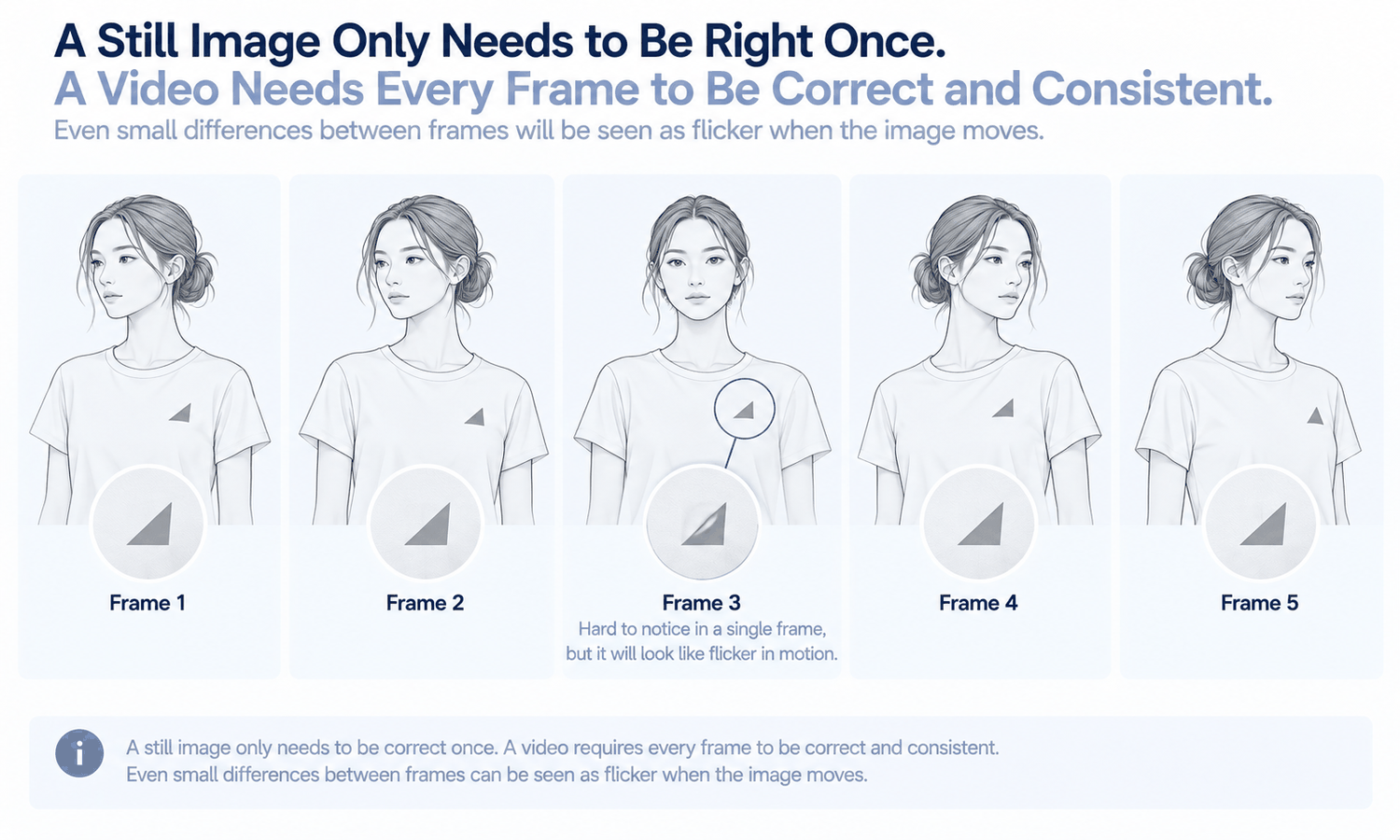
Virtual models in video look like the natural next step after still images. If a generated model can wear a garment convincingly in a photo, it seems a short step to have that model turn, walk or let a skirt swing for a few seconds of social or campaign content. The step is shorter than it used to be, and it is still a large one. A still image asks every detail to be right once. A video asks every detail to be right, and the same, in every frame.
That difference changes what can go wrong. A logo that is slightly reshaped in a still might pass unnoticed. In a video, the same logo may reshape a little differently in each frame, and the eye catches the flicker immediately. A face that looks consistent across a set of photos may drift within a few seconds of motion. And movement itself says something about a garment, how its fabric swings, stretches or settles, which a generated clip renders rather than records.
This article explains what changes when the image moves, why consistency across frames is the core challenge, how fabric in motion should be treated, which videos suit generation and which are better filmed, and how to use virtual models in video responsibly.
| What video adds | Why it is harder than a still | What to check |
|---|---|---|
| Movement | Every frame is produced, not only one | Watch at full size and at slower speed |
| The same person throughout | Face and hair can drift between frames | Identity at the start, middle and end |
| The same garment throughout | Logos, text, trims and prints can shift frame to frame | Details at several points in the clip |
| Fabric in motion | Swing, stretch and settling are rendered | Whether the motion suits the real fabric |
| Hands and feet in motion | Moving hands and feet are especially hard | Fingers, feet and contact points |
| A stable scene | Backgrounds and props can shift | Edges and background details |
What Changes When the Image Moves
A still image is a single decision. Everything in it, the model, the garment, the light, the background, has to be right in one frame, and it can be checked in one look.
A video is a sequence of frames, each produced so that together they look like continuous motion. Every frame has to agree with the ones around it. Where a still can be almost right, a video that is almost right in slightly different ways from one frame to the next shows those differences as movement: a pocket that flickers, a hem that jumps, a pattern that crawls across the fabric.
That is why video is more demanding than a set of stills, even a large set. Stills are judged one at a time; video is judged as a whole, in motion, by an eye that is especially sensitive to things that change when they should not.
Consistency Across Frames
Consistency across frames is the central challenge, and it remains a current weak area for generated imagery. It shows up in several places.
-
Identity. The model's face, hair and proportions should stay the same throughout. Drift is most likely during turns, when the face changes angle, and in longer clips.
-
Garment details. Logos, printed text, buttons, trims and seams should stay fixed on the garment as it moves. Reconstructed detail that is almost right in each frame can vary between frames.
-
Prints and patterns. Stripes, checks and prints should move with the fabric, not slide across it or change scale. Complex prints are a weak area even in stills and more so in motion.
-
Hands and feet. Moving fingers and feet are among the hardest things to keep consistent, especially where they touch the garment or the ground.
-
The scene. Backgrounds, props and lighting should stay stable, without objects shifting or light changing direction partway through.
The quality of the starting image matters even more in video than in stills. A clip generated from an image with a small error carries that error through every frame, and often amplifies it as the error shifts with the motion. Starting from a still that has already passed a full check against the garment source removes most of those errors before motion is added. Where a motion reference is used, such as a clip of a walk or a turn, choose one with a clear, uncluttered body position and movement that suits the garment.
Short clips with simple motion keep these risks lowest. The longer the clip and the larger the movement, the more frames there are in which something can drift.
Fabric in Motion
Movement makes a claim about fabric. A skirt that swings freely suggests a light, fluid fabric. A jacket that holds its shape through a turn suggests structure. A knit that stretches as the arm lifts suggests elasticity. Shoppers read these cues, often without noticing.
In a generated video, that motion is rendered to look plausible for the garment, not calculated from the fabric's real weight, stiffness or stretch. The result can be convincing and still describe a fabric that behaves differently in reality: a heavy wool skirt swinging like chiffon, a rigid denim moving like jersey.
So motion in a generated clip should suit the real fabric. Keep movement modest and appropriate: a slow turn for a structured coat, a gentle walk for a soft dress. Where the way a fabric moves is a genuine selling point, such as the swing of a pleated skirt or the drape of a silk dress, filming the real garment in motion is the honest choice.
Video, like stills, shows appearance, not fit. A generated model moving in a garment says nothing about how that garment will fit a particular customer.
Which Videos Suit Generation
Some kinds of video suit virtual models well; others are better filmed.
Generated video suits short mood and campaign clips, where the aim is atmosphere and the garment is shown in a general way. It suits subtle motion, such as a head turn, a slight shift of weight or a slow walk, built from an approved still. It suits social content where many short, consistent clips are needed across a range, provided each is checked.
Filming suits product videos whose purpose is to show exactly how a garment moves, fits or functions: the drape of an evening dress, the stretch of activewear, the way a coat fastens. It suits detail demonstrations, such as a zip, a pocket or a reversible lining. And it suits any garment in the current weak areas, such as complex prints, lace, sheer fabrics or layered styling, where frame-to-frame consistency is least reliable.
Many brands use both: filmed product videos where the motion must be true, and generated clips for atmosphere and volume.
Channels shape video too. Short vertical clips, square loops and wide banners each frame the garment differently, and a movement that reads well in one may crop the garment awkwardly in another. Plan the formats before generating, keep the garment inside the safe area of every crop and check each version, since cropping a clip can hide the details that the check relied on.
Using Virtual Models in Video Responsibly
Checking video takes a different routine from checking stills. Watch each clip at full size, several times. Watch it at reduced speed, where flicker and drift are easier to see. Pause at the start, middle and end and compare the garment's details with its source at each point. Check the face at each point too. Watch any loop point, where the end meets the start, for jumps. Label generated video wherever a channel's rules expect it, as with stills.
The most reliable starting point is an approved still. When a clip is generated from an image that has already been checked against its garment source, the video starts from a correct garment and a consistent model, and the check can focus on what motion adds.
In Lightchain AI (apparel AI), short fashion video starts from approved imagery.
-
AI Virtual Try-On produces the approved on-model still from the garment's flat-lay, which becomes the starting point for the clip.
-
The Video Workbench generates short fashion video from fashion imagery and direction, and its Action Replication combines a fashion image with a motion reference.
-
Video Modification applies a change to a selected time range of a clip, which suits correcting a short section without regenerating the whole video.
For brands producing on-model imagery and short video across many styles, Scale E-commerce is the Lightchain AI solution built for that work. Product videos where motion must be true are better filmed.
Frequently Asked Questions
Can virtual models be used in video?
Yes, for short clips with modest motion, especially mood, campaign and social content built from approved stills. Consistency across frames remains a current weak area, so every clip needs careful checking.
Why is video harder than still images?
Because every frame is produced and must agree with the others. Details that are almost right in each frame can vary between frames, and the eye sees that variation as flicker.
What drifts most often in generated video?
The model's face during turns, garment details such as logos and trims, prints that slide across the fabric, hands and feet, and background details. Longer clips and larger movements give each more room to drift.
Does motion in a generated video show how fabric really moves?
No. It is rendered to look plausible, not calculated from the fabric's properties. Keep motion appropriate to the real fabric, and film garments whose movement is the selling point.
How should generated video be checked?
Watch it at full size and at reduced speed, pause at the start, middle and end to compare details with the garment source, check the face at each point and watch the loop point. Reduced speed makes flicker much easier to see.
Which videos should be filmed instead?
Product videos showing how a garment moves, fits or functions, detail demonstrations and garments in the current weak areas, such as complex prints, lace or sheer fabrics. Filming records the real behavior rather than rendering it.
How does Lightchain AI support fashion video?
It starts from an approved on-model still made with AI Virtual Try-On, then the Video Workbench generates short fashion video, with Action Replication for motion references and Video Modification for correcting a time range. Scale E-commerce is the solution to use for that work.
In Closing
Virtual models in video add movement, and movement multiplies the chances for something to drift. Every frame must keep the same person, the same garment and the same scene, and consistency across frames remains a current weak area. Keep clips short and motion modest, start from approved stills, make motion suit the real fabric and check each clip at full size, at slower speed and at several points. Film the videos where how a garment moves is the point.
Start Here
If your brand wants short, consistent fashion video alongside its on-model imagery, Scale E-commerce is the solution to use. It is built for producing on-model content across many styles: you start from an approved still, generate short clips with modest motion and correct short sections without regenerating everything. Start with one approved still and a simple movement, check the clip frame by frame and extend to more styles once it holds.
**Explore Scale E-commerce → **https://www.lightchainai.com/global/solutions/scaleECommerce