
Most of what a small apparel team has to set up for virtual clothes try on is not software. The account takes an afternoon. The parts that decide whether any of it works are a corner of a room, a naming convention, and one named person, and those take longer and get skipped because they do not feel like setup.
There is a second thing that matters more in a team of four than in a team of forty. Whatever you build has to keep working when the person who built it is on holiday. In a large team, roles are separate and knowledge is duplicated by accident. In a small one, everything lives in somebody's head unless it was deliberately written down, and a setup that depends on a head is not a setup.
So the guide below is ordered by what is hardest to change later rather than by what is quickest to start.
What actually needs setting up
| What to set up | Roughly how long | What it costs to get wrong |
|---|---|---|
| A capture corner with repeatable light, a marked camera position, and a written standard | An afternoon to build, a season to hold | Everything. Inconsistency entering here cannot be corrected downstream and is invisible until a collection page looks wrong |
| Four identity fields on every file: style code, colorway, season, state | One conversation | Files that cannot be told from superseded ones, and approvals nobody can date |
| Two named review roles, held by two different people | One decision, made before the first batch | The comparison check gets absorbed into a general look and stops happening around month three |
| A written list of which categories go to photography, with reasons | An hour | The same argument reopened every season by whoever is busiest |
| The software account itself | An afternoon | Little. This is the only row on the list you can redo in an hour |
Read the third column and the priority order is the reverse of where enthusiasm goes. The account is the fastest thing on the list and the only one that can be redone in an hour. The capture corner is the slowest and the only one whose mistakes cannot be corrected downstream at all.
Build the capture corner once, photograph it, and freeze it
Every generated image is a derivation from a source photograph, which makes the capture the only description of each garment the rest of the workflow will ever have. In a small team it is also the thing most likely to drift, because whoever is free that afternoon does it and nobody wrote down what free means.
-
Pick one spot with light you can repeat, which usually means artificial light rather than a window, since a window is a different light in March than in June and different again at four in the afternoon
-
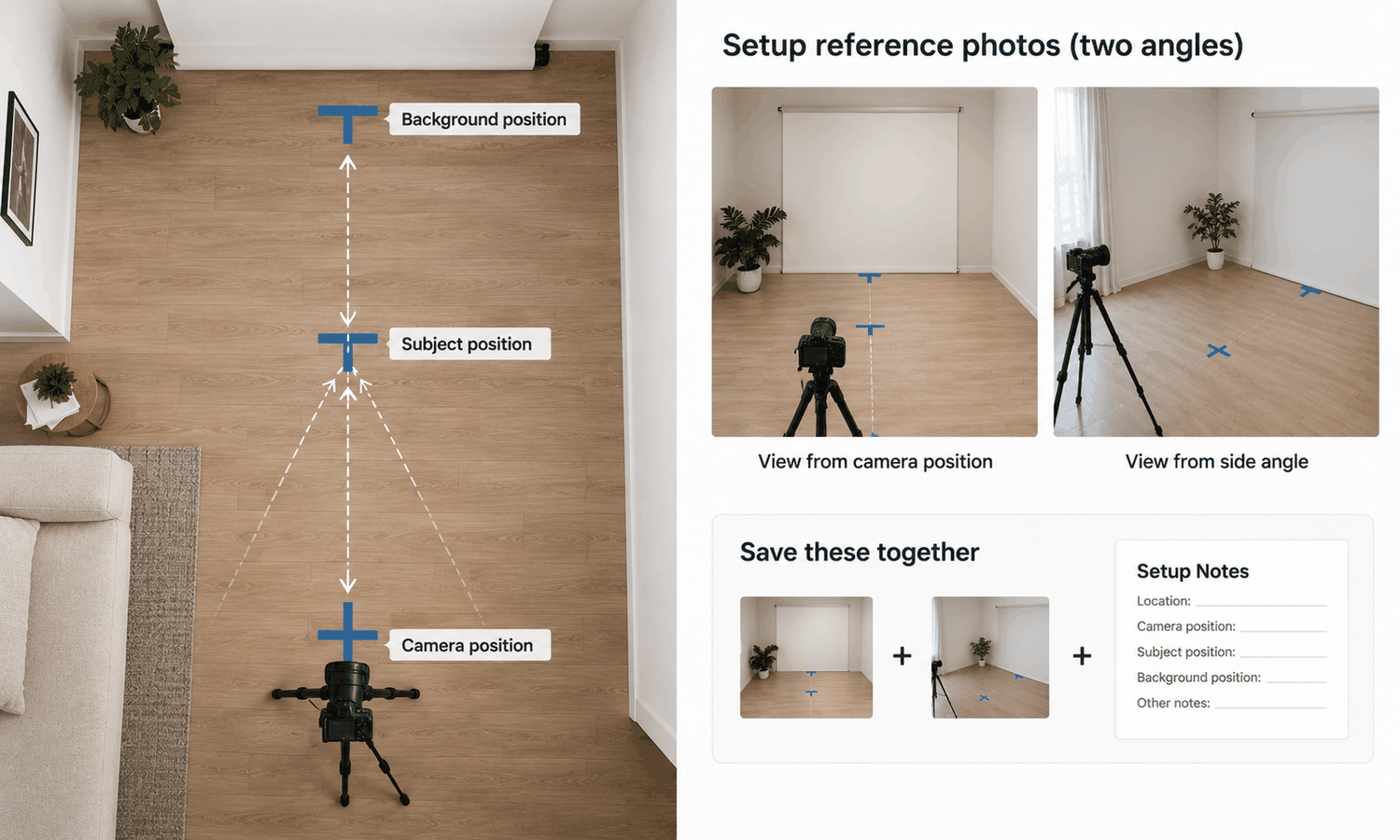
Mark the floor and the camera position with tape, so the distance and angle are not re-estimated each time
-
Fix one background, plain and unpatterned, and keep a spare in case the first one gets marked
-
Write the settings down and tape the card to the wall where the shooting happens rather than filing it somewhere sensible
-
Photograph the setup itself, from two angles, and keep those photographs with the written standard, because a reference photograph settles arguments that a description does not
-
Shoot every piece complete and unobstructed, including areas a later styling decision might cover, since that decision has not been made yet
Freeze it for a season. The instinct to keep improving the corner is what produces a range that reads as three different brands, and improving mid-season costs more than the improvement is worth. Hold the output side constant too: one model direction, one pose, one scene per category in Model Studio, changed between seasons rather than within one.
If your existing library was shot inconsistently, start the standard now and reshoot only the styles that appear together on a page. A partial set at one standard beats a complete set at four.
Decide where things live before you make any
Volume arrives faster than filing habits form. Twenty outputs are manageable in any folder structure; four hundred are manageable only in the one you decided on first.
Two things need deciding. The first is what identifies a file: the style code, the colorway, the season, and its state — proposal, selection, or confirmation. Those travel in the record and in the message rather than in the filename, which gets rewritten the second time somebody downloads it.
The second is whether an output can be traced back to the source it came from. That trace is what turns a defect shared across a batch into one fix instead of many, and without it a category-wide problem becomes an excavation. In Lightchain AI (apparel AI) the uploaded source stays beside the on-model outputs derived from it, so the link exists without anybody maintaining a spreadsheet about it. Whatever you use, check that this is true before the first batch rather than after.
Two review roles, even in a team of four
Review is two activities that small teams almost always run as one, and separating them is the single change that makes the workflow survive its second month.
The conformity check asks whether an output matches its source. It has a right answer, two people will reach the same verdict, and it can never be sampled, because outputs sharing a capture standard fail together and a clean sample tells you about the batch rather than about the images. The judgment pass asks whether an image is good. It can be sampled, delegated, or run at category level.
Inside the conformity check, one rule holds without exception. Logos, printed text, care labels, and small hardware get compared against the source image on every single output. Reconstructed detail lands almost right — a letterform slightly off, a stitch count wrong, a zipper pull the wrong shape — and almost right survives an appreciative look at your own work. Looking is not comparing, and in a small team that distinction is the first thing negotiated away on a busy week.
Name a person for each role, and make them different people even if that means the founder checks the designer's work. The comparison does not require the taste that produced the image, which is exactly why somebody else can do it. When a single region fails and the rest of the frame is sound, a targeted correction to that region is smaller than a rerun and keeps the rest of the batch comparable.
What the setup cannot do for you
The output is a visual asset. It does not predict fit, determine sizing, model how a fabric behaves in motion, or forecast returns. Those come from measurements, a graded pattern, a physical sample, and your own data. That is a property of what the asset is rather than a limitation of any particular result, and no part of a setup changes it.
Two things follow for a small team specifically. A size guide cannot be assembled from imagery, so fit language on a page or in a line sheet has to trace back to the measurement chart and the fit session. And no part of this workflow can be presented as the reason a return rate or a conversion figure moved, since both sit at the end of a chain running through sizing, price, assortment, and traffic.
Color needs a decision at setup time rather than an argument later. Screen color is not a physical reference, exact code matching is not something to promise, and the gap between a monitor and a roll of cloth stays open regardless of display quality. Colorways get settled by strike-offs against an agreed standard, so plan for physical swatches as part of the process and treat any colorway shown on screen as a shortlist.
Two scope answers save time. Footwear is not covered by this class of workflow, and that is structural rather than a gap waiting to close. Lace and open work, sheer fabrics, complex prints, and heavily layered looks are documented weak spots, so decide now which of your categories go to photography and write the reason next to each.
The first two weeks, in order
Sequence matters more than pace, and a small team can do all of this alongside normal work.
In the first week, build and photograph the capture corner, write the one-page standard, and decide the four identity fields. Name the two review roles. Do not generate anything yet, which is the instruction people find hardest and which protects the rest of the sequence.
In the second week, take one style from your hardest category, capture it to the new standard, and run it three times unchanged. Look at the details against the source before forming an overall impression. Write the finding as a sentence about the category rather than as a verdict about the tool, and decide the variant budget per style before the next batch rather than during it, including how many colorway directions will actually get reviewed.
Whether the work runs through Lightchain AI or a camera, that sequence is the setup. The software is the part you can change your mind about.
Frequently asked questions
How small is too small for this?
The setup is worth it when a single capture gets reused, so count how many times each style appears across colorways, channels, and seasons rather than counting styles. A range with heavy reuse repays the discipline quickly. A range shot once and never revisited does not, and continuing to shoot is a reasonable answer.
We do not have space for a permanent corner.
Mark the floor and photograph the setup so it can be rebuilt in ten minutes rather than reinvented. A repeatable temporary setup outperforms a permanent one that nobody documented. The consistency comes from the marks and the reference photographs, not from the furniture staying put.
Can one person hold both review roles at low volume?
They can hold both for a short period, and the failure comes gradually rather than suddenly as volume rises. Name two people at setup even if one of them is rarely needed, since adding a role later requires a conversation and having it already named does not. The role that gets absorbed first is always the comparison.
What do we do about the library we already have?
Leave it alone except for the styles that appear together on a page or in a line sheet, since inconsistency is most visible in a grid. Reshoot those to the new standard and let the long tail sit. Trying to redo everything is how the standard gets abandoned in week three.
How many variants per style should we plan for?
Decide the number before generating rather than discovering it, and set it per style so a hero piece can carry more than a basic one. Every extra variant adds a conformity check and adds nothing until somebody chooses between them. Most teams find the number they need is smaller than the number they were producing.
When should we revisit the capture standard?
Between seasons, and only if something specific failed rather than because somebody had an idea. Changes made mid-season produce a range that does not match itself, and the cost of that is larger than any single improvement. Record what changed and why, so the next comparison is possible.
In closing
The setup that matters in a small team is the part that works when its author is elsewhere. That means a corner with taped marks and a photographed standard, four identity fields decided before the first file exists, two named review roles that are two different people, and a written note of which categories go to photography and why. None of it is software, all of it can be built in two weeks alongside normal work, and the software decision is the easiest one on the list to change later.
Start here
Spend the first afternoon on the corner rather than the account. Tape the floor, fix the light, shoot the setup from two angles, and write the settings on a card that stays on the wall. Then photograph one garment from your hardest category to that standard. That single photograph is the thing everything else derives from, and having one good example of it makes every subsequent argument about the standard much shorter.
**Start with the on-model workflow → **https://www.lightchainai.com/global/solutions/aiVirtualTryOn