
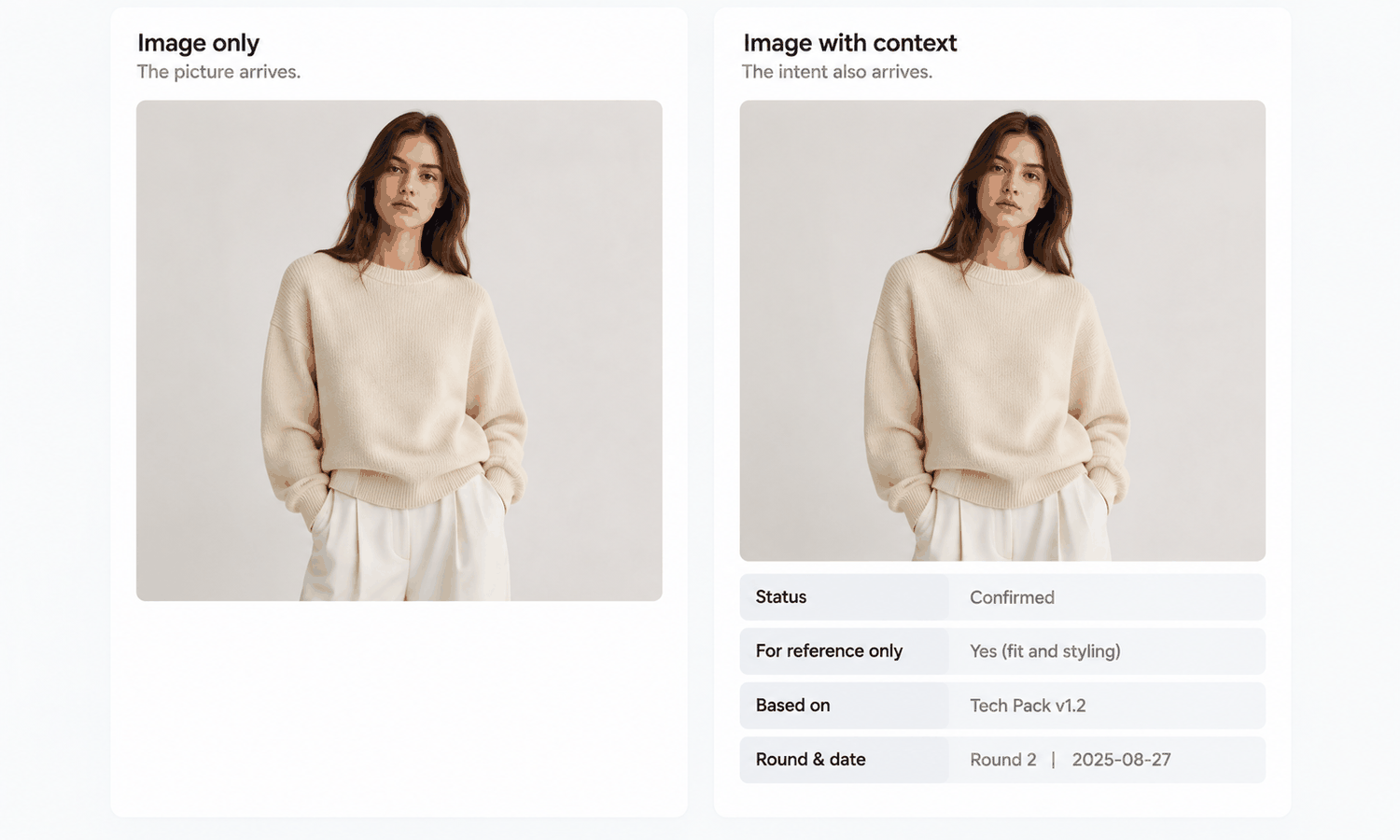
A brand sends an approved on-model image to a factory. Six weeks later the sample arrives with a pocket nobody asked for, a hem an inch off, and a color everyone remembers approving. No one misbehaved. The image did what images do: it traveled perfectly and instructed badly.
Try on me is a shopper's phrase. It describes someone putting a garment on themselves, on a screen, before deciding whether to buy. Inside a supply chain the same kind of picture does an entirely different job. It goes to a person who has to build the garment, in another country, in another language, working from a document the picture is not part of.
What survives that trip is what the picture looks like. What does not survive is which parts of it were decided, which parts the model produced on its own, and who is allowed to act on either.
The file arrives intact; the intent does not
A JPEG is lossless in transit and lossy in meaning. Everything a viewer needs in order to read it correctly — the sample round it belongs to, whether the sleeve length was chosen or inherited from a reference, whether the color is a direction or an approval — lives outside the file. It travels only if somebody deliberately puts it in the message.
This is structural rather than careless. The person sending has the context in their head and the file in their hand, and only the file gets sent. Meanwhile the receiving side has a strong reason to treat anything the customer sends as an instruction: ignoring something a customer sent is a worse mistake, from the factory's side, than building something the customer did not quite ask for.
So a supplier who reads an illustrative image as a specification is behaving rationally. The fix is not to remind them to ask more questions. It is to stop sending pictures that are ambiguous about their own status.
What drops out on the way
| What the sender meant | What arrives at the other end | Why it drops out |
|---|---|---|
| This detail is a decision; that one is not | Every detail reads as a decision | A flat image has no way to mark some regions as fixed and others as illustrative |
| This is round two of the sample | An undated picture | Generated output carries no sample round, and file names get rewritten on every re-share |
| The color is a direction | A color that looks specific | Screen color reads as a value even when nobody assigned one |
| The print sits at the intended repeat | A print at whatever scale was generated | Repeat scale is a measurement, and the picture shows a ratio |
The last row is the one that turns into money. A print repeat is a measurement, and a picture shows a ratio rather than a measurement, so a factory scaling from the image will land somewhere plausible and wrong. Nothing about the output announces this, because the image looks correct at every size.
The risk grows as output quality improves, which is the part teams do not expect. A rough sketch invites questions; a clean on-model render does not. An output generated in AI Virtual Try-On keeps a trail back to the inputs it came from, which makes the round and the source recoverable on your side — none of that crosses the wire with the file itself. The better the picture, the fewer questions come back, and fewer questions during development is not good news.
The caption is the payload
Treat the image as an attachment to the message rather than the message. Every picture leaving for a supplier carries four fields, written in the body of the mail where they cannot be renamed away:
-
What is fixed, named region by region, using the field names the tech pack already uses
-
What is illustrative, stated plainly — the model, the pose, the background, and any styling are not part of the request
-
Where the truth lives: the document version that governs, and what to do if the picture and the document disagree
-
Which sample round the image corresponds to, and the date
Before the caption gets written, one check has to happen without exception. Logos, printed text, care labels, and small hardware are compared against the source image on every single output. Reconstructed detail lands almost right — a letterform slightly off, a stitch count wrong, a zipper pull the wrong shape — and almost right is far more dangerous here than obviously wrong, because a factory will reproduce a plausible error faithfully and invoice you for it. Catching it at this stage is what makes it cheap: the region is rebuilt against the source in Partial Redraw while everything else in the output is left as it was, so what goes into the caption is a corrected file rather than a fresh generation that has to be checked all over again.
One field is worth calling out on its own. A colorway direction shown in an image is a shortlist rather than an approval, and it belongs under illustrative until a strike-off has settled it. Leaving it unmarked is how a mill ends up matching a monitor.
Keeping the output beside the input it came from makes the caption cheap to write months later. Working inside one environment helps: in Lightchain AI (apparel AI), generation history and the uploaded source sit together, so the answer to which round is this can be recovered instead of guessed. That only solves your half of the problem. The supplier's half still depends on what you typed in the message.
Adjectives do not survive translation
Slightly shorter. Cleaner finish. More natural drape. These are the fastest words to write and the least likely to arrive intact, for two reasons that compound. Each one is relative to a baseline that was never stated, and each one then gets translated by somebody who does not hold that baseline.
Replace the adjective with the field name and a number wherever a field exists: center-back length, sleeve opening, top-stitch spacing, placket width. Where no number exists, replace it with a named comparison instead — the same as the second sample of the previous round, the same as the finish on a style already in production. A comparison survives translation because it points at an object both sides can hold.
There is a stricter version of the rule worth adopting. If a word in your message is not a field in the governing document, either add it to the document or stop using the word. A vocabulary that exists only in email is a vocabulary that resets every time somebody new joins the thread.
Line drawings travel better than renders for the same reason. A line drawing is lossy in the useful direction: it drops the lighting, the model, and the styling, and keeps the construction. Converting selected garment imagery into a line drawing or a tech-sheet-style draft in the Design & Production Workbench gives you something closer to an instruction, though those outputs are drafts and a technical designer still has to review them before they go out.
What the image cannot carry
Be exact about the limits before any of this becomes a request to a supplier. The output is a visual asset. It does not predict fit, determine sizing, model how a fabric behaves in motion, or forecast returns. Those come from measurements, a graded pattern, a physical sample, and your own data.
Two rules follow directly. Never ask a supplier to confirm fit from a picture, and never accept a confirmation of fit that was made from one. The fall of a garment in a generated image is a rendering of drape rather than a prediction of it, and a factory trying to match what it sees may reach for a different weight or a different finish to get there — which is how a picture quietly changes a bill of materials.
Color has a separate limit that supplier communication makes worse. Screen color is not a physical reference, exact code matching is not something to promise, and the gap between a monitor and a roll of cloth does not close with a better display. Colorways get settled by strike-offs against an agreed standard. Values must not be read off a generated asset and sent onward as a target.
Make the round trip the unit, not the message
With eight or twelve hours between the two ends, a badly formed question costs a day rather than five minutes. That changes what a good message looks like. Batch the questions, number them, and ask for numbered answers so a partial reply is still usable.
-
Each question answerable with a yes, a no, or a number
-
What you will do with each answer, stated next to the question, so a reply becomes a decision instead of more information
-
What you will do if a question goes unanswered by a named date, so silence has a defined consequence
The reverse channel deserves as much attention and rarely gets it. Brands send pictures and expect words back. Suppliers usually have a camera, a sample, and the fastest possible way to settle an argument, and most of them have never been told that sending a photo back with a caption of its own is welcome. Say so explicitly, and give them the same four fields to fill in. A photograph of the actual sample beside a printed reference answers more questions in one message than a week of adjectives.
None of this depends on which tool made the picture. Whether an image came out of Lightchain AI, a camera, or a hand sketch, it enters the supplier's inbox with the same missing information, and the caption is what supplies it.
Frequently asked questions
Should we stop sending generated images to suppliers?
No. They are useful for showing intent quickly and for settling arguments about proportion and styling before anyone cuts anything. What has to stop is sending them without a statement of status, because an unlabeled image defaults to being read as a specification.
Our supplier reads English with difficulty. What changes?
Fewer adjectives and more field names, since field names are already shared vocabulary in the document both sides hold. Numbers, style references, and photographs of physical objects survive a language gap better than descriptive language does. Keep the caption to short declarative lines rather than paragraphs.
Who should write the caption?
Whoever generated or approved the image, at the moment they send it, because that is the only point where the context still exists in someone's head. Handing captioning to a coordinator later produces confident captions that are wrong. If the sender cannot fill a field, leaving it marked as unknown is more useful than filling it with a guess.
A factory already built something wrong from an image we sent. What now?
Establish which of the four fields was missing before deciding anything about cost, since the answer usually determines who absorbed the mistake. Then add that field to the caption template rather than to a reminder email. A recurring failure of this kind is a template problem, not an attention problem.
Can we send a generated image as a color reference?
Send it as a shortlist and label it as one. Physical color gets settled by a strike-off against an agreed standard, and a screen value carries none of that authority. Sending an image without that label invites a mill to match a monitor, which is a difference nobody can resolve afterwards.
Would a higher-resolution output reduce this problem?
It usually makes it slightly worse. Resolution raises the apparent authority of the picture without adding any of the information that was missing, so the receiving side asks fewer questions and assumes more. The gap being described here is in the message, not the pixels.
In closing
The picture is not the problem. An on-model image is a good way to show intent and a poor way to issue one, and the difference between the two lives entirely in what you type around it. Name what is fixed, name what is illustrative, name the document that governs, name the round. Replace adjectives with field names or a physical comparison. Ask numbered questions and let the supplier answer in pictures. None of it is technically difficult, which is why it keeps getting skipped, and why the samples keep arriving with a pocket nobody asked for.
Start here
Take one style currently moving between you and a supplier and pull the last three images you sent. Write the four caption fields for each of them now, after the fact. The fields you cannot fill are the ones the factory has been filling in on your behalf, and that list is usually short enough to fix in an afternoon. Do it before the next round rather than after the next sample, because a caption written in advance costs a sentence and a caption written afterwards costs a sample.
**Start with the on-model workflow → **https://www.lightchainai.com/global/solutions/aiVirtualTryOn