
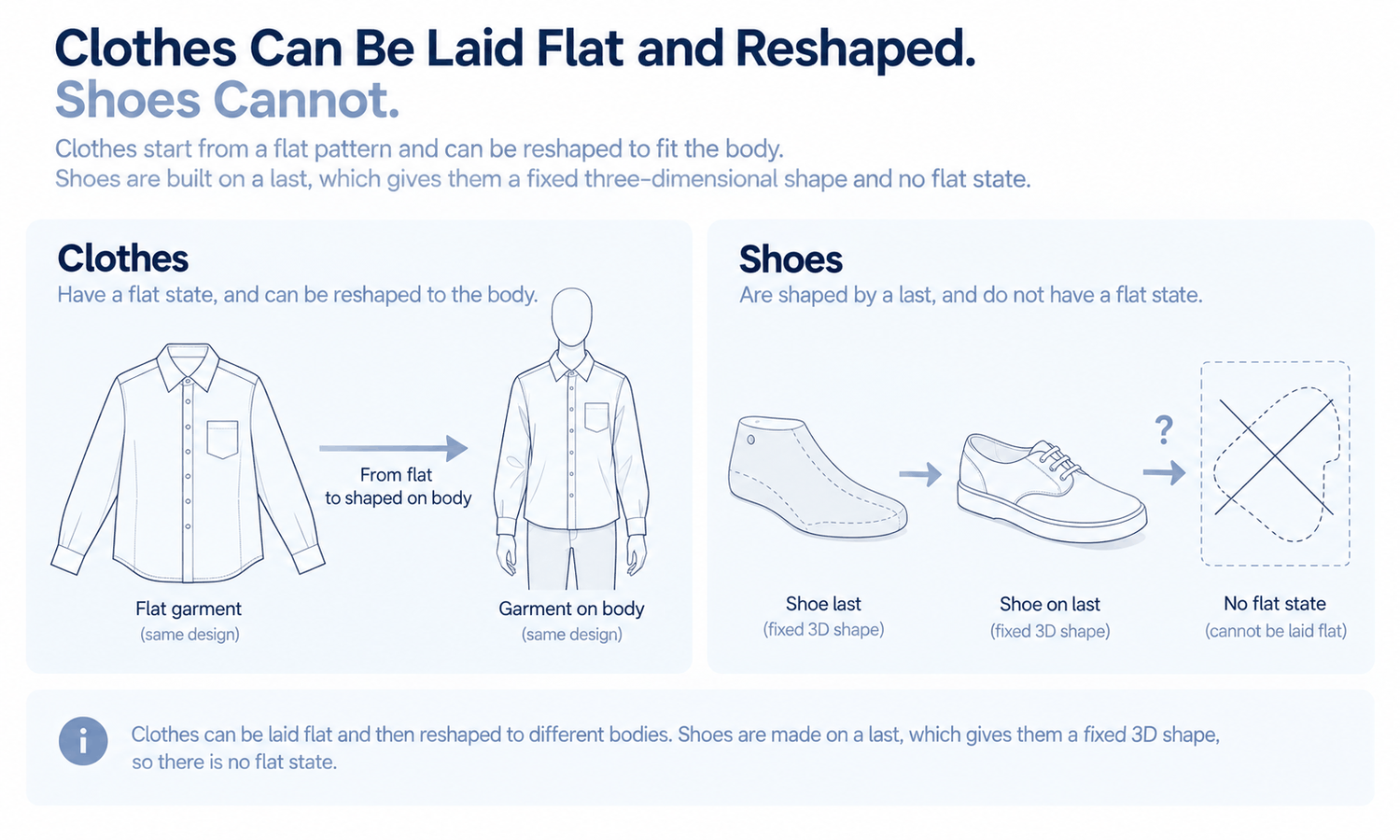
Showing shoes with AI looks like it should be the same task as showing clothes: take a product photo, place it on a model, produce an image. In practice, footwear behaves very differently from garments, and the difference is structural. A shirt or a dress can be laid flat, photographed and then shaped around a body in an image, because fabric follows whatever it is placed on. A shoe cannot. Its shape is built around a last, held by rigid and semi-rigid materials and defined by a sole, a heel and a toe that do not change with the body wearing them.
That difference matters for any brand that sells shoes, and for any brand whose clothing images include shoes. The first group needs accurate images of footwear as a product. The second needs shoes that sit quietly in the background of apparel images. The two needs call for different approaches, and confusing them is where most footwear image problems start.
This article explains why clothes and shoes behave differently, what makes footwear hard to show accurately, how to handle shoes when they are the product, how to handle them when they are only the styling and how to show apparel with shoes in practice.
| Footwear feature | Why it is hard | Typical error in a generated image | Approach |
|---|---|---|---|
| Shape from the last | The shape is fixed, not draped | Toe shape or heel height drifts | Photograph shoes as products |
| Rigid structure | Counters, toe caps and soles hold their form | Shoes bend like fabric | Photograph shoes as products |
| Left and right pair | Two mirrored shoes, not one repeated | Two left shoes, mismatched details | Check pairs in every image |
| Sole and tread | Detailed, often visible, often branded | Tread simplified or invented | Photograph soles directly |
| Laces and eyelets | Many small, repeating parts | Wrong count, laces that do not connect | Check at full size |
| Materials | Patent, suede, mesh and knit all catch light differently | Surfaces flattened or given a false sheen | Photograph textured and shiny materials |
| Branding | Logos on sides, tongues, heels and insoles | Marks reshaped or invented | Keep generated shoes plain |
Why Clothes and Shoes Behave Differently
Most garments have a flat state. Laid on a table, a shirt shows its whole shape, and when it is worn, the fabric drapes over the body. That is what makes it possible to place a garment on a generated model from a flat-lay: the garment's information is visible in the flat photo, and the image reshapes it around the body in a new pose.
Shoes do not work this way. A shoe is built around a last, a three-dimensional form that fixes the shape of the toe, the arch, the heel and the instep. Stiffeners in the heel and toe hold that shape. The sole and heel are rigid or semi-rigid parts with their own geometry. There is no flat state that shows the whole shoe, and when a shoe is worn, it does not drape over the foot; the foot fills a shape that already exists.
So the method that works for garments, starting from a flat photo and reshaping it on a body, has nothing reliable to start from for a shoe. A generated image of a shoe on a foot is largely built from what is plausible for a shoe of that kind, not from the specific shoe. That is why footwear is outside the range generated garment imagery handles well, and why structured accessories such as hats with a firm crown present the same challenge.
What Makes Footwear Hard to Show Accurately
Several features of footwear make accuracy especially difficult.
-
Fixed geometry. Toe shape, heel height, heel shape and the line of the vamp are precise design decisions. Small drifts, such as a rounder toe or a lower heel, change the shoe.
-
Pairs. A pair is two mirrored shoes, and each must be correct on its own side. Generated images can produce two identical shoes, mismatched details or a pair that does not quite belong together.
-
Soles. Tread patterns, sole edges and heel shapes are detailed and often carry branding. They are easily simplified or invented.
-
Small repeating parts. Laces, eyelets, buckles and straps must be counted and connected correctly, and they are exactly the kind of detail that comes back almost right.
-
Materials. Patent leather reflects its surroundings, suede absorbs light, mesh shows through to what is underneath and knit uppers have a texture that changes with the light. Each is hard to render faithfully.
-
Branding. Logos appear on the side, tongue, heel, sole and insole. Any mark that is reshaped or invented misrepresents the product.
When the Shoe Is the Product
When the shoe is what the customer is buying, the reliable approach is photography.
A standard set of footwear images usually includes the side view of one shoe, the view from above, the sole, the heel, the front and the pair together. Many brands add on-foot photography, which shows how the shoe sits when worn. Each view shows information a shopper uses: the silhouette, the toe shape, the tread, the heel height and the details.
Footwear photography has its own practical requirements. Shoes are usually stuffed or fitted with shapers so they hold their form, laces are tied neatly and consistently, and the soles are cleaned before shooting. Reflective materials need light placed so that highlights describe the shape rather than hiding it, and dark suede or black leather needs enough light to show stitching and texture. Getting these right once and writing them into a shooting guide keeps every shoe in the range comparable.
Consistency makes a footwear range readable. Photograph every shoe from the same angles, at the same camera height, under the same even light, and present the views in the same order. Shoes that are shot consistently can be compared at a glance on a category page.
Accuracy still needs checking. Compare each image with the shoe for color, details, logos and hardware, and judge color against the physical product, since screen color is not a physical reference. Fit and sizing for footwear are a separate matter entirely, handled through size charts, measurements and the brand's own fit guidance, and no image can show how a shoe will fit a particular foot.
When Shoes With AI Imagery Are Only the Styling
Many apparel images include shoes that are not for sale. A dress, a pair of trousers or a full outfit is shown on a model, and the model is wearing shoes. Here, the shoes are supporting pieces, and the goal is the opposite of product photography: they should be accurate enough to look natural and quiet enough not to draw attention.
The principles for supporting pieces apply directly. Choose simple shoes in neutral tones that suit the category and the brand, and keep them consistent across a category so the page reads as one set. Keep them free of logos or marks, so nothing resembles another brand's product. And make sure they do not look like items for sale, which could confuse shoppers about what is included.
Generated images still need a check where the shoes meet the ground and the clothing. Feet should rest on the ground with their weight, and the shoes should not float, sink or turn at an angle the legs could not produce. Trouser hems should break naturally over the shoe, and a long skirt's hem should fall where it would with that shoe. These points affect how the garment reads, which is what the image is really for.
Brands that sell both clothing and footwear can connect the two. Product pages for shoes rely on photography, while apparel images can show the brand's own shoes as styling, as long as those shoes are shown accurately enough not to mislead. If a brand's shoe appears in an apparel image and a shopper might want to buy it, the safest route is to use a photographed version of that shoe or to keep the shoe plain enough that it reads as styling rather than as a product.
Showing Apparel With Shoes in Practice
The practical division is simple: photograph shoes when they are the product, and generate apparel images when shoes are only the styling, with the shoes kept plain and consistent.
In Lightchain AI (apparel AI), apparel imagery that includes shoes as styling runs through a few tools.
-
AI Virtual Try-On places the garment on a model from its flat-lay, so the product being sold is built from its own source.
-
Model Studio keeps the pose, scene and angle consistent across a category, which keeps the styling, shoes included, consistent too.
-
When a generated shoe draws too much attention or carries an unwanted mark, Target Revision can replace it in a defined area using a reference of the brand's approved plain shoe, as described on the Partial Redraw page.
For brands producing on-model apparel imagery across many styles, Scale E-commerce is the Lightchain AI solution built for that work. Footwear sold as a product is better photographed.
Frequently Asked Questions
Why are shoes with AI harder to generate than clothes?
Because shoes have no flat state. Their shape comes from a last and rigid parts, so there is no flat photo that a generated image can reshape onto a body the way it does with a garment.
Should footwear products be shown with generated images?
When the shoe is the product, photography is the reliable approach: side, top, sole, heel, front and pair views, shot consistently. Generated images tend to drift in toe shape, heel height, soles and details.
What goes wrong most often with generated shoes?
Mismatched pairs, simplified or invented soles, wrong lace or eyelet counts, flattened materials and reshaped logos. Each changes what the shopper sees.
Can apparel images still include shoes?
Yes, as styling. Keep the shoes simple, neutral, free of logos and consistent across a category, so they support the garment rather than compete with it.
What should be checked where shoes appear in apparel images?
That the feet rest naturally on the ground, that the shoes do not look like items for sale and that trouser and skirt hems fall naturally over them. These affect how the garment itself reads.
Can an image show how a shoe fits?
No. Footwear fit and sizing come from size charts, measurements and the brand's fit guidance, not from images.
How does Lightchain AI handle images that include shoes?
It produces the apparel side: AI Virtual Try-On places the garment from its flat-lay, and a distracting generated shoe can be replaced with the brand's approved plain shoe using Target Revision. Scale E-commerce is the solution to use for apparel imagery; footwear products are better photographed.
In Closing
Shoes with AI are harder than clothes because shoes have no flat state: their shape comes from a last, rigid parts and a sole that do not drape. When the shoe is the product, photograph it consistently from every standard view and check it against the real shoe. When shoes are only the styling in apparel images, keep them plain, neutral, consistent and free of marks, check where they meet the ground and the hems and let the garment remain the focus.
Start Here
If your brand produces apparel images where shoes are part of the styling, Scale E-commerce is the solution to use. It is built for on-model apparel imagery across many styles: you place each garment from its flat-lay, keep scenes and styling consistent and replace a distracting shoe with an approved plain one. Photograph your footwear products separately, and start with one apparel category, its styling rules and a single approved plain shoe.
**Explore Scale E-commerce → **https://www.lightchainai.com/global/solutions/scaleECommerce