
A pose maker online lets you decide how a figure stands, sits or moves before an image is generated: arms raised or relaxed, weight on one leg, head turned, a hand on the hip. It feels like directing a model. Underneath, the software is working with something much simpler than a body, and understanding that simpler thing explains why some poses come out convincing and others come out with a hand that has one finger too many.
Most pose tools, and the image generators that follow them, describe a pose as a small set of points and the lines between them. That description is efficient, and it captures the broad shape of a pose well. It also leaves out a great deal, especially at the hands, the feet and anywhere one part of the body passes in front of another.
This article explains how AI represents a pose, why hands are so hard, what depth, overlap and feet add to the difficulty, what that means when you use a pose maker online and how to set poses for apparel imagery in practice.
| Body area | How it is usually represented | Why it is hard | What to check |
|---|---|---|---|
| Torso and hips | A few points at the shoulders and hips | Rarely hard; large and clear | Balance and posture |
| Shoulders and arms | Points at shoulders, elbows and wrists | Depth: in front of or behind the body | Which way each arm actually goes |
| Head | A few points for the face and neck | Turns and tilts can be ambiguous | Direction of gaze and neck angle |
| Legs and feet | Points at hips, knees, ankles and sometimes toes | Foreshortening and ground contact | Feet flat on the ground, facing sensibly |
| Hands and fingers | Many small points, often only roughly | Many joints, small size, overlap | Finger count, shape and contact with objects |
| Overlapping limbs | The same points, crossing | Which part is in front | Order and continuity of crossed limbs |
How AI Represents a Pose
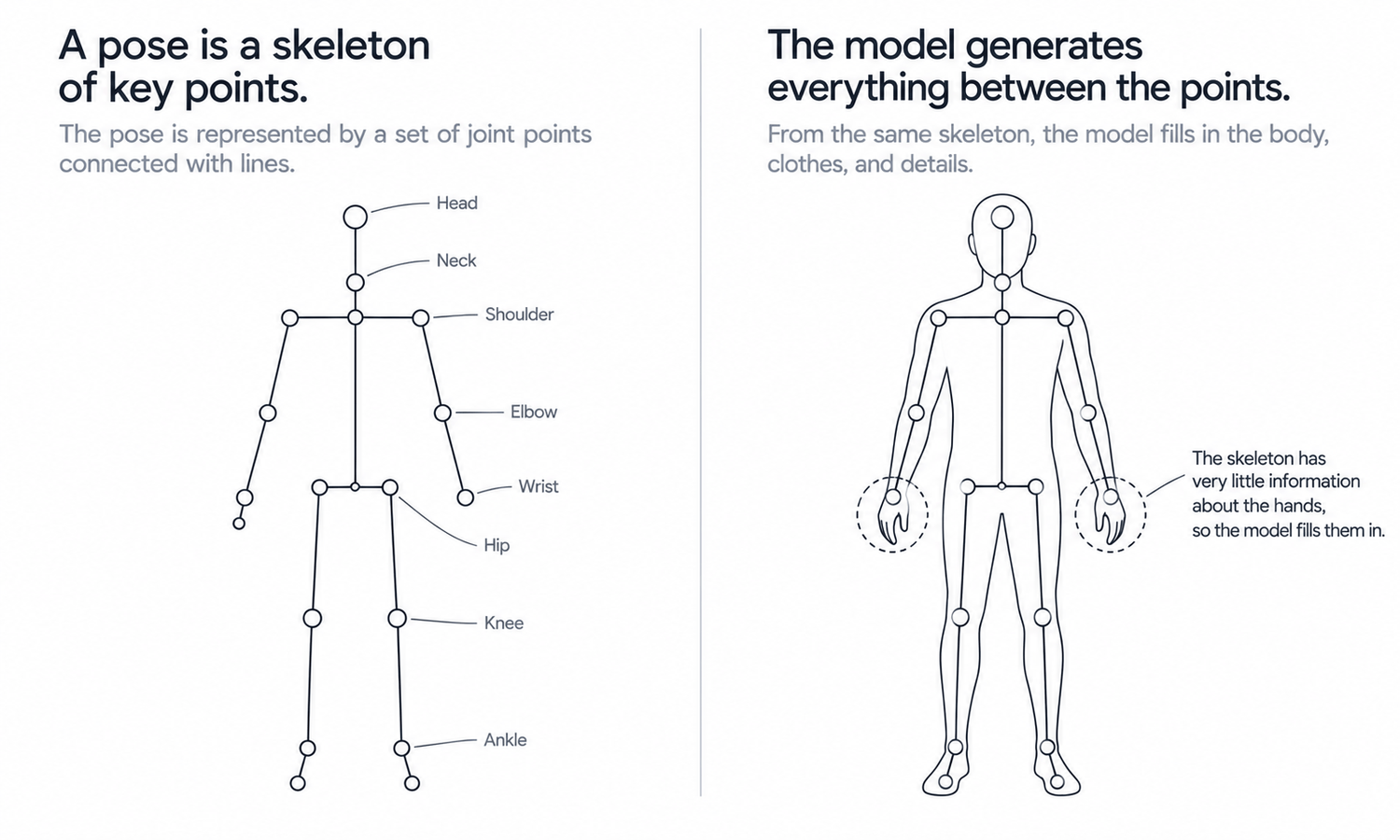
Many pose tools describe a body as a set of keypoints, meaning positions for the main joints: shoulders, elbows, wrists, hips, knees, ankles, plus a few points for the head and neck. Connecting those points with lines gives a simple skeleton, and the arrangement of that skeleton is the pose. Moving the elbow point bends the arm; moving the hip points shifts the weight.
When an image is generated from a pose, the generator draws a body whose joints fall on those points. It fills in everything between them: the shape of the limbs, the muscles, the skin, the clothing and the hands. The skeleton says where the body goes. The generator decides what the body looks like there.
This works well for the large structure of a pose. A skeleton captures posture, the direction of the limbs and the overall silhouette, which is most of what makes a pose read as standing, walking or seated. Where it struggles is with things the skeleton describes loosely or not at all.
A skeleton drawn on a flat image also has limited information about depth. A wrist point beside the hip could belong to an arm resting at the side, an arm reaching slightly forward or an arm behind the back. The points look almost the same in two dimensions, and the generator has to choose.
Why Hands Are Hard
Hands are the most familiar failure in generated images, and the pose representation explains much of it.
A hand has more joints than an entire arm, packed into a small area. Many pose tools represent it with a handful of points or only a point at the wrist, so most of the hand's shape is left to the generator. Fingers overlap, curl and hide each other, and in a full-length image a hand occupies only a small patch of pixels. The generator is asked to produce a very complex structure from very little information.
The common errors follow directly.
-
Wrong number of fingers. An extra or missing finger, especially when fingers overlap.
-
Merged fingers. Two fingers drawn as one, or fingers melting into each other.
-
Impossible bends. Joints bending the wrong way or at angles a hand cannot reach.
-
Hands merging with objects. Fingers blending into a pocket, a bag strap or the fabric they touch.
For apparel imagery, the last one matters most. When a hand rests on a pocket, holds a lapel or tucks into a waistband, the generator has to resolve both the hand and the fabric it touches, and errors there change how the garment reads as well as how the hand looks.
Depth, Overlap and Feet
Hands are the most visible difficulty, but not the only one.
Depth is the second. Because a flat skeleton does not say clearly which limbs are in front and which are behind, a pose can come out with an arm that should pass behind the body drawn in front of it, or a hand meant to rest on the far hip appearing on the near one. Poses that keep limbs clearly separated from the body avoid most of this. A slight gap between the arm and the torso, visible from the camera, is often enough to remove the ambiguity entirely.
Overlap is the third. When arms cross, legs cross or a hand passes in front of the torso, the generator has to decide what is in front at every point along the overlap. Continuity can break: an arm that disappears behind the body and reappears at a slightly wrong angle, or a crossed leg that joins the hip in the wrong place.
Feet are the fourth. Feet are foreshortened in most standing poses, pointing toward or away from the camera, and they have to meet the ground convincingly. Common errors include feet that float slightly, feet turned at angles that do not match the legs and toes that blur into the floor. For apparel, feet matter because hems, trouser breaks and shoes sit right there. A trouser hem that should break softly over the top of the foot can end up floating above it or disappearing into it, which changes how the trouser length reads to a shopper.
What This Means When Using a Pose Maker Online
Knowing how poses are represented turns into a few practical habits.
For product imagery, choose poses that avoid the hard cases. Keep hands clear of the garment's selling details and away from pockets and plackets in the primary image. Keep limbs separated from the body rather than crossing it. Keep feet flat and turned naturally. These poses are easier for the generator and clearer for the shopper.
Check the hard areas every time. Look at hands, feet and any overlapping limbs at full size, not as thumbnails, and count fingers when hands are visible. Check where hands meet fabric, because an error there affects the garment as well as the figure.
Save the difficult poses for images that can carry them. Crossed arms, hands in pockets and dynamic strides suit campaign images, where they add character and where each image can be reviewed carefully, better than product pages where dozens of images must be consistent.
Keep a pose standard for each category so that, once a pose has been found to work, it is reused rather than recreated. A pose that has already passed review is a known quantity.
Some pose makers let you start from a reference photo instead of placing points by hand. The tool reads the pose from the photo and turns it into a skeleton, which carries the same limits described above, and sometimes more: a reference with hidden hands or crossed limbs gives the tool little to read in exactly the areas that are already hard. Choose references with the whole body visible and the limbs clear. Use your own photographs or images you have the right to use, rather than lifting a pose from another brand's campaign, where the photograph belongs to someone else even if a pose on its own does not.
Setting Poses in Practice
In Lightchain AI (apparel AI), poses for apparel imagery are set and refined with a few tools.
-
Model Studio sets the model's pose, scene and angle for each image, so a category's approved poses can be applied consistently.
-
When a hand or a foot comes out wrong in an otherwise good image, the area can be corrected locally, as described on the Partial Redraw page, without regenerating the whole image.
-
AI Virtual Try-On places each garment on the posed model from its flat-lay, including on a saved model set.
For teams producing on-model imagery across many styles, Scale E-commerce is the Lightchain AI solution built for that work.
Frequently Asked Questions
How does a pose maker online describe a pose?
Many pose tools describe a body as keypoints at the main joints, connected into a simple skeleton. The generator then draws a body whose joints fall on those points and fills in everything between them.
Why do generated hands so often look wrong?
A hand has many small joints, fingers overlap and hide each other, and many pose tools represent the hand with only a few points. The generator has to produce a complex shape from little information, which leads to wrong finger counts and merged fingers.
Why do arms sometimes appear in front of the body when they should be behind it?
A skeleton on a flat image carries limited depth information, so the generator has to guess which limbs are in front. Poses with limbs clearly separated from the body avoid most of this.
Which poses suit product images?
Poses with hands clear of the garment's details, limbs not crossing the body and feet flat and naturally turned. They are easier to generate accurately and clearer for shoppers.
What should be checked in every posed image?
Hands, feet and any overlapping limbs, at full size, including a finger count. Also check where hands meet the garment, because errors there change how the garment reads.
Are difficult poses ever worth using?
Yes, in campaign images where they add character and each image can be reviewed carefully. Product pages usually benefit from simpler, repeatable poses.
How does Lightchain AI help with posing apparel images?
Model Studio sets the pose, scene and angle for each image, and hands or feet that come out wrong can be corrected locally without regenerating the whole image. Scale E-commerce is the solution to use for applying approved poses across many styles.
In Closing
A pose maker online works with a simplified body: keypoints at the main joints, connected into a skeleton, with everything else filled in by the generator. That captures posture well and leaves hands, depth, overlapping limbs and feet as the hard cases. For apparel imagery, choose poses that keep hands clear and limbs separate, check the hard areas at full size in every image, save difficult poses for campaigns and reuse poses that have already passed review.
Start Here
If your team needs on-model images with poses that hold up across many styles, Scale E-commerce is the solution to use. It is built for producing on-model imagery at volume: you set approved poses for each category, place garments on the posed model from their flat-lays and correct hands or feet locally when needed. Start with one category's primary pose, check hands and feet at full size, and reuse it once it passes.
**Explore Scale E-commerce → **https://www.lightchainai.com/global/solutions/scaleECommerce