
For a small studio that shoots apparel for brand clients, a pose AI generator looks like a way to deliver more from less. A shoot that once produced three usable poses per style can now yield six. A generated model can be posed standing, walking, seated or turned, without another studio day. Clients who want variety for social channels can have it without a second booking.
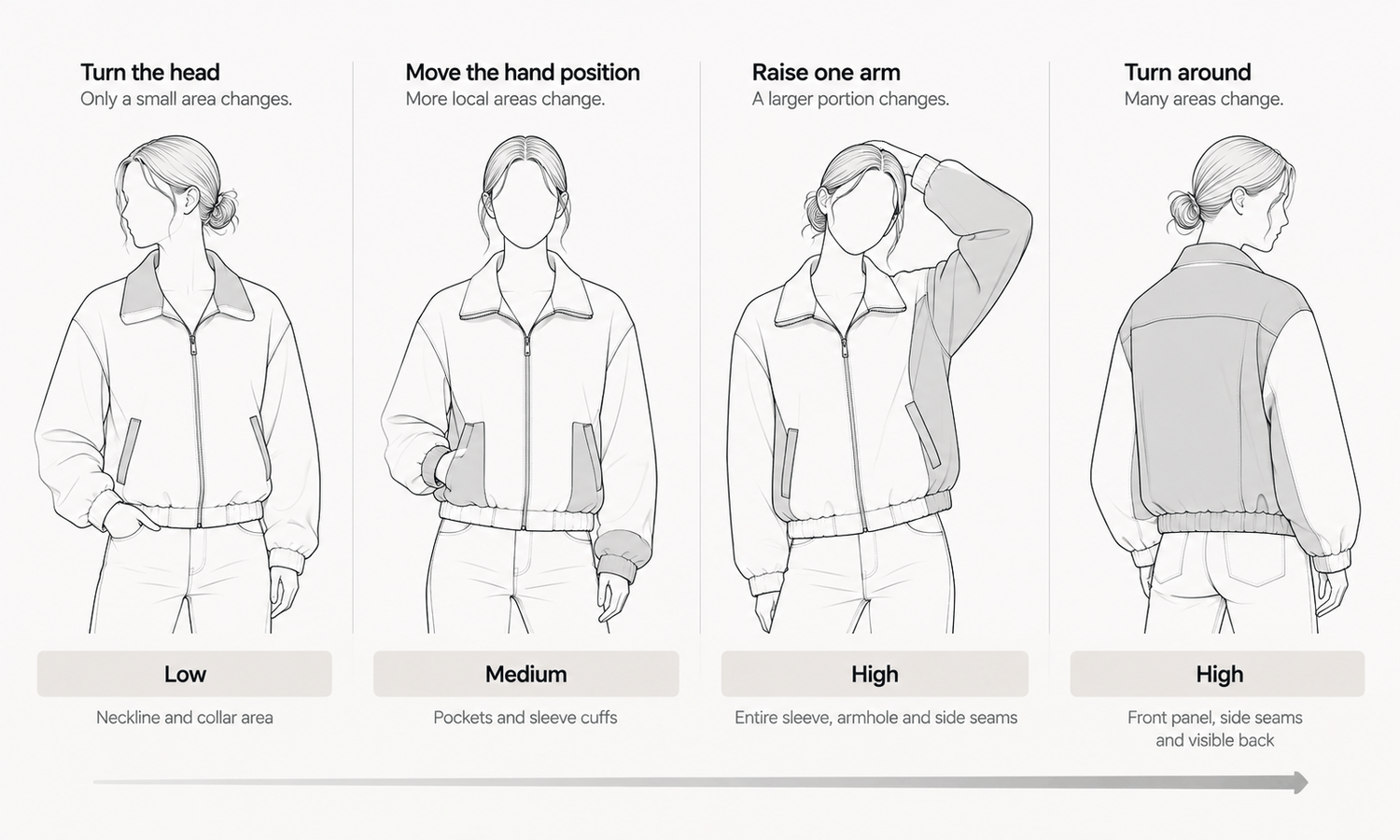
There is a catch that matters more to a studio than to anyone else, because the studio is the one delivering the images and answering for them. Every new pose redraws part of the garment. When a model raises an arm, the sleeve, the armhole and the side seam have to follow. When the body turns, the front closure and the side seams move. The garment in the new pose is not the garment from the original image moved into place. It is a new rendering of the garment on a body in a new position, and it has to be checked as one.
This article explains what a pose change does to an image, how to match the size of a pose change to the job, how to check every pose before delivery, what to settle when working from photographs of real models and what to agree with clients.
| Pose change | What gets redrawn | Risk to the garment | Suited to |
|---|---|---|---|
| Head turn or expression | Face and hair | Low, except at the collar | Product and campaign images |
| Hand position | Hands and nearby fabric | Moderate at pockets and cuffs | Product images, with checks |
| Raised arm | Sleeve, armhole, side seam | High at the upper body | Campaign images |
| Turn of the torso | Front closure, side seams, back | High across the whole garment | Campaign images, or a captured view |
| Walking or stride | Hem, trouser legs, drape | High below the waist | Campaign images |
| Seated | Most of the garment | Very high | Campaign images only |
What a Pose Change Does to an Image
A generated image of a model in clothes is not a photograph with movable parts. When the pose changes, the software produces a new image in which the body is in the new position and the garment has been placed on that body again. The areas the pose does not touch can stay very close to the original. The areas it does touch are produced fresh.
That is why the size of the change matters. Turning the head or adjusting the expression touches the face and hair, and the garment is affected only where hair meets a collar. Moving a hand touches the fabric around it: a pocket, a cuff, the hem of a jacket. Raising an arm changes the whole sleeve, the armhole and the side of the bodice. Turning the torso changes where the front closure sits, which side seams are visible and whether part of the back appears. A seated pose changes almost everything below the chest.
In each case, the redrawn part of the garment is reconstructed from what the software knows about it. Details that were clear in the original can come back slightly different: a pocket flap a little smaller, a button spacing shifted, a print pattern that no longer lines up at a seam. The larger the pose change, the more of the garment is reconstructed, and the more there is to check.
A pose also makes a claim about the fabric. A stride that swings a hem suggests a light, fluid fabric; a raised arm that pulls fabric smoothly suggests stretch. The drape in a generated image is rendered, not calculated, so a studio should choose poses that suit what the fabric actually does.
Matching Pose Changes to the Job
Not every image needs the same caution. The practical approach is to match the size of the pose change to what the image is for.
-
Product images: keep changes small. Product pages need the garment shown accurately and comparably. Use upright, front-facing poses with small variations in head and hand position, and keep the garment's selling details in view.
-
Secondary product views: capture rather than generate where you can. A back or side view generated by turning the body shows a back the software reconstructed. If the client's garment has back details, a captured back view is more reliable.
-
Campaign and social images: larger changes are acceptable. Walking, turning and seated poses add energy, and campaign images are not the primary reference for the product. They still need checking, but the tolerance for small differences in drape is different from a product page.
-
Anything that shows the garment in motion as a selling point: photograph it. If a client sells a skirt on its swing, a generated stride makes a claim the fabric has not been tested against.
Write the approach into the studio's standard brief for pose work, so that each client knows which images will use large pose changes and which will not.
Checking Every Pose Before Delivery
The studio's reputation rests on what it delivers, and pose generation makes checking more important, not less.
Check every image against the garment source, without exception. Compare construction, logos, printed text, trims, hardware and print placement, paying particular attention to the areas the pose moved. Reconstructed detail tends to come back almost right, and almost right is what a tired reviewer approves at the end of a long batch. Sampling does not work here, because images produced from the same source and settings tend to share the same mistake.
Check the contact points: where the garment hangs from the shoulders, closes at the waist and ends at the cuffs, and anywhere a hand meets the fabric. These are the places pose changes disturb most.
Check that the model is the same person in every pose. A face that drifts slightly between a standing and a walking image is easy to miss one image at a time and obvious when the set is laid out side by side.
Some styles remain harder for generated imagery regardless of pose: complex prints, lace and openwork, sheer fabrics and layered styling are current weak areas. Tell the client early that those styles will be photographed, and why.
Working From Real Model Photos
Small studios often hold a library of real shoot photographs: models the studio booked, wearing clients' garments. It is tempting to take those photographs and generate new poses from them.
That raises a question the studio should answer before it starts. The person in the photograph is a real, identifiable model, and changing their pose produces an image of them doing something they did not do on the day. Whether that falls within the model's agreement, and within the client's usage rights, is a question for whoever manages those agreements: the studio, the model's agency and the client. Settle it in writing before generating anything, and keep the answer with the job records.
Where the answer is unclear, working with generated models avoids the question. The studio can create a model for the client, approve it, record a likeness check and pose it freely within the limits described above.
What to Agree With Clients
Pose generation changes what a studio delivers, so it is worth agreeing a few points with each client at the start of a job.
Agree which images are product images and which are campaign images, and therefore which pose changes each set may use. Agree who checks and who approves: the studio checks every image against the garment source and contact points, and the client approves the final set. Agree how the client labels AI-generated imagery in its markets and channels. Agree that generated images will not carry size-worn captions, since a generated model did not wear the garment in any size.
Return records with the images: which model, which garment source, which pose settings and who reviewed each image. Clients increasingly need to answer questions about where their imagery came from, and a studio that hands over the evidence with the work is easier to keep working with.
In Lightchain AI (apparel AI), a studio's pose work runs through a few tools.
-
Model Studio sets and adjusts pose, scene and angle for each image, so the studio can keep product poses conservative and use larger changes for campaign sets.
-
When a pose change disturbs a pocket, a cuff or a hand in an otherwise good image, the area can be fixed locally, as described on the Partial Redraw page.
-
When a garment has drifted too far, AI Virtual Try-On places it on the model again from its flat-lay, giving the review a clean source to compare against.
For studios producing on-model imagery for several clients across many styles, Scale E-commerce is the Lightchain AI solution built for that work.
Frequently Asked Questions
What does a pose AI generator change in an image?
It places the model in a new position and places the garment on that body again. The areas the pose moves are reconstructed, so details there can come back slightly different from the original.
Which pose changes are safe for product images?
Small ones: head turns, expressions and minor hand adjustments, with the garment's selling details kept in view. Larger changes such as raised arms, turns, strides and seated poses suit campaign images better.
Why capture back views instead of generating them?
Because a back generated by turning the body is reconstructed rather than seen. If the garment has back details, a captured back view shows them reliably.
Does every posed image need checking?
Yes, every image, against the garment source, with particular attention to the areas the pose moved. Images produced from the same source and settings tend to share mistakes, so a clean sample says little about the rest.
Can a studio change the pose of a real model in its photos?
Only after confirming that the model's agreement and the client's usage rights cover it. Settle that in writing with the agency and the client before generating anything.
What should a studio agree with its clients about pose work?
Which images are product and which are campaign, who checks and who approves, how AI imagery is labeled, and that generated images carry no size-worn captions. Return the image records with the delivery.
How does Lightchain AI support a small studio's pose work?
Model Studio sets pose, scene and angle for each image, local fixes handle disturbed pockets, cuffs and hands, and AI Virtual Try-On re-places a garment from its flat-lay when it has drifted. Scale E-commerce is the solution to use for delivering on-model imagery to several clients across many styles.
In Closing
A pose AI generator lets a small studio deliver more variety from fewer shoots, but every new pose redraws part of the garment. Match the size of the change to the job: small changes for product images, larger ones for campaigns and photography for motion that sells the product. Check every image against its source and contact points, settle agreements before posing real models, and agree scope, approval and labeling with clients before the work begins. The variety is real; so is the responsibility for what the studio delivers.
Start Here
If your studio delivers on-model imagery to brand clients and wants to offer more poses without losing accuracy, Scale E-commerce is the solution to use. It is built for producing on-model imagery across many styles: you set poses for product and campaign sets, fix disturbed details locally and re-place garments from their flat-lays when needed. Start with one client and one style, compare every pose against the garment source, and extend from there.
**Explore Scale E-commerce → **https://www.lightchainai.com/global/solutions/scaleECommerce