
A garment that sells in several markets needs several sets of images. The coat that launches in autumn in one market launches in spring in another. The marketplace listing wants a clean square frame, the social post wants a tall one, and the promotion banner wants a wide one with space for text in the local language. The garment is the same in every case. Almost everything around it changes.
Teams often handle this one market at a time. Each market's images get made separately, sometimes by different people, sometimes by adapting the last market's images to fit the next. It works until someone notices that the coat is a slightly different shade in two markets, or that a pocket detail visible in one set has disappeared in another.
A models with clothes workflow built for many markets starts from the other end. It treats the garment as the one fixed source, decides in advance what may never change and what should change by market, and produces every market's images from that source. This article explains how that workflow is structured, what belongs on each side of the line, where photography still has a place and how to run it in practice.
| Element | Fixed across markets | Changes by market | Check against |
|---|---|---|---|
| Garment | Construction, details, color | — | The master garment source |
| Product information | Meaning of names, sizes and care details | Language | The product record |
| Model | The same model within one product's set | Age and build, where each market's plan differs | The model brief |
| Scene and season | — | Setting, light and layering | The market's season and brief |
| Format | — | Aspect ratio, crop, space for text | Each channel's requirements |
| Labeling | — | AI-image disclosure where required | Each market's and platform's rules |
Start From the Garment, Not From a Finished Image
Every image in a multi-market set should trace back to one source: the garment itself, captured as a clean flat-lay or garment photo. That source is the master. Each market's images are produced from it directly.
The tempting shortcut is to chain instead. The first market's on-model image is finished, so the second market's version is made from that image by changing the scene, and the third market's from the second by changing the format. Each step looks small. The problem is that each generated image carries its own small reconstruction errors, and a chain inherits all of them. A collar point softened in the first image stays softened in the second and may soften further in the third. By the end of the chain, the garment has drifted in ways no single step made obvious.
Branching from the master avoids this. Every market's image is one step away from the garment source, so every image can be checked against the same reference, and an error in one market's image stays in that image rather than spreading to the rest.
A good master is worth the effort. Photograph or scan the garment flat, evenly lit, with every selling detail visible: collar, closures, pockets, trims, hardware and any print. Record the approved color reference alongside it. Everything downstream is compared against this, so anything missing or unclear in the master will be missing or unclear everywhere.
What Must Stay Fixed Across Every Market
The fixed side of the line is short, and it should be treated as non-negotiable.
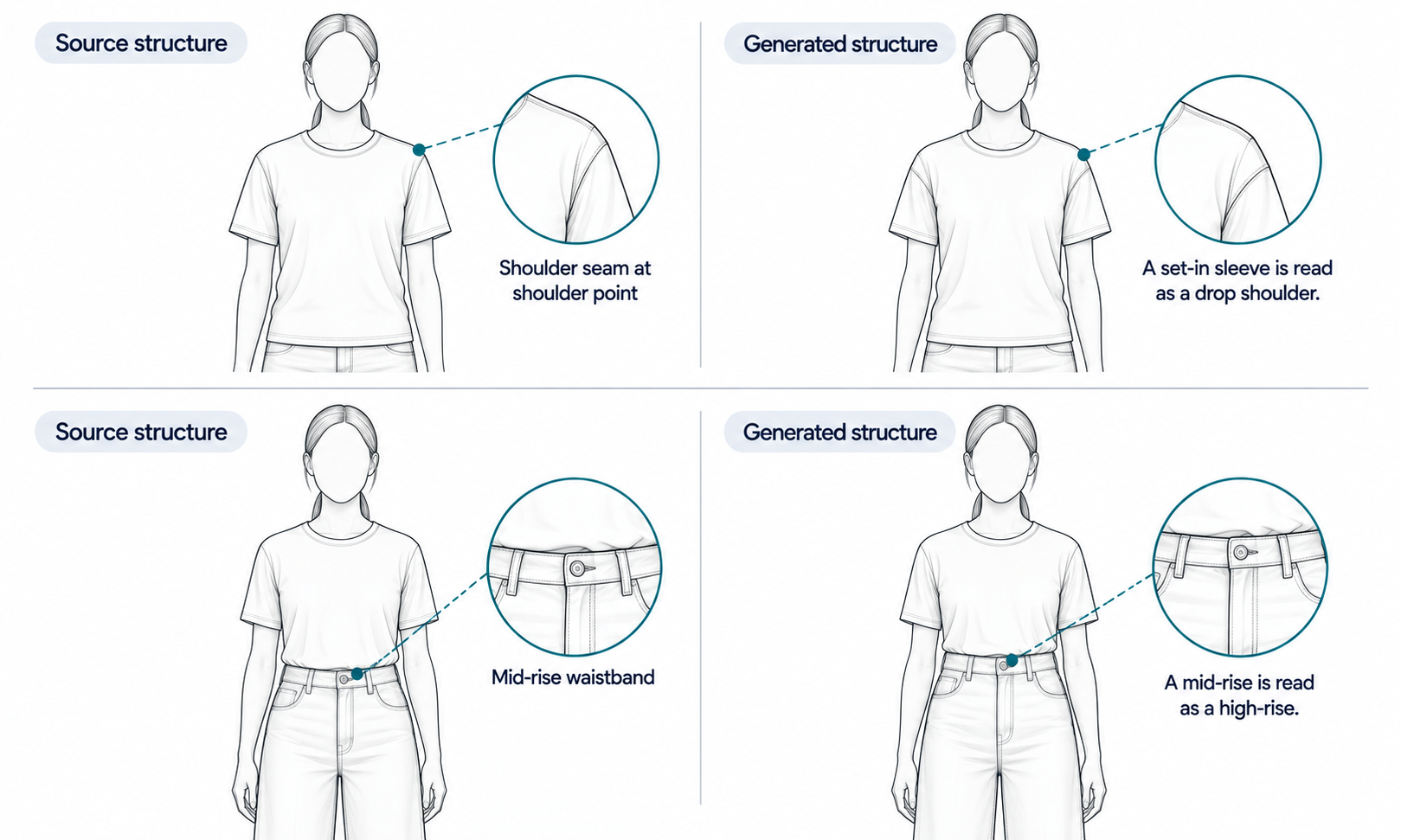
The garment's construction and details do not change by market. A pocket that exists in the product exists in every market's image, in the same place, with the same flap and the same stitching. Logos, printed text, trims and small hardware match the master in every image. Reconstructed detail tends to come back almost right, and almost right survives a quick look, so compare every image against the master without exception. Checking a sample does not work, because images produced from the same settings tend to share the same mistakes.
Color deserves particular care, because scene changes are exactly what shift it. A garment placed in warm evening light for one market and cool daylight for another can read as two different colors, and shoppers comparing listings, or receiving the product, will notice. Keep the garment's appearance aligned with the approved color reference across every scene. At the same time, remember what a screen can and cannot do. Screen color is not a physical reference, generated imagery does not promise an exact color-code match, and the gap between a display and the fabric does not close with a better display. The colorway itself is settled by the lab dip or sample against the agreed standard, and color values should not be read from generated images and published as product attributes.
Product information stays fixed in meaning even as its language changes. Color names, size ranges and care details are translated, not reinterpreted. If a product is called one color in one market, the translated name in another market should describe the same color.
What Changes by Market
The changing side of the line is where each market's images earn their place.
-
Season and climate. When one market is heading into winter, another may be heading into summer. The same jacket might be shown over a knit in a cold, overcast street for one market and open over a light top on a mild evening for another. The garment stays the same; the setting, light and layering around it change.
-
Scene and styling conventions. Markets differ in the settings and styling that feel natural for a category, such as city street, interior or outdoor leisure. Choose scenes that suit how the garment is actually worn in each market, and write them into each market's brief.
-
Channel formats. Marketplace listings, social feeds, stories and web banners each want different aspect ratios and crops, and some need clear space for text. Plan the crop when the image is composed, so that the garment is not cut off when the frame changes.
-
Text in the image. Promotional lines, price callouts and labels are in the local language, and their length changes with translation. Leave room for the longest version.
Models belong partly on each side. Within one product's image set, keep the same model throughout, so that the product reads as one listing. Across markets, the model can change where each market's customer plan calls for a different age range or build. Decide that in the plan, not image by image.
Labeling belongs on the changing side too. Expectations for disclosing AI-generated imagery differ by market and by platform, so confirm the rules for each market and apply them to that market's images consistently.
Where Reshoots Still Belong
This workflow reduces how often a garment needs to be photographed again for a new market. It does not remove photography, and it is worth being clear about where photography still does the job better.
Some garments remain difficult for generated imagery. Complex prints, lace and openwork, sheer fabrics and layered styling are current weak areas. For those styles, route the product to photography and record why, rather than regenerating until something looks acceptable. Once photographed, the same photograph can then be cropped and formatted for each market's channels, so the multi-market structure still applies.
Some products fall outside a garment workflow altogether. Footwear and structured items such as hats take their shape from a last or block, and there is no flat state that carries that shape. Photograph them.
And when a garment's movement is itself the selling point, such as the swing of a skirt or the drape of a wrap dress, remember that generated drape is rendered rather than calculated. A photograph or short video of the real garment shows movement honestly.
Running the Workflow
In practice the workflow is a short loop repeated for each product: prepare the master, write each market's brief, produce each market's images from the master, then review every image against the master and each market's brief.
In Lightchain AI (apparel AI), that loop runs through a few connected tools.
-
AI Virtual Try-On puts the garment on a model directly from the master flat-lay or garment photo, so every market's image is one step from the source.
-
Model Studio adjusts pose, scene and angle for each market's brief while keeping the model and garment in place.
-
The Omni-Marketing Workbench assembles channel assets, such as e-commerce images, social posts and promotional layouts, with room for local-language text, and Smart Cropping in the Image Editor prepares each channel's frame.
For teams producing on-model imagery across many styles and markets, Scale E-commerce is the Lightchain AI solution built for that work.
Whatever tools you use, keep two reviews separate. The first compares every image with the master: construction, details, trims and color. The second compares every image with its market's brief: season, scene, format, text and labeling. Combining them into one pass is how a correct scene with a drifted collar gets approved.
Frequently Asked Questions
What is a models with clothes workflow for many markets?
It is a way of producing on-model images of one garment for several markets from a single garment source. What must stay fixed, such as construction, details and color, is decided in advance, and what changes by market, such as season, scene, format and text, is set in each market's brief.
Why not adapt one market's finished images for the next market?
Each generated image carries small reconstruction errors, and adapting a finished image inherits them. Producing every market's images directly from the garment source keeps each image one step from the reference and stops errors from spreading.
How do we keep a garment's color consistent across markets?
Keep the garment aligned with the approved color reference in every scene, and check it especially where lighting changes. Treat screen color as a visual guide only; the colorway is settled by the lab dip or sample, not by the image.
Should the model change from market to market?
Within one product's image set, keep the same model. Across markets, change the model only where each market's customer plan calls for a different age range or build, and decide that in the plan.
Which products still need photography?
Styles with complex prints, lace and openwork, sheer fabrics or layered styling, and products such as footwear and structured hats. Photograph them once, then crop and format the photographs for each market's channels.
Do AI-generated images need labeling in every market?
Labeling expectations differ by market and platform. Confirm the rules for each market and apply them consistently to that market's images.
Which Lightchain AI solution fits a multi-market workflow?
Scale E-commerce. It puts each garment on models directly from its flat-lay and lets you adjust scene and pose for each market's brief, while channel assets can be prepared in the Omni-Marketing Workbench. Every image can then be checked against the same master.
In Closing
One garment going to many markets does not need many separate productions. It needs one good master, a clear line between what is fixed and what changes, and every market's images produced directly from that master. Keep construction, details, color and product meaning fixed. Let season, scene, format, text and labeling change by market. Review each image twice, once against the garment and once against its market's brief, and send to photography the styles and products that generated imagery does not yet handle well.
Start Here
If you launch the same garments in several markets and want each market's images to trace back to one source, Scale E-commerce is the solution to use. It is built for on-model imagery across many styles and markets: you put each garment on models directly from its flat-lay, adjust scene and pose for each market's brief and prepare channel formats from the same set. Start with one product and two markets, review every image against the master, and extend from there once the results hold.
**Explore Scale E-commerce → **https://www.lightchainai.com/global/solutions/scaleECommerce