
Models with clothes images are only finished when they are delivered in a form each channel can use. An image can be accurate, consistent and well styled, and still fail at the last step: cropped so the hem disappears, compressed until the knit texture turns to smudge, shifted in color by the wrong color profile or named so vaguely that nobody can tell which colorway it shows. None of these problems is about generation or photography. They happen during export and delivery, and they undo good work quietly. Because they appear at the very end, they are also the problems most likely to reach shoppers before anyone notices.
Delivery specifications are rarely exciting, which is why they are often left to chance. A short, agreed set of rules for crop, resolution, format, color profile, compression, naming, alt text and records prevents most of these problems and keeps product pages consistent across a whole range. Each channel publishes its own requirements, which change over time, so the rules below are principles to combine with each channel's current guidance rather than a replacement for it.
This article explains why delivery specs matter, how to handle crop, aspect ratio and resolution, format, color profile and compression, naming, alt text and records, and how to export models with clothes images for each channel.
| Spec | Why it matters | Rule of thumb |
|---|---|---|
| Aspect ratio and crop | Each channel frames images differently | Keep a full master and crop per channel |
| Resolution | Shoppers zoom into details | Export at the size each channel supports for zoom |
| File format | Formats differ in quality, size and transparency | Use the formats each channel accepts |
| Color profile | The wrong profile shifts colors | Use sRGB for web images |
| Compression | Heavy compression blurs fine detail | Check texture and text after export |
| File naming | Files must be findable and matched to products | Style code, color, view and version in every name |
| Alt text | Describes the image for people who cannot see it | Describe the garment accurately |
| Records and labeling | Traceability and channel rules | Keep source and settings with each file; label per channel |
Why Delivery Specs Matter
Delivery is where an image meets the channel. A marketplace may require a particular framing for its main image, a brand site may display images in a square grid on category pages and a tall frame on product pages, and social channels favor vertical formats. An image prepared for one can look wrong in another.
Consistency is the other reason. A category page shows many products side by side. When their images share the same crop, scale and color handling, the page looks orderly and shoppers compare garments rather than images. When each image has been exported differently, the page looks untidy even if every image is good on its own.
And accuracy has to survive export. Every image is checked against its garment source before delivery, and that check means little if export then blurs the logo, shifts the color or crops away a detail.
Crop, Aspect Ratio and Resolution
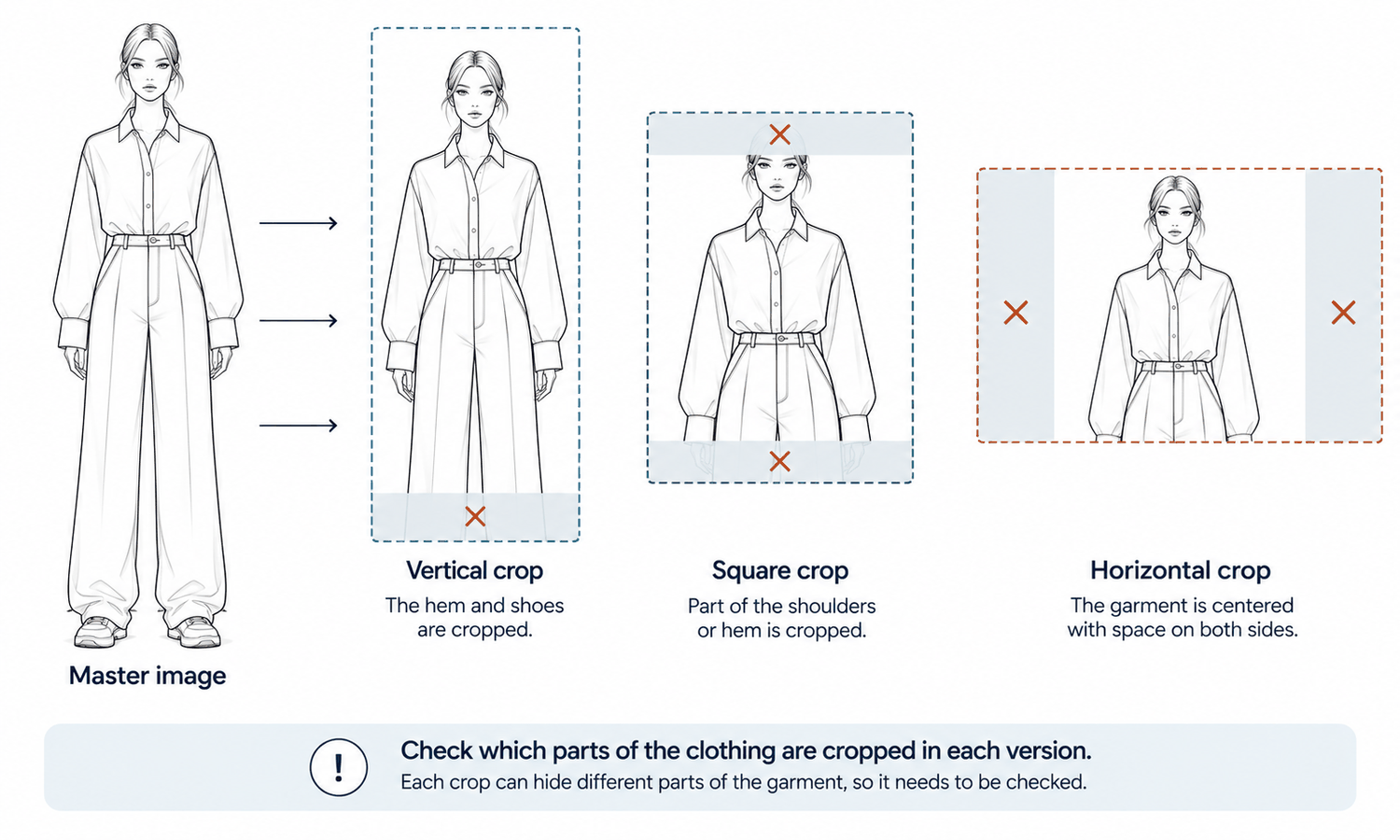
Start from a master image: the highest-quality version, with the full garment and some space around it. Produce each channel's version from the master rather than from another export, so quality does not degrade with each step.
Crops should follow each channel's framing while protecting the garment. Keep the whole garment inside the frame where the channel expects it, and keep enough space around it for the channel's own interface, such as buttons or badges that appear over the image. Vertical crops can cut off hems and shoes, and square crops can cut off shoulders or hems on long garments, so check each crop for what it hides.
Consistency across a category matters as much as each crop. Decide how much of the frame the garment fills, where it sits and how much space surrounds it, and apply the same rule to every product in the category. Background color and brightness should match too, since a slightly different white behind one product stands out on a grid of many.
Resolution matters because shoppers zoom. Export at the size each channel supports for its zoom feature, so details such as stitching, texture and trims stay clear. If an image needs to be enlarged beyond its original size, upscaling can help, but it rebuilds fine detail to fill the extra pixels, so trims, text and texture should be checked at full size afterward.
Format, Color Profile and Compression
Three technical settings decide how faithfully an image survives export.
-
File format. Photographic formats such as JPEG suit most product images and keep files small. PNG keeps transparency and sharp edges, which suits cutouts on transparent backgrounds. Some channels also accept newer web formats. Use what each channel accepts and recommends.
-
Color profile. Web images should use the sRGB color profile, the standard most screens and browsers expect. Images saved in a wider profile and displayed without conversion can look dull or shifted.
-
Print color. Images for print usually need different color handling, which should be agreed with the printer rather than converted by guesswork.
-
Compression. Compressing an image reduces its file size by discarding detail. Light compression is usually invisible; heavy compression blurs fine knits, prints and small text and can add blocky artifacts in smooth areas.
-
A check after export. Compare the exported file with the master at full size, especially fine texture, printed text and logos, and look for color shifts.
Color deserves a note of its own. Even a correctly exported image shows color on a screen, and screen color is not a physical reference. Export settings keep color as consistent as possible; the garment's true color is still settled on the physical sample.
Naming, Alt Text and Records
Good files are easy to find and hard to confuse.
A naming convention should include the style code, the color code, the view and a version, in a fixed order, so that "style, color, front, version two" can be read from the name alone. Color codes are safer than color names, which can be translated or abbreviated differently across teams and channels. Consistent names also make it far easier to attach the right image to the right variant on a product page. Keep the same convention for masters and exports, adding the channel to export names, so any exported file can be traced back to its master.
Alt text is a short written description attached to an image, read aloud by screen readers for people who cannot see it. For product images, describe the garment accurately and usefully: its type, color, key details and how it is shown, such as "navy wool coat with notch lapels and flap pockets, shown buttoned on a model, front view." Describe what a shopper needs to know about the product rather than how the image was made.
Records complete the delivery. Keep, for each delivered file, the garment source it came from, the model used, the settings, who checked it and when. Apply labeling for AI-generated imagery where each channel's current rules expect it. When a question comes up later, the answer is in the record rather than in someone's memory.
Exports also need maintaining. When a product changes, for example a new trim or an updated colorway, its images are replaced at the master level and every channel version is exported again, so that no channel keeps showing the old version. When a channel changes its requirements, the preset is updated and the affected images are re-exported from their masters rather than resized from existing exports. Keeping masters and presets organized is what makes both kinds of change quick.
Exporting Models With Clothes Images for Each Channel
A simple routine keeps delivery consistent. Keep one approved master per image. Export each channel's version from the master using an agreed preset for crop, size, format, color profile and compression. Check every export at full size against the master for cropped details, blurred texture and color shifts. Name each file by the convention, add alt text and deliver with its record.
In Lightchain AI (apparel AI), several tools support preparing images for delivery.
-
The Image Editor includes Smart Cropping with custom and channel-oriented presets, background removal for clean cutouts and Upscale for larger sizes, with every enlargement checked at full size.
-
The Omni-Marketing Workbench prepares channel assets such as banners and posters from approved images.
-
An AI Compliance Mark watermark control is available where a channel or the brand's policy calls for labeling generated images.
For brands producing and delivering on-model imagery across many styles and channels, Scale E-commerce is the Lightchain AI solution built for that work. Images start from garments placed on models with AI Virtual Try-On, and each channel's current requirements decide the final export settings.
Frequently Asked Questions
What specs matter when delivering models with clothes images?
Crop and aspect ratio, resolution, file format, color profile, compression, file naming, alt text and records. Each channel's current requirements decide the exact settings.
Why keep a master image?
Because every channel's version should be exported from the highest-quality original, not from another export. Repeated exporting degrades quality.
Which color profile should web images use?
sRGB, the standard most screens and browsers expect. Images for print usually need different handling agreed with the printer.
How can compression damage product images?
Heavy compression discards fine detail, blurring knit textures, prints and small text. Check exported files at full size against the master.
What should alt text for a product image say?
The garment's type, color, key details and how it is shown, written for someone who cannot see the image. Describe the product, not how the image was made.
Why use color codes in file names?
Because color names can be translated or abbreviated differently, while codes stay the same. Codes make it easier to attach each image to the right variant.
How does Lightchain AI help prepare images for delivery?
The Image Editor provides Smart Cropping presets, background removal and Upscale, the Omni-Marketing Workbench prepares channel assets and an AI Compliance Mark is available for labeling. Scale E-commerce is the solution to use for delivering imagery across many styles and channels.
In Closing
Models with clothes images are finished only when they are delivered well. Keep one approved master per image and export each channel's version from it. Crop to each channel's framing without hiding the garment, export at a resolution that supports zoom, use sRGB for web, compress lightly and check every export at full size. Name files by style code, color code, view and version, write alt text that describes the garment and deliver each file with its record and any labeling the channel expects.
Start Here
If your team delivers on-model images to several channels and wants them consistent and accurate at every size, Scale E-commerce is the solution to use. It is built for producing and delivering imagery across many styles: you prepare channel crops from approved masters, keep backgrounds and framing consistent and label generated images where required. Start by writing one export preset per channel, applying it to your next batch and checking each export against its master.
**Explore Scale E-commerce → **https://www.lightchainai.com/global/solutions/scaleECommerce