
An image of a model in clothes has two subjects. One is the person, and with a generated model the person can be invented freely, because no real individual has to be matched. The other is the garment, which is what the shopper is buying and has to be shown faithfully. Most discussion of on-model imagery treats those two subjects separately: is the face convincing, and is the garment accurate?
The pitfalls that matter most sit between them. A garment is not just shown near a body; it hangs from shoulders, closes at a waist, ends at a wrist, stretches under a hand and moves with a pose. Every one of those places is a point where the body and the garment have to agree. When they do not, the shopper does not think the face looks wrong. They think the clothes look wrong, and that is the more expensive mistake.
This article walks through the contact points where models in clothes most often go wrong: where the garment hangs, where hands meet fabric, how pose and fabric weight have to match, and when the model starts to compete with the product.
| Contact point | What should happen | Common pitfall | What to check |
|---|---|---|---|
| Shoulders and neckline | Seams sit where the garment was cut to sit | Shoulder seam drifts, neckline changes shape | Seam position against the flat-lay |
| Waist and hem | Waistband and hem sit at the garment's intended height | Waist rises or drops, hem length changes | Proportions against the product shot |
| Cuffs and hands | Cuffs end at the wrist the pattern intends | Sleeves lengthen or shorten around the hand | Sleeve length and cuff detail |
| Hands on fabric | Fabric gives where a hand presses or grips | Fingers merge into cloth, pockets change shape | Pockets, straps and anything a hand touches |
| Pose and fabric weight | Movement matches how heavy the fabric is | Heavy fabric floats, light fabric looks stiff | Whether the pose tells the truth about the fabric |
| Styling around the product | The product stays readable | Accessories, layers or crops hide details | Whether the selling details are visible |
Why the Contact Points Matter
When a garment is put onto a generated model, it is reconstructed on that body rather than photographed on it. The software has to decide where each seam lands, how the fabric falls from each point of support and what happens where the garment meets skin or another object. Away from the body, the garment can simply be reproduced. At the contact points, it has to be reinterpreted.
That is why errors cluster there. A print on the middle of a shirt front has little to negotiate. A shoulder seam has to land on a particular shoulder, a waistband has to close around a particular waist, and a pocket has to hold a particular hand. Each of those is a small decision the software makes, and a small error in any of them changes how the garment reads.
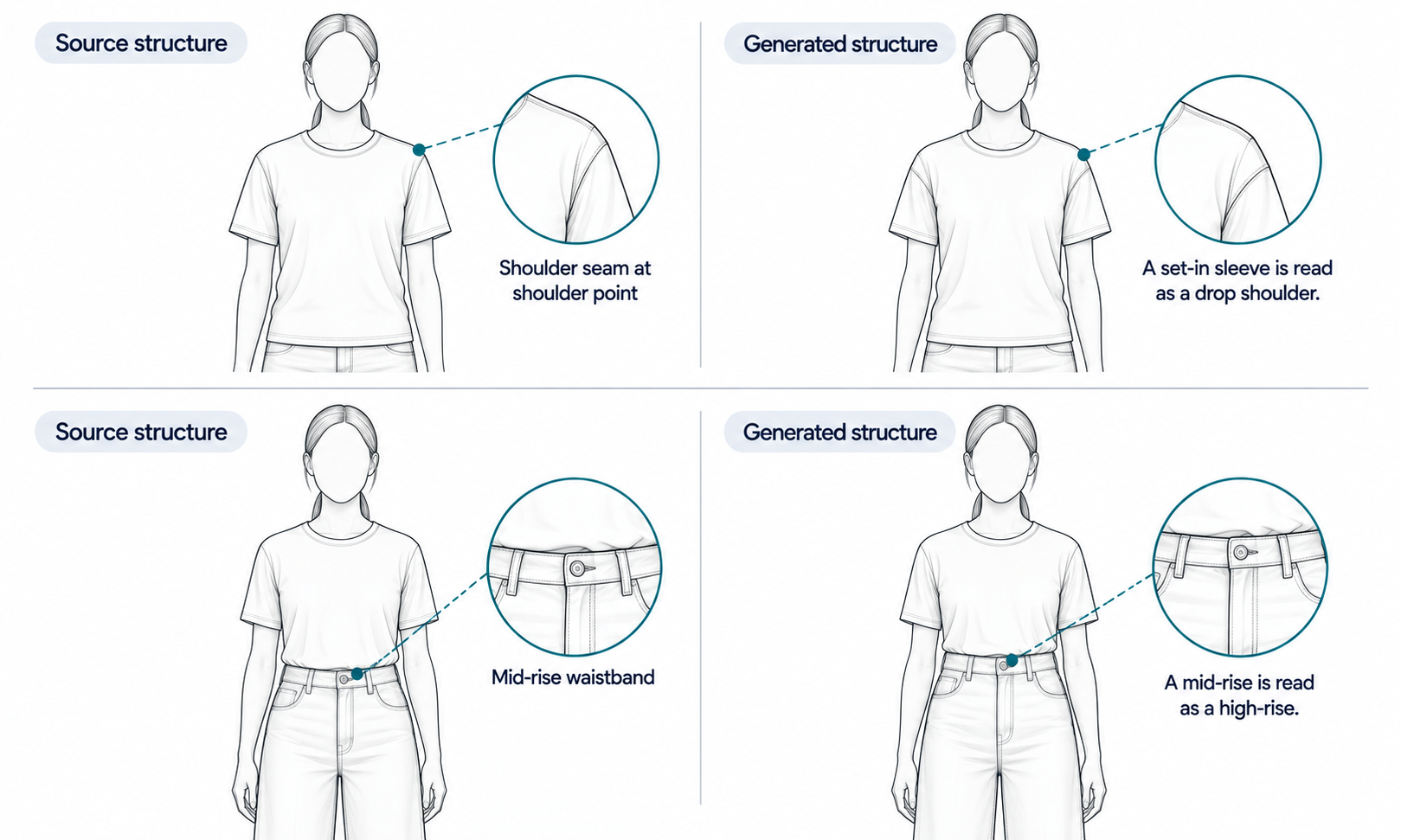
The stakes are higher than they look because these points describe construction. A shoulder seam that sits too low makes a set-in sleeve look like a dropped shoulder. A waistband that rises makes a mid-rise trouser look high-rise. The shopper is not only seeing a slightly odd image; they are being shown a different garment from the one they will receive.
One clarification keeps this in proportion. Checking where a garment hangs on a generated body is about whether the image shows the garment's construction correctly. It is not a fit test. The output is a visual asset and does not predict fit or determine sizing; measurements, a graded pattern and a physical sample answer those questions.
Where the Garment Hangs: Shoulders, Neckline and Waist
The points that hold a garment up are the ones to check first, because they set the proportions of everything below them.
-
Shoulder seams. Compare where the seam sits in the image with where it sits on the flat-lay or product shot. A seam that drifts toward the upper arm or up toward the neck changes the silhouette the shopper sees.
-
Necklines and collars. A crew neck should stay a crew neck, a collar point should keep its length and a placket should keep its button count. Necklines are also where hair and chin meet the garment, which makes them a frequent source of redrawn detail.
-
Waistbands and rise. The height of a waistband relative to the body defines trousers, skirts and many dresses. Check that it sits where the garment was cut to sit, and that any tuck, belt or drawstring matches the source.
-
Hems and lengths. Hem length relative to the knee, ankle or hip is one of the first things a shopper uses to judge a garment. A hem that has moved by a few centimeters can change a midi into a knee-length skirt.
These checks are faster against a reference than by eye. Keep the flat-lay or product shot open next to the on-model image and compare proportions directly: where the seam falls relative to the neckline, where the waist falls relative to the hem. Reconstructed detail tends to come back almost right, and almost right is the failure that passes a quick look, so compare every image with its source rather than a sample.
Hands, Pockets and Carried Items
Hands are hard for image software in general, and they become harder when they touch a garment. A hand in a pocket has to push the fabric out in the right place. A hand holding a bag strap has to press the strap into the shoulder of a jacket. A hand resting on a hip has to sit on top of the fabric, not merge into it.
The common failures are specific. Fingers blend into the cloth they touch. A pocket changes shape or position to accommodate a hand, or appears where the garment has no pocket at all. A strap passes through a lapel instead of lying over it. A cuff swallows part of the hand, or stops short and changes the sleeve length.
Each of these can misrepresent the product. A pocket that moved is a design detail that moved. A lapel crushed under a strap hides a detail the product page may be selling.
The simplest prevention is in the brief. For garments where pockets, cuffs or front details are selling points, choose poses that keep the hands away from them for the main image, and save hands-in-pockets poses for secondary images where the detail has already been shown clearly. When a hand interaction is needed, check it at full size against the source before approving the image.
Pose, Fabric Weight and Movement
A pose makes a claim about the fabric. A model mid-stride in a coat whose hem flares out lightly is telling the shopper that the coat is light and fluid. A model standing still in a silk dress that hangs in stiff, straight folds is telling them the silk is heavy. If those claims are wrong, the image misleads even when every seam is in the right place.
This is a direct consequence of how generated imagery works. The drape in the image is rendered, not calculated. The software produces folds that look plausible for the pose, and it does not model how that particular fabric, with its weight and stiffness, would actually behave in motion. So the pose is the one lever a team controls, and it should be chosen to suit the fabric rather than to add energy to the image.
Heavy wools, structured denim and thick knits generally read truthfully in still or gently weighted poses. Light, fluid fabrics can take more movement, and even then the movement shown should be modest enough that it does not promise a flow the fabric lacks. When the fabric's behavior is itself a selling point, such as the swing of a skirt or the drape of a wrap dress, a photograph or a short video of the real garment is more honest than a generated still. Note that consistency across video frames remains a current weak area for generated imagery, so generated motion is not a substitute either.
When the Model Competes With the Garment
The last pitfall is not an error in the image at all. It is an image where everything is correct and the product is still hard to see.
It happens through styling. A long scarf covers the neckline being sold. A jacket worn open hides the front of the top underneath. A crop cuts off the hem. A dramatic pose turns the body so that the garment's front is mostly out of view. Layered styling adds another problem: layering and overlap are also a current weak area for generated imagery, so a look with three garments on top of each other is both harder to read and harder to render faithfully.
The fix is to decide, for each image, which job it has. The first product image has the job of showing the garment plainly: front-facing, uncovered, full length where length matters. Styled and layered images can follow, once the garment has been shown clearly on its own.
In Lightchain AI (apparel AI), most contact-point problems can be fixed without starting over.
-
When a pose hides the product or makes a false claim about the fabric, change the pose in Model Studio and keep the model, scene and garment as they are.
-
When a seam, pocket or hand interaction is wrong in an otherwise good image, fix that area locally, as described on the Partial Redraw page, rather than regenerating the whole image.
-
When the garment itself needs to be put onto the model again, start from the flat-lay with AI Virtual Try-On, so the review has a clean source to compare against.
For teams producing on-model imagery across many styles, Scale E-commerce is the Lightchain AI solution built for that work.
Frequently Asked Questions
What is the most common pitfall with models in clothes?
Garment construction shifting at the points where it meets the body, such as a shoulder seam that drifts or a waistband that rises. These change how the garment reads, so the shopper is shown a slightly different product.
Why do hands cause so many problems in on-model images?
A hand touching a garment forces the software to reinterpret the fabric around it, and fingers, pockets and straps are all fine details. Keep hands away from selling details in the main image and check any hand interaction at full size against the source.
Can a generated image show how a fabric moves?
Not reliably. The drape is rendered to look plausible for the pose, not calculated from the fabric's weight. Choose poses that suit the fabric, and use a photograph or video of the real garment when movement is a selling point.
Does checking where a garment hangs tell us how it fits?
No. It checks whether the image shows the garment's construction correctly. Fit comes from measurements, a graded pattern and a physical sample.
How should the first product image be styled?
Plainly. Show the garment front-facing, uncovered and at full length where length matters, then add styled or layered images once the product has been shown clearly on its own.
Should every image be checked, or is a sample enough?
Every image. Reconstructed details tend to come back almost right, and images produced from the same settings tend to repeat the same mistake, so a clean sample says little about the rest.
How does Lightchain AI help fix contact-point problems?
It lets you change the pose in Model Studio, fix a seam, pocket or hand locally without regenerating the whole image, and put the garment on again from its flat-lay when needed. For on-model imagery across many styles, Scale E-commerce is the solution to use.
In Closing
Most pitfalls with models in clothes are not about the model or the garment alone. They sit where the two meet: at the shoulders and waist that hold the garment up, at the hands that touch it, in the pose that makes a claim about the fabric and in the styling that decides whether the product can be seen. Check those points against the source on every image, choose poses that tell the truth about the fabric and let the first image show the garment plainly. The person can be invented; the way the garment sits on them cannot.
Start Here
If you produce on-model imagery across many styles and want the garment to stay the subject of every picture, Scale E-commerce is the solution to use. It is built for on-model imagery with AI-generated models: you put your garments on models through virtual try-on, control pose, scene and styling for each image and refine details without regenerating whole images. Start with a few styles whose selling details sit at the shoulders, waist or pockets, check those points against the source, and extend from there.
**Explore Scale E-commerce → **https://www.lightchainai.com/global/solutions/scaleECommerce