
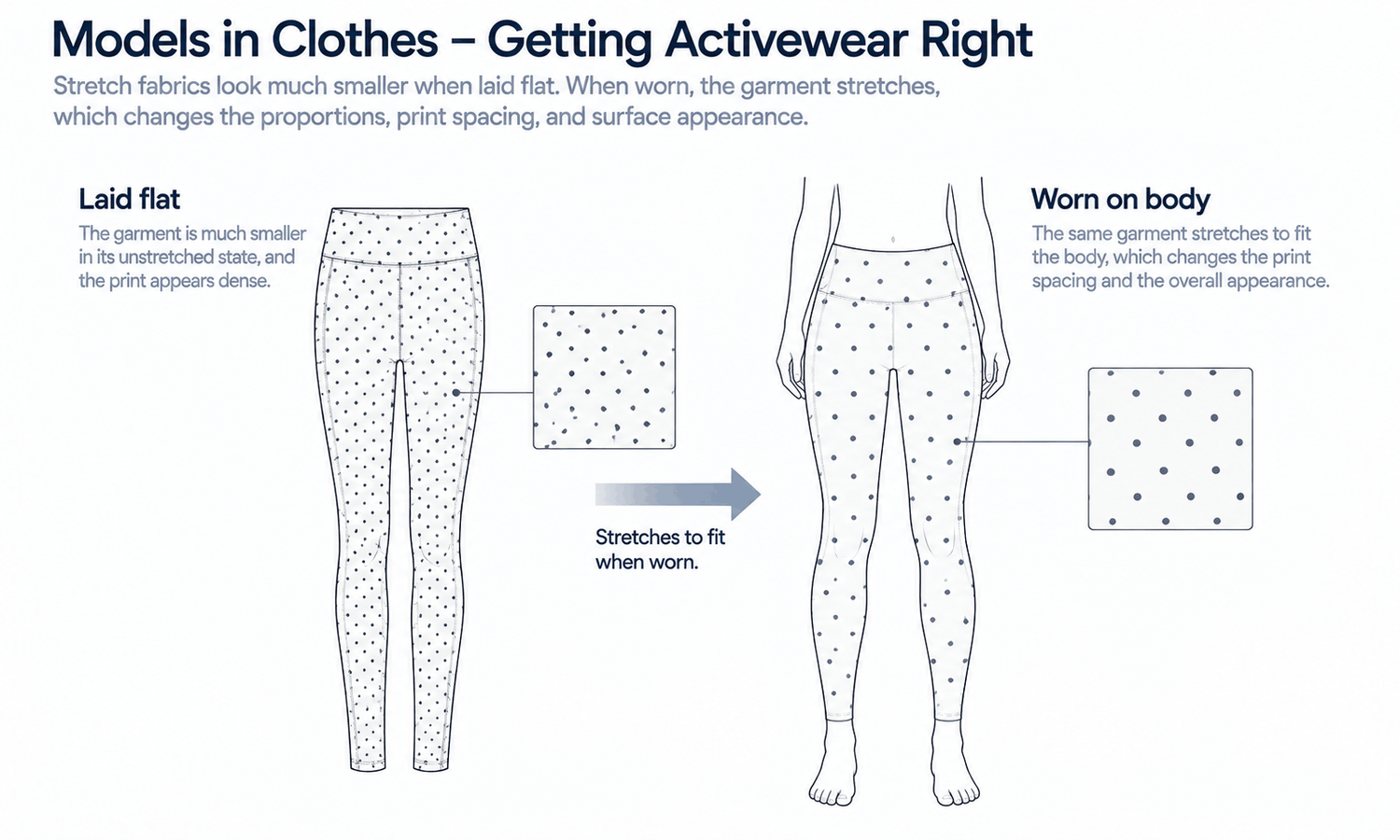
Models in clothes images for activewear bring a set of challenges that most other categories do not. Activewear is built from stretch fabrics that change shape on the body, technical surfaces with sheen and texture, mesh and perforated panels, flat or bonded seams, reflective trims and bold logos placed across curved areas. It is also sold on function, such as support, stretch, breathability or visibility, and images can suggest function without being able to prove it.
That combination makes activewear a category where images are easy to get almost right and where almost right matters. A logo that warps unnaturally across a stretched panel, a mesh insert that turns solid, a flatlock seam drawn as an ordinary one or a pose that stretches a garment beyond what it really does all change what the shopper sees. And because activewear is so often shown in motion, the temptation to use dramatic poses runs straight into the limits of generated imagery.
This article explains what makes activewear different, what to check in fabrics, panels and seams, how logos, trims and reflective details behave, how to choose between dynamic and clear poses and how to set up models in clothes images for activewear.
| Feature | Why it is hard to show accurately | What to check |
|---|---|---|
| Stretch fabric | The garment is much smaller flat than worn | Proportions and coverage against the design |
| Technical surfaces | Sheen and texture change with light | Surface appearance against the real fabric |
| Mesh and perforation | Openings are fine and regular | Openings are present, sized and placed correctly |
| Flatlock and bonded seams | Distinctive seam finishes | Seam type and position against the source |
| Color-blocked panels | Panel lines define the design | Panel shapes and color placement |
| Logos and graphics | Printed across curved, stretched areas | Letterforms and natural warping |
| Reflective trims | Appearance depends entirely on light | Placement and size, not the reflection |
| Waistbands, zips and drawcords | Small functional details | Type, count and position |
What Makes Activewear Different
Most garments hang on the body. Activewear is often designed to hold close to it. Leggings, sports bras, cycling shorts and fitted tops are made from stretch fabrics that are significantly smaller when laid flat than when worn, and they take their worn shape only by stretching over a body. That stretching changes their proportions, the spacing of their prints and the look of their surfaces.
Activewear also uses fabrics and constructions chosen for function: smooth or brushed technical knits, mesh panels for ventilation, perforations, bonded edges that lie flat, flatlock seams that avoid chafing and reflective trims for visibility. These details are part of what the customer is paying for, and each looks distinctive.
Finally, activewear is sold on performance. Claims such as support, compression, moisture management or breathability come from the fabric and the construction and are established by testing. An image can show what a garment looks like; it cannot show whether it wicks, supports or breathes. Performance claims belong in product copy backed by the brand's own testing, not in anything an image implies. Keeping that line clear protects both the shopper and the brand.
Fabrics, Panels and Seams
Several features of activewear fabrics and construction need close attention in generated images.
-
Stretch and coverage. A stretch garment is placed on the body by stretching it in the image. Check that its length, waistband height and coverage match the design, not a version the image has made longer or shorter.
-
Surface sheen. Technical knits range from matte to high sheen, and sheen depends on light. Check that a matte fabric has not gained a gloss or a glossy one lost it.
-
Brushed and textured surfaces. Brushed interiors, ribbed textures and jacquard knits can be smoothed away. Compare with close-ups of the fabric.
-
Mesh and perforation. Ventilation panels depend on small, regular openings. Check that they appear, in the right size and place, rather than turning into solid fabric.
-
Flatlock and bonded seams. Flatlock seams show a distinctive flat stitch; bonded seams have no visible stitching. Check the seam type matches the source.
-
Color-blocked panels. Panel shapes and the placement of each color define many activewear designs. Check each panel's outline and color.
Logos, Trims and Reflective Details
Activewear often carries large logos and graphics across the chest, thigh or waistband, placed on areas that stretch and curve. On a real garment, a logo printed on stretch fabric distorts in predictable ways as the fabric stretches over the body. In a generated image, the logo is reconstructed as the garment is placed, and the distortion can be too much, too little or simply wrong. Check logos letter by letter against the artwork, and judge whether their warping follows the body naturally.
Reflective trims are a particular case. Their appearance depends entirely on light: under ordinary light they may look gray or silver, and under direct light they glow. A generated image cannot show real reflectivity. Check that reflective elements are in the right place and size, and do not rely on the image to show how they perform.
Matching sets add a consistency requirement. Activewear is often sold as coordinated tops and bottoms in the same fabric and color, bought together or separately. Images of each piece and of the set should show the same color, sheen and print scale, which means photographing the sources under the same light and checking the images side by side. A top and leggings that look like slightly different shades on a product page raise doubts that are hard to resolve online.
Small functional details matter too. Zipped pockets, key pockets inside waistbands, drawcords, thumbholes and adjustable straps are often reasons to buy. Check each detail's type, count and position, and photograph them in close-up for product pages where they are selling points.
Poses: Dynamic Versus Clear
Activewear invites dynamic poses: running strides, deep stretches, jumps. They are appealing in campaigns, and they are exactly where generated imagery is weakest.
A dynamic pose changes the garment. A deep stretch pulls fabric tight, shifts seams and stretches prints; a stride lifts hems and bends waistbands. In a generated image, all of that is reconstructed rather than recorded, so a dramatic pose can show the garment behaving in ways the real fabric does not. Extreme poses also challenge physical plausibility: balance, joint angles and the contact of feet with the ground are harder to get right the more dramatic the movement.
For product images, clear poses work better: standing, relaxed and front-facing, with the garment's panels, seams and details visible and not overstretched. Save dynamic movement for campaign images, where each is reviewed carefully, or for photography, where the movement and the garment's response to it are real. Styling follows the same restraint: plain supporting pieces, simple footwear and no accessories that cover waistbands or pockets keep attention on the product. The model is described in neutral terms, such as age range and build, chosen to reflect the customers the range is for rather than to suggest what the garment does to a body. Motion itself, as in video, is a current weak area for consistency across frames.
Setting Up Models in Clothes Images for Activewear
Good activewear images start with a source that shows the garment clearly. Because stretch garments look small and crumpled when flat, photograph them laid out smoothly and evenly lit, and add close-ups of the fabric surface, mesh panels, seams, logos, trims and functional details. Record the garment's key measurements, such as length and waistband height, from the technical specification, so the image can be checked against them.
In Lightchain AI (apparel AI), activewear images are produced from the garment source with a few tools.
-
AI Virtual Try-On places each garment on a saved model from its flat-lay, so every style in the range appears on the same person.
-
Model Studio sets clear, consistent poses for product images, keeping dynamic movement for campaign work.
-
When a logo, panel or detail comes out wrong, Target Revision can correct it in a defined area from a reference close-up, as described on the Partial Redraw page.
For brands showing activewear that starts from the garment itself, AI Virtual Try-On is the Lightchain AI solution built around that input.
Check every image against its garment source, without exception, and at full size. Judge color against the physical garment, since screen color is not a physical reference. And remember that images show appearance: fit and size guidance come from measurements and size charts, and performance claims come from testing.
Frequently Asked Questions
Why is activewear harder for models in clothes images?
Because stretch fabrics change shape on the body, technical surfaces change with light, and functional details such as mesh, flatlock seams and reflective trims are fine and distinctive. Each is easy to get almost right in a generated image.
What should be checked in activewear images?
Length, waistband height and coverage, surface sheen and texture, mesh and perforations, seam types, color-blocked panels, logos and their warping, and functional details such as zips and pockets. Check them at full size, since many are fine details.
Can images show activewear performance?
No. Images show appearance. Support, compression, moisture management and breathability come from fabric and construction and are established by testing.
Which poses suit activewear product images?
Clear, relaxed, front-facing poses that show panels and details without overstretching the garment. Dynamic poses suit campaigns or photography.
How should reflective trims be shown?
Check their placement and size in images, and do not rely on a generated image to show how they reflect. Photograph them under light if reflectivity is a selling point.
How should stretch garments be photographed as sources?
Laid out smoothly and evenly lit, with close-ups of fabric, seams, logos and details, and with key measurements recorded from the specification. The measurements let the image be checked for length and coverage.
How does Lightchain AI support activewear images?
AI Virtual Try-On places each garment on a saved model from its flat-lay, Model Studio keeps product poses clear and consistent and Target Revision corrects a logo or panel from a reference close-up. AI Virtual Try-On is the solution to use for activewear that starts from the garment.
In Closing
Models in clothes images for activewear have to handle stretch, technical surfaces, functional details and bold logos, and they have to avoid implying performance they cannot show. Prepare smooth, evenly lit sources with close-ups and key measurements. Check coverage, sheen, mesh, seams, panels, logos and trims against the source at full size. Keep product poses clear, save dynamic movement for campaigns or photography and let testing, not images, support performance claims.
Start Here
If your brand sells activewear and wants on-model images that show every panel, seam and logo accurately, AI Virtual Try-On is the solution to use. It is built around starting from the garment: you place each piece on a saved model from its flat-lay, keep poses clear for product pages and correct details from reference close-ups. Start with one style that has mesh panels or bold logos, and check it at full size.
**Explore AI Virtual Try-On → **https://www.lightchainai.com/global/solutions/aiVirtualTryOn