
Model to Model: What Carries Over When You Swap the Person in a Photo
Model to model means taking an existing on-model photo and replacing the person in it with someone else, while the garment, the pose and the setting stay where they were. Brands use it for practical reasons. A photo library shot with one model needs to reach a market where a different face will connect better. A season of product images exists, and the team wants a generated model instead of a photographed one. A refresh is due, and reshooting every style is not.
The appeal is obvious: the expensive parts of a shoot, meaning the styling, the garment preparation, the lighting and the framing, are already done. The less obvious part is that a swap is not a clean exchange of one person for another. Some things carry over exactly, some are redrawn, and the places where the two meet are where most problems appear.
This article explains what a model-to-model swap keeps, what it changes, where the seams show, what happens when the body changes too, and what to settle about the person who was in the original photo before any of it is published.
| Element | Usually carries over | Usually redrawn | What to check |
|---|---|---|---|
| Garment | Yes, where the body stays the same | Near the neck, hair and hands | Collar, neckline and cuffs against the source |
| Pose and framing | Yes | — | Whether the pose still suits the new person |
| Light and scene | Yes | Light on the new face | Shadow direction on face and neck |
| Face and hair | — | Yes | Hairline, ears and anything touching the collar |
| Visible skin | Sometimes | Face, and often neck and hands | Tone continuity between face, neck and hands |
| Body shape | Yes, unless you change it | Everything, if you change it | The garment, treated as a new image |
What a Swap Keeps and What It Redraws
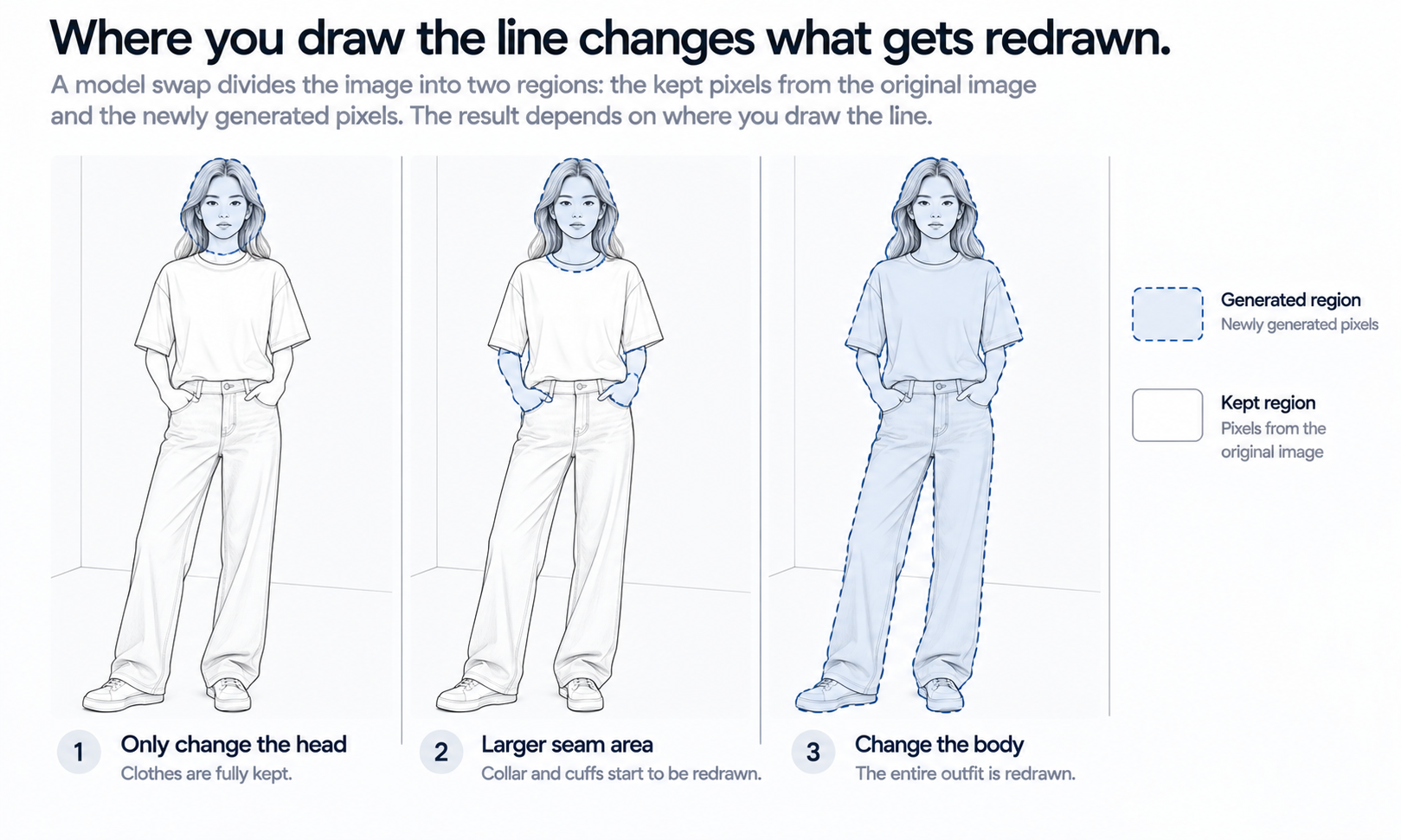
A model-to-model swap divides one photo into two regions. One region is kept: its pixels come through from the original. The other is regenerated: its pixels are produced fresh to show the new person. Everything about the result follows from where that line is drawn.
In the simplest swap, only the head is regenerated. The face, hair and perhaps the neck are produced new, and the garment, the body, the pose and the background are carried over untouched. This is the most faithful version for the garment, because the garment pixels are copied rather than rebuilt. A print stays exactly where it was, a logo keeps its exact letterforms, and a seam line stays straight because nobody redrew it.
What carries over is not only the garment. The pose carries over, and a pose is a choice that was made for a particular person. A stance that looked natural on the original model can look slightly borrowed on someone else, especially if the new model is meant to read as a different age or personality. The light carries over too. The original shoot lit a particular face from a particular direction, and the new face has to be lit as if it had been standing there in that same light.
The wider the regenerated region, the more of the image is produced rather than copied. That trade is the whole subject of model to model. Every extra part you ask the swap to change is a part that stops being a photograph of your product and becomes a drawing of it.
Where the Seams Show
The boundary between kept and regenerated pixels is where a swap succeeds or fails. A face can be convincing on its own and still give the image away at its edges, because the edges are where the new person has to agree with the old photo.
Most seam problems appear in a small number of places.
-
Skin tone continuity. If the face is regenerated but the hands and neck are carried over, all three have to read as the same person's skin under the same light. A face a shade warmer or cooler than the hands is the most common giveaway.
-
Hairline and collar. Hair falls over collars, hoods and shoulder seams. When the hair is redrawn, the garment underneath it is often redrawn too, and that is where a collar shape or a neckline can quietly change.
-
Ears, jewelry and small accessories. Earrings, glasses and hair clips sit on the boundary. They may disappear, duplicate or change shape, and any accessory that belongs to the product story has to be checked.
-
Light direction on the face. The original light fell from one side. A new face lit evenly, or from the other side, looks placed rather than photographed, even when every feature is convincing.
The garment near the seam deserves the same rule as any reconstructed detail. When a neckline, a collar point or a drawstring is redrawn, it tends to come back almost right, and almost right passes a quick look. Check every swapped image against its source at the neckline and cuffs, without exception, rather than checking a sample and trusting the rest. Images produced from the same settings tend to repeat the same mistake.
When the Body Changes Too
Sometimes the reason for the swap is not the face but the body. A brand wants the same garment shown on a model of a different size or build. This changes the nature of the job.
When only the head is swapped, the garment is carried over and stays faithful. When the body changes, the garment cannot be carried over, because it has to drape over a different shape. It has to be regenerated, and at that point the swap is no longer preserving your product photo. It is producing a new image of your garment on a new body, with all the checks that implies: logos and printed text, stitch lines, trims, hardware and print placement, each compared against the source.
Some garments remain harder than others in that situation. Complex prints, lace and openwork, sheer fabrics and layered styling are current weak areas for generated imagery. When a style falls into one of those categories and the body has to change, photograph it and record why rather than regenerating until something looks acceptable.
There is also a limit that no amount of care removes. A garment redrawn on a larger or smaller body shows how the garment looks on that body in an image. It does not show how the garment would fit a real person of that size, because the output is a visual asset and does not predict fit or determine sizing. Measurements, a graded pattern and a physical sample answer the fit question, and product pages should keep that information next to the imagery.
A practical consequence follows. If the body is changing anyway, it is often better to start from the garment itself, meaning a flat-lay or a garment photo, and put it on the new model directly, rather than swapping a person out of an existing photo and asking the garment to follow. Starting from the garment gives the review a clean source to compare against.
The Person in the Original Photo
A model-to-model swap starts from a photograph of a real person. Replacing the face does not always remove that person from the image. Their body, their pose, their hands and any distinctive features such as a tattoo or a scar may remain. Before a swapped image is published, it is worth settling what the original model agreed to.
Photography agreements and model releases often specify where images can be used, for how long and in what form. Whether an image that keeps a model's body but replaces their face falls within an existing agreement is a question for whoever manages those agreements, and it should be answered before a swap program starts rather than after the images are live. Where the answer is unclear, starting from a garment photo rather than an on-model photo avoids the question entirely.
The new face deserves its own check. If the replacement is a generated person, look at the face as a stranger would and ask whether it closely resembles someone real and identifiable, and replace it if it does. Expectations for labeling AI-generated or altered imagery also differ by market and by platform, so confirm the rules where each image will appear, and read the current terms of the tool you use for commercial use of generated people.
Running a Model-to-Model Swap
With the decisions above settled, the work itself is a short sequence: choose the source images, decide what may change, make the swap, then review the seams and the garment.
In Lightchain AI (apparel AI), that sequence maps onto a few tools.
-
Model Studio replaces the model and adjusts the face, and can change pose, scene and angle where the swap needs them.
-
Seam fixes, such as a hairline over a collar or a hand that no longer matches the face, can be made locally without regenerating the whole image, as described on the Partial Redraw page.
-
When the body changes, AI Virtual Try-On puts the garment on the new model from a flat-lay or garment photo, so the review has a clean source to compare against.
For brands adapting one photo library to several markets, Scale E-commerce is the Lightchain AI solution built for that work: localized on-model imagery across styles and channels, with fewer shoots to rebuild.
Whatever tools you use, keep the change as narrow as the goal allows. A swap that changes only the face keeps the most of your original photograph. Each additional change buys flexibility at the cost of fidelity, and it is worth deciding that trade deliberately for each set of images.
Frequently Asked Questions
What is model to model in apparel imagery?
It is replacing the person in an existing on-model photo with someone else while the garment, pose and setting stay in place. Brands use it to adapt a photo library to new markets or to move from photographed to generated models.
Does swapping the model change the garment?
It should not, as long as only the head is regenerated. The garment can change near the seams, at the collar, neckline and cuffs, and it is fully redrawn if the body changes. Check those areas against the source photo on every image.
Can we show the same garment on a different body size this way?
You can show how it looks on a different body in an image, but the garment is then regenerated rather than carried over. That image does not show fit; measurements, a graded pattern and a physical sample do. Starting from a flat-lay is usually the cleaner route.
Do we need the original model's permission?
Check the photography agreement or model release before swapping, because the original model's body and pose may remain in the image. The people who manage those agreements should confirm whether a swapped image falls within them.
What is the most common sign that a swap has gone wrong?
A mismatch in skin tone between the new face and the hands or neck carried over from the original. Light falling on the face from a different direction than on the rest of the body comes a close second.
Should swapped images be labeled?
Labeling expectations for AI-generated or altered images differ by market and platform. Confirm the rules where each image will be published and apply them consistently across the set.
Can Lightchain AI handle model-to-model swaps?
Yes. Model Studio replaces the model and adjusts the face, local edits fix seams without regenerating the whole image, and Scale E-commerce is the solution to use for adapting a photo library across markets. Check the original model's agreement before starting.
In Closing
A model-to-model swap is a decision about which pixels stay photographs. The garment, pose and light carry over when the change is narrow, and that is what makes a swap worth doing. Every widening of the change, first the neck and hands, then the body, turns more of your product photo into a drawing that has to be checked. Settle the rights of the person in the original photo before you begin, review every image at the seams and against its source, and start from the garment itself whenever the body needs to change.
Start Here
If you want to adapt an existing photo library to new markets or move it onto AI models, Scale E-commerce is the solution to use. It is built for localized on-model imagery across many styles: you choose models that reflect each market, replace or restyle the person in your images, and keep your garments at the center of every picture. Start with a small set of photos where only the face changes, review the seams against the originals, and widen the program once the results hold.
**Explore Scale E-commerce → **https://www.lightchainai.com/global/solutions/scaleECommerce