
For a marketplace seller, model clothing images are not a creative extra. They are a listing requirement. Each product needs a main image that meets the marketplace's rules, a set of secondary views and, for every color the product comes in, images of that color. Until those exist and pass review, the listing does not go live.
Generated models have made the images themselves faster to produce. What still holds listings up tends to sit elsewhere. Images get rejected because they break a marketplace rule nobody built into production. Color variants wait because every colorway needs its own images, and not every colorway sample arrives at once. And the shortcut that looks like it solves the second problem, recoloring one image into the others, creates a new one.
This article explains what a marketplace listing needs from model clothing images, how to build marketplace rules into production so images pass the first time, how to handle color variants without misrepresenting them, what to check before submission and how to run the process.
| Listing need | Common hold-up | How to prevent it |
|---|---|---|
| Main image | Rejected for breaking a marketplace rule | Build the rules into the template before production |
| Secondary views | Missing back or detail views | Define the required set per category in advance |
| Color variants | Waiting for every colorway sample | Capture each colorway's flat-lay as it arrives |
| Variant accuracy | Recolored images that do not match the product | Verify every variant image against its physical colorway |
| Garment accuracy | Details that differ from the product | Check every image against its garment source |
| AI labeling | Rules missed for generated imagery | Confirm each marketplace's current rules |
What a Marketplace Listing Needs
Every marketplace publishes image requirements, and they differ from one marketplace to another. They typically cover the main image most strictly, then set looser rules for secondary images. The categories are usually familiar: background, framing and how much of the frame the product fills, whether text, graphics or badges may appear, whether items not included with the product may be shown, minimum resolution and file format, and whether and how a model may appear.
Two things make these requirements easy to miss. They change, so a template built last year may no longer comply. And they differ by category within the same marketplace, so a rule that applies to dresses may not apply to footwear or accessories. The only reliable source is the marketplace's current published guidance for the category you are listing in.
Beyond the main image, a listing usually needs a set of secondary views: back, side, detail and sometimes a styled or lifestyle image. And each color variant needs its own images, so that a shopper who selects a color sees that color.
Building Marketplace Rules Into the Template
The cheapest rejection is the one that never happens. That means turning each marketplace's rules into production settings before any images are made, not into a checklist used after they are made.
-
A requirements sheet per marketplace and category. Summarize the current rules in the team's own words, with a link to the source and the date it was checked. Review it on a schedule, because rules change.
-
Templates that encode the rules. Set the background, crop, product fill and resolution for each marketplace's main image once, so every image produced for that marketplace starts compliant.
-
A clean main image by default. Keep text, badges and graphics off the main image unless the marketplace explicitly allows them, and add them only to secondary or promotional images where permitted.
-
Styling that matches the sale. Where a marketplace restricts showing items that are not included with the product, keep the main image free of accessories or layered pieces that are sold separately.
Add a pre-submission check that compares each image against the requirements sheet. It takes seconds per image and prevents the far longer delay of a rejection, a fix and a resubmission.
Generated imagery makes this easier than photography does. When the background, crop and framing are settings rather than decisions made on a shoot day, they can be made compliant once and applied to every product.
Color Variants: The Tempting Shortcut
Color variants are where marketplace listings most often stall. A product might come in six colors. Each color needs its own images. The colorway samples arrive at different times, and the listing either waits for all of them or launches with some colors missing.
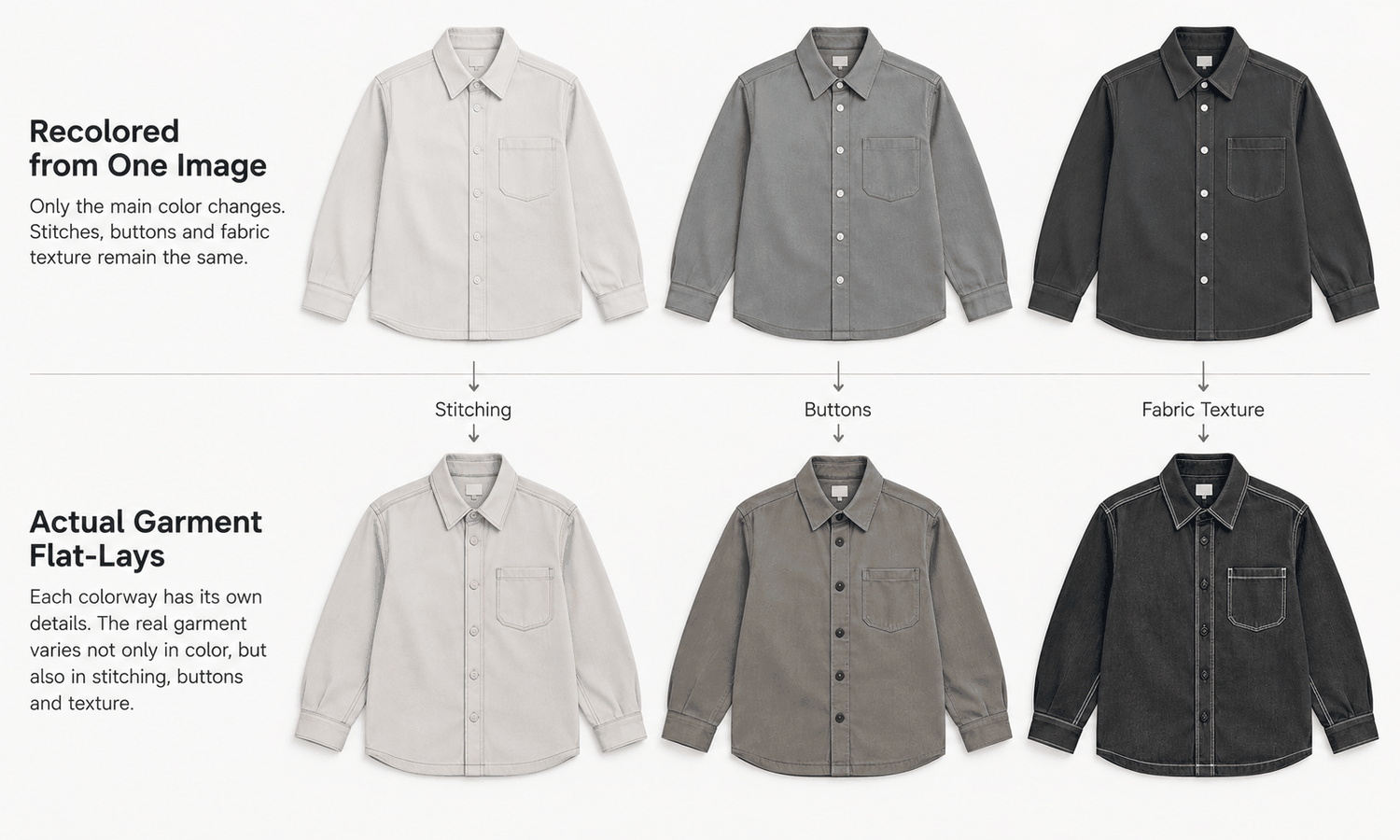
The obvious shortcut is to take the image of one color and recolor it into the others. It is fast, and the results can look convincing. The trouble is what the shopper is shown. A recolored image shows what the garment might look like in another color. It does not show that colorway. Real colorways differ in more than hue: a darker dye can change how a fabric's texture reads, contrast stitching and trims may be different in each colorway, and a print's colors are rarely a simple shift of the original. Selling a color variant with an image that has never been checked against that color risks showing the shopper something they will not receive.
Color needs care beyond that, too. Screen color is not a physical reference, generated imagery does not promise an exact color-code match, and the gap between a display and the fabric does not close with a better display. The colorway is settled by the lab dip or sample against the agreed standard, and color values should not be read from images and published as product attributes.
A more reliable approach is to capture each colorway's flat-lay as soon as its sample arrives, which takes far less time than a shoot, and place it on the same model in the same pose and scene as the first color. Each variant then shows its own garment, and the listing can add colors as they arrive rather than waiting for the last one. Recolored images still have a use: for internal planning, early merchandising decisions and discussion. Label them as drafts and keep them out of listings until they have been verified against the physical colorway, or better, replaced by an image made from it.
Variants also fail in a quieter way: the right image attached to the wrong color. When six colorways share one model, one pose and one scene, the images differ only in the garment's color, and a navy image uploaded to the black variant is easy to miss in a batch. Name every file with the product code, the color code and the view, match the color code to the marketplace's variant field rather than to a color name that may be translated or abbreviated differently, and check the live listing by selecting each color in turn after it publishes. A mismatched variant image is one of the most common reasons a shopper receives a color they did not expect, and it is entirely preventable.
Accuracy and Labeling Before Submission
A listing that passes the marketplace's image rules can still misrepresent the product, and that creates a different and more expensive problem: complaints that an item is not as described.
Check every image against its garment source for construction, logos, printed text, trims, hardware and print placement, without exception. Reconstructed detail tends to come back almost right, and almost right survives a quick look, especially at thumbnail size. Sampling does not work, because images produced from the same source and settings tend to share the same mistake.
Keep captions honest. A caption stating the model's height and the size worn describes a real person in a real garment. A generated model did not wear the garment in any size, so do not add size-worn captions to generated imagery; give size guidance through the size chart and measurements.
Confirm each marketplace's current rules on AI-generated imagery, and apply them consistently to that marketplace's listings. Keep a record of the images submitted, their sources and the date, so that if a question arises later the answer is quick to find.
Some styles are better photographed from the start. Complex prints, lace and openwork, sheer fabrics and layered styling are current weak areas for generated imagery. Mark them in the plan so their photography is scheduled rather than discovered late.
Running It Day to Day
In practice the process is a loop per product: capture each colorway's flat-lay, place it on the listing model, apply the marketplace template, check and submit.
In Lightchain AI (apparel AI), that loop uses a few connected tools.
-
AI Virtual Try-On places each colorway's flat-lay on the same saved model set, so every variant shows its own garment in a matching image.
-
The Image Editor includes background removal and smart cropping for preparing clean main images to each marketplace's framing.
-
The Omni-Marketing Workbench has an e-commerce scenario for preparing secondary and promotional images, where text and badges are permitted.
For sellers producing on-model imagery across many products and marketplaces, Scale E-commerce is the Lightchain AI solution built for that work.
Frequently Asked Questions
Why do marketplace images get rejected?
Usually because they break a rule in the marketplace's current image requirements, such as background, framing, text on the main image or items shown that are not included. Building those rules into production templates prevents most rejections.
Where should sellers find marketplace image rules?
In each marketplace's current published guidance for the category being listed. Rules change and differ by category, so record the source and the date checked.
Can one image be recolored for other color variants?
Only as an internal draft. A recolored image does not show the real colorway, which can differ in texture, trims and print colors. Capture each colorway's flat-lay and verify every variant image against its physical colorway before listing.
How can listings go live before every colorway arrives?
Capture each colorway's flat-lay as its sample arrives and add that color to the listing once its images are made and checked. The listing grows color by color instead of waiting for the last one.
Should generated model images include a size-worn caption?
No. A generated model did not wear the garment in any size. Give size guidance through the size chart and measurements.
Do marketplaces have rules for AI-generated images?
Some do, and they can change. Confirm each marketplace's current rules and apply them consistently to that marketplace's listings.
How does Lightchain AI help marketplace sellers?
It places each colorway's flat-lay on the same saved model with AI Virtual Try-On and prepares clean, correctly framed images with the Image Editor. Scale E-commerce is the solution to use for producing listing imagery across many products and marketplaces.
In Closing
For marketplace sellers, model clothing images are part of the listing, and listings stall in predictable places. Build each marketplace's current rules into production templates so images pass the first time. Treat color variants as separate products: capture each colorway's flat-lay, place it on the same model and verify it against the physical color rather than recoloring one image into many. Check every image against its source, keep captions honest and confirm each marketplace's rules on generated imagery before submission.
Start Here
If you list apparel on marketplaces and want listing images that pass the first time and show every colorway accurately, Scale E-commerce is the solution to use. It is built for producing on-model imagery across many products: you place each colorway on the same saved model from its flat-lay, prepare clean main images to each marketplace's framing and add colors as their samples arrive. Start with one product and all its colorways, and extend once the template holds.
**Explore Scale E-commerce → **https://www.lightchainai.com/global/solutions/scaleECommerce