
A free AI model generator is the natural place to start. It costs nothing to try, it shows quickly what generated models can look like, and it lets a small team find out whether the idea suits its brand before anyone has to justify a budget. For many teams, the first generated model they ever see comes from a free tool.
The harder question comes next. Can those images go on a product page, into an ad or onto a marketplace listing? Can the same model carry a whole product's image set? Is the garment in the picture actually your garment? Free tools differ widely on those points, and the differences matter more for apparel than for most other uses of generated imagery.
This article does not rank tools or argue that free is a false economy. It explains what free is good for, what to check before free images go live, the two apparel-specific problems that free tools often leave open, how to count the real cost of an image and a simple test for deciding whether free is enough for your store.
| Question to ask | Why it matters for apparel | Where to find the answer |
|---|---|---|
| May the images be used commercially? | Product pages and ads are commercial use | The tool's current terms |
| How are uploaded images used? | Your garment photos are unreleased product | The tool's terms and privacy information |
| Can the same model be kept across images? | One product needs one model across its set | A test with one product |
| Is your actual garment put on the model? | The garment is what the customer buys | A test from your own flat-lay |
| What resolution, and is there a watermark? | Product pages need clean, sharp images | The tool's output settings |
| How many images can you produce? | A season means many styles and views | The tool's usage limits |
What Free Is Good For
Free generators are genuinely useful, and it is worth being clear about where.
They are good for learning. A team new to generated models can find out what a brief needs to say, how pose and scene change an image and how long review takes, without committing to anything.
They are good for exploration. Mood boards, rough campaign directions and internal concepts do not need commercial rights or a perfect garment. They need ideas, and free tools produce plenty.
They are good for deciding whether generated models suit the brand at all. Some brands find that generated models fit their look; others decide their imagery depends on photography. A free trial answers that question cheaply.
In all three cases the images stay inside the team. The questions change the moment an image is meant for customers.
Five Things to Check Before Free Images Go Live
Before any generated image appears on a product page, in an ad or on a marketplace, check the following. None of them is about image quality, and all of them can stop an image from being usable.
-
Commercial-use terms. Some free tiers restrict commercial use, require attribution or reserve rights over outputs. Read the current terms for the tier you are actually using, not the paid tier described on the same page.
-
What happens to your uploads. Garment photos are often unreleased product. Check how the tool stores, uses and deletes uploaded images, and whether uploads may be used to improve the service.
-
Watermarks and resolution. A watermark or a low output resolution makes an image unusable on a product page, however good it looks in a preview.
-
Likeness and labeling. Look at each generated face as a stranger would and confirm it does not closely resemble a real, identifiable person. Check the labeling rules for AI-generated imagery in each market and on each platform where you publish.
-
Volume limits. A free allowance that covers a test may not cover a season. Count the styles, views and markets you actually need.
Write down what you found and when. Terms change, and the record shows what applied when each image was made.
The Two Apparel Problems Free Tools Often Leave Open
Beyond terms and limits, two problems decide whether generated images work for selling clothes. Free tools, especially general-purpose ones, often leave one or both of them open.
The first is holding the same model. A product page usually shows one garment in several views: front, back, side, detail. If each image is generated fresh with nothing tying it to the last, each shows a slightly different person. Across a catalog, the problem compounds, and shoppers notice a brand whose models never quite look the same twice. What solves it is the ability to save an approved model and reuse it, or to generate new views from an approved image rather than from a description.
The second is putting your actual garment on the model. Many generators produce a person wearing a garment that matches a description. That is useful for concepts and useless for product pages, because the shopper is buying your garment, not one that resembles it. What solves it is a workflow that starts from your flat-lay or garment photo and transfers that garment onto the model.
Even then, the garment has to be checked. Transferred garments are reconstructed, and reconstructed detail tends to come back almost right: a logo slightly off, a trim a different shape, a print shifted. Compare every image with its garment source, without exception. Complex prints, lace and openwork, sheer fabrics and layered styling remain current weak areas for generated imagery, so photograph those styles and record why.
Counting the Real Cost of Free
The price of a free tool is zero per generation. The cost of an image you can actually publish is something else.
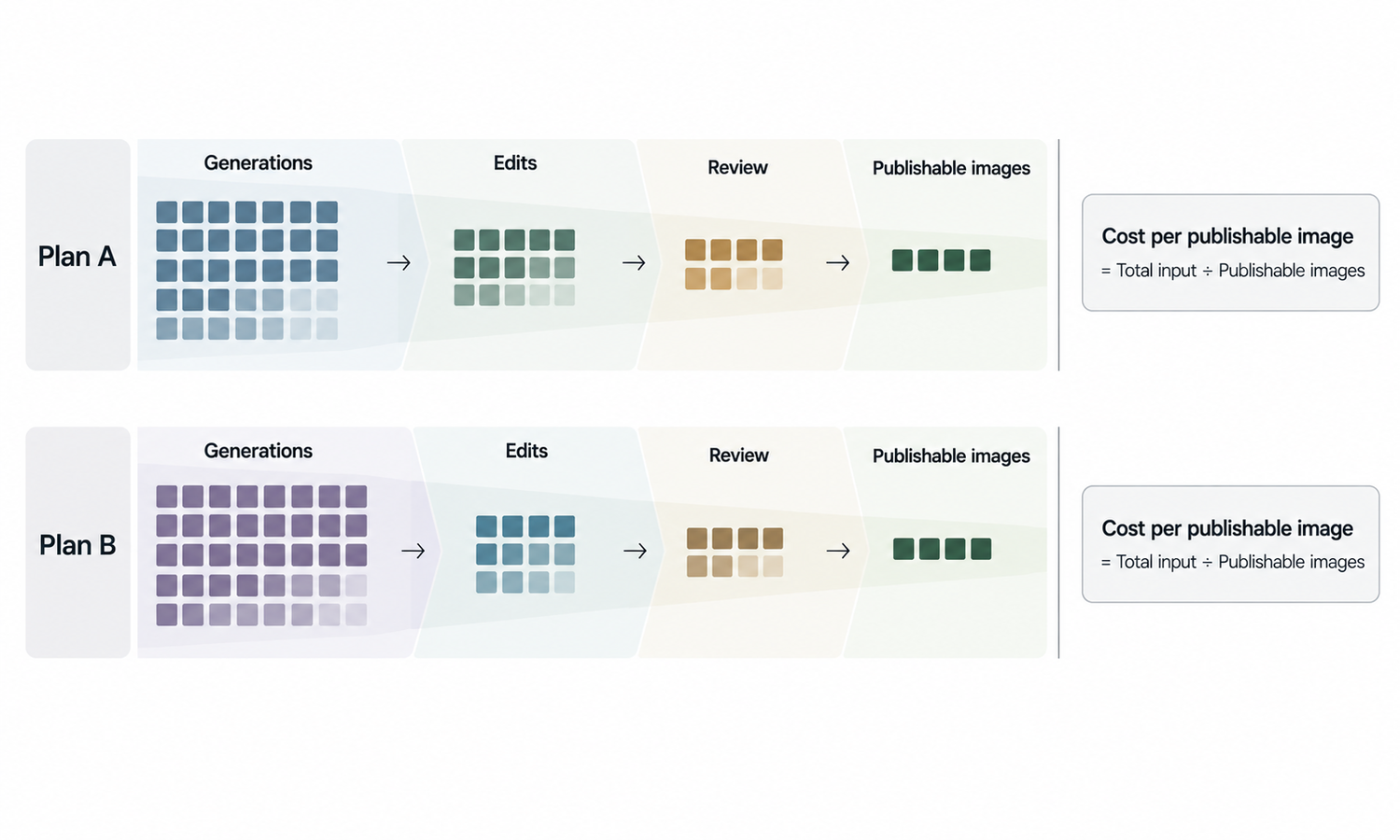
Count the time. A usable image may take several generations, some manual retouching and a careful review against the garment source. If a free tool needs ten attempts where another needs two, the free tool is not cheaper for that task; it moves the cost from the invoice to the team's hours.
Count the rework. Images that fail review late, such as a garment detail noticed after publication or a model who changes between views, have to be replaced, and replacing live images costs more than getting them right the first time.
Count the risk. An image published under terms that did not allow commercial use, or from an upload that should not have left the company, costs far more than any subscription.
A fair comparison between tools, free or paid, is cost per accepted image: everything it took to reach an image you would publish, divided by the images you actually publish. That number is worth measuring on a real product rather than estimating.
A Simple Test: Is Free Enough for Your Store?
Take one real product, with its flat-lay, and try to produce the image set you would publish for it: several views, one model, your actual garment, at the resolution your store needs.
If the free tool gets you there, with terms that allow your use and a reasonable amount of time and retouching, free may be enough for now. Repeat the test when your volume or your markets change.
If it does not, note which part failed. Terms, the same model, the actual garment and resolution are different problems, and knowing which one stopped you tells you what to look for next.
Keep a short record of the test while you run it. Note the product, the flat-lay used, how many generations each view took, how long review and retouching took, which details failed against the source and what the terms said on the day. That record turns a vague impression, such as "it was fiddly" or "it looked fine", into something the team can compare later, including against the same test run with a different tool. It also protects against a common trap: judging a tool by its strongest image. The question is not whether a tool can produce one good picture, but whether it can produce the whole set a product page needs, reliably, at the pace your season demands.
If the test shows you need garment-accurate on-model imagery at volume, Lightchain AI (apparel AI) is built around those two apparel problems.
-
AI Virtual Try-On puts your garment on a model from its flat-lay or garment photo, including on a saved model set, so one product's views stay on one model.
-
Model Studio creates and adjusts models, and approved models can be kept in personal or enterprise libraries for the whole team.
-
Output is available in 2K and 4K, and an AI Compliance Mark watermark control is there for teams that need to label generated images.
For stores producing on-model imagery across many styles, Scale E-commerce is the Lightchain AI solution built for that work. Whatever tool you use, check its current terms for your intended use before publishing.
Frequently Asked Questions
Can images from a free AI model generator be used on product pages?
Only if the tool's current terms for the free tier allow commercial use and the images meet your store's requirements for resolution and watermarks. Check the terms for the tier you are using, and keep a record of what applied when each image was made.
What are free AI model generators good for?
Learning how generated models work, exploring concepts and mood boards, and deciding whether generated models suit the brand at all. In those uses the images stay inside the team.
Why do product images need the same model in every view?
Because a product page shows one garment in several views, and a different person in each view looks inconsistent to shoppers. Saving and reusing an approved model is what keeps a product's set on one person.
Does a free generator put my actual garment on the model?
Not always; general-purpose tools often generate a person wearing a garment that matches a description. Test with your own flat-lay and compare the result with the source detail by detail.
How should we compare the cost of free and paid tools?
Use cost per accepted image: all the generations, retouching and review time it takes to reach an image you would publish, divided by the images you publish. Measure it on a real product rather than estimating.
Should uploaded garment photos be treated as confidential?
Often, yes, because they can show unreleased product. Check how each tool stores and uses uploads before sending anything you would not want to share.
When should a store look at Lightchain AI?
When the test shows you need your actual garment on a consistent model across many styles. Scale E-commerce is the solution to use for that: it puts garments on models from flat-lays, keeps saved model sets and supports shared libraries. Check its current terms against your intended use, as you would for any tool.
In Closing
A free AI model generator is a good way to learn, explore and decide whether generated models suit your brand. Whether free is enough for customer-facing images depends on things a preview does not show: commercial terms, what happens to your uploads, whether one model can carry a product's views and whether the garment in the picture is really yours. Run one product through the whole process, count the cost per accepted image and let that result, not the price tag, decide.
Start Here
If your store needs on-model images of its actual garments, on the same model across every view and across many styles, Scale E-commerce is the solution to use. It is built for producing that imagery at volume: garments go onto models from flat-lays through virtual try-on, approved models are kept in saved sets and shared libraries, and pose and scene can be set for each image. Start with one product and its full image set, and compare the result with its source before extending.
**Explore Scale E-commerce → **https://www.lightchainai.com/global/solutions/scaleECommerce