
A virtual cowboy hat try on looks like the simplest version of a problem software already handles every day: take a photo of a person, add an item, make it look worn. A hat even seems easier than a shirt. There are no sleeves, no buttons, nothing to tuck.
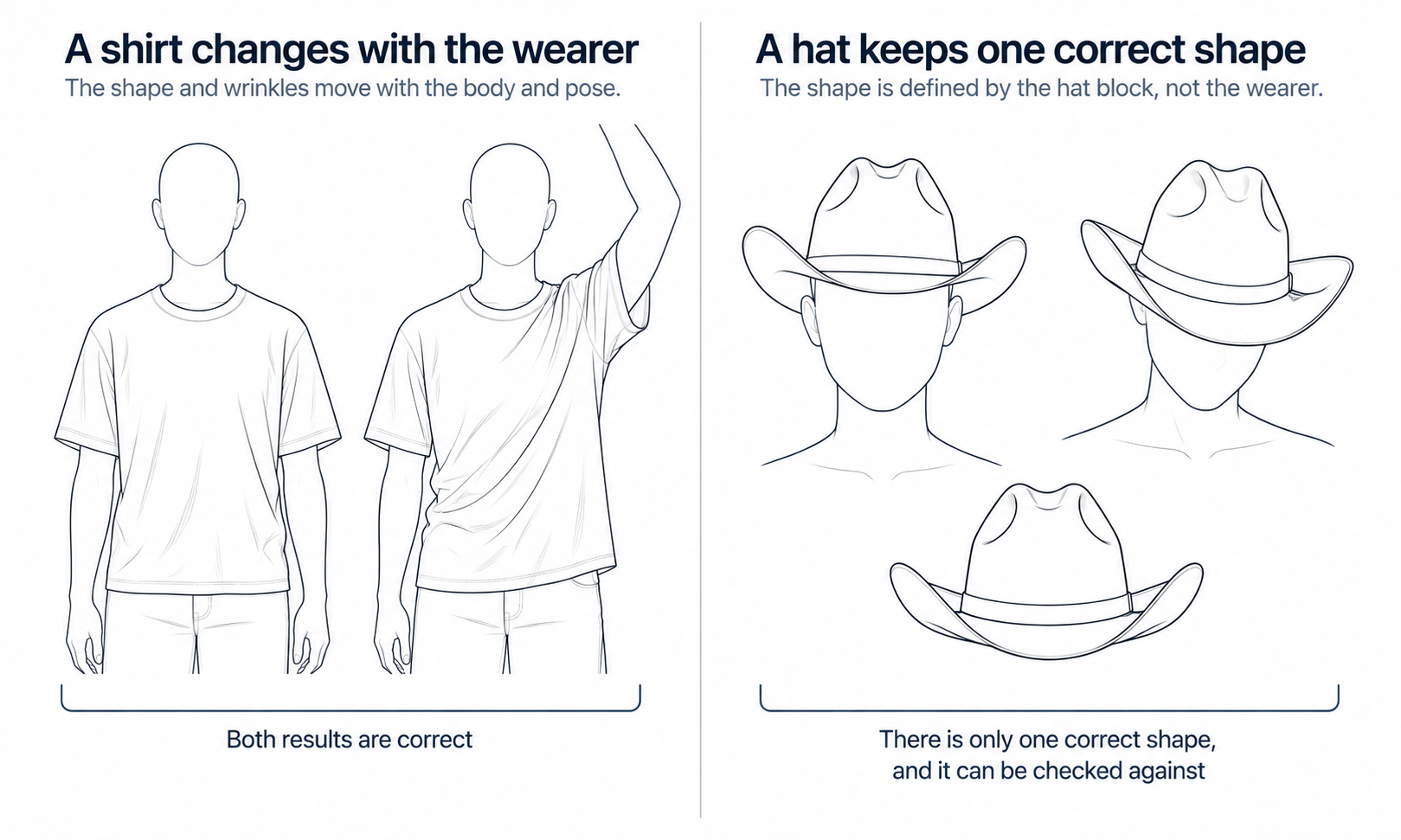
In practice a hat is harder, and the reason is worth understanding before you decide what a generated hat image can do for a product page. A shirt is soft. It takes its final shape from the body underneath it, and a plausible fold is as good as any other fold because nobody can check it against a single correct answer. A cowboy hat is rigid. Its crown and brim were shaped before anyone put it on, and the person wearing it does not change them. Every image of that hat has to reproduce a shape that already exists, not invent one that could exist.
This article explains how the common approaches place a hat on a photo, where hat images tend to go wrong, what no image can tell a shopper about size, and how a Western wear team can decide when a generated hat belongs in its imagery at all.
| Question | A shirt | A cowboy hat |
|---|---|---|
| Where the shape comes from | The body underneath it | The block it was shaped on |
| What the wearer changes | Most of the silhouette | Very little — tilt and sit height |
| How size is defined | Chest, length and other body measurements | Head circumference and the shape of the crown opening |
| What goes wrong first in an image | Print placement and fine surface detail | Brim geometry, crown crease and sit height |
| What a generated image can answer | How the garment looks on a model | How the hat looks as styling, not how it fits |
Soft Goods Follow the Body; a Hat Arrives Finished
A felt or straw cowboy hat is formed over a hat block. Heat, steam and pressure set the crown to a particular height and crease, and the brim is flattened, flanged and curled by hand or by press. By the time the hat reaches a shelf, its geometry is fixed. The pinch at the front of the crown, the depth of the dent on top, the way the brim rolls up at the sides and dips at the front and back are all decisions a maker already took.
That fixed geometry changes what counts as a good image. When a shirt is shown on a model, many fold patterns would all be correct. Cloth responds to posture and to the way an arm is held, and a viewer has no reference against which to call one crease wrong. The standard for a shirt image is plausibility: does this look like cloth behaving like cloth?
A hat has one correct shape for each product, and a shopper can check it. The listing usually carries a studio photo of the hat alone. A returning customer may own the same style. If the crease in the worn image is shallower than the crease in the product shot, or the brim rolls in a way the real hat does not, the viewer can see the disagreement. The standard for a hat image is fidelity, which is a much harder test to pass.
Angle makes the test harder again. A front view flattens a hat into a silhouette; a three-quarter view reveals the pinch, the side roll of the brim and the height of the crown. A rigid shape seen from a new angle has to follow perspective exactly, not approximately.
Three Ways Software Puts a Hat on a Photo
Most hat try-on tools use one of three approaches, and each trades the same two qualities against each other: faithfulness to the real hat and naturalness in the finished photo.
The first approach is an overlay. A cutout image of the hat is laid on top of the photo, and the user scales, drags and rotates it into place. Because the hat pixels are copied rather than recreated, the crease, band and color stay exactly as photographed. The cost is everything around the hat. It keeps the angle it was photographed at even when the head is turned, sits on top of the hair instead of pressing into it, and throws no shadow on the face.
The second approach is live tracking in a camera view. Software estimates the position and orientation of the head in each frame and anchors a three-dimensional model of the hat to it, so the hat turns when the head turns. This handles angle well because a real three-dimensional shape exists, but someone has to build an accurate model of each hat, and the try-on can be no better than that asset. Lighting and hair contact are approximated rather than photographed.
The third approach is generative redrawing. An image model repaints the head region with the hat in it, guided by a photo of the hat or a written description. Because the model redraws the hair, the shadow under the brim and the light on the felt together, the result usually looks natural. The cost is on the other side of the trade. The model is rebuilding the hat, not copying it, so the crease, the brim curl and the band are recreated each time and can drift from the real product.
None of these approaches is a flawed version of another. Copying pixels keeps the hat true and makes the scene hard; producing pixels makes the scene easy and the hat hard. The choice is about which failure a particular image can afford.
Where Hat Images Usually Go Wrong
Whatever approach produced it, a worn-hat image tends to fail in a small number of places.
-
Brim perspective and symmetry. A brim seen at an angle is an ellipse, and its near and far sides have to agree with the direction the head is turned. A brim that is wider on one side while the face points straight ahead is the most common giveaway.
-
Sit height. A cowboy hat rests on the head along a line above the ears and across the forehead. Images often float the hat above the hair or sink it down to the eyebrows, and either one changes how the hat reads.
-
Hair contact and shadow. Hair should compress where the inner band meets it and show under the brim at the sides and back. A wide brim also shades the forehead and often the eyes, and a face lit as if the brim were not there looks lit separately from the hat.
-
Crown crease, band and hardware. The shape of the crease, the pinch at the front, the hatband and any small hardware such as a buckle or concho are the details that make a hat a specific product.
That last group deserves its own rule. When a detail is rebuilt rather than copied, it tends to come back almost right: a pinch slightly softer than the real one, a band a little narrower, a buckle with the wrong proportions. Almost right is exactly the failure that passes a quick look. Every image that shows the hat should be checked against the source photo for crease, band and hardware, without exception. Sampling does not work here, because images made from the same inputs tend to share the same mistakes. A clean sample tells you something about the batch, not about the image you did not open.
Some materials add difficulty of their own. A fine open straw weave behaves like the openwork and lace that remain a current weak area for generated imagery; the pattern of gaps is easily regularized or smudged. When a hat's weave is part of what the shopper is buying, route that style to photography and write down why.
What No Image Can Tell a Shopper About Hat Size
Hat size is a measurement, not an appearance. It starts with the circumference of the head, taken around the forehead and above the ears where the hat will sit, and converted into the maker's size scale. It also depends on the shape of the crown opening, since heads vary between rounder and longer ovals and makers cut their openings differently. A hat can match a shopper's circumference and still press at the front and back if the oval is wrong.
None of this is visible in a photo. The fit happens inside the hat, where the inner band meets the head. Every try-on method scales the hat to look right in the picture. An overlay is resized by the user; a tracking view fits the model to the detected head; a generative redraw produces whatever size looks natural. In each case the hat is sized to the image, not to the head.
So the output of a virtual cowboy hat try on is a visual asset. It shows appearance: color, proportion against a face, how a style reads with an outfit. It does not determine size or predict fit, and that is a property of the image rather than a shortcoming of one tool. Size comes from a tape measure and the maker's size chart, and a product page that publishes measuring instructions next to its imagery answers the question the imagery cannot. A picture also cannot settle whether a hat flatters a particular person; that judgment belongs to the person wearing it.
Product or Styling: The Decision for Western Wear Teams
For a brand selling Western wear, the useful question about a hat in an image is not which method made it. It is what the hat is doing in the picture.
When the hat is the product, photograph it. The shopper is paying for a specific crease, brim and band, and a rebuilt version that is almost right misrepresents the thing being sold. The same logic that keeps footwear out of flat-lay workflows applies here: a structured hat has no flat state that carries its shape, so a method that starts from a flat garment image has nothing faithful to start from. Lightchain AI (apparel AI) builds its try-on workflow around garments, and a hat you sell is not a garment in that sense.
When the hat is styling for the clothes you sell, the picture changes. A pearl-snap shirt, a denim jacket or boot-cut jeans are the product, and the hat completes the look the way a background or a pose does. Here generated imagery earns its place, through garment tools rather than hat tools.
-
Put the shirts, jackets and jeans on a model with AI Virtual Try-On, starting from flat-lays or garment photos.
-
Set the model, pose, scene and angle in Model Studio, so every style in a drop can be styled toward the same look.
-
Where the styling calls for a hat, use Target Revision to place or replace one in a defined area from a reference image, as described on the Partial Redraw page.
-
Check every garment against its source photo, and check the hat for the obvious errors listed earlier: brim symmetry, sit height, hair and shadow.
One boundary keeps this honest. If a hat that appears as styling is also in your catalog, and a shopper could click from the styled image to buy it, it has become a product in that image. Photograph it, or choose a hat for the styling that you do not sell.
For a team that needs this kind of on-model imagery across many styles and markets, Scale E-commerce is the Lightchain AI solution built for it. It brings garment try-on together with control over model, scene and styling, so a Western wear line can be shown as one collection while fewer styles need a shoot of their own.
Frequently Asked Questions
Can a virtual try-on show whether a cowboy hat will fit?
No. Every try-on method sizes the hat to look right in the picture, not to the shopper's head. Fit depends on head circumference and the shape of the crown opening, and neither is visible in a photo. Measuring instructions and the maker's size chart answer that question.
Why do some virtual hat try-ons look pasted on?
Overlay tools copy the hat image exactly, so the hat keeps the angle it was photographed at, sits on top of the hair and casts no shadow on the face. The hat itself is accurate; the scene around it is not. Generative tools reverse that trade, which is why their results look natural but need checking against the real hat.
Is generated hat imagery acceptable on a product page?
For styling, yes, provided each image is reviewed for brim symmetry, sit height, hair contact and shadow. For a hat that is itself for sale, use photography. A rebuilt crease or band that is almost right misrepresents the product.
Which details should be checked on every image that shows a hat?
Check the crown crease, the front pinch, the hatband and any hardware against the source photo on every image, not on a sample. Also look at brim symmetry, sit height, hair under the brim and the shadow on the face. Images made from the same inputs tend to repeat the same mistakes, so one clean image says little about the next.
Can Lightchain AI help with virtual cowboy hat try-on?
Not for a hat you are selling: Lightchain AI (apparel AI) builds its try-on workflow around garments, and a structured hat has no flat state that carries its shape, so photograph hats sold as products. Where the hat is styling for Western wear, Scale E-commerce is the solution to use, putting your shirts, jackets and jeans on models and letting you style the look around them.
What should a Western wear product page provide besides images?
Clear instructions for measuring head circumference, the maker's size chart, and a note on crown shape where the maker provides one. Photographed front, side and three-quarter views show the crease and brim that a single worn image can hide.
In Closing
A shirt in a generated image only has to be plausible; a cowboy hat has to be itself. That single difference explains why hat images go wrong at the brim, the crease and the band, why no image can settle the size question, and why the useful decision is not which method to use but what the hat is doing in the picture. When the hat is the product, photograph it. When it is styling for the clothes you sell, generated imagery can carry one look across a whole line, as long as every image is checked against its sources before it ships.
Start Here
If you sell Western wear and the hat is part of the look rather than the product, Scale E-commerce is the solution to use. It is built for teams that need on-model imagery across many styles and markets: garments go onto models through virtual try-on, and you control the model, pose and scene for each image, so a new drop can be presented as one collection. Start with a single style where the hat is styling only, check the garments against their source photos, and extend to the rest of the line once the results hold.
**Explore Scale E-commerce → **https://www.lightchainai.com/global/solutions/scaleECommerce