
A human model generator can give a two-person clothing brand something that used to require a studio, a photographer and a booked model: on-model images of every product. For a small team, that is a real change. It also creates a new risk, because most advice about generated imagery assumes a team with category managers, retouchers, reviewers and time. Two people cannot do everything that advice describes, and trying to usually means doing none of it well.
The useful question for a small team is not what else it could do. It is what it can safely leave for later, and what it must never skip, however busy the week gets.
This article explains how to use a human model generator with a small team: start with one of everything, set up a simple workflow for two people, decide what can wait, hold the few checks that cannot, and run the process week to week.
| Task | Small-team approach | When to expand |
|---|---|---|
| Models | One approved model | When a second line or customer group needs its own |
| Poses | The product-page views only | When campaigns or social need more |
| Scenes | One neutral scene | When the brand has a clear second setting to show |
| Channels | One main channel, done well | When a second channel brings real sales |
| Records | One simple sheet | When outside help or a larger range arrives |
| Checks against the garment | Every image, every time | Never reduced |
Start With One of Everything
The fastest way for a small team to get consistent, trustworthy images is to keep choices to a minimum at the start.
-
One model. Create a shortlist, test it on one real style, approve one model and save it. Every product then appears on the same person, which makes the store look coherent and halves the checking.
-
One scene. Choose a neutral background or a single simple setting that suits the brand. Variety can come later; consistency matters more now.
-
One set of views. Decide which views a product page needs, usually front, back and one detail or side, and produce those for every style.
-
One main channel. Do one channel properly, whether that is your own store or a single marketplace, before adapting images for others.
Each of these is a decision made once. After that, adding a new product is a routine, not a set of new choices.
Setting Up a Human Model Generator Workflow for Two People
With two people, the simplest division is one person producing and one person checking. If both do everything, nobody reviews anything with fresh eyes.
The producer captures the garment source and generates the images. Capture is where most of the quality is decided. A flat-lay should be pressed, evenly lit and photographed straight on, with separate close-ups of trims, labels and any print, and a back view when the back matters. A few minutes spent on a good flat-lay saves far more time in correction later.
The checker compares every finished image with that garment source before it goes live. They look at construction, logos, printed text, trims, hardware and print placement, and at the points where the garment meets the body: shoulders, neckline, waist and cuffs. They also handle the listing itself, which puts the final check right before publication.
A weekly rhythm keeps this manageable. Capture the new styles early in the week, produce the images, check them in one focused session and publish in a batch. Checking in one session, at full size, is more accurate than checking a few images between other tasks.
When the checker finds a problem, the fix follows a simple loop. If the issue is small and away from the garment, such as a stray object or an awkward crop, it is edited. If it is on the garment, such as a wrong trim or a shifted pocket, the image is produced again from the garment source, and the checker looks at every other image of that style for the same error, since images made the same way tend to share it. If the same kind of problem keeps appearing across styles, the cause is usually upstream, most often in how the flat-lays are captured, and one change there saves many corrections later. The checker notes each problem and its fix on the record sheet, which quickly shows which issues come back.
What Can Wait
A small team can leave several things for later without putting the store at risk. Deferring them is not cutting corners; it is putting effort where it matters most.
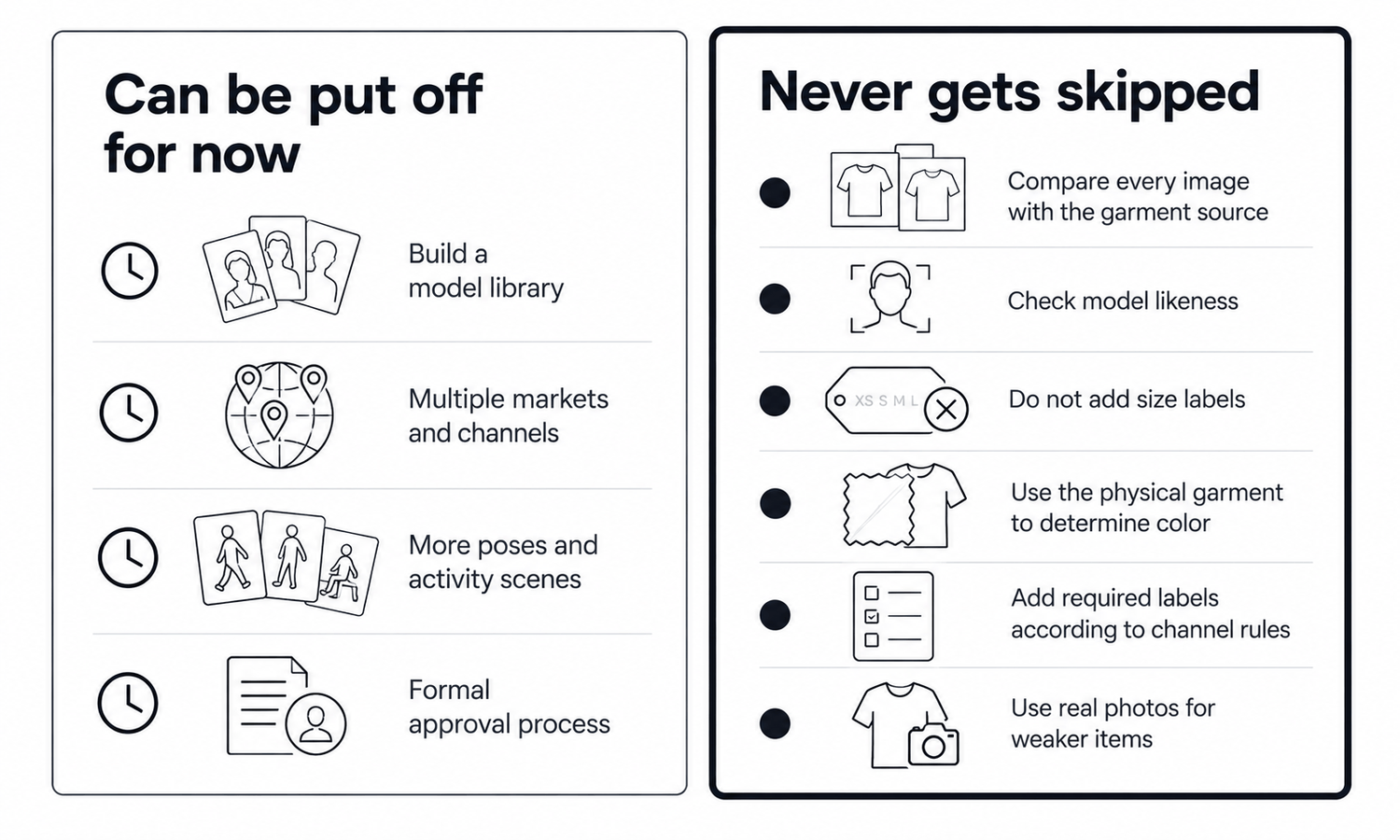
A model library can wait. One approved model is enough until a second product line or a clearly different customer group needs its own. Until then, a second model mostly adds checking and inconsistency.
Multiple markets and channels can wait. Adapting images for several marketplaces, languages and seasons is a job for when a second channel is bringing real sales, not a starting requirement.
Many poses and campaign scenes can wait. Walking shots, seated poses and lifestyle settings are attractive, but every new pose redraws part of the garment and needs its own check. Product-page views come first.
Formal approval processes can wait. A single sheet that records, for each style, the garment source, the model used, who checked the images and when they went live is enough structure for two people.
The signals that it is time to expand are usually clear. A second product line with a noticeably different customer is a reason for a second model. A second channel that already brings meaningful orders is a reason to adapt images for it. Regular requests from social or email for more varied images are a reason to add a campaign pose or scene. Without a signal like these, the extra work mostly adds checking without adding sales.
When these things are added, add them one at a time, and let each one prove its value before the next.
What Never Gets Skipped
A few steps stay in place no matter how small the team or how busy the week. They are what keeps the images honest.
Every image is checked against its garment source, without exception. Generated garments are reconstructed, and reconstructed detail tends to come back almost right: a button with the wrong number of holes, a label with a letter off, a pocket slightly moved. Images produced from the same source and settings tend to repeat the same mistake, so checking a sample does not work.
The model's face is checked once, before approval, to make sure it does not closely resemble a real, identifiable person.
No size-worn captions appear on generated images. A generated model did not wear the garment in any size, so size guidance comes from the size chart and measurements.
Color is judged against the real garment. Screen color is not a physical reference, generated imagery does not promise an exact color-code match and color values are not read from images into product data.
Labeling follows the rules of the channel where the images appear. Some channels have expectations for AI-generated imagery; confirm them for the channel you sell on.
Some styles are photographed rather than generated. Complex prints, lace and openwork, sheer fabrics and layered styling are current weak areas for generated imagery. A small team can photograph these simply, on a plain background with good light, rather than spending hours correcting generated versions.
Running It Week to Week
With the choices made and the checks in place, the weekly routine is short.
In Lightchain AI (apparel AI), a two-person workflow uses a small set of tools.
-
AI Virtual Try-On places each garment on the approved model from its flat-lay, and a saved model set keeps every product on the same person.
-
Model Studio creates the model once and fixes the pose, scene and angle for the product-page views.
-
The Image Editor handles the finishing steps a listing needs, such as background removal and cropping to the channel's frame.
For small brands that want on-model images without a studio, AI Virtual Try-On is the Lightchain AI solution built around starting from the garment. As the team grows, the same workflow extends to more models, channels and styles through Scale E-commerce.
Frequently Asked Questions
How should a small team start using a human model generator?
Start with one of everything: one approved model, one scene, one set of product-page views and one main channel. Each is a decision made once, so adding new products becomes a routine.
How should two people split the work?
One person captures garment sources and produces images; the other checks every image against its source and handles the listing. Separating the two gives every image a fresh review.
What can a small team leave for later?
A model library, multiple markets and channels, extra poses and campaign scenes, and formal approval processes. Add them one at a time when the business needs them.
What should never be skipped?
Checking every image against its garment source, the likeness check on the model's face, honest captions without size-worn claims, judging color against the real garment and following each channel's labeling rules. These hold however small the team or busy the week.
Which styles should a small team photograph instead?
Styles with complex prints, lace and openwork, sheer fabrics or layered styling. A simple photograph on a plain background is usually quicker than correcting a generated version.
How much record-keeping does a two-person team need?
One sheet is enough: for each style, the garment source, the model used, who checked the images and when they went live. It makes any later question quick to answer.
Which Lightchain AI solution suits a small team?
AI Virtual Try-On is the one to use. It places each garment on a saved model directly from its flat-lay, which is the core task a small team repeats every week, and the workflow extends through Scale E-commerce as the team grows.
In Closing
Using a human model generator with a small team means making fewer choices and holding firmer checks. Start with one model, one scene, one set of views and one channel. Split the work so one person produces and the other checks. Leave the library, the extra markets, the extra poses and the formal processes for later. Never skip the check against the garment source, the likeness check, honest captions, physical color judgment and the channel's labeling rules. Small teams that hold those lines publish images they can stand behind.
Start Here
If you run a small clothing brand and want on-model images of every product without a studio, AI Virtual Try-On is the solution to use. It is built around starting from the garment: you place each flat-lay on your approved model, keep every product on the same person and prepare images for your main channel. Start with one approved model and your next few styles, check every image against its flat-lay, and build from there.
**Explore AI Virtual Try-On → **https://www.lightchainai.com/global/solutions/aiVirtualTryOn