
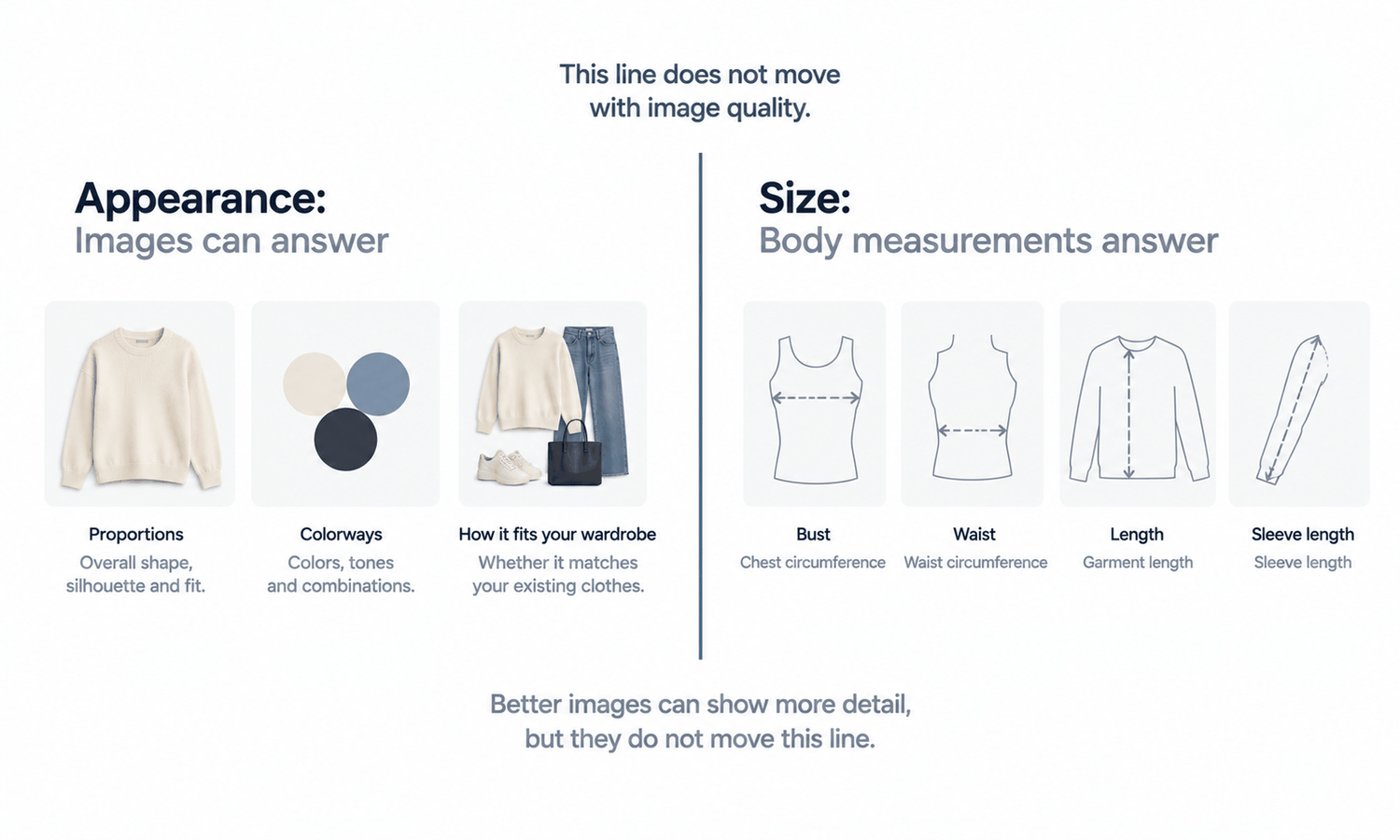
Somebody trying on clothes virtually is asking one question, and the picture in front of them can answer a different one. That mismatch is the whole subject, and it matters to shoppers and sellers for opposite reasons.
A shopper wants to know whether a piece will be right for them. The image can tell them what the piece looks like. Those overlap enough to be useful and differ enough to cause a returned parcel, and the difference is not something better image quality closes.
So a practical guide has two halves. For shoppers: use the picture for the questions it actually settles, and get the other answer somewhere else. For sellers: build the page so the two questions cannot be confused, because a shopper who confuses them will be disappointed by a garment that was never wrong.
What the picture answers, and what it does not
| The question | Can a try-on view answer it | Where the answer is |
|---|---|---|
| Is this the proportion I pictured | Yes. This is what the view is for | The view itself, and other product photography |
| Does this color family read the way I expected | Roughly. It narrows the options rather than settling the shade | The view for the shortlist, and the garment itself for the shade |
| Does this go with something I already own | Yes, and it is one of the more useful things to use it for | The view, compared against your own wardrobe |
| Will this fit me | No. A view shows appearance rather than dimension | The garment measurements, compared against a piece you already own |
| What size should I order | No, and a view that appears to answer this is the main source of disappointment | The size guide for that specific style, and the measurement chart |
| How will it move when I wear it | No. A still image shows one state and no behavior | Reviews, video if the seller has any, and wearing it |
The dividing line is between appearance and dimension. Anything about how a piece reads — its proportion, its color family, whether it works with something you already own — is a question about appearance, and a picture is a reasonable way to explore it. Anything about how it will sit on a specific body is a question about dimension, and dimensions live in a measurement chart.
Nothing about that line moves as the technology improves. A more convincing image is more convincing about appearance and no more informative about dimension, which is worth knowing before spending time on the feature in either role.
For shoppers: a method that takes five minutes
The reliable approach is unglamorous and works regardless of which retailer's tool you are using.
-
Use the try-on view for the appearance questions: is this the proportion you expected, does the color family read the way it did in the thumbnail, does it sit against pieces you already wear
-
Get the size answer from the garment measurements rather than from the size label, since labels vary between brands and centimeters do not
-
Measure a piece you already own and like the fit of — flat on a table, across the chest, the waist, and the length — and compare those numbers against the chart on the page
-
Read the size guide for that specific style rather than the site-wide one, because a brand's block varies across categories more than most people expect
-
Check the return terms before ordering rather than after, particularly for anything made to order, where the usual correction may not be available
The measurement comparison is the step people skip and the one that does the work. It takes a tape measure and about five minutes, and it answers the question a try-on view structurally cannot.
For sellers: keep the two questions apart on the page
If the appearance answer and the dimension answer sit next to each other with no distinction, a shopper will read a fit conclusion out of the picture. That is a predictable outcome of the layout rather than a failure of attention on their part.
A page that handles this well does a few concrete things. It places the try-on view with the styling and detail imagery rather than adjacent to the size selector. It labels the view for what it is. It puts garment measurements, not just size letters, in a place that does not require a modal and a scroll. And it keeps any fit guidance in words that trace back to the measurement chart rather than to how the garment appears.
Sellers running a storefront-side experience have a specific version of this obligation, since the feature invites a shopper to picture themselves in the piece. One option in that space is Lightchain AI Virtual Try-On for Shopify, from Lightchain AI (apparel AI), and the standard that applies to it is the same one that applies to every other image on the page: what it shows has to be something the shipped garment will recognizably match.
For sellers: the accuracy obligation behind the feature
An interactive try-on view raises how closely a shopper looks at the garment. That is the point of it, and it is also the reason the accuracy discipline behind it has to be in place first.
Every generated image is a derivation from a source photograph, so the source standard decides what the whole feature is capable of being. One position, one distance, one background, one light, held across the range. Inconsistency entering at capture cannot be corrected downstream, and across a catalog it produces a set that reads as several different brands.
Then there is a rule with no exceptions attached. Logos, printed text, care labels, and small hardware get compared against the source image on every single output. Reconstructed detail lands almost right — a letterform slightly off, a stitch count wrong, a zipper pull the wrong shape — and a shopper who has just spent a minute examining a garment in a try-on view is the most attentive reviewer in the chain. In Lightchain AI (apparel AI) the uploaded source stays beside the outputs derived from it, which is what turns that check into a comparison rather than a search.
Colorway presentation needs its own decision. Screen color is not a physical reference, exact code matching is not something to promise, and the gap between a monitor and a roll of cloth stays open regardless of display quality. Colorways get settled by strike-offs against an agreed standard, so a colorway view is a way of showing which options exist rather than a rendering of the exact shade that will arrive.
What no try-on image can do
The output is a visual asset. It does not predict fit, determine sizing, model how a fabric behaves in motion, or forecast returns. Those come from measurements, a graded pattern, a physical sample, and your own data. That is a property of what the asset is rather than a limitation of any particular result, and no improvement in how convincing an image looks moves it.
Three consequences follow for anyone building or using one of these views. A size recommendation cannot be derived from imagery, so any guidance offered has to come from measurements and from the brand's own history in that category. A size guide assembled from pictures is a sizing claim with nothing behind it. And no feature of this kind can be presented as the reason a return rate or a conversion figure moved, since both sit at the end of a chain running through sizing, price, assortment, and traffic.
Movement is outside it too. How a fabric falls when somebody walks, how a jacket sits when the arms move, how a knit relaxes over a day — these are physical behaviors, and there is no simulation here. Nothing builds geometry or predicts material behavior, so the drape in an output is rendered rather than computed. Existing 3D assets can be converted into flat garment images that enter as inputs, which is a different thing from producing or simulating 3D.
What to expect, honestly, on both sides
For a shopper, the useful expectation is that a try-on view is a better version of looking at product photography, not a substitute for a fitting room. It will save you from ordering something whose proportion you had misread. It will not tell you your size, and treating it as though it might is how a good tool produces a bad purchase.
For a seller, the useful expectation is that the feature raises attention on the garment and therefore raises the cost of every inaccuracy already present in your imagery. That is a reason to fix the capture standard and the comparison check before launching it rather than after. A page where the picture and the measurement chart agree is doing the whole job; a page where they quietly disagree has simply made the disagreement easier to see.
Frequently asked questions
Can a virtual try-on tell me my size?
No, and the size answer comes from garment measurements compared against something you already own and wear comfortably. Try-on views show appearance rather than dimension, so a piece can look right in the view and be two centimeters short in the sleeve. Use the tape measure for the size question every time.
The garment looked different when it arrived. What went wrong?
Check first whether the difference is shade or shape, since those have different causes. Shade differences between a screen and cloth are ordinary and never fully close; shape or detail differences suggest the imagery did not match the garment, which is worth reporting to the retailer. Either way the return terms you read before ordering are what determines your options.
As a seller, should we launch this before fixing our photography?
The feature raises how closely a shopper looks, so it raises the cost of every existing inaccuracy rather than covering any of them. Fix the capture standard and name who owns the comparison check first. Launching in the other order means discovering your image problems through customer contact.
Should we say the images are generated?
Decide it once as a policy and apply it uniformly, so it reads as a standard rather than a caveat on particular products. The more consequential commitment is that the image matches what ships, which is what a shopper is actually relying on. Disclosure without accuracy does not help either side.
Can we offer fit advice next to the try-on view?
Offer it as long as every sentence traces back to the measurement chart or to your own returns history in that category, and not to how the garment appears in the view. Wording matters here: this style measures 2cm narrower through the chest than our standard block is a measurement statement, and this style runs small is an inference somebody will hold you to.
Does this work for every category?
Plain-surface garments in stable fabrics behave most predictably. Lace and open work, sheer fabrics, heavily layered looks, and complex prints are documented weak spots, and footwear is not covered by this class of workflow at all. Sort your range by surface and material rather than by department when deciding what to include.
In closing
The picture answers appearance and the chart answers dimension, and almost every disappointment in this area comes from one being used to settle the other. Shoppers get more out of a try-on view by using it for proportion, color family, and how a piece sits with what they own, and by spending five minutes with a tape measure on the size question. Sellers get more out of it by keeping the two answers structurally separate on the page and by fixing the source photography before the feature makes every inaccuracy easier to notice.
Start here
If you are shopping, measure one garment you already own and like the fit of, and keep those four numbers somewhere you can find them. They will outlast any individual purchase and they answer the question no picture can. If you are selling, open one product page and ask whether a shopper could read a fit conclusion out of the imagery without meaning to. If they could, that is a layout decision you can change this week.
**Start with the on-model workflow → **https://www.lightchainai.com/global/solutions/aiVirtualTryOn