
How AI Model Generating Works: From Model Brief to Campaign Image
An AI model, in apparel, is not an algorithm. It is a person who does not exist: a face, a body, a way of standing, produced by image software so that a garment has someone to be worn by. AI model generating has become a normal part of how product and campaign imagery gets made, and it is easy to use without understanding what is happening underneath.
That understanding matters because the questions teams actually face are practical ones. Why does the model look slightly different in the third image? Can the same person appear across a whole season? Does showing a garment on a larger model tell a shopper how it fits? Who can use the face, and where? Each answer follows from how a generated person comes into being.
This article walks through that process in order: what an AI model is, what goes into the brief, how one identity is held across many images, how the garment gets onto the model, and what happens between a model image and a campaign image.
| Question | A photographed model | An AI-generated model |
|---|---|---|
| Where the person comes from | A real person, cast and booked | Generated from a written brief, a reference or a saved model |
| What stays the same between images | The person, automatically | Only what the workflow holds fixed, so it has to be checked |
| What you control | Casting, styling, direction on the day | Attributes, pose, scene and angle for each image |
| What the image says about fit | How the garment sat on that person | Nothing — size is a visual choice, not a measurement |
| What must match reality | The garment and the person | The garment only |
What an AI Model Actually Is
A generated person is not retrieved from a catalog of faces. Image models learn general patterns from large collections of pictures: how skin catches light, how hair falls, how shoulders sit under fabric. When you ask for a model, the software does not look anyone up. It produces a new image that fits the description; many image models do this by starting from random noise and refining it step by step until it matches the request.
Two consequences follow, and most of this article is about them.
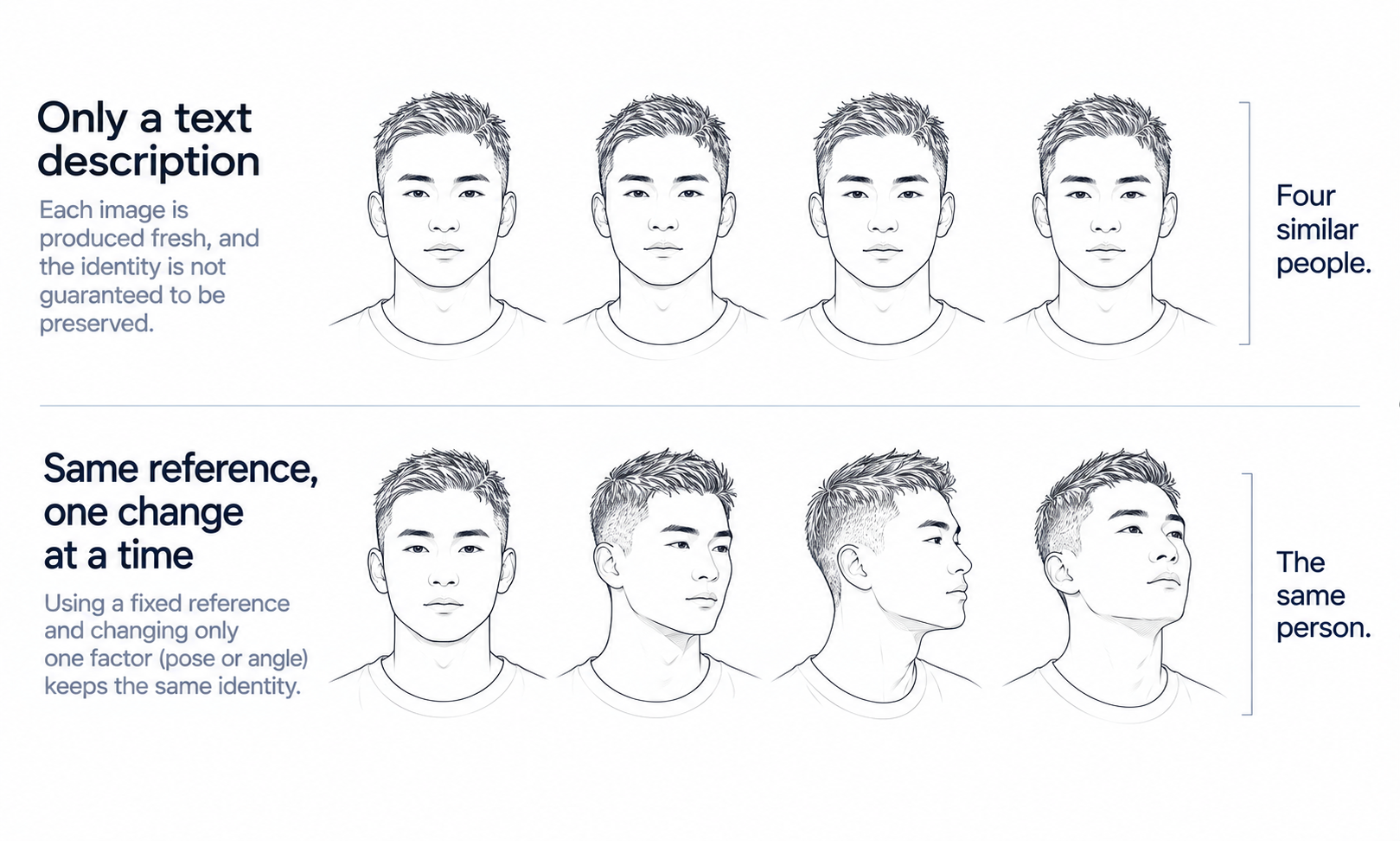
First, every image is a new production. If nothing ties one image to the next, the software will produce a new person each time who merely fits the same description. Two images of "a woman in her thirties with shoulder-length dark hair" are two different women. Identity is not something the software keeps by default; it has to be held on purpose.
Second, the person is the one part of an apparel image that is allowed to be invented. A product photo has two subjects, the garment and the wearer, and they carry very different obligations. The garment is being sold, so it has to be reproduced faithfully. The wearer is not being sold. As long as the model is a generated person rather than a likeness of a real one, there is no real reference the face must match. That is why AI model generating works well for the person and needs care for the clothes.
The Model Brief: Deciding Who Wears the Garment
Every generated model starts from a decision about who the customer should see. That decision is the model brief, and it can be expressed in three ways.
A written description names the attributes: age range, skin tone, hair, expression, build, pose and setting. It is flexible and fast, and it leaves the most to interpretation. A reference image shows the look you want instead of describing it, which narrows interpretation but introduces a question about where the reference came from. A saved model reuses a person you have already generated and approved, which is the strongest way to keep the same face from one shoot to the next.
Whatever the form, a useful brief is written from the customer outward. The point of choosing age, skin tone and build is to show garments on the range of people who actually buy them, in the markets where the line is sold. These are neutral settings, not judgments about which bodies suit which clothes, and the brief should read that way. A brief that says "late twenties, medium-deep skin tone, relaxed stance, urban street at dusk" gives the software enough to work with and gives a reviewer something to check the result against.
A brief also records what should never change. If the brand has decided that its models do not wear heavy makeup, or always appear in natural light, that belongs in the brief, because a detail left unstated is a detail the software will fill in differently each time.
Holding One Identity Across a Line
For a single hero image, any convincing person will do. For a collection of forty styles, a lookbook, or an ongoing brand presence, the same person has to appear again and again. This is the hardest part of AI model generating, and the part most worth understanding.
Because each image is produced fresh, small differences creep in. The jawline softens slightly. The eyes sit a fraction further apart. Hair that parted on the left now parts in the middle. Any one of these is easy to miss in a single image, and together they turn one person into several people who look related. Shoppers moving between product pages notice, even when they could not say what changed.
Workflows hold identity in a few ways. A saved model gives the software a fixed reference for the face and body rather than a description to reinterpret. Changing one thing at a time, such as the pose while the face stays put, keeps drift out of the parts you did not ask to change. Generating a new angle from an approved image rather than from the brief gives the software less room to wander.
None of these removes the need to look. Review consistency across the set, not one image at a time: lay the images side by side, compare the face at the same scale, and check hair, hands and skin tone together. Angle is where drift shows first, so check a three-quarter and a side view against the front before approving a model for a whole line.
Putting the Garment on the Model
A generated person becomes useful the moment a real garment is on them. This is the step where the obligations reverse: the model can be invented, but the garment cannot.
The garment usually starts as a flat-lay, a ghost-mannequin shot or a photo on another model, and try-on software transfers it onto the generated person. The result has to be checked against the source for the details that make the product what it is: logos and printed text, stitch lines, trims and small hardware, and the placement of any print. Reconstructed detail tends to come back almost right, and almost right is the failure that survives a quick look, so check every image against its source rather than a sample.
Some garments remain harder than others. Complex prints, lace and openwork, sheer fabrics and layered styling are current weak areas for generated imagery. For those styles, route the product to photography and record why, rather than regenerating until something looks acceptable.
There is also something the image cannot do, however good it is. Choosing a larger or smaller model changes how a garment looks on the page; it does not show how the garment fits a real body of that size. The output is a visual asset. It does not predict fit or determine sizing. Measurements, a graded pattern and a physical sample answer those questions, and product pages should keep them next to the imagery rather than letting a model's size stand in for them.
From Model Image to Campaign Image
A model wearing the garment is still only a product image. A campaign image adds a setting, a mood and a format: a street at dusk for social, a clean studio frame for a marketplace, a wide banner for the homepage. The same model and garment may need to appear in all three.
In practice this stage is a sequence of controlled changes. Change the scene while the model and garment stay fixed. Change the pose while the scene stays fixed. Crop and resize for each channel last, once the image itself is approved. Changing several things at once makes it hard to tell which change introduced a problem.
In Lightchain AI (apparel AI), this sequence runs through a small number of tools.
-
Model Studio creates the model and adjusts its face, body, size, pose, scene and angle.
-
AI Virtual Try-On places garments on the model from flat-lays or garment photos, including on a saved model set.
-
Local edits, such as adjusting a hand, a background or a small detail, can be made without regenerating the whole image, as described on the Partial Redraw page.
Two checks belong at the end of this stage. The first is a likeness check: look at the face as a stranger would and ask whether it closely resembles a real, identifiable person, and replace it if it does. The second is disclosure. Expectations for labeling AI-generated imagery differ by market and by platform, so confirm the rules where you publish. Lightchain AI (apparel AI) includes an AI Compliance Mark watermark control for teams that need to mark generated images. Commercial-use terms for generated people also vary between tools, so read the current terms of whichever tool you use before a campaign goes live.
Frequently Asked Questions
Is an AI-generated model a real person?
No. The software produces a new person who fits the brief; it does not retrieve an existing individual. That is also why a likeness check before publication is worthwhile, so that a generated face does not closely resemble someone real.
Can the same AI model appear across a whole collection?
Yes, if the workflow holds the identity on purpose, usually through a saved model and changes made one at a time. Review the set side by side at the same scale, and check three-quarter and side views, because drift shows first when the angle changes.
Does choosing a model's size show how a garment fits?
No. A model's size is a visual choice, not a measurement, and the image shows appearance rather than fit. Fit comes from measurements, a graded pattern and a physical sample.
What should a model brief include?
Age range, skin tone, hair, build, expression, pose and setting, written for the customers the line actually serves. Add anything that must never change, such as makeup or lighting rules, because unstated details get filled in differently each time.
Which garments should not go through this workflow?
Complex prints, lace and openwork, sheer fabrics and layered styling are current weak areas. Photograph those styles and record why, rather than regenerating until an image looks acceptable.
Do images with AI models need to be labeled?
Labeling expectations differ by market and platform, so confirm the rules where each image will appear. A watermark or label control in the tool you use makes that decision easier to apply consistently.
Which Lightchain AI solution fits AI model generating?
Scale E-commerce is the one to use. It brings Model Studio and AI Virtual Try-On together, so you can create models, put garments on them and control pose and scene across many styles. Review each image against its garment source before publishing.
In Closing
AI model generating is two jobs that look like one. Producing the person is the part the software does well, because a generated person has no real reference to match. Holding that person steady across a line takes deliberate workflow and side-by-side review. Putting a real garment on them is where fidelity matters, because the garment is what the customer buys. Keep those three straight, keep size and fit out of what the image is asked to prove, and the path from model brief to campaign image becomes a sequence of checkable steps rather than a hopeful regeneration.
Start Here
If you need on-model imagery across many styles, markets and channels, Scale E-commerce is the solution to use. It is built around AI-generated models: you define models that reflect your customers, including brand-specific ones, put your garments on them through virtual try-on, and control pose, scene and styling for each image. Start with one model brief and a handful of styles, review the set side by side for identity and garment detail, and extend to the rest of the line once the results hold.
**Explore Scale E-commerce → **https://www.lightchainai.com/global/solutions/scaleECommerce