
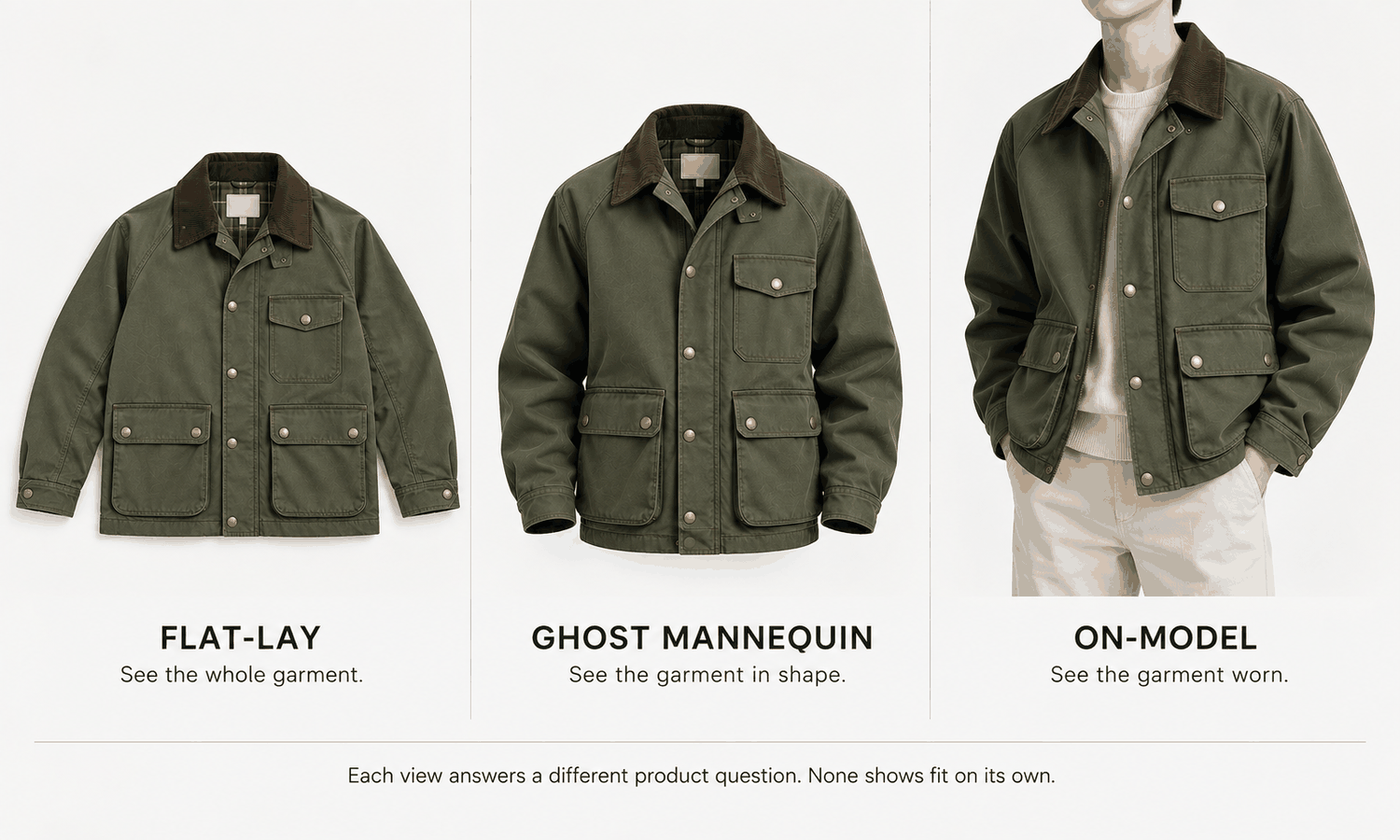
Ghost mannequins, flat-lays and on-model images are the three views that carry most apparel product pages. Each shows the same garment in a different way, and each answers a different question a shopper has. A flat-lay shows the whole garment and its details. A ghost mannequin image shows its shape without a person. An on-model image shows how it looks worn. Choosing between them, or deciding how to combine them, is one of the most practical decisions an apparel team makes.
The choice is often made by habit: whatever the studio has always done, or whatever a competitor seems to do. A better way is to start from what each view can and cannot show, then match views to categories and channels, and build a product image set in which each view does the job it is good at.
This article explains what each view shows, how to match views to categories and channels, how ghost mannequin images work alongside the other two and how to produce a consistent set.
| Question | Flat-lay | Ghost mannequin | On-model |
|---|---|---|---|
| Does it show the whole garment? | Yes, laid out | Yes, front and often back | Partly; the body and pose hide some parts |
| Does it show three-dimensional shape? | No | Yes | Yes |
| Does it show the inside of the neck or lining? | Sometimes, if opened | Yes, through the composited neck | Rarely |
| Does it show how the garment looks worn? | No | Partly, as shape | Yes |
| Does it show fit? | No | No | No; it shows appearance |
| How consistent across a catalog? | Very | Very | Consistent with one model and setup |
| What does it take per product? | A simple setup | A mannequin, several shots and compositing | A shoot, or generation from a garment photo |
What Each View Shows
A flat-lay shows the garment laid out on a surface and photographed from above. Its strength is completeness: every seam, pocket, closure and trim is visible at once, without folds or a body in the way. It is also the simplest view to produce and the easiest to keep consistent. Its limit is that it looks flat. It gives little sense of how the garment holds its shape or how it sits on a body.
A ghost mannequin image shows the garment photographed on a mannequin that is then removed in editing, with the inside of the neck composited in. Its strength is shape: a jacket keeps its shoulders, a shirt keeps its chest, a collar stands as it would when worn, and there is no model to distract from the product. Its limit is effort. It needs the right mannequin, several matched photographs and careful compositing, and it still shows the garment without a person.
An on-model image shows the garment on a person, photographed or generated. Its strength is context: proportions on a body, how the garment looks with a pose and styling, and the sense of what it would be like to wear. Its limit is that the body and pose hide parts of the garment, and that consistency depends on keeping the same model and setup across products.
None of the three shows fit. An on-model image shows how a garment looks on one body in one pose; it does not predict how it will fit another. Fit and size guidance come from measurements and the size chart.
Matching the View to the Category
Different categories are served better by different views, because their selling points differ.
-
Structured tops and outerwear. Shirts, blazers, jackets and coats have a shape worth showing. Ghost mannequin images show it clearly, and on-model images add how the piece looks worn.
-
Soft and unstructured pieces. Very soft knits, loungewear and pieces without a defined worn shape can look limp on a mannequin. A flat-lay often shows them more honestly, with on-model images for context.
-
Dresses, skirts and trousers. Length, drape and proportion on a body matter, so on-model images carry much of the weight. A flat-lay or ghost image adds the complete garment and its details.
-
Detail-led pieces. Garments sold on trims, embroidery, prints or construction benefit from a flat-lay and close-ups, where every detail is visible without folds.
These are starting points rather than rules. The right mix for a category is the one that shows its selling points most clearly and most honestly.
A quick way to decide is to test the mix on a few representative products. Produce all three views for three or four styles in a category, lay them out as a shopper would see them on a category page and a product page, and ask which view answers each question fastest: what the whole garment looks like, what shape it holds and how it looks worn. The views that earn their place become the category's standard set. The ones that add little can be dropped, which saves production time on every product that follows. Revisit the set when the category changes, for example when a new silhouette or fabric arrives that the current views do not show well.
Matching the View to the Channel
Channels have their own expectations, and some have rules.
Marketplaces often publish image requirements, especially for the main image, covering background, framing and whether a model may appear. Those rules differ between marketplaces and categories and change over time, so check the current guidance for the category you list in and let it decide the main image.
A brand's own site has the most freedom. A common pattern is a clean first image, flat-lay or ghost, that makes products comparable on category pages, followed by on-model images and details on the product page.
Wholesale line sheets and catalogs favor views that make many styles comparable at a glance, which usually means flat-lays or ghost images in a consistent layout.
Social and campaign channels lean toward on-model images, where styling and context carry the message and a product-only view feels static. Even there, a product-only view is useful as the image a shopper lands on after tapping through, because it answers the question the campaign image raised: what exactly is this garment?
Using Ghost Mannequins Alongside Other Views
Most product pages use more than one view, and the views do their jobs well when each is given a specific one. A typical set might lead with a ghost mannequin image for shape, follow with on-model images for the worn look and add a flat-lay or close-ups for details. The exact order depends on the category and channel, but the principle is the same: no view has to do everything.
Consistency within the set matters as much as the choice of views. The garment's color should read the same in every view, which means consistent lighting and a check against the physical garment, since screen color is not a physical reference. Details should agree: a pocket visible in the flat-lay should appear in the same place on the ghost and on-model images.
Production is easier when one capture serves several views. A clean flat-lay is useful in its own right, and it is also a strong garment source for generated on-model images, which can then be produced without a shoot and checked against the flat-lay. A ghost mannequin image needs its own mannequin shoot and editing, so it is worth reserving for the categories where shape matters most.
When generated on-model images are part of the set, check every one against the garment source, without exception, because reconstructed detail tends to come back almost right. Complex prints, lace and openwork, sheer fabrics and layered styling remain current weak areas for generated imagery and are better photographed.
Producing the Set
In Lightchain AI (apparel AI), the flat-lay and on-model parts of a product image set connect directly.
-
AI Virtual Try-On places the garment on a model directly from its flat-lay, including on a saved model set, so on-model images come from the same capture as the flat-lay view.
-
Model Studio keeps the model, pose, scene and angle consistent across a category's on-model images.
-
The Image Editor handles finishing steps such as background removal and cropping to each channel's frame.
For teams that want on-model views from the flat-lays they already capture, AI Virtual Try-On is the Lightchain AI solution built around that input. Ghost mannequin images remain a photography and editing workflow of their own, and on-model imagery across many styles can scale through Scale E-commerce.
Frequently Asked Questions
What are ghost mannequins used for?
Ghost mannequins are used to photograph garments with their three-dimensional shape but without a visible person or mannequin. The mannequin is removed in editing and the inside of the neck is composited in, which suits structured garments on product pages and catalogs.
Which is better, a flat-lay or a ghost mannequin image?
Neither is better in general. A flat-lay shows the whole garment and its details simply; a ghost image shows its shape. Structured garments benefit from ghost images, while soft pieces and detail-led pieces often suit flat-lays.
Do shoppers still need on-model images?
Usually yes, because on-model images show how a garment looks worn, with proportion and styling. They complement flat-lays and ghost images rather than replacing them.
Does any of these views show fit?
No. Each shows appearance. Fit and size guidance come from measurements and the size chart.
How should a product image set be ordered?
Lead with the view that suits the category and channel, often a ghost or flat-lay for comparability, then add on-model images and details. Check marketplace rules for the main image where they apply.
Can one capture serve several views?
Yes. A clean flat-lay is a view in its own right and a strong garment source for generated on-model images. Ghost mannequin images need their own mannequin shoot and editing.
How does Lightchain AI fit into a product image set?
It produces on-model images from the flat-lays a team already captures, through AI Virtual Try-On, and keeps them consistent with Model Studio. AI Virtual Try-On is the solution to use for that part of the set, while ghost mannequin images stay with photography and editing.
In Closing
Ghost mannequins, flat-lays and on-model images each answer a different question: what the whole garment looks like, what shape it holds and how it looks worn. None shows fit. Match views to the category's selling points and to each channel's expectations, give each view a specific job in the product set and keep color and details consistent across all of them. Let one clean flat-lay serve as both a view and a source for on-model images, and reserve ghost mannequin shoots for the garments whose shape is worth showing.
Start Here
If your product pages need on-model views alongside the flat-lays you already capture, AI Virtual Try-On is the solution to use. It is built around the garment source: you place each flat-lay on your approved model and produce consistent on-model images from the same capture. Start with one category, decide which views it needs, and check every on-model image against its flat-lay before it joins the product page alongside the other views.
**Explore AI Virtual Try-On → **https://www.lightchainai.com/global/solutions/aiVirtualTryOn