
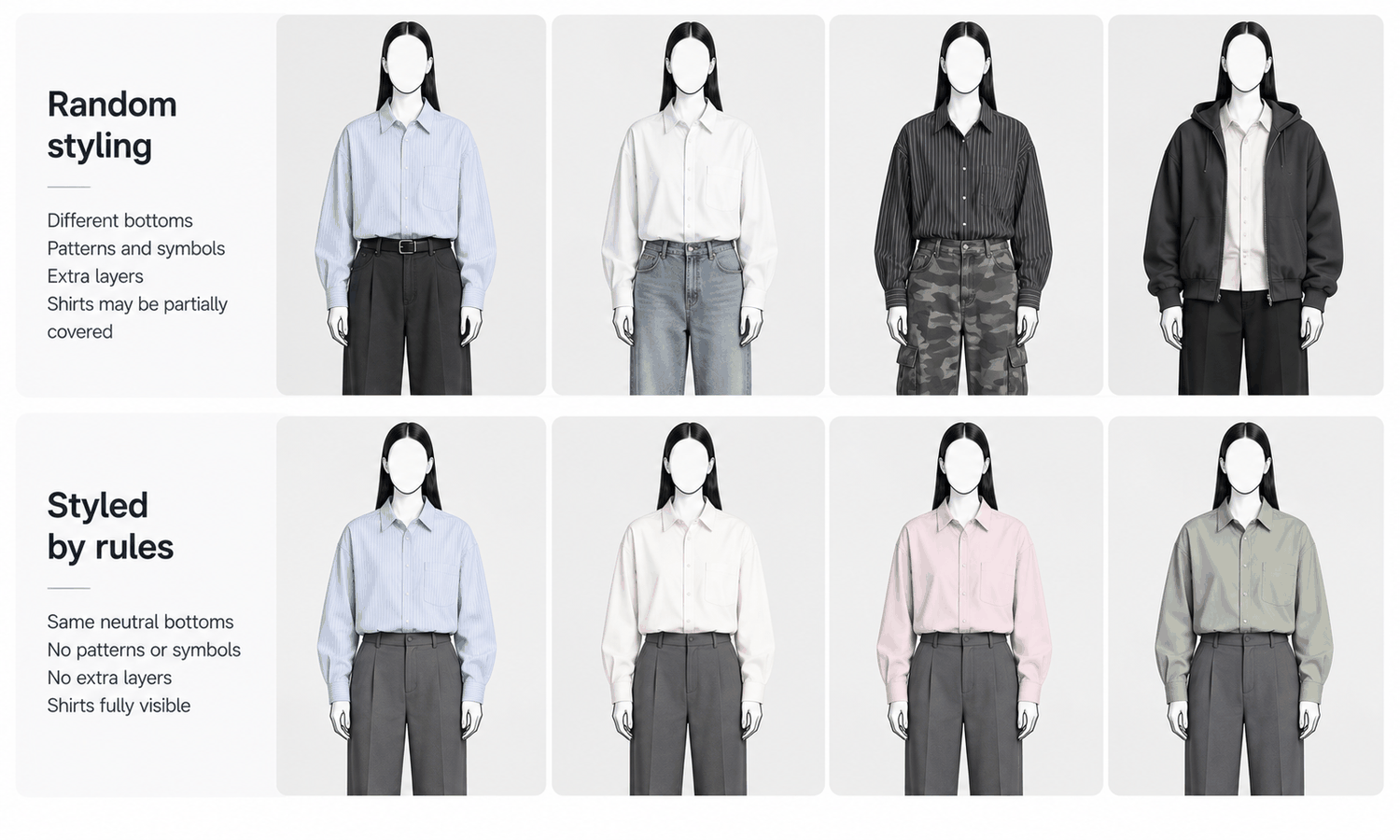
Fashion model clothing in a product image is more than the garment being sold. A model wearing a shirt is also wearing trousers and shoes. A model wearing a skirt is also wearing a top. A model in a coat may have a sweater underneath, a bag on one shoulder and boots below. Those supporting pieces decide a great deal about how the product is seen, and they are usually chosen with far less thought than the product itself.
With photographed shoots, a stylist chose the supporting pieces and kept them consistent across the day. With generated models, the supporting pieces are easy to overlook, because only the product garment is usually supplied. Whatever the model wears besides it is either specified deliberately or filled in by the image, and what the image fills in can pull attention away from the product, suggest items the customer will not receive or introduce details that do not belong in a brand's catalog.
This article explains why the rest of the outfit matters, what happens when supporting pieces are left open, how to choose them, how to set rules for a whole catalog and how to handle styling in practice.
| Selling | What the model also wears | Main risk | Rule of thumb |
|---|---|---|---|
| A top or shirt | Trousers or a skirt, shoes | A bottom that draws the eye | Plain, neutral, fitted bottoms |
| Trousers or a skirt | A top, shoes | A top that covers the waistband | A simple top, tucked or cropped to show the waist |
| Outerwear | A layer underneath, bottoms, shoes | An underlayer that competes with the coat | Quiet, plain underlayers |
| A dress | Shoes, sometimes a layer | A layer that hides the silhouette | Shoes only, or a layer shown in a secondary image |
| Any category | Accessories | Items that look included or branded | Few or none in the primary image |
| Any category | Footwear | Distinctive shoes that dominate | Simple shoes in a neutral tone |
Why the Rest of the Outfit Matters
The supporting pieces shape the image in three ways.
They direct attention. A shopper's eye goes to contrast, color and detail. A bright or patterned pair of trousers under a simple shirt pulls attention downward, away from the product. Neutral supporting pieces let the product be the focus.
They set expectations. Shoppers can reasonably wonder whether a styled jacket, a belt or a bag is part of what they are buying. Some marketplaces restrict showing items that are not included with the product in the main image, and even where they do not, an image that suggests extra items invites disappointment when the parcel arrives without them.
They carry the brand's look. Consistent supporting pieces make a catalog feel curated. Random ones make it feel assembled. A customer browsing a category page sees dozens of images at once, and inconsistency in the supporting pieces is often what makes a page look untidy even when each image is fine on its own.
What Happens When the Supporting Pieces Are Left Open
When only the product garment is supplied, the generated model still needs something to wear with it. The image supplies it, choosing what is plausible for the scene and the product. That choice varies from image to image.
The results tend to follow a pattern. Supporting pieces change color and style from one product to the next, so a category page looks inconsistent. Some supporting pieces are more eye-catching than the product. Some look finished and desirable enough that shoppers ask where to buy them. Occasionally, a generated shoe, bag or top carries a mark or detail that resembles a real brand's, which has no place in anyone else's product image.
None of this is a fault in the product garment. It happens because the supporting pieces were never specified. The fix is to specify them.
Product images and campaign images need different answers here. In a campaign image, the full outfit is part of the story: a coat styled with a particular scarf, boots and bag can express a season or a mood, and shoppers read it as a look rather than an inventory. In a product image, the job is narrower. The shopper is deciding about one garment, and the supporting pieces should help them see it clearly and then step out of the way. Many teams keep a quiet styling for the primary product image and a fuller, more expressive styling for one secondary or campaign image, which gives each image a clear purpose.
Choosing Supporting Pieces
Good supporting pieces are chosen to disappear. A few principles cover most categories.
-
Neutral colors. Black, white, gray, navy, stone and denim in plain washes sit quietly beside most products. Choose tones that contrast enough to separate the product from the rest of the outfit without drawing attention.
-
Plain surfaces. No logos, no graphics, no visible branding and no strong patterns, so nothing competes with the product and nothing resembles another brand's mark.
-
Simple shapes. Fitted or straight-cut basics that do not change the product's silhouette. Wide trousers under a cropped top change how the top reads; slim trousers let it read as designed.
-
Nothing covering the product. Underlayers should not hide a neckline, a jacket should not cover a shirt's details in the primary image and a top should not hide a skirt's waistband.
-
Brand-appropriate. Supporting pieces should look like something the brand's customer would wear, so the styling feels natural rather than generic.
-
The same pieces every time. Once chosen, the supporting pieces for a category stay the same across all its products.
Where possible, use real supporting garments the brand owns, photographed as flat-lays, as the reference for what the model wears. That gives the image something specific to show instead of something invented.
Fashion Model Clothing Rules for a Catalog
A short styling sheet for each category turns these principles into rules anyone can follow. It names the supporting pieces for that category, with references, and states how they are worn: tucked or untucked, sleeves rolled or down, jacket open or closed. It says which accessories, if any, appear in the primary image and which may appear in secondary or campaign images.
The sheet also records how supporting pieces are described. If the brand sells the supporting pieces, a line such as "styled with" and a link can be useful. If it does not, product copy should not mention them, and nothing about the image should suggest they are included.
Review the styling sheet each season. Supporting pieces date just as products do, and a basic that looked neutral last year can look out of step with a new collection's colors or silhouettes. Changing the supporting pieces at the start of a season, and applying the change to the whole category at once, keeps the catalog coherent. Changing them product by product, as ideas occur, is how inconsistency creeps back in.
Checking follows the same logic as any on-model image, with one addition. Every image is checked against its garment source for the product's construction, logos, text, trims and print placement, without exception, because reconstructed detail tends to come back almost right. Then the supporting pieces are checked against the styling sheet: the right items, in the right colors, with no marks or logos, not covering the product and consistent with the rest of the category.
Keep the usual boundaries in place. A generated model did not wear the garment in any size, so no size-worn captions appear. Screen color is not a physical reference, so the product's color is judged against the garment. Complex prints, lace and openwork, sheer fabrics and layered styling remain current weak areas for generated imagery, which is one more reason to keep layering simple in product images.
Styling in Practice
In Lightchain AI (apparel AI), the product garment and its styling are handled with a few tools.
-
AI Virtual Try-On places the product garment on a model directly from its flat-lay, including on a saved model set, so every product in a category appears on the same person.
-
When a supporting piece comes out wrong, Target Revision replaces that element in a defined area using a reference image of the approved supporting piece, as described on the Partial Redraw page.
-
Model Studio keeps the pose, scene and angle consistent across a category, so the styling reads the same from one product to the next.
For teams producing on-model imagery across many styles with one consistent look, Scale E-commerce is the Lightchain AI solution built for that work.
Frequently Asked Questions
What does fashion model clothing include in a product image?
Everything the model wears: the product being sold and the supporting pieces around it, such as bottoms, tops, underlayers, shoes and accessories. The supporting pieces shape how the product is seen as much as the product itself.
Why do supporting pieces matter so much?
They direct attention, set expectations about what is included and carry the brand's look. Bright, patterned or inconsistent supporting pieces pull focus from the product and make a catalog look untidy.
What happens if supporting pieces are not specified?
The image fills them in, and the choices vary from product to product. Some draw attention, some look like items for sale and occasionally some carry marks resembling another brand's.
What makes a good supporting piece?
A neutral color, a plain surface without logos, a simple shape that does not change the product's silhouette and a position that does not cover the product's details. Keep the same pieces across a category.
Should accessories appear in product images?
Few or none in the primary image, especially where marketplace rules restrict showing items not included. Accessories can appear in secondary or campaign images where they add context.
How should supporting pieces be described in product copy?
If the brand sells them, "styled with" and a link can help. If it does not, leave them out of the copy and avoid anything that suggests they are included.
How does Lightchain AI help keep styling consistent?
AI Virtual Try-On places each product on the same saved model, Target Revision can replace an unwanted supporting piece using a reference of the approved one and Model Studio keeps pose and scene consistent. Scale E-commerce is the solution to use for that work across many styles.
In Closing
Fashion model clothing is the product plus everything worn around it, and the supporting pieces are what the image fills in when nobody specifies them. Choose supporting pieces that disappear: neutral, plain, simply cut and never covering the product. Fix them for each category in a short styling sheet, keep them out of the product copy unless they are sold and check them in every image alongside the product itself.
Start Here
If your product images need a consistent, quiet styling that keeps attention on the garment, Scale E-commerce is the solution to use. It is built for producing on-model imagery across many styles: you place each product on your saved model, correct supporting pieces from approved references and keep pose and scene consistent across a category. Start with one category's styling sheet, apply it to a few products, and extend from there.
**Explore Scale E-commerce → **https://www.lightchainai.com/global/solutions/scaleECommerce