
A dress designer online tool lets a designer see a dress as a realistic image long before it is cut and sewn: a sketch becomes a garment on a model, a length can be judged against a body, a neckline can be compared with an alternative. For dresses, that early view is especially valuable, because a dress is judged as a whole. Its length, silhouette, waistline and drape decide how it reads, and all of them are hard to judge from a flat drawing.
Dresses are also the category where an early image says the least about some of the things that matter most. A dress often depends on how its fabric moves, and many dresses are made in exactly the fabrics that generated imagery handles least well: chiffon, lace, sheer layers and soft, fluid crepes. A realistic preview can settle some questions and leave others completely open.
This article explains what makes dresses different, how to judge length, silhouette and waist on realistic proportions, where previews say least about drape and fabric, how to handle necklines, straps and backs, and how to use a dress designer online tool well.
| Dress feature | What a realistic preview can show | What it cannot show | Confirm with |
|---|---|---|---|
| Length and hem | Where the hem appears to fall on a body | How the length fits a real body | The sample on a fit model |
| Silhouette and waist | Overall shape and waist position | How the fabric supports that shape | The sample |
| Neckline and straps | Shape and proportion of the neckline | Whether straps and neckline sit securely | The sample on a fit model |
| Drape and movement | A plausible rendered drape | How the fabric actually hangs and moves | Swatches and the sample |
| Lace, chiffon and sheer fabrics | A general impression | The fabric's pattern, transparency and texture | Swatches and photography |
| Back details | Only what the back source shows | Anything not supplied | A back view source and the sample |
| Color | A screen rendering | The exact colorway | The lab dip |
What Makes Dresses Different
Most garments cover part of the body. A dress covers most of it, in one piece, and its design is a set of relationships: where the waist sits relative to the hem, how the neckline balances the skirt, how the fabric carries the shape from shoulder to hem. Change one and the others read differently.
That makes dresses rewarding to preview. Seeing a design on a realistic body shows those relationships in a way a flat sketch cannot, especially for length and proportion.
It also makes dresses demanding. A dress often sells on movement and fabric: the swing of a skirt, the fall of a bias cut, the softness of a crepe, the texture of lace. Those qualities are exactly what a generated image renders rather than records. A preview can suggest them. It cannot confirm them.
The practical approach is to use previews for the questions they answer well and to route the other questions to swatches, samples and photography from the start.
Length, Silhouette and Waist on Realistic Proportions
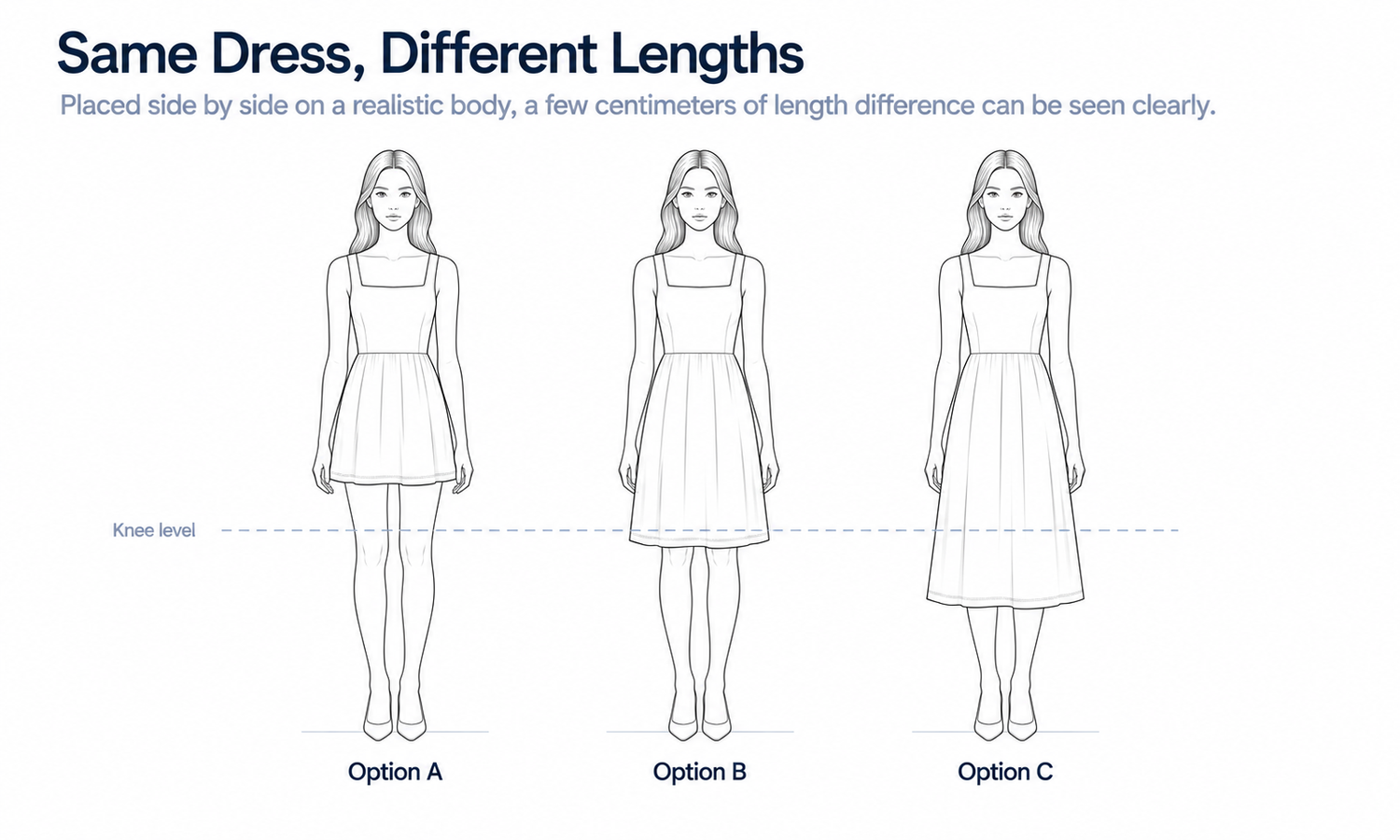
Length is where previews earn their keep. Designers sketch on stylized figures with long legs, so a hem that looks right on a sketch can fall at a noticeably different point on a realistic body. A midi drawn at mid-calf may land higher or lower; a mini that looks deliberately short may read as simply short.
A preview on a generated model with realistic proportions shows where the hem appears to fall. Use a range of builds that reflects the customers the dress is for, described neutrally, rather than a single body, since a length that works on one build may look different on another. This is about how the design reads, not about fit.
Silhouette and waist follow the same logic. A fitted bodice with a full skirt, a straight shift, a wrap with a defined waist: each has a shape that depends on where the waist seam or tie sits. A preview shows the overall shape and the waist position on a body, which is often enough to decide between two directions before a sample is made.
A practical way to use this is to preview the same dress at two or three lengths side by side, on the same model in the same pose. Differences of a few centimeters that are hard to imagine from a sketch become easy to see in a row, and the team can agree a length before the pattern is drafted rather than after the first sample.
What the preview does not show is how the garment fits. The image places the dress on the body visually; it does not model how the pattern sits on a real person. The output is a visual asset: it does not predict fit or determine sizing. Fit is confirmed on a sample worn by a fit model.
Drape and Fabric: Where Previews Say Least
The drape in a generated image is rendered, not calculated. The image produces folds and flow that look plausible for the silhouette, but it does not know the fabric's weight, stiffness or stretch. For many garments that limit is minor. For dresses, it can be the whole story.
Several fabrics common in dresses need particular care.
-
Chiffon, georgette and other sheer fabrics. Transparency and layering are current weak areas for generated imagery. The image may make a sheer fabric look opaque, or show a lining that is not there.
-
Lace and openwork. The lace's pattern and the openings in it are easily simplified or regularized, so the fabric no longer matches the one chosen.
-
Fluid crepes and satins. Their appeal is in how they fall and catch the light, which a render can suggest but not confirm.
-
Structured fabrics. Taffeta, heavy cotton and brocade hold a shape of their own; a render may soften them or stiffen them compared with the real fabric.
-
Complex prints. Large or intricate prints can shift in scale or repeat, which changes how the dress reads.
For dresses built on these fabrics, use the preview for proportion and silhouette only, and judge the fabric from swatches draped on a dress form and from the sample itself. When the dress reaches product imagery, photograph it rather than relying on a generated image.
Necklines, Straps and Backs
The top of a dress draws the eye, and its details are small. A neckline's depth, a collar's shape, the width of straps and the way a bodice meets them are all reconstructed in a preview, and reconstructed detail tends to come back almost right. Compare these against the sketch and the design references carefully, since a slightly deeper neckline or a narrower strap changes the design.
A preview also cannot show whether straps stay in place or a neckline sits securely on a body. Those are fit questions, answered at the fitting.
Backs deserve their own attention. Many dresses carry their most distinctive detail at the back: a low cut, crossed straps, a row of buttons, a tie, a visible zip. A preview generated from a front view has no information about the back, so any back view it shows is filled in. Supply a back sketch or, once a sample exists, a back flat-lay, and generate the back view from that. For product images, a photographed back view is often the more reliable choice.
Color follows the usual rule. Screen color is not a physical reference, generated imagery does not promise an exact color-code match and the colorway is settled by the lab dip on the actual fabric.
Using a Dress Designer Online Tool Well
A dress designer online tool is most useful when it is given a clear job: showing proportion and silhouette early, so the team can choose between directions before sampling.
Supply the sketch with references, including a fabric photo, a color reference and notes on any lines that might be misread, such as whether a line at the hem is a shaped edge or movement. Review previews on a range of builds, and label them as concepts wherever they are shown. Route sheer, lace and fluid fabrics to swatches and photography from the start. And keep a record of what each preview was made from, so that when the first sample arrives, differences can be traced to the design, the references or the image.
In Lightchain AI (apparel AI), dress previews move through a short sequence.
-
Line Sketch to Flat Lay turns a dress sketch into a realistic flat-lay, as described on the Production-Marketing Synergy page, with fabric and color references guiding the result.
-
AI Virtual Try-On places the flat-lay on generated models, including a saved model set, so lengths and silhouettes can be compared across builds.
-
Model Studio sets the body, size, pose and scene, so every design in a review is shown on equal terms.
For designers who want to see dresses before they are sewn, Ideas to Reality is the Lightchain AI solution built for that stage.
Frequently Asked Questions
What can a dress designer online tool show?
It shows a dress as a realistic image before it is made, which is most useful for judging length, silhouette and waist position on realistic proportions. It shows appearance, not fit or fabric behavior.
Why do dress lengths look different from the sketch?
Because designers sketch on stylized figures with elongated legs. On realistic proportions, the same hem can fall at a noticeably different point, which a preview makes visible.
Can a preview show how a dress will drape?
Only as a plausible rendering. The image does not know the fabric's weight or stretch, so drape is confirmed with swatches and the sample.
Which dress fabrics need extra care?
Chiffon and other sheers, lace and openwork, fluid crepes and satins, structured fabrics and complex prints. Use previews for proportion only and judge these fabrics from swatches, samples and photography.
How should the back of a dress be previewed?
From a back sketch or a back flat-lay, since a front view carries no information about the back. For product images, a photographed back view is often more reliable.
Can a preview confirm the fit of straps and necklines?
No. Whether straps stay in place and necklines sit securely are fit questions, answered on a fit model with the sample.
Which Lightchain AI solution helps preview dresses?
Ideas to Reality is the one to use. It turns dress sketches into realistic flat-lays and shows them on generated models across a range of builds, so length and silhouette can be judged before sampling.
In Closing
A dress designer online tool shows a dress before it is sewn, and for dresses that is most valuable for length, silhouette and waist position on realistic proportions. It says least about drape and about the fabrics dresses so often use: sheers, lace, fluid crepes and complex prints. Use previews for proportion, supply back sources for back details, confirm color on the lab dip, route delicate fabrics to swatches and photography and confirm fit on a fit model.
Start Here
If you design dresses and want to judge length and silhouette before cutting a sample, Ideas to Reality is the solution to use. It is built for the early stages of development: you turn sketches into realistic flat-lays, see them on generated models across a range of builds and compare directions on equal terms. Start with a few designs where length or waist position is still undecided, and take the strongest into sampling.
**Explore Ideas to Reality → **https://www.lightchainai.com/global/solutions/ideasToReality