
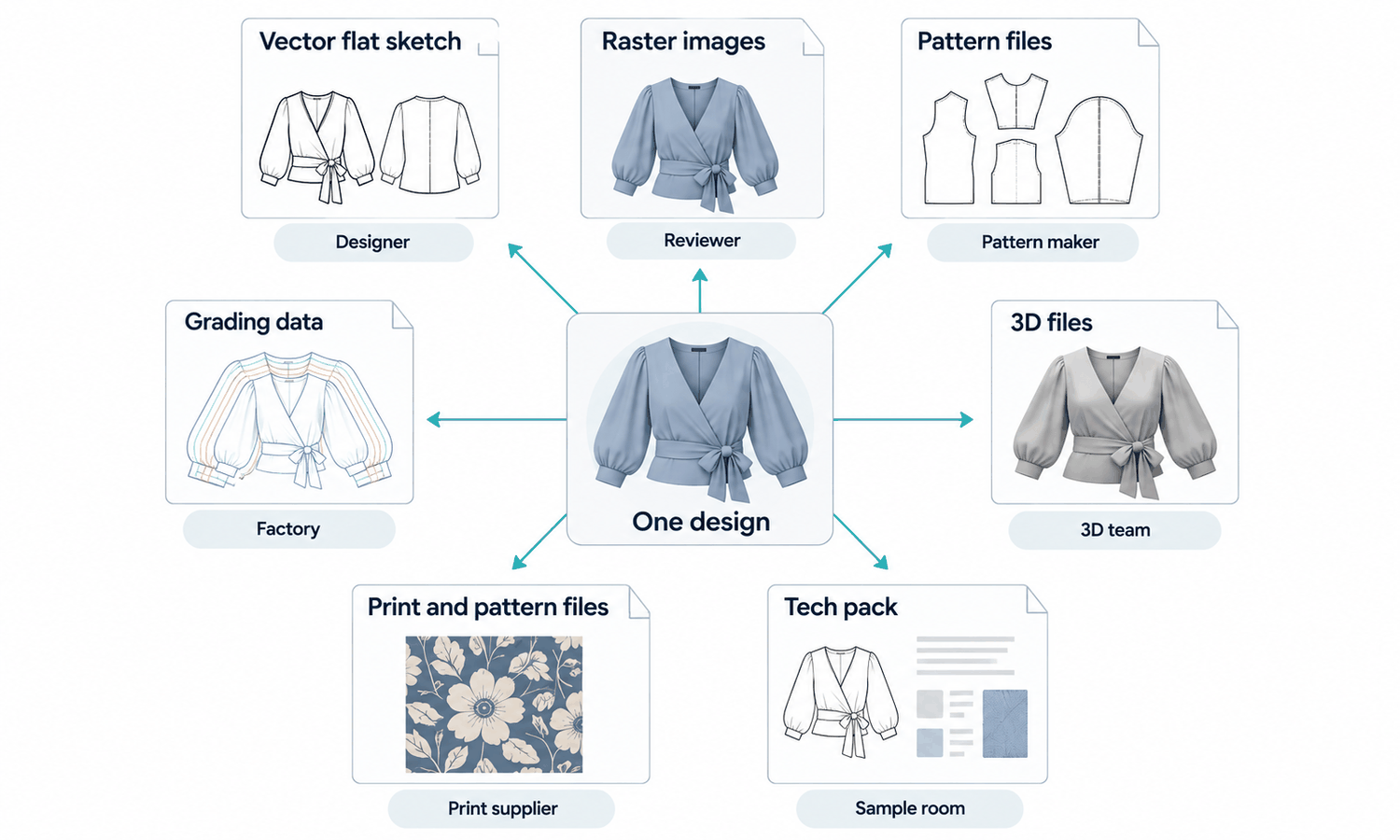
When you create fashion designs online, the design does not travel as one file. It travels as several, each holding a different part of the garment: drawings of how it looks, a pattern that describes how it is cut, grading that scales it across sizes, artwork for its prints, sometimes a 3D model and a tech pack that ties everything together. Each file type suits a different person in the chain, and sending the wrong one, or the right one in the wrong form, is one of the most common reasons designs get lost or misread between a designer and a factory.
Understanding the main file types does not require technical expertise. It requires knowing what each one holds, who uses it and what can go wrong when it is shared. With that, a designer can send a pattern maker what they need, give a factory files they can open and keep the whole package consistent as it changes.
This article explains why file types matter, and then covers drawings and images, pattern and grading files, 3D files, artwork and tech pack documents, and how to share files online without losing information.
| File type | What it holds | Who uses it | Watch out for |
|---|---|---|---|
| Vector drawings | Technical flats and line art | Designers, technical designers, factories | Sending a flattened image instead of the editable drawing |
| Raster images | Photos, renders, illustrations | Everyone, for reference | Low resolution; color on screen is not a reference |
| Digital patterns | Pattern pieces with seam allowances and markings | Pattern makers, factories | Compatibility between pattern systems |
| Grading data | How each piece changes across sizes | Pattern makers, factories | Missing or inconsistent grade rules |
| 3D files | Digital garments and avatars | Technical designers, 3D teams | Limited exchange between 3D systems |
| Artwork files | Prints, embroidery, labels | Print and trim suppliers | Wrong size, missing layers, flattened files |
| Tech pack documents | The full specification | Factories, sample rooms | Outdated versions in circulation |
Why File Types Matter When You Create Fashion Designs Online
Each person who works on a garment needs something different from the design. A buyer needs to see it. A pattern maker needs its shape and measurements. A factory needs to know how to make it. A print supplier needs the artwork at the right size. A single file cannot serve all of them, which is why a design becomes a set of files.
The trouble starts when a file is converted into a form that loses information. A technical flat saved as a low-resolution image cannot be edited, and small details blur. A pattern exported without its markings loses its notches and grain lines. Artwork flattened into a single image loses the separate colors a printer needs. Each loss is invisible to the person who sent the file and obvious to the person who has to work with it.
Files also move in a rough order. Early in development, sketches and flats go to the team and to a pattern maker. Once the pattern exists, pattern and grading files go to the sample room and factory, along with the first tech pack. Artwork follows once prints and labels are settled, and every file is updated after each sample. Knowing where a design is in that sequence tells a designer which files the next person needs, and which ones are still too early to send.
So the practical question for any file is not only "what is in it?" but "what does the person receiving it need to be able to do with it?"
Drawings and Images: Vector and Raster
Most design images fall into two families.
Vector files describe drawings as lines and shapes defined mathematically, so they stay sharp at any size. Technical flats, line art, logos and many graphics are drawn this way. A vector flat can be enlarged to show a detail or reduced for a line sheet without losing quality, and its lines can still be edited. Common exchange formats include SVG and PDF, which can hold vector content, alongside the native files of whatever drawing tool is used. When a factory or a technical designer needs to edit a flat, send the editable vector file, not an exported picture of it.
Raster files describe images as grids of pixels. Photographs, renders, painted illustrations and scanned sketches are raster images, commonly saved as JPEG, PNG or TIFF. Their quality depends on resolution: an image that looks sharp on a phone can be too small for a print or for close inspection of a detail. Raster images are ideal for showing how something looks and poor for describing construction precisely.
Both families share a limit when it comes to color. A color in a file, whether in a drawing or a photo, is a screen value. It helps discussion, but a garment's color is agreed on a physical standard and confirmed on lab dips of the actual fabric.
Pattern and Grading Files
Pattern files are where the garment's shape is actually defined, and they are the most technical files in the set.
-
Digital pattern pieces. Each piece of the garment drawn to its exact shape, with seam allowances included or marked.
-
Markings. Notches, grain lines, drill holes, fold lines and labels on each piece, which tell the cutter and sewer how pieces fit together.
-
Grading data. The rules for how each piece changes from size to size, so the pattern can be produced across the size range.
-
Size sets. The graded pieces for every size, ready for cutting.
-
Markers. Layouts showing how pieces are arranged on the fabric for cutting, which affect fabric use.
Pattern makers work in dedicated pattern systems, and those systems do not always read each other's native files perfectly. Common exchange formats exist to move patterns between systems, but pieces can arrive with missing markings, shifted grade rules or changed seam allowances. When a pattern moves between teams, the receiving side should check that markings, allowances and grading came through intact, and ideally compare a printed or plotted piece against the original.
3D Files, Artwork and Tech Pack Documents
3D files hold digital garments and the avatars they are shown on. A 3D garment built from its pattern pieces, with fabric properties assigned, can support development work such as fit review within its own software, judged by that software's own standards. Exchanging 3D garments between different 3D systems is often limited, so teams usually agree on one system for a project, and share renders or exported views with anyone outside it.
Artwork files carry prints, embroidery designs, labels and hang tags. A printer or embroiderer needs the artwork at the correct final size, with colors separated where the method requires it, text converted so fonts do not go missing and a note of the placement and color references. A flattened, resized image of the artwork is one of the most common reasons a print comes back wrong.
The tech pack ties everything together: flats, measurements, construction, materials, colors, artwork placement and labels. It is often shared as a PDF so everyone sees the same layout, with the editable source kept by the brand. Because it changes from sample to sample, the most important thing about a tech pack file is that everyone is working from the current version.
Sharing Files Online Without Losing Information
A few habits prevent most file problems when working online.
-
Send the editable source where it is needed. Pattern makers and technical designers need editable files; buyers and reviewers need readable exports.
-
Keep a naming and version system. Include the style code, file type and version in every file name, so the current file is always obvious.
-
Confirm what the recipient can open. Ask which formats a factory or supplier works with before sending, rather than discovering it after a delay.
-
Package fonts and linked files. Artwork and documents that depend on fonts or linked images should include them or convert them, so nothing is missing on the other end.
-
Keep one master set. Store the current files in one shared place instead of passing copies around by email.
-
Protect unreleased designs. Agree who can access design files and how they are sent, since they describe products that have not been launched.
Finally, keep an archive. When a style is finished, store its final set together: the approved flats, the production pattern and grading, the final artwork, the last tech pack and the approved color references. Reorders, updates and new variations all start from that set, and reconstructing it later from scattered emails is slow and error-prone.
Frequently Asked Questions
What file types are used when you create fashion designs online?
Vector drawings for flats, raster images for photos and renders, pattern and grading files for the garment's shape and sizes, 3D files for digital garments, artwork files for prints and labels, and a tech pack document that ties them together. Each serves a different person in the chain.
What is the difference between vector and raster files?
Vector files describe drawings as lines and shapes, so they stay sharp at any size and remain editable. Raster files describe images as pixels, so their quality depends on resolution.
Which file should be sent to a pattern maker?
The editable flats, the measurement sheet and, if one exists, the digital pattern with its markings and grading. A picture of a flat is not enough to work from.
Why do patterns sometimes arrive wrong in another system?
Pattern systems do not always read each other's files perfectly, so markings, seam allowances or grading can shift in exchange. Check these on arrival and compare a printed piece with the original.
What does a printer need in an artwork file?
The artwork at its final size, with colors separated where the print method requires it, text converted so fonts do not go missing, and the placement and color references noted. A resized or flattened image is a common cause of prints coming back wrong.
Can the color in a design file be used as the garment's color?
No. File colors are screen values for discussion. The garment's color is agreed on a physical standard and confirmed on lab dips of the actual fabric.
In Closing
When you create fashion designs online, each file carries a different part of the garment to a different person. Send vector flats rather than pictures of them, raster images at a resolution fit for their use, patterns with their markings and grading intact, artwork at final size with separated colors and a current tech pack that ties them together. Name and version every file, confirm what the recipient can open and keep one master set, so nothing is lost between the designer and the factory.