
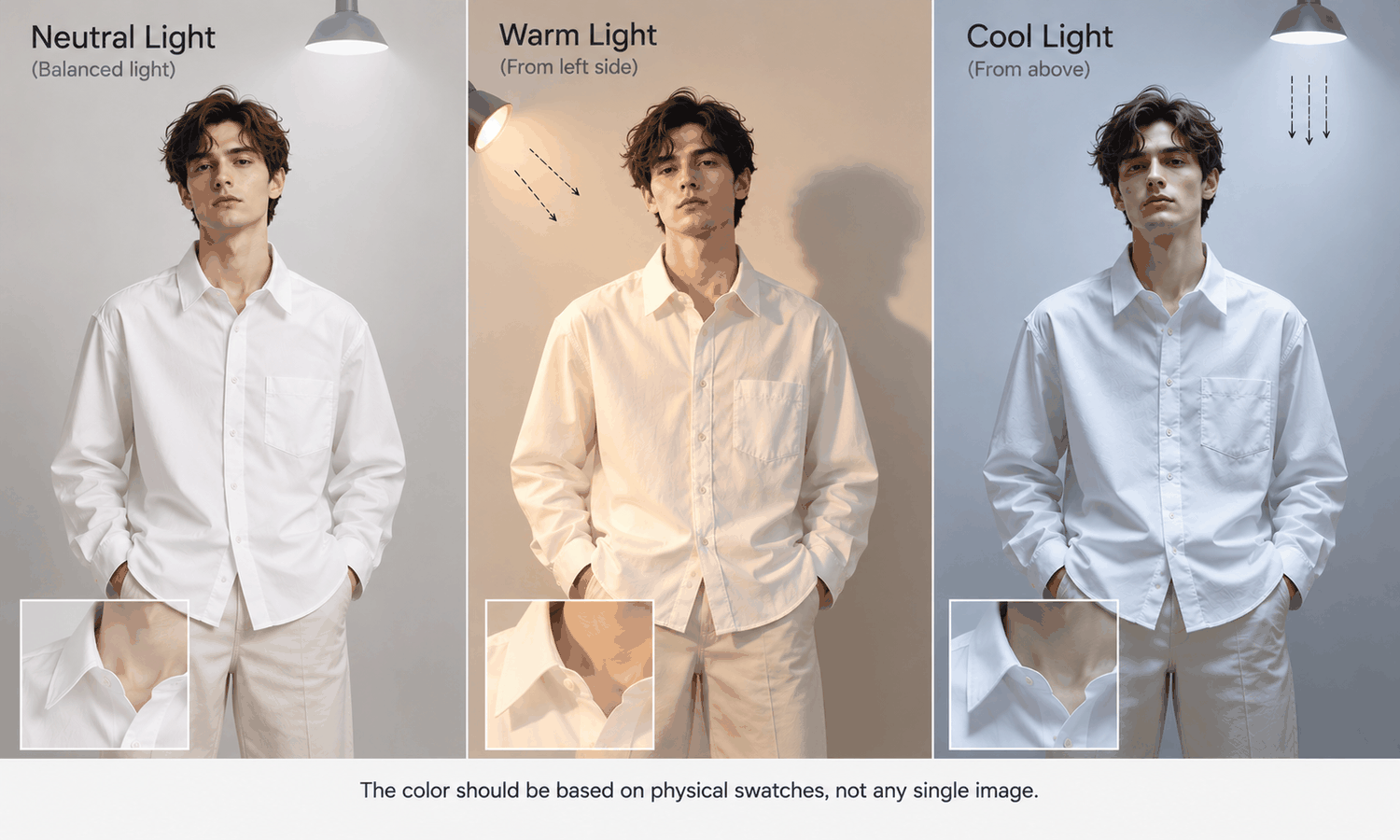
Clothes changing with generated images involves a step most people never think about: the new garment has to be relit. The garment was photographed under one light, usually the even, flat light of a flat-lay setup. The model stands in another light, perhaps warm evening sun from one side or cool studio light from above. For the garment to look as if it belongs on that body in that scene, its highlights, shadows and colors have to change to match the new light.
That relighting is what makes a good image convincing, and it is also where some of the most confusing results come from. A garment that looked one color in its flat-lay can look slightly different on the model. A satin blouse can gain or lose its sheen. A dark jacket can look flat or muddy. None of these are necessarily errors in the garment. They are the effects of light, and understanding them makes it much easier to judge what an image shows.
This article explains why a garment has to be relit, how light changes what a garment looks like, which fabrics are hardest to relight, how the garment source affects relighting and how to keep relit images honest in practice.
| What light changes | What happens in the image | Why it matters | What to check |
|---|---|---|---|
| Direction | Shadows fall on the side away from the light | Shadows define folds and shape | Shadows fall the same way as on the face and body |
| Color temperature | Warm light warms colors, cool light cools them | The garment's color appears to shift | Color against the physical sample |
| Softness | Soft light gives gentle shadows, hard light sharp ones | Texture looks smoother or rougher | Texture against the flat-lay close-ups |
| Intensity | Bright light lifts dark garments, dim light flattens them | Dark colors can lose detail | Details on dark garments are still visible |
| Reflections | Shiny fabrics pick up highlights from the scene | Sheen can appear, vanish or move | Sheen against the real fabric |
Why a Garment Has to Be Relit
A photograph records a garment under the light it was photographed in. Every highlight, shadow and color in a flat-lay belongs to that setup. If the flat-lay were simply cut out and pasted onto a model, it would carry its own light with it, and it would look pasted: evenly lit while the model's face is lit from one side, or brightly lit in a dim evening scene.
So when a garment is placed on a model, its lighting is redone to match the scene. The shape of the garment on the body creates new folds that need shadows. The direction of the scene's light decides which side of each fold is bright and which is dark. The color of the light tints the garment. Shiny surfaces pick up reflections from the new surroundings.
A useful comparison is the difference between a studio product shot and a lifestyle photograph of the same shirt. In the studio, the shirt is lit evenly so its color and details read clearly. Outdoors at sunset, the same shirt glows warm on one side and falls into cool shadow on the other. Both photographs are true, but they show the shirt under different light. A relit image is closer to the lifestyle photograph: it shows the garment as it might look in that scene, which is why product images benefit from scenes lit as evenly as a studio.
This is part of what image generation does when it places a garment. It is also a reconstruction: the new lighting is produced to look plausible for the scene, not measured from the real garment under that light. That is why relit images need to be judged with light in mind.
How Light Changes What a Garment Looks Like
Light affects a garment in several ways at once.
Direction shapes the garment. A fold catches light on one side and falls into shadow on the other. If the scene's light comes from the left, the garment's shadows should fall to the right, the same way as the shadows on the model's face and arms. When the garment's shadows disagree with the body's, the image looks wrong even if nobody can say why.
Color temperature tints it. Warm light, such as sunset or tungsten, pushes colors toward yellow and orange; cool light, such as overcast daylight or some studio lighting, pushes them toward blue. A white shirt looks cream in warm light and bluish in cool light. A navy dress can look almost black in warm, dim light. The garment has not changed; the light has.
Softness changes texture. Soft, diffuse light smooths a fabric's surface; hard, direct light brings out every ridge of a knit or twill. The same garment can look smoother or rougher depending on the scene.
Intensity affects dark and light garments differently. Bright light lifts detail out of dark fabrics; dim light can flatten a black garment into a shape with no visible seams or texture. Very bright light can wash out pale fabrics.
Which Fabrics Are Hardest to Relight
Some fabrics relight easily, and some make every lighting decision visible.
Matte fabrics such as cotton, linen and most wools are the easiest. Their surface scatters light evenly, so relighting mainly changes their brightness and shadows.
Shiny fabrics are the hardest. Satin, silk, leather, sequins and metallic finishes reflect their surroundings, so their highlights depend on where the light comes from and what is around them. A relit satin blouse may gain a sheen it does not have, lose the sheen it does have or show highlights in places the real fabric would not. Because sheen is often a reason a customer chooses such a fabric, these differences matter.
Very dark and very pale fabrics are demanding in a different way. Dark fabrics can lose their seams, texture and details in shadow; pale fabrics can lose them in highlights. Checking these at full size is essential.
Textured fabrics such as corduroy, boucle, velvet and chunky knits depend on light to show their texture at all. Velvet in particular changes appearance with the angle of the light. And sheer fabrics, where light passes through the fabric, remain a current weak area for generated imagery, partly because relighting them means deciding what shows through.
How the Garment Source Affects Relighting
Relighting starts from the garment source, so the source's own lighting matters.
A flat-lay photographed in even, soft, neutral light gives the cleanest starting point. Its colors are close to the garment's own, its texture is visible without harsh shadows and it carries little lighting of its own that has to be undone.
A flat-lay photographed in uneven or colored light causes problems. A strong shadow across one side can be read as part of the garment's color. A warm cast from a window or a lamp can be carried into every image. Harsh light can exaggerate texture that the scene then exaggerates again.
So the most effective step toward good relighting happens before any image is made: photograph the garment in even, neutral light, with a color reference card in a separate frame under the same light and close-ups of the texture. That gives the image a clean source and gives the reviewer something to check against.
Keeping Clothes Changing Images Honest
Relighting makes images convincing, and it can also move a garment away from what the customer will receive. A few habits keep it honest.
Check color against the physical sample, not against the flat-lay on screen and not against another image. Screen color is not a physical reference, generated imagery does not promise an exact color-code match and the colorway is settled by the lab dip. For product images, a neutral scene light keeps the garment's color closest to its own.
Check that the garment's shadows agree with the body's. The light should fall on the garment the same way it falls on the face, arms and hands.
Check shiny and textured fabrics at full size against close-ups of the real fabric, and route fabrics whose appearance depends heavily on light, such as satin, sequins and velvet, to photography when their sheen or texture is a selling point.
And check every image against its garment source for construction, logos, text and trims as well, without exception.
In Lightchain AI (apparel AI), lighting is handled through the scene and the garment source.
-
Model Studio sets the scene, pose and angle for each image, so product images can use a consistent, neutral scene across a category.
-
AI Virtual Try-On places each garment on the model from its flat-lay, so a well-lit flat-lay gives the cleanest starting point.
For teams producing on-model imagery across many styles with consistent lighting, Scale E-commerce is the Lightchain AI solution built for that work.
Frequently Asked Questions
Why does clothes changing change how a garment looks?
Because the garment is relit to match the new scene. Its shadows, highlights and colors are redone for the scene's light direction, color and softness, so it can look different from its flat-lay.
Why does the same garment look a different color in different scenes?
Warm light pushes colors toward yellow and orange, and cool light pushes them toward blue. Judge the garment's color against the physical sample, not against images in different scenes.
Which fabrics are hardest to relight?
Shiny fabrics such as satin, silk, leather and sequins, whose highlights depend on the surroundings. Very dark, very pale, textured and sheer fabrics are also demanding.
How should garments be photographed for clothes changing?
In even, soft, neutral light, with a color reference card in a separate frame under the same light and close-ups of the texture. A clean source gives the cleanest relighting.
What should be checked in a relit image?
Color against the physical sample, shadows that agree with the model's body, sheen and texture against close-ups of the real fabric, and construction, logos and trims against the garment source. Check every image, not a sample.
When should a garment be photographed instead?
When its appearance depends heavily on light, such as satin, sequins or velvet, and its sheen or texture is a selling point. A photograph records the real reflections instead of reconstructing them.
How does Lightchain AI handle lighting?
Model Studio sets a consistent scene for each image, and AI Virtual Try-On places each garment from its flat-lay, so a well-lit source gives the cleanest result. Scale E-commerce is the solution to use for consistent on-model imagery across many styles.
In Closing
Clothes changing means relighting: the garment's shadows, highlights and colors are redone to match the scene it is placed in. That is what makes an image convincing, and it is why a garment can look different from its flat-lay. Start from a flat-lay shot in even, neutral light, use neutral scenes for product images, check color against the physical sample and shadows against the body, and photograph fabrics whose appeal depends on how they catch the light.
Start Here
If your team produces on-model images and wants garments to look as they really are under consistent light, Scale E-commerce is the solution to use. It is built for producing on-model imagery across many styles: you place each garment from a well-lit flat-lay, keep a neutral scene across a category and compare every image with the physical sample. Start with your next batch of flat-lays, reshoot any with uneven light, and compare the results.
**Explore Scale E-commerce → **https://www.lightchainai.com/global/solutions/scaleECommerce