
There is one distinction underneath every question about detail quality, and it is not about model quality. Any detail visible in a swapped image was either transferred from the source photograph or invented to look plausible. Those are different origins with different reliability, and they are indistinguishable by eye.
Knowing which is which for your own products is the difference between assets you can publish without a second thought and assets that need checking one by one.
Preserved or invented
A swap works by taking the garment as recorded in one image and presenting it on a body in another. Where the source recorded something clearly, the output can carry it. Where the source did not — because the detail was too small, in shadow, hidden behind an arm, or simply outside the frame — the output still has to show something, and what it shows is a construction.
This is why the same tool produces flawless results on one garment and questionable results on another shot the same day. The variable is what each photograph managed to record, not how the software performed.
The practical consequence is that detail quality is largely decided before generation, which puts the lever in the hands of whoever takes the source photograph rather than whoever runs the swap.
That reassignment is worth making explicit inside a team, because the complaints usually arrive at the wrong desk. A merchandiser unhappy with stitch quality raises it with the person operating the tool, who cannot fix it, while the person who could — whoever set up the shot — never hears about it. Routing the feedback to the source step is a management change rather than a technical one, and it is the one that improves output.
A detail hierarchy worth knowing
| Detail type | Typical behavior | What to do |
|---|---|---|
| Overall color and tone | Transfers reliably | Spot-check against the physical swatch once per style |
| Print scale and placement | Transfers when the source resolves it | Check placement across the body, not just presence |
| Weave and surface texture at normal viewing size | Usually holds | Review at destination size, not full screen |
| Topstitching and seam lines | Fragile, often reconstructed | Compare against the source on every asset |
| Small hardware, eyelets, zip pulls | Frequently reconstructed | Treat as unverified until checked |
| Logos, wordmarks, care labels | Reconstructed unless clearly resolved | Check every time, without exception |
| Anything occluded in the source | Always invented | Check against the physical product |
The middle rows are where teams get caught. Topstitching reads as a plausible line whether it was transferred or generated, and a reviewer scanning for obvious errors will not notice that a twin-needle detail has become a single line.
Build the hierarchy for your own products rather than adopting this one. A denim brand and a silk brand have completely different fragile rows, and the exercise of writing your own list forces a conversation about which details customers actually notice — which is separately useful.
Resolution is the threshold
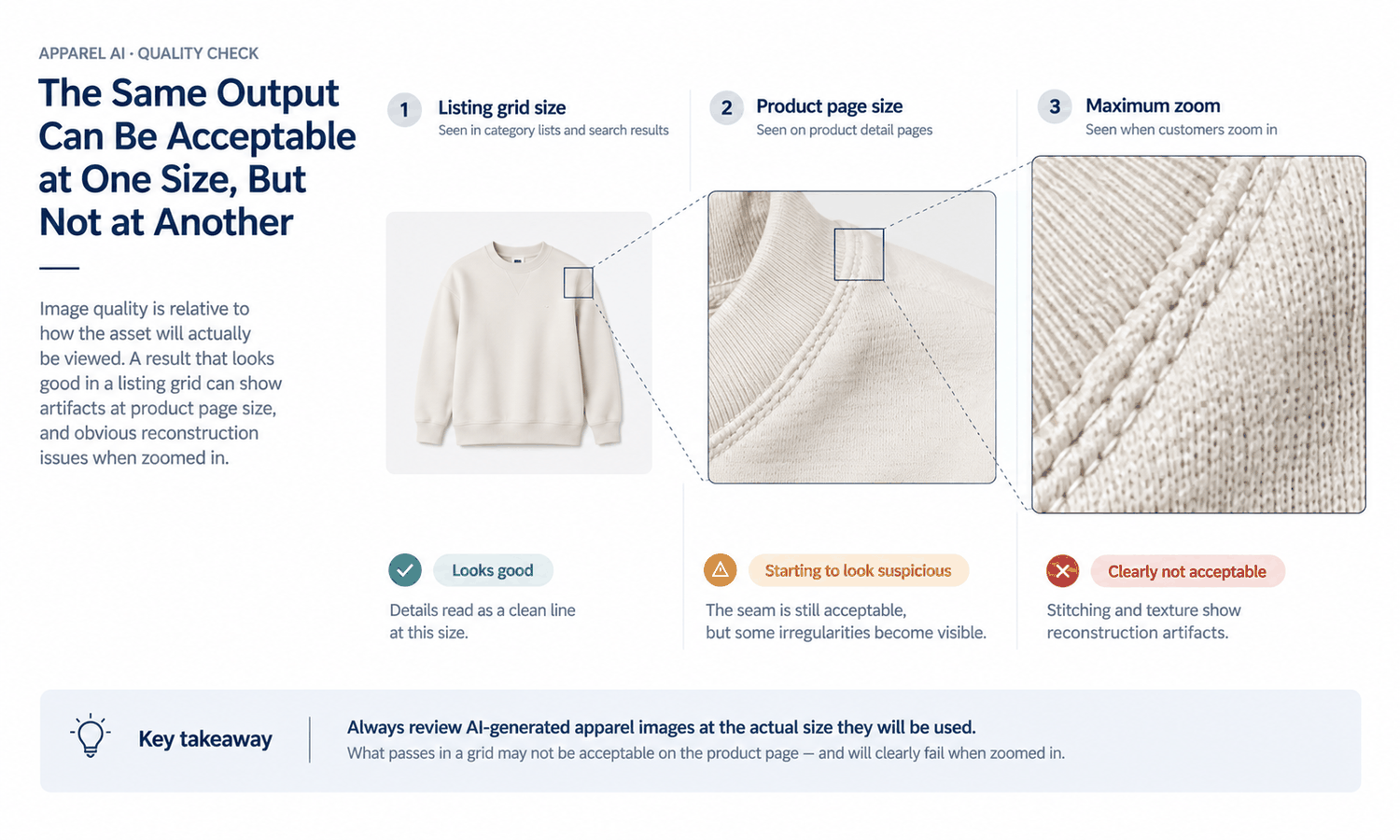
There is a point below which a detail stops being reproduced and starts being approximated. That point is set by how many pixels the detail occupied in the source, and it moves with the size the output will be seen at.
A stitch line that occupies two pixels in the source cannot survive as a stitch line. What appears in the output is a texture that reads correctly at a distance and dissolves under inspection. On a listing grid that is entirely fine. On a product page with zoom it is a visible problem.
The useful habit is to decide the destination size first, then look at the source and ask whether the details that matter are resolved at that size. A source that is adequate for a thumbnail set is not automatically adequate for a zoom-enabled page, and the same asset can pass one and fail the other.
This also explains a pattern that confuses teams: assets that were fine last year failing now. Nothing changed in the tool or the sources — the storefront started offering deeper zoom, which moved the threshold. Any change to how large customers can view an image is a change to your input requirements, and it rarely gets communicated as one.
What drape means in the output
The word does a lot of work and it means something specific here. The output shows a garment hanging on a body in a way that looks convincing for the pose. It does not calculate how that fabric would hang.
Two garments of very different weight will produce similar-looking results unless the source photographs show the difference clearly. A heavy melton and a lightweight twill in the same silhouette can come back looking closer to each other than they are, because the model is rendering an appearance consistent with the shape rather than simulating material behavior.
This matters for a specific decision. The output is a visual asset and it does not predict fit, determine sizing, model how a fabric behaves in motion, or forecast returns. Anyone judging fabric weight or hang from a generated image is reading a rendering as a measurement, and the image gives no signal that it should not be trusted for that.
Logos, text and hardware need checking every time
Set this as a rule rather than a habit, because it is the category where errors are both most likely and most consequential.
Text is reconstructed unless it was clearly resolved in the source, and reconstructed text is frequently almost right — a letterform slightly off, a word subtly misshapen. Almost right is worse than obviously wrong, since obviously wrong gets caught. Hardware behaves similarly: a zip pull or an eyelet can appear in the correct place with the wrong form.
The rule costs little. Any asset containing a logo, a wordmark, printed text, or visible hardware gets a direct comparison against the source before it leaves the team. No exceptions for volume, deadline, or how good the rest of the image looks.
There is a commercial edge to this beyond quality. A reconstructed wordmark is a representation of a mark, and where that mark is licensed or belongs to a partner, the accuracy question acquires a second dimension. Treatment of marks and licensed material varies by market and by platform, so anything in that category belongs with whoever owns compliance rather than being settled at the review desk.
The check that takes two minutes
Open the source and the output side by side at the size the asset will be seen, then look at three things in this order.
- The boundary where garment meets body — neckline, cuffs, hem — since edges are where reconstruction is most visible.
- Any text or hardware, compared character by character and part by part against the source.
- One structural detail you know well on that style, such as a pocket seam or a specific stitch, which functions as a spot check for everything else.
Two minutes, three looks, at the correct size. A reviewer doing this catches more than one spending fifteen minutes at full screen, because full screen is not where the asset will be judged and it hides nothing that matters while revealing plenty that does not.
Where a detail crop belongs instead
Some shots exist specifically to show material truth — the close crop that tells a customer what a fabric actually looks like. Those belong to a camera, and asking a swap to produce them is asking the wrong tool.
The productive division is straightforward. Generated on-model imagery covers coverage, angles, colorways, and consistency across a set; photographed detail crops carry material evidence. A listing with both is stronger than one produced entirely either way. The AI Virtual Try-On module in Lightchain AI (apparel AI) produces the on-model set from an approved source image — see AI virtual try-on — and where the change concerns the material itself rather than the model, fabric, color and style substitution is the relevant operation.
Shoot the detail crops once per fabric rather than once per style. Fabrics repeat across a range far more often than silhouettes do, which makes a small library of material crops unusually efficient, and it survives across seasons in a way style-specific assets do not.
Questions apparel teams ask
Does the tool preserve stitching? Where the source resolves it clearly, largely yes. Where the stitching occupies very few pixels, what appears in the output is a plausible reconstruction rather than the actual detail. The distinction is invisible by eye, which is why the comparison against the source is worth doing.
Why did the same garment come out well once and poorly another time? Almost always the source photograph rather than the tool. Different lighting, angle, or resolution changes what was recorded, and everything downstream is built from that record.
Can we judge fabric weight from the output? No. The image renders an appearance appropriate to the pose rather than simulating how the material behaves, so garments of different weight can look similar. Weight and hand come from a physical swatch.
How do we protect logos and printed text? Check every asset that contains them against the source, with no exceptions. Reconstructed text is often almost correct, and almost correct is precisely what a fast review misses.
Should we shoot sources at higher resolution? For anything destined for a zoom-enabled page, yes, and it is one of the cheapest quality improvements available. Decide the destination size first and shoot to clear it.
What about very fine fabrics like lace or mesh? These are the hardest case, because the structure sits close to or below the resolution threshold in most product photography. Expect reconstruction, check closely, and consider a photographed detail crop alongside.
What actually decides detail quality
The source photograph, at the size the asset will be seen. Details clearly recorded in the input can be carried through; details below the resolution threshold or hidden behind an arm are reconstructed to look plausible, and nothing in the output distinguishes the two. Build the review around that fact — edges first, then text and hardware, then one structural detail you know — and keep material truth with a camera. The tool handles detail as well as the photograph you gave it allows, which is a more useful statement than any claim about preservation.
Compare one output against its source at destination size today.
Put them side by side at the size a customer will see, then check the garment edges, any text or hardware, and one structural detail you know well on that style. The exercise takes two minutes and tells you where your own sources sit relative to the resolution threshold — which determines how much checking every subsequent batch needs. → AI virtual try-on