
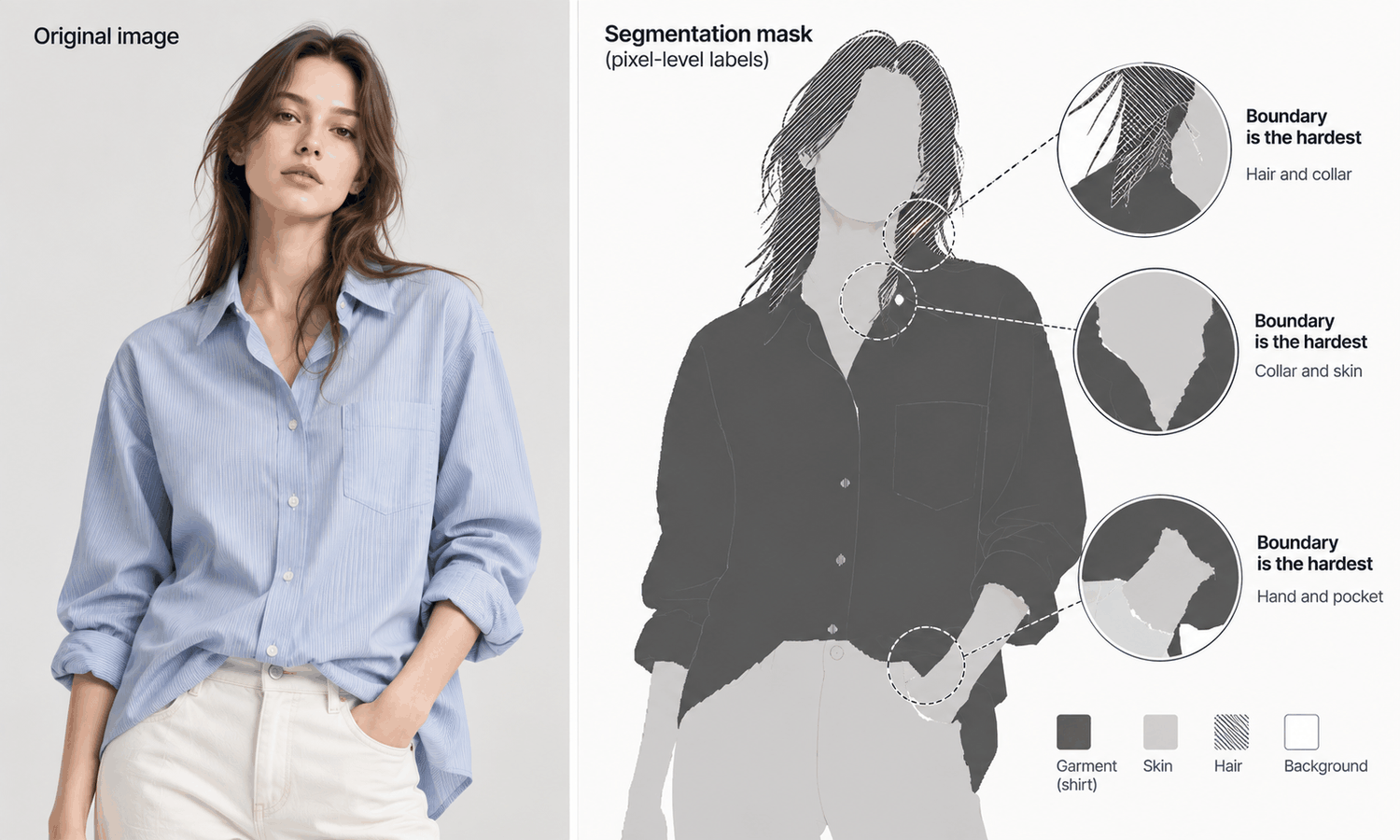
Change clothing AI tools can only replace a garment once they know where that garment is. Before anything new is placed on the model, the software has to decide, pixel by pixel, which parts of the image are clothing, which are skin, which are hair and which are background. That step is usually invisible to the person using the tool, and it shapes the result more than almost anything else.
The step is called segmentation. When it goes well, the new garment lands exactly where the old one was, the face and hair stay untouched and the edges look natural. When it goes wrong, the errors are specific and recognizable: a piece of the old collar survives, a strand of hair turns into fabric, a hand in a pocket becomes part of the jacket. Understanding how segmentation works explains why those errors happen where they do, and how to take photos that make them less likely.
This article explains what segmentation means, where change clothing AI gets the edges wrong, what happens when the outline is wrong, how to help segmentation succeed and how to handle it in practice.
| Boundary | Why it is hard | Typical error | What to check |
|---|---|---|---|
| Hair over a collar | Fine strands mix with fabric | Hair turned into fabric, or collar left as hair | Collar shape and hairline |
| Hands on or in the garment | Skin and fabric overlap closely | Fingers merged into the garment, pocket reshaped | Hands and pockets |
| Skin next to similar-colored fabric | Little contrast at the edge | Garment edge drawn too far or too short | Necklines, sleeves and hems |
| Sheer or lace fabric | Skin or background shows through | Transparent areas treated as solid, or dropped | Sheer panels and lace |
| Garment against a similar background | Outline hard to find | Garment edge leaks into the background | The outline |
| Fringe, loose threads, fur | Very fine, irregular edges | Edges smoothed away or left behind | Fine edges |
| Straps and accessories | Thin objects crossing the garment | Straps cut through or absorbed | Bag straps and jewelry |
What Segmentation Means
Segmentation is the process of dividing an image into labeled regions. For a photo of a person in clothes, the software assigns each pixel to a category: this pixel is the shirt, this one is skin, this one is hair, this one is background. The result is often called a mask, a map of where each region is.
In most change clothing workflows, segmentation comes first. The mask marks the area to be replaced, and everything else is protected. The new garment is then placed within that area and blended with what surrounds it. The mask decides where the change happens and where it does not.
Most segmentation tools are very good at large, clear regions: a shirt against a plain background, a face, a solid pair of trousers. They find those reliably. Difficulty rises at boundaries, where regions touch, overlap or look alike, and at fine structures that are only a few pixels wide. Those are exactly the places where clothing meets a person.
Segmentation also explains a pattern familiar from changing clothing in photos: the regions that are kept, covered, created and removed. The mask is what draws the line between them. Where the mask says garment, the old clothing is covered or removed and new pixels are produced; where it says skin, hair or background, the original is kept. Every one of those outcomes starts with a decision about a pixel's label.
The important thing to understand is that segmentation errors are inherited. If the mask is wrong, everything built on it is wrong in the same place. A replacement cannot fix a boundary the mask put in the wrong spot.
Where Change Clothing AI Gets the Edges Wrong
Certain boundaries cause most of the trouble, and knowing them makes a review much faster.
-
Hair over clothing. Individual strands falling over a collar or shoulder are finer than most masks can follow. The tool has to decide whether each strand is hair or fabric, and it often gets some wrong.
-
Hands touching the garment. A hand in a pocket, holding a lapel or resting on a hip overlaps the garment tightly. Fingers can end up inside the garment's mask and be redrawn as fabric, or the pocket can be pulled into the hand's region.
-
Low contrast. A beige top against light skin, or a black coat against a dark background, gives the tool little to separate the regions. The garment's edge can be drawn too far or stop short.
-
Transparent and open fabrics. Sheer fabrics and lace let skin or background show through. The tool has to decide whether those areas belong to the garment, and either answer can be wrong. This is part of why sheer fabrics and lace remain current weak areas.
-
Fine, irregular edges. Fringe, frayed hems, loose threads and fur have edges too fine and irregular for a clean outline, so they are often smoothed away or left behind.
-
Thin objects crossing the garment. Bag straps, necklaces and belts cross the clothing and can be absorbed into it or cut through it.
What Happens When the Outline Is Wrong
A wrong mask produces three kinds of error, and each has a recognizable signature.
A mask that is too small leaves part of the old garment unreplaced. The new garment is placed inside the mask, and whatever lay outside it survives: a sliver of the old collar at the neck, the edge of an old cuff at the wrist, a line of the old hem across the legs. These leftovers are among the most common giveaways of an altered image.
A mask that is too large replaces things that should have been kept. Hair near the collar becomes fabric, part of a hand disappears into a sleeve, a slice of background turns into garment. The new garment looks as if it has grown beyond its edges.
A mask with the wrong label treats one region as another. A collar is treated as hair and left unchanged, or a patch of skin is treated as fabric and covered. The result can look strangely patched, with one region appearing where another should be.
All three errors sit at boundaries, which is why the edges of a changed garment deserve the closest look. Checking the neckline, cuffs, hem, hairline and hands at full size catches most of them. The garment itself still needs its own check against its source for construction, logos, text and trims, without exception.
Batches deserve particular attention. When many garments are changed on the same base photo, they often share the same mask boundaries around the hair, hands and background. A boundary error in that base photo therefore tends to repeat in every image of the batch, in the same place. Check the first few images of a batch at the boundaries before producing the rest, and if the same error appears, fix it at the base photo or the mask rather than image by image.
Helping Segmentation Succeed
Segmentation is easier when the photo gives it clear boundaries. A few choices, made before the change, prevent many of the errors above.
Use contrast. A garment against a background of a clearly different color and tone is far easier to outline than one that blends in. The same applies to skin and clothing: garments very close to the model's skin tone are harder to separate.
Keep boundaries clear. Hair tucked behind the shoulders, hands away from pockets and plackets and arms separated slightly from the body all give the tool clean edges to find.
Avoid overlaps that do not matter. Remove bag straps, scarves and jewelry from base photos unless they are part of the image's purpose.
Start from a clean garment source. When the new garment comes from a pressed, evenly lit flat-lay, its own edges are clear, which helps it sit correctly inside the mask.
Where a tool shows the mask or lets you adjust the area to be changed, check it before generating. Correcting an outline takes seconds; correcting its consequences takes much longer.
Change Clothing AI in Practice
In Lightchain AI (apparel AI), several tools work with image regions and outlines.
-
The Image Editor includes smart cutout and background removal, which separate a subject from its background.
-
Target Revision edits a defined area of an image using a reference image or a written instruction, as described on the Partial Redraw page, which suits correcting a boundary that came out wrong.
-
AI Virtual Try-On places a garment on a model from its flat-lay, starting from a clean garment source.
For teams refining images at the edges where garments meet people, Partial Redraw is the Lightchain AI solution built for precise, local work.
Frequently Asked Questions
How does change clothing AI know where the clothes are?
Through segmentation: the software labels each pixel as clothing, skin, hair or background and builds a mask of the area to replace. The new garment is placed within that mask.
Why do edges cause the most problems?
Because boundaries are where regions touch, overlap or look alike, such as hair over a collar or a hand in a pocket. Large, clear regions are found reliably; fine and overlapping edges are not.
What does a leftover collar or cuff mean?
Usually that the mask was too small, so part of the old garment lay outside the area that was replaced. Check necklines, cuffs and hems for leftovers in every image.
Why do sheer fabrics and lace cause trouble?
Skin or background shows through them, so the tool has to decide whether those areas belong to the garment. Either choice can be wrong, which is part of why these fabrics remain current weak areas.
How can photos be prepared to help?
Use a background that contrasts with the garment, keep hair and hands clear of the clothing, remove straps and jewelry that are not needed and start from a clean, evenly lit garment source. Clear boundaries in the photo mean clearer boundaries in the mask.
Is checking the edges enough?
No. Edges catch segmentation errors, but the garment itself still needs checking against its source for construction, logos, text and trims in every image.
How does Lightchain AI help with edges and outlines?
The Image Editor's smart cutout and background removal separate subjects from backgrounds, and Target Revision corrects a defined area using a reference or instruction. Partial Redraw is the solution to use for that precise, local work.
In Closing
Change clothing AI finds the clothes through segmentation: labeling every pixel and building a mask of the area to replace. Large, clear regions are easy; boundaries are not. Hair over collars, hands on garments, low-contrast edges, sheer fabrics, fine fringe and crossing straps are where masks go wrong, leaving old garments behind, swallowing hair and hands or mislabeling regions. Give the tool clear boundaries in the photo, check the edges at full size and check the garment against its source.
Start Here
If your team changes garments in images and wants clean edges where clothing meets people, Partial Redraw is the solution to use. It is built for precise, local refinement: you correct a boundary in a defined area using a reference or instruction, and the rest of the image stays as it was. Start with a few recent images, check their necklines, cuffs and hairlines at full size, and correct what you find.
**Explore Partial Redraw → **https://www.lightchainai.com/global/solutions/partialRedraw