
An AI pose generator from photo takes an image you already have and produces the same garment on a model in a new pose. It is one of the quickest ways to turn a single image into a set: a front-facing product shot becomes a walking shot, a three-quarter view, a seated campaign image. For teams that need variety across channels, it looks like a shortcut worth taking every time.
What the phrase leaves open is which photo you start from, and that choice decides more about the result than the pose itself. A photo of the garment already on a model and a flat-lay of the garment on its own contain very different information. A new pose can only show what its source gave it, and whatever the source did not show has to be filled in.
This article explains the two kinds of starting photo, what an on-model photo hides, why a flat-lay gives new poses more to work with, when starting from an on-model photo still makes sense and how to set up a workflow for garments that need several poses.
| What the new pose needs | Starting from an on-model photo | Starting from a flat-lay |
|---|---|---|
| Areas hidden in the original pose | Not in the source, so filled in | Visible, laid out flat |
| The garment's own shape | Bent and compressed by the original pose | Shown unstretched |
| Details at folds and seams | Often distorted or partly hidden | Shown clearly |
| Consistency across several poses | Each pose inherits the first pose's distortions | Each pose starts from the same clean source |
| The person in the image | May be a real model with agreements attached | No person involved |
Two Kinds of Starting Photo
The first kind is an on-model photo: the garment already worn, either photographed on a real model or generated on an AI model. It shows the garment the way a shopper sees it, which is why it is tempting as a starting point. It also shows the garment in one particular pose, with everything that pose did to the fabric.
The second kind is a garment photo, usually a flat-lay: the garment laid out, pressed and photographed from above, with a back view and detail shots where the design needs them. It shows no person and no pose. It shows the garment itself, as completely as a single view can.
Both can feed a pose generator. The difference is what each gives the generator to work with when the body moves into a position the source never showed.
What an On-Model Photo Hides
A garment worn in a pose is a garment reshaped by that pose. The fabric folds where the body bends, stretches where it pulls and disappears wherever an arm, a hand or the body itself covers it. When a pose generator moves that garment into a new pose, it has to reconstruct everything the original pose concealed or changed.
The hidden and distorted areas are predictable.
-
Under the arms and along the inner sleeves. Arms held close to the body hide the side seams, underarm gussets and the inside of the sleeves. A raised arm in the new pose needs all of them.
-
The back. A front-facing photo contains no information about the back. Any new pose that turns the body shows a back the generator had to invent.
-
Areas covered by hands or crossed arms. Pockets, plackets and waistbands behind a hand are simply not in the source.
-
Prints and patterns at folds. A print bent around the body is distorted in the photo, and a new pose can carry that distortion forward or rebuild the print imperfectly.
-
Details compressed by the pose. A pleat pressed flat by a seated pose or a drape pulled tight by a stride shows a shape the garment does not have at rest.
Each of these is filled in from what is plausible rather than from what is true. The result can look entirely convincing and still show a side seam, a back yoke or a pocket that differs from the real garment. And every further pose generated from that image inherits whatever the first one got wrong.
Why a Flat-Lay Gives New Poses More to Work With
A flat-lay shows the garment whole. Seams, panels, pockets, closures and trims are laid out without folds hiding them or a pose stretching them. A back flat-lay adds the other side. Detail shots add the small things a full view cannot resolve.
When each new pose is generated from that source, the generator places a garment it can see fully rather than one it has to partly reconstruct. It still has to fit the garment to the body and render how the fabric falls, so every image still needs checking. But there is far less for it to invent, and far less for a reviewer to catch.
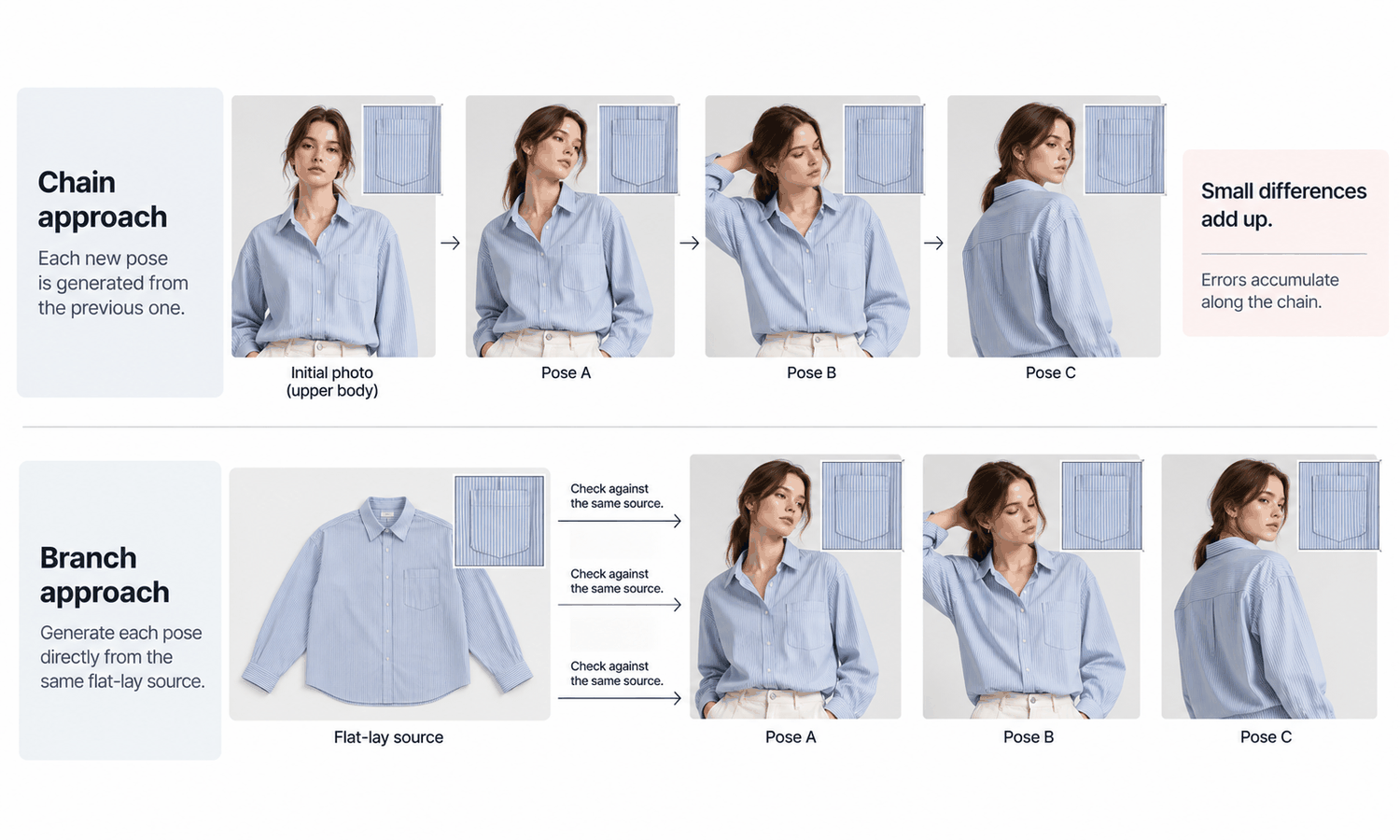
A flat-lay also makes multiple poses consistent in a way a chain of on-model images cannot. If the front, walking and seated images are all produced from the same flat-lay, each is one step from the same source and can be checked against it. If the walking image is produced from the front image and the seated image from the walking one, errors accumulate along the chain, and the last image has drifted furthest.
One limit applies whichever photo you start from. The drape in any generated pose is rendered, not calculated, so it shows how the fabric might look in that pose, not how it actually behaves. When movement itself sells the garment, a photograph or video of the real garment in motion tells the truth more directly.
When Starting From an On-Model Photo Still Makes Sense
Starting from an on-model photo is not always wrong. It suits some jobs well.
Small pose changes from an approved image are the clearest case. Turning the head, adjusting the expression or moving a hand slightly leaves most of the garment untouched, so the source's hidden areas stay hidden and nothing new needs to be invented. For those changes, the approved image is a reasonable starting point.
Legacy images are the second case. A brand may have on-model photos of styles whose garments are no longer available to capture. There, the on-model photo is the only source there is. Keep the new poses modest, check the areas the original pose hid and avoid generating views, such as the back, that the source cannot support.
If the garment still exists, though, capturing a flat-lay is usually quicker than correcting a series of poses reconstructed from an on-model photo.
A starting photo of a real model raises one more question. Changing that person's pose produces an image of them in a position they never held. Before generating anything, confirm that the model's agreement and the client's usage rights cover it, and keep the answer with the job records. Starting from a flat-lay and a generated model avoids the question entirely.
Setting Up a Multi-Pose Workflow
For garments that need several poses, the reliable workflow starts from the garment rather than from a finished image.
In Lightchain AI (apparel AI), that workflow is built around the garment source.
-
AI Virtual Try-On places the garment on the model directly from its flat-lay or garment photo, including on a saved model set, so each pose starts from the same source.
-
Model Studio sets the pose, scene and angle for each image, following the category's pose standard where there is one.
-
Small adjustments to an approved image, such as a hand or a head turn, can be made locally, as described on the Partial Redraw page, without generating a new pose from scratch.
For teams producing several poses per garment across many styles, AI Virtual Try-On is the Lightchain AI solution built around starting from the garment.
Whatever tools you use, keep the sequence simple. Capture the flat-lay, the back and the details. Approve the model. Produce each pose from the garment source, not from another pose. Check every image against the source, without exception, paying particular attention to the areas each pose reveals. Complex prints, lace and openwork, sheer fabrics and layered styling remain current weak areas, so photograph those styles rather than generating poses for them.
Frequently Asked Questions
What does an AI pose generator from photo do?
It produces a garment on a model in a new pose, starting from an image you already have. The result depends heavily on whether that image is an on-model photo or a flat-lay of the garment.
Is it better to start from an on-model photo or a flat-lay?
For new poses, a flat-lay usually gives better results, because it shows the whole garment without folds or hidden areas. An on-model photo suits small changes to an approved image.
Why do new poses from an on-model photo show details that differ from the garment?
Because the original pose hid or distorted parts of the garment, such as the underarms, the back or areas behind a hand. The new pose has to fill those in, and filled-in details are rarely exact.
Can we generate several poses from one on-model image?
You can, but each pose inherits what the first one got wrong, and errors accumulate if poses are generated from each other. Generating each pose from the same flat-lay keeps every image one step from the source.
What if we only have on-model photos of an older style?
Keep new poses modest, check the areas the original pose hid and avoid views such as the back that the source cannot support. If the garment still exists, capture a flat-lay instead.
Can we change the pose of a real model in a photograph?
Only after confirming that the model's agreement and the client's usage rights cover it. Settle it in writing before generating anything.
Which Lightchain AI solution suits generating several poses of one garment?
AI Virtual Try-On is the one to use. It places the garment on a saved model directly from its flat-lay for each pose, while Model Studio sets the pose, scene and angle and local edits handle small adjustments to an approved image.
In Closing
An AI pose generator from photo can only show what its starting photo gave it. An on-model photo carries the original pose's folds, stretches and hidden areas into every new pose, and whatever it concealed has to be filled in. A flat-lay shows the whole garment, so each pose has more to work with and can be checked against the same source. Use approved on-model images for small adjustments, start from the garment for new poses and check every image against its source.
Start Here
If your team needs several poses of each garment and wants every pose to show the garment as it really is, AI Virtual Try-On is the solution to use. It is built around starting from the garment: you capture a flat-lay, place it on a saved model in each pose and check every image against the same source. Start with one style, its flat-lay and back view, and compare the results with poses generated from an on-model photo.
**Explore AI Virtual Try-On → **https://www.lightchainai.com/global/solutions/aiVirtualTryOn