
A pose decides what a shopper sees. The same dress shows its length in one pose and hides it in another. The same jacket shows its front closure when worn closed and its lining when worn open. With photographed models, pose was largely the photographer's and model's call on the day, guided by a brief. With generated models, AI pose becomes a setting, and a setting can be chosen deliberately and repeated exactly.
That shifts a decision toward the person who knows what each category needs to show. A category manager knows that trousers are bought on their cut and rise, that knitwear is bought on its texture and shape, and that a dress with an open back will not sell from a front view alone. A pose standard turns that knowledge into a rule every image in the category follows.
This article explains how category managers can set a pose standard: why pose belongs to the category, how to test candidate poses on one style, how to write the standard, what to watch in back and side views, and how to roll the standard out across a category.
| Category | What the pose must show | Pose to favor | What to avoid |
|---|---|---|---|
| Dresses and skirts | Length, hem and silhouette | Full length, upright, weight evenly placed | Strides that swing the hem |
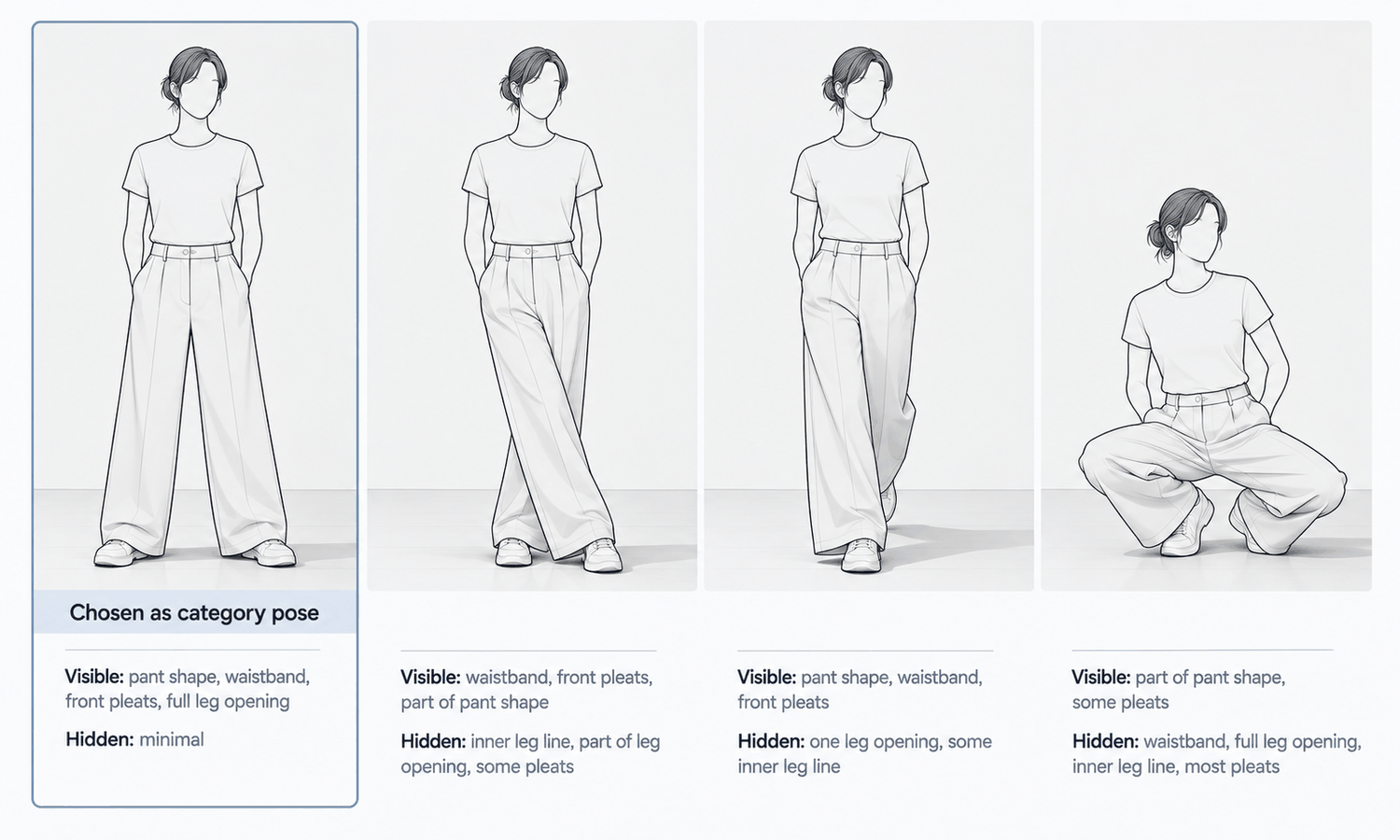
| Trousers and jeans | Cut, rise and leg shape | Standing, legs apart, not crossed | Crossed legs and deep bends |
| Outerwear | Front closure and silhouette | One consistent choice, closed or open | Mixing closed and open within a category |
| Knitwear | Texture, shape and drape | Relaxed arms, garment untouched | Hands pulling or bunching the fabric |
| Tops and shirts | Neckline, placket and body shape | Front-facing, arms clear of the torso | Arms folded over the front |
| Styles with back details | The back | A required back view | Relying on a front view alone |
Why Pose Belongs to the Category
It is tempting to treat pose as styling: something that adds mood and variety, chosen image by image. For campaign imagery, that is often right. For product imagery, pose is information. It controls which parts of the garment are visible, how its proportions read and how easily one product can be compared with the next.
Comparison is the key. A shopper browsing a category page moves from thumbnail to thumbnail, judging length, shape and detail across products. When every product in the category is shown in the same pose, the differences the shopper sees are differences between garments. When poses vary, some of what the shopper sees is the pose, and the comparison becomes harder.
Categories differ in what they need to show, so one standard cannot serve the whole catalog. A pose that shows a dress's length well can hide a trouser's rise. That is why the standard belongs to the category, and why the category manager is the right owner.
One boundary is worth stating plainly in the standard itself. A pose chosen to show length or silhouette clearly makes the image more informative about appearance. It does not make the image a statement about fit. Size and fit guidance still come from the size chart and measurements.
Testing Poses on One Style
Start with one style that represents the category and carries its typical selling details: a dress with the category's usual length and neckline, a pair of trousers with a representative cut, a jacket with the common closure. Generate the style on the same model in a set of candidate poses, and compare them side by side.
For each candidate pose, record the answers to a few questions.
-
What is visible? List the selling details the category depends on and mark which ones the pose shows clearly.
-
What is hidden? Note anything covered by an arm, a hand, a crossed leg or a turn of the body.
-
What does the pose claim about the fabric? A stride that swings a hem, or a pose that makes a heavy coat look light, tells the shopper something about the fabric that may not be true.
-
Where does the garment meet the body? Check shoulders, waist, cuffs and anywhere a hand touches the garment, since those are the points where generated imagery most often goes wrong.
-
Does it crop cleanly? Check that the pose works in every format the category uses, from square thumbnails to tall mobile images.
The test usually narrows quickly. Most categories end up with one primary pose that shows the essentials, one or two secondary views for detail and a required back view where the back matters. Run the chosen poses on two or three more styles from the category before committing, to confirm the standard holds beyond the test piece.
Writing the Standard
A pose standard should fit on one page per category and be usable by anyone producing images, including outside producers.
It names the primary pose and describes it in plain terms: facing, stance, arm position, head position. It names the secondary views and when each is required. It sets the hand rules, such as keeping hands clear of pockets, plackets and logos in the primary image. It fixes framing and crop, meaning how much of the model appears and where the garment sits in the frame. It sets the camera angle, usually straight on at a consistent height.
Include a reference image for each pose. A picture of the approved pose is followed far more consistently than a description of it.
Name the exceptions too. Some styles will not fit the standard: a garment whose main feature is a dramatic sleeve, or a coat designed to be worn open. The standard should say who can approve an exception and require the reason to be recorded, so exceptions stay deliberate rather than becoming a gradual drift away from the rule.
Decide in advance how the standards meet. Sets, co-ords and outfits often cross categories: a matching top and trousers, a dress sold with a jacket. Each piece may have its own product page, and each page follows its own category's standard. The set image, if there is one, needs a rule of its own, usually the standard of the piece the set is merchandised under, with the other piece checked to make sure its selling details are still visible. Writing that down once saves the same debate on every set. The same applies when two category managers share a model or a scene: agree which standard governs shared images, so a shopper moving between neighboring categories sees one coherent brand rather than two slightly different ones.
Back and Side Views: What Is Filled In
Back and side views deserve their own attention, because they are where generated imagery has the least to go on.
If the garment source is a front flat-lay only, a generated back view is largely filled in. The software produces a plausible back for a garment of that shape, but it has no way to know about a back yoke, a vent, a zip, a cut-out or a print that continues around the body. The resulting image can look entirely convincing and still show a back the garment does not have.
The standard should therefore require a back capture for any style whose back matters, and the category manager is well placed to say which styles those are. With a back flat-lay or garment photo as a source, the back view is placed from real information rather than invented.
Every view, front, back and side, is then checked against its garment source without exception. Reconstructed detail tends to come back almost right, and almost right is what passes a quick look, especially in secondary views that reviewers glance at more briefly. Some styles remain harder for generated imagery in any view: complex prints, lace and openwork, sheer fabrics and layered styling are current weak areas. For those, the standard can simply say photograph, and record why.
Rolling Out Across the Category
With the standard written, apply it to every style in the category and review the category as a set: lay out the thumbnails and check that the poses match, the crops align and the selling details are visible across the board.
In Lightchain AI (apparel AI), a pose standard can be applied with a few tools.
-
Model Studio sets the pose, scene and angle for each image, so the category's approved pose can be applied to every style.
-
AI Virtual Try-On places each garment on the approved model from its flat-lay, including on a saved model set, so one product's views stay on one model.
-
When a hand or an arm covers a detail in an otherwise good image, it can be adjusted locally without regenerating the whole image, as described on the Partial Redraw page.
For teams applying standards across many styles and categories, Scale E-commerce is the Lightchain AI solution built for that work.
Revisit the standard when the category changes: a new silhouette, a new length or a new feature that the current poses do not show well. A standard that follows the category keeps doing its job; one written once and left alone becomes a habit nobody remembers the reason for.
Frequently Asked Questions
Why should pose be standardized by category?
Because each category needs to show different things, and shoppers compare products within a category. A shared pose means the differences they see are differences between garments rather than between poses.
How do we choose the right pose for a category?
Test candidate poses on one representative style, recording what each shows, hides and implies about the fabric. Confirm the chosen poses on a few more styles before committing.
What should a pose standard include?
The primary pose, secondary views, hand rules, framing and crop, camera angle and a reference image for each pose. It should also name who can approve exceptions and require the reason to be recorded.
Why do back views need a separate capture?
Because a back view generated from a front flat-lay is largely filled in and may show a back the garment does not have. For any style whose back matters, capture the back and check the view against it.
Does a standard pose show how a garment fits?
No. A clear pose makes the image more informative about appearance, but fit and size guidance come from the size chart and measurements.
Should campaign images follow the same standard?
Not necessarily. Campaign imagery can use more expressive poses, while product imagery follows the category standard so shoppers can compare.
How does Lightchain AI help apply a pose standard?
Model Studio sets the approved pose, scene and angle for each image, and AI Virtual Try-On places each garment on the same saved model from its flat-lay. Scale E-commerce is the solution to use for applying a category's standard across many styles.
In Closing
For product imagery, pose is information, and with generated models it is a setting that can be chosen and repeated. That makes it the category manager's decision. Test candidate poses on one representative style, write the result as a one-page standard with reference images, require back captures where the back matters and check every view against its source. Apply the standard across the category, review it as a set and revise it when the category changes.
Start Here
If you manage categories whose product images need to be consistent and comparable, Scale E-commerce is the solution to use. It is built for producing on-model imagery across many styles: you apply each category's approved pose, scene and angle, place garments on the same saved model from their flat-lays and adjust details without regenerating whole images. Start with one category, test poses on one representative style, and roll the standard out once it holds.
**Explore Scale E-commerce → **https://www.lightchainai.com/global/solutions/scaleECommerce