
Every content team knows the pattern. The launch date is fixed, the sample is late, and the time left for imagery shrinks with every day it does not arrive. When teams talk about the AI of models, meaning the generated models that now stand in for booked ones, one practical question sits underneath: what does that change when the sample is late?
With a photographed shoot, the answer used to be very little. The model, the studio and the photographer were all waiting for the same box. When it arrived, everything happened at once, in whatever time was left, and the checking at the end was the part most likely to be squeezed.
Generated models split the work differently. Much of what goes into an on-model image does not depend on the garment at all, and that part can be finished before the sample arrives. This article explains what can start early, what drafts are good for, what must wait for the physical garment and how to run the process so a late sample costs less time without costing accuracy.
| Work item | Needs the physical garment? | Can start before the sample? | Publishable before the garment is checked? |
|---|---|---|---|
| Choosing and approving the model | No | Yes | — |
| Setting scenes, poses and angles | No | Yes | — |
| Channel layouts and text space | No | Yes | — |
| Copy and in-image text | Partly | As a draft | — |
| Draft images from sketches or supplier photos | No | Yes, as concepts | No |
| Capturing the garment source | Yes | No | — |
| Final on-model images | Yes, via its source | No | No |
| Checking images against the garment | Yes | No | — |
What a Late Sample Used to Change
In a photographed workflow, the sample is a bottleneck for everything. Nothing can be shot until it arrives, so the delay passes straight through to the whole shoot. Studio time gets rebooked, the model's availability becomes a constraint, and the post-production window shrinks to whatever remains before launch.
The squeeze does not fall evenly. Setup and shooting still take the time they take. What gets compressed is review: checking that every detail in the finished images matches the garment, that the color reads correctly and that the right images went to the right channels. Late samples are one of the most common reasons that avoidable errors reach a product page.
Generated models do not remove the dependency on the garment. They remove the dependency of everything else on the garment, and that is a different and more useful thing.
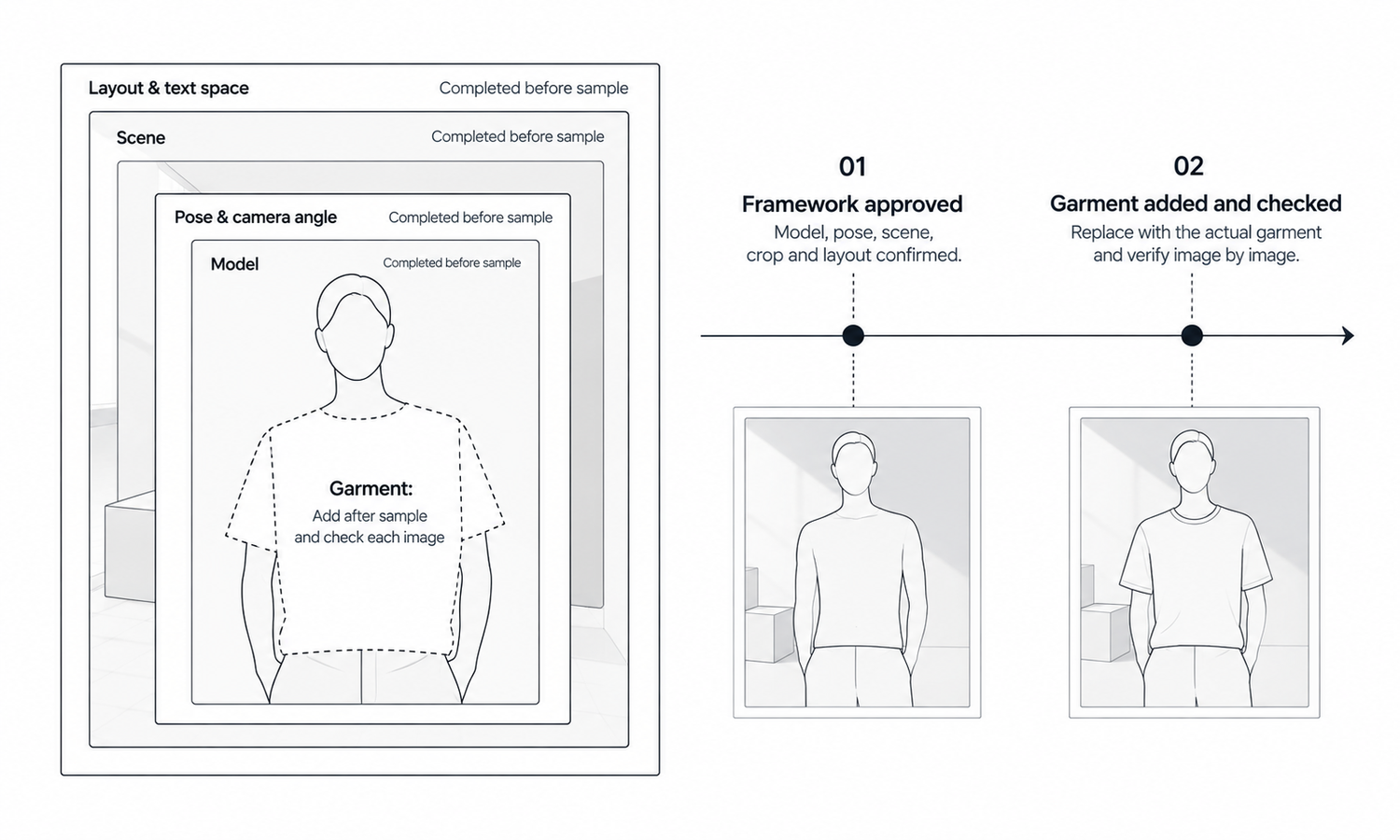
That changes how the calendar should be planned. In a photographed workflow, the content calendar usually has one milestone per style, the shoot, and everything hangs from the sample's arrival date. With generated models, it makes sense to split that into two milestones with different dependencies. The first, frame approved, depends only on the team's own decisions and can be scheduled with confidence weeks ahead. The second, garment placed and checked, depends on the sample and moves with it. Tracking the two separately shows merchandising and marketing colleagues exactly where a late style stands, and it stops a delay in one box from looking like a delay in the whole content plan. It also makes the team's real capacity visible: how many styles can be placed and checked per day once samples land, which is the number that decides whether a late batch can still make its date.
Build Everything Around the Garment First
An on-model image is a garment placed inside a frame: a model, a pose, a scene, a crop and a layout. Only the garment needs the sample. The frame can be built, reviewed and approved while the sample is still on its way.
-
The model. Choose and approve the model for the style or line before the sample exists, including the likeness check and approval record. There is no booking to wait for.
-
Scenes, poses and angles. Set these for the category, so the style will be shown the same way as the rest of its line. Approve them on similar existing garments if that helps the review.
-
Channel layouts. Prepare the crops and templates for each channel, including space for local-language text, prices and badges, so the finished image drops straight into place.
-
Copy and in-image text. Draft the words that sit around and on the image, and leave the garment-specific details, such as fabric composition and exact color names, to be confirmed once the sample arrives.
When the frame is ready, the late sample's arrival triggers a much shorter sequence: capture the garment source, place the garment on the approved model in the approved scenes, check every image and publish. The work that remains is exactly the work that needs the garment, and nothing else is waiting on it.
This also makes the time the review needs easier to protect. If the frame is finished in advance, the time saved at the end can go to checking rather than to setup.
Drafts Before the Sample: Useful, Not Publishable
Teams often want to go one step further and produce images before the sample arrives, using what they have: a sketch, a supplier's photographs or a similar style from a previous season. Those drafts have real uses. They let a layout be approved with realistic content, give a copywriter something to write against and help a merchandiser see how the style will sit on a category page.
They are not product images. A draft from a sketch shows a garment in which fabric, color, weight and many details were filled in by the image rather than specified. A draft from supplier photos may show a pre-production piece that differs from the final sample. A draft from a similar style shows a different garment. Label every draft as a concept, keep drafts out of any folder that feeds publishing and make sure nobody outside the team mistakes them for the real thing.
One rule matters more than the others: replace drafts, do not correct them. It is tempting, when the sample arrives, to take the draft image and edit it toward the real garment, changing the color here and the collar there. The trouble is that a corrected draft keeps every invented detail nobody noticed. The final image should be produced from the real garment source, placed into the frame that was built in advance. The draft has done its job once the frame is approved.
The Line That Does Not Move
A late sample creates pressure, and the pressure lands on the one step that cannot be moved: checking the finished images against the physical garment.
That check covers construction, logos, printed text, trims, hardware and print placement for every image, without exception. Reconstructed detail tends to come back almost right, and almost right is exactly what a rushed review approves. Sampling does not work under time pressure any better than it does without it, because images produced from the same source and settings tend to share the same mistake.
Color is part of the same line. Screen color is not a physical reference, and generated imagery does not promise an exact match to a color code. When the sample arrives, confirm the garment's color against the approved lab dip or standard, and do not read color values from images to fill in product data that was left open.
Some styles should be planned for photography from the start, and late samples make that planning more important. Complex prints, lace and openwork, sheer fabrics and layered styling are current weak areas for generated imagery. If one of those styles is late, book the photography slot in advance, so the late arrival does not also trigger a scramble for a studio.
Running a Late-Sample Workflow
In practice, the workflow has two phases: build the frame while waiting, then place the garment and check when it arrives.
In Lightchain AI (apparel AI), both phases use tools that do not depend on the sample until the last step.
-
Model Studio creates and adjusts the model, pose, scene and angle in advance, so the frame for each style is approved before the sample exists.
-
When the garment source is captured, AI Virtual Try-On places the garment on the approved model from its flat-lay, including on a saved model set, so the new style joins its line in the same way as the others.
-
The Omni-Marketing Workbench lets channel layouts and in-image text be prepared ahead, ready for the final images.
For teams producing on-model imagery across many styles and launch dates, Scale E-commerce is the Lightchain AI solution built for that work.
Whatever tools you use, keep a simple status for each style: frame approved, garment source captured, images produced, images checked, published. A late sample then shows up as one style waiting at one step, rather than as a whole shoot on hold.
Frequently Asked Questions
What changes when the sample is late and the models are generated?
Everything except the garment can be prepared in advance: the model, scenes, poses, layouts and most of the copy. When the sample arrives, only the garment capture, placement and checking remain.
Can we publish images made before the sample arrives?
No. Drafts made from sketches, supplier photos or similar styles are concepts, and they should be labeled and kept out of publishing. Final images are produced from the real garment source and checked against the garment.
Why replace drafts instead of correcting them?
Because a corrected draft keeps every invented detail nobody noticed. Producing the final image from the real garment source, placed into the approved frame, avoids carrying those details forward.
Can the review be shortened when the sample is late?
No. Every image is still checked against the physical garment, without exception. Building the frame in advance is what creates time for that review.
How should color be handled when the sample arrives?
Confirm the garment's color against the approved lab dip or standard. Do not take color values from generated images to fill in product data.
Which styles should be planned for photography?
Styles with complex prints, lace and openwork, sheer fabrics or layered styling, which are current weak areas for generated imagery. Book the photography slot in advance so a late sample does not also mean a late studio.
How does Lightchain AI help when a sample is late?
It lets the model, scenes, poses and layouts be prepared in Model Studio and the Omni-Marketing Workbench before the sample exists, then places the garment on the approved model from its flat-lay with AI Virtual Try-On when the source is captured. Scale E-commerce is the solution to use for running this across many styles and launch dates.
In Closing
A late sample used to hold up the whole shoot. With generated models, it holds up only the garment. Build the frame around it in advance, meaning the model, scenes, poses, layouts and copy, and use drafts to approve that frame without ever publishing them. When the sample arrives, capture it, place it and check every image against the physical garment. The time gained by preparing early belongs to that check, not to skipping it.
Start Here
If your launches depend on samples that do not always arrive on time, Scale E-commerce is the solution to use. It is built for producing on-model imagery across many styles: you approve models, scenes and poses in advance, place each garment on its approved model from a flat-lay when the sample arrives and keep one product's images on one model. Start with your next late style, build its frame before the sample lands, and compare the timeline with your usual process.
**Explore Scale E-commerce → **https://www.lightchainai.com/global/solutions/scaleECommerce