
AI models for clothing have made the first round of images fast. A garment goes onto a generated model, the scenes and poses are set, and a batch of on-model images is ready for review in a fraction of the time a shoot would take. The time that remains is spent on the rounds after the first: the notes, the fixes, the second look and, too often, the third.
Most of those extra rounds are not caused by hard problems. They are caused by notes that could be read more than one way. "The collar looks wrong." "Make it more natural." "The color is off." The person making the fix was not in the review, cannot see what the reviewer saw and has to guess. The guess is sometimes right. When it is not, the image comes back for another round, and the same note is written again with a little more detail.
This article explains why second rounds happen with generated imagery, what a note needs to contain, how presentation notes differ from product notes, which notes belong in the brief before the first round and how to run reviews that end in one round.
| Vague note | Why it causes a second round | A note that works |
|---|---|---|
| "Doesn't look real" | Names no location and no standard | "Image 04: shadow under the brim is missing; the face is lit as if uncovered" |
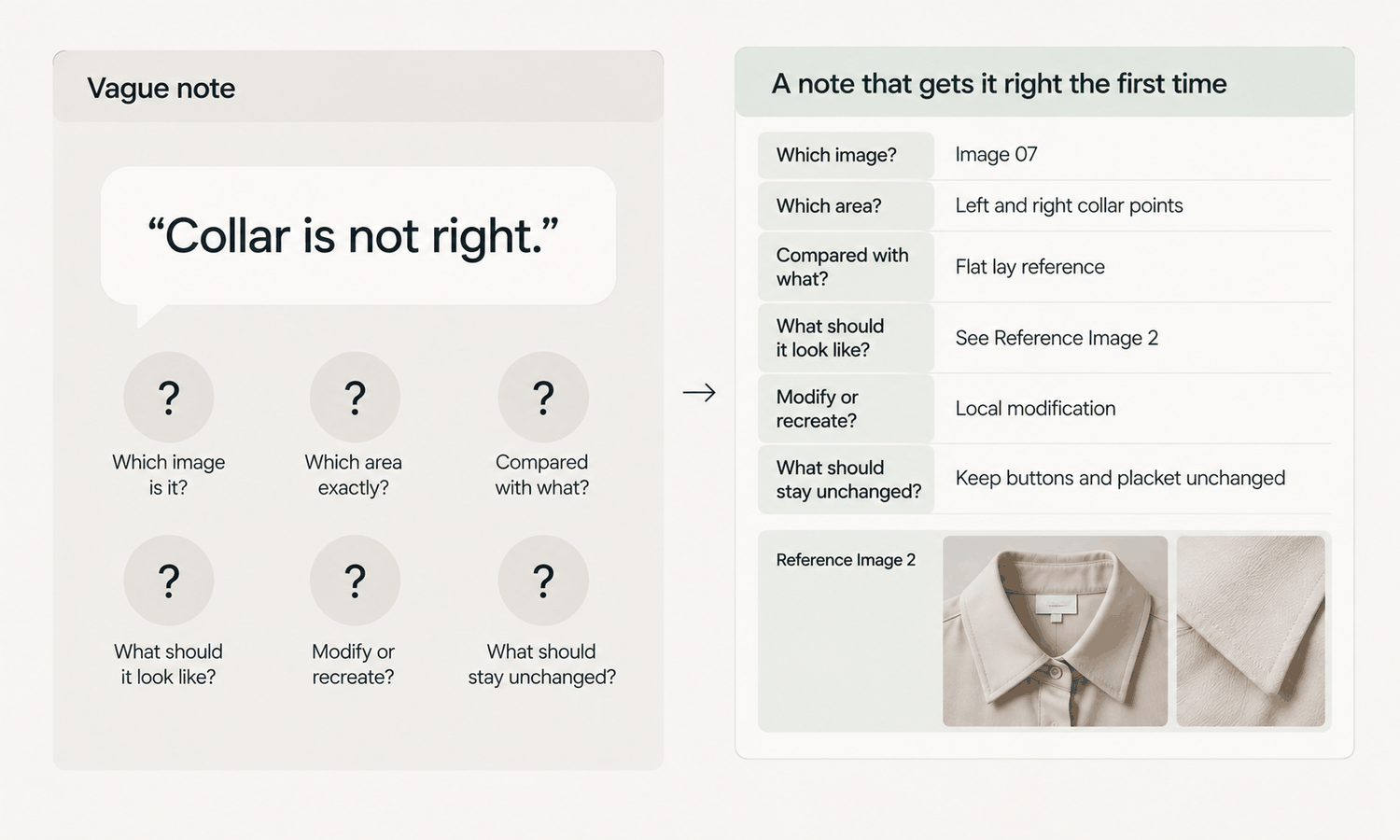
| "Collar is wrong" | Does not say how or against what | "Image 07: collar points are shorter than on the flat-lay; match reference 2" |
| "Make it more natural" | A preference with no target | "Image 03: relax the left arm so it hangs clear of the pocket" |
| "Color is off" | Judged on a screen, with no reference | "Style 118 navy: check against the approved lab dip before any change" |
| "Fix the hands" | Does not say which or what is wrong | "Image 05: right hand has merged into the jacket hem; separate it and check the hem" |
| "Same as last time" | Relies on memory | "Apply rule 4 in the brief: hands clear of pockets in every primary image" |
Why Second Rounds Happen
Two things make vague notes more expensive with generated imagery than with photography.
The first is distance. The person applying the note is often not the person who wrote it, and sometimes works for a different company. They have the image and the words, but not the reviewer's reference, the reviewer's reasoning or the conversation that led to the note. Every gap in the note becomes a decision they have to make on the reviewer's behalf.
The second is that changes travel. When part of a generated image is changed, the edited area is produced fresh, and its surroundings can shift with it. A note that fixes a hand can move a pocket; a note that adjusts the hair can change a collar. If the note does not say what must stay as it is, the fix can introduce a new problem, and the next round is spent on that.
So a note that prevents a second round does two things. It says exactly what to change, and it says what must not change.
What a Note Needs
A good note is short, but it answers every question the person applying it would otherwise have to guess.
-
Which image and where. An image number or file name, and the exact location: left cuff, second button from the top, lower hem at the back.
-
What is wrong, compared with what. Not "the button is wrong" but "the button shows two holes; the reference shows four." The comparison is what makes the note checkable.
-
What it should be. Attach or name the reference: the flat-lay, the trim close-up, the artwork file, the approved pose. A note without a target invites another interpretation.
-
Whether it is presentation or product. Say whether the note concerns how the image looks, such as pose, light or background, or what it shows about the garment. The two have different tolerances.
-
Edit or regenerate. Say whether a local fix is enough or whether the image should be produced again from the garment source.
-
What must stay unchanged. Name the parts of the image that are correct and must remain so after the fix.
It helps to keep notes in one shared place, one line per issue, with the image reference and the attached reference beside each. Notes scattered across messages and screenshots are where details get lost between rounds.
Presentation Notes and Product Notes
Not every note carries the same weight, and treating them alike slows reviews down.
Presentation notes concern how the image looks: a pose that feels stiff, a background that is too busy, light that is too warm, a crop that is too tight. They are partly matters of taste. They should still be specific, but they can be settled by agreement, and a reasonable fix can be accepted without a strict comparison.
Product notes concern what the image shows about the garment: construction, trims, printed text, print placement, color and how the garment hangs from the body. They are not matters of taste. The image either matches the product or it does not, and the fix is checked against a reference, not against a preference. Reconstructed detail tends to come back almost right, so product notes should always name the reference the fix will be checked against.
Color notes need particular care. A note that says the color looks wrong on screen does not establish what the color should be. Screen color is not a physical reference, generated imagery does not promise an exact color-code match and the colorway is settled by the lab dip or approved sample. A color note should therefore point to the physical reference and to the garment source, and the fix, where needed, is usually a better garment source rather than a recolor.
The Note to Write Before the First Round
The most effective note is the one written before any image is made. Many second-round notes repeat things the reviewer knew from the start but did not put in the brief.
Write down what must never change: the trims, the printed text, the print placement, the construction details that make the product what it is. Clarify anything ambiguous in the garment source, such as whether a line is a seam or a fold, or whether a hem is shaped or moving. State the pose and scene rules for the category, including where hands may and may not rest. Name the styles that will be photographed rather than generated: complex prints, lace and openwork, sheer fabrics and layered styling are current weak areas, and routing them early prevents a round spent discovering it.
Then watch for notes that repeat. When the same note appears across several images, or across several batches, it is no longer a note about an image. It is a missing rule. Add it to the brief or the template, so the next batch starts with it in place.
Running Reviews That End in One Round
A few habits make one-round reviews the norm rather than the exception.
Consolidate notes before they are sent. When several people review the same batch, their notes can conflict: one wants the arm lowered, another likes it raised. Have one person merge the notes and resolve conflicts before anything goes back for fixing.
Review every image against its garment source, at full size, without exception. Images produced from the same source and settings tend to share the same mistake, so a clean sample says little about the rest, and a problem found late in one image usually exists in others.
Group notes by cause. If the same problem appears across a batch, the cause is probably upstream, in the garment source or the settings, and one fix at the source is better than the same edit made twenty times.
Record the outcome of each note: fixed by edit, fixed by regeneration or routed to photography. The record shows which kinds of note keep coming back, and which rules the brief is missing.
In Lightchain AI (apparel AI), each kind of note has a matching fix.
-
Presentation notes, such as a background, a crop or a stray object, map to Image Editor tools, including Partial Edit for small local changes.
-
Product notes about a specific trim map to Target Revision, which replaces an element in a defined area using a reference image.
-
Notes that call for a fresh start map to AI Virtual Try-On, which places the garment on the model again from its flat-lay.
For teams turning review notes into precise, local fixes, Partial Redraw is the Lightchain AI solution built for that work.
Frequently Asked Questions
Why do AI model images often need a second round?
Mostly because notes are vague and the person applying them has to guess. Changes to generated images can also shift nearby areas, so a note that does not say what must stay unchanged can introduce a new problem.
What should a revision note include?
The image and exact location, what is wrong compared with a named reference, what it should be, whether it is a presentation or product issue, whether to edit or regenerate and what must stay unchanged. Each of those removes a guess the person applying the note would otherwise have to make.
How are presentation notes different from product notes?
Presentation notes concern how the image looks and can be settled by agreement. Product notes concern what the image shows about the garment and must be checked against a reference.
How should color problems be noted?
Point to the physical colorway, such as the lab dip or approved sample, and to the garment source. Screen color is not a physical reference, so the fix is usually a better garment source rather than a recolor.
What belongs in the brief rather than in review notes?
Anything that must never change, clarifications of ambiguous details, pose and scene rules and the styles that will be photographed. Notes that repeat across batches should become rules in the brief.
Who should send notes back for fixing?
One person who has merged the reviewers' notes and resolved any conflicts. Conflicting notes are one of the most common causes of a second round.
How does Lightchain AI help notes get fixed in one round?
It gives each kind of note a matching fix: Image Editor tools for presentation notes, Target Revision for trim notes with a reference image and AI Virtual Try-On for a fresh start from the flat-lay. Partial Redraw is the solution to use for turning review notes into precise, local fixes.
In Closing
AI models for clothing make the first round fast; vague notes make the rounds after it slow. A note that prevents a second round names the image and location, compares against a reference, states what it should be, separates presentation from product, chooses between edit and regeneration and says what must stay unchanged. Write the notes you already know into the brief before the first round, consolidate reviewers' notes before sending them and turn every repeated note into a rule.
Start Here
If your team reviews generated on-model images and wants fixes to land in one round, Partial Redraw is the solution to use. It is built for precise, local refinement: you apply presentation fixes with image editing tools, replace a specific trim from a reference image and leave correct areas as they are. Start with your next batch, write every note with its reference and location, and track how many come back.
**Explore Partial Redraw → **https://www.lightchainai.com/global/solutions/partialRedraw