
For a content producer, AI models in fashion start as a production shortcut: a model can be generated instead of booked, and a garment can be on a person by the afternoon. After a season or two, something else has happened. The team has built up a collection of generated models, some approved, some abandoned, some used across dozens of products and some used once. That collection is a model library, whether anyone set out to build one or not.
An unmanaged library causes quiet problems. Two producers generate nearly identical models for different lines. Nobody can say which models were approved for publication and which were only used in an internal review. A shopper, a colleague or a legal team asks where a particular image came from, and the answer takes a day to reconstruct. A model the brand stopped using reappears in a new campaign because it was still sitting in a folder.
This article explains how content producers can keep a model library in order: why it needs managing, what each model record should hold, how to trace every image back to its sources, and how to handle approval, refresh and retirement.
| What to record | Why it matters | When to check it |
|---|---|---|
| The model's brief and references | Lets the team recreate or extend the model | When the model is created |
| Where the model is used | Prevents duplicates and clashes across lines | Each time the model is assigned |
| Approval status | Separates publishable models from internal ones | Before any image goes live |
| The sources of every image | Makes errors traceable and fixable in bulk | When each image is produced |
| Likeness check and labeling rule | Records that publication checks were done | Before first publication |
| Review or retirement date | Stops outdated models from resurfacing | At each scheduled review |
Why a Model Library Needs Managing
Generated models are cheap to create, which is exactly why libraries grow untidy. With photographed models, every booking left a trail: a contract, an invoice, a call sheet. With generated models, a new person can appear in a few minutes and leave no trace beyond the image itself.
The costs of that show up later. Near-duplicate models dilute a brand's look, because shoppers see several people who seem related without being the same. Unclear approval status means an image made for an internal range review can end up on a product page. Missing records make every question slow to answer, and some questions, such as whether a face was checked for resemblance to a real person, cannot be answered at all after the fact.
A library also outlives the people who built it. Producers change roles, freelancers finish projects, and agencies hand work back. Records that live only in someone's memory leave with them.
Managing the library does not need special software. It needs a small set of agreed records, kept at the moments when information is easiest to capture: when a model is created, when an image is produced and when something is approved.
What a Model Record Should Hold
Each model in the library should have a record, kept wherever the team keeps its production documents. A useful record is short and consistent across models.
-
An identifier and a working name. A code that never changes, plus a name the team can use in conversation. Names help people; codes keep records unambiguous.
-
The brief and the reference images. The attributes the model was generated from, such as age range, build, hair, expression and default pose, written plainly, with any reference images attached. This is what lets the team recreate the model or extend it into new poses and scenes.
-
Assignment. Which product lines, categories and markets the model is used for. Assignment is what prevents two producers from generating near-duplicates, and it keeps one product's image set on one model.
-
Status and checks. Whether the model is approved for publication, limited to internal use or retired, and the dates of its likeness check and approval.
Keep attribute descriptions neutral. A record describes the settings a model was made from; it does not judge whether a body or an age suits a garment. If the team plans models across the catalog by age range and build, the record is where that plan becomes visible for each model.
Tracing Every Image to Its Sources
A model record describes a person. An image record describes a production: which model, which garment source, which references and which settings produced this particular image, who reviewed it and when.
That may sound like bureaucracy, but it pays for itself the first time something goes wrong. Suppose a review finds that a collar point is consistently softened in one batch of images. Images produced from the same settings tend to repeat the same mistake, so the question immediately becomes: which other images were made the same way? With image records, that is a filter. Without them, it is a hunt through folders by eye.
Image records also answer the questions that come from outside the team. A customer asks whether a product page image shows the real garment. A marketplace asks whether an image is AI-generated. A legal team asks which images use a model that is being retired. Each of those has a quick answer if the sources were written down when the image was made.
A naming convention does much of the work. A file name that encodes the product code, the model identifier, the market and a version number lets anyone see an image's origins without opening a spreadsheet. The spreadsheet or asset system then holds the detail: garment source, references, reviewer and date.
Records also support review. Every image should be checked against its garment source, without exception, because reconstructed detail tends to come back almost right, and almost right survives a quick look. The image record is where the reviewer confirms that check was done.
Approval, Refresh and Retirement
Models move through a life cycle, and the library should reflect it.
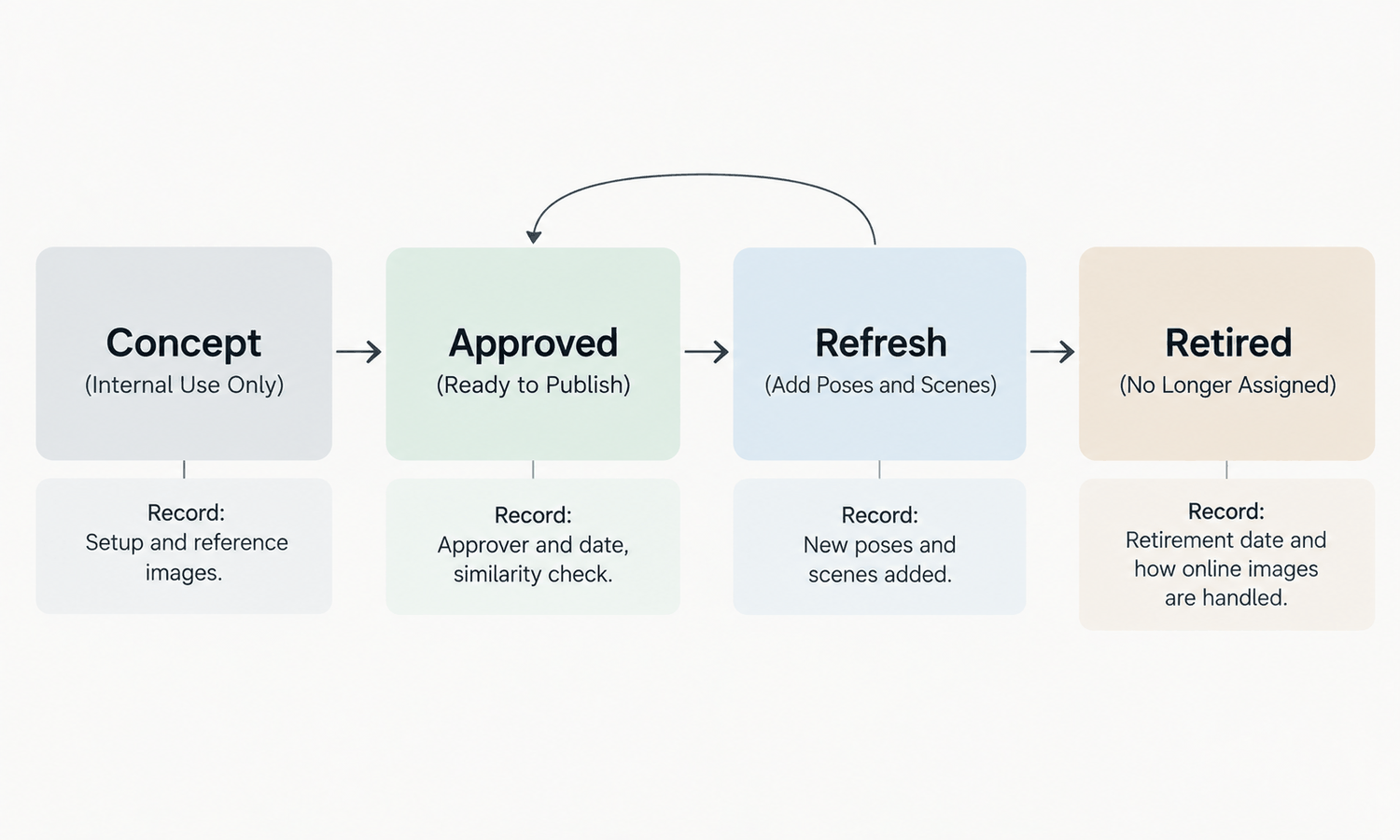
A new model starts as a concept. It can be used for internal reviews, range planning and tests, but not for publication. Approval moves it into use: someone with authority has checked the model against the brand's plan, confirmed the likeness check and agreed the labeling rules for the markets where it will appear. Only approved models should be assigned to live product lines.
Refresh happens when something changes. A new line, a shift in who buys a category or a new market can each mean the library needs a new model, or an existing model needs new poses and scenes. Refresh is also the moment to check for near-duplicates: before generating a new model, look for an existing one that could be extended.
Retirement is the step teams most often skip. When a model is retired, mark it in the record, remove it from active assignment and decide what happens to live images that use it. Some teams replace them over time; others let them run until the products end. Either is workable, as long as the decision is recorded and the retired model cannot be picked up for new work by mistake.
A scheduled review, such as at the end of each season, keeps the cycle moving. Walk through the library, confirm each model's status and assignment, retire what is no longer used and note what the next season needs.
Agencies and freelancers need the same structure. When outside producers generate images for the brand, agree up front that they use models from the brand's library rather than creating their own, that they return image records with the finished files, and that new models they propose enter the library as concepts until approved. The brand keeps accountability for what it publishes, so the evidence of how each image was made should come back with the work, not stay with whoever made it.
Keeping the Library in Practice
In Lightchain AI (apparel AI), the pieces of a model library already sit inside the product.
-
Model Studio creates models and adjusts face, body, size, pose, scene and angle, so an approved model can be extended into new poses and scenes rather than regenerated from scratch.
-
AI Virtual Try-On supports saved model sets, which keep one product's image set on one model.
-
Assets can be drawn from upload history, generation history, a personal library or an enterprise library, which gives a team a shared place for approved models and garment sources.
-
An AI Compliance Mark watermark control is available for teams that need to label generated images in particular markets or channels.
For teams producing on-model imagery across many styles and markets, Scale E-commerce is the Lightchain AI solution built for that work. The records themselves, meaning the model records, image records and approval log, still belong in the team's own production documents, where they can be kept alongside briefs, product data and sign-offs.
Frequently Asked Questions
What is a model library?
It is the collection of AI-generated models a content team has created and used over time. Once a team works with generated models for more than a season, it has a library, and keeping records for it prevents duplicates, confusion over approval and slow answers to simple questions.
What should be recorded for each model?
An identifier and working name, the brief and reference images, the lines and markets the model is assigned to, and its status with the dates of its likeness check and approval. Keep the attribute descriptions neutral.
Why record the sources of every image?
Because errors tend to repeat across images made the same way. When one image shows a problem, image records let the team find every other image produced from the same sources and settings, and they answer outside questions quickly.
When should a model be retired?
When it no longer fits the brand's plan, a line or a market. Mark it retired, remove it from active assignment and record what happens to live images that use it.
How do we avoid near-duplicate models?
Record where each model is assigned and check the library before creating a new one. Extending an existing model into new poses and scenes is usually better than generating a similar person from scratch.
Who should approve a model for publication?
Someone with authority over the brand's imagery, after checking the model against the brand's plan, confirming the likeness check and agreeing the labeling rules for each market where it will appear. Record the approver and the date in the model record, so the decision can be traced later.
Which Lightchain AI solution helps content producers keep a model library?
Scale E-commerce is the one to use. It brings Model Studio, saved model sets in virtual try-on and shared personal and enterprise libraries together for producing on-model imagery across many styles. Keep the model and image records alongside it in your production documents.
In Closing
AI models in fashion make it easy to create a new person and just as easy to lose track of one. A model library turns that ease into an asset instead of a liability. Keep a short record for every model, trace every image to its model, garment source and references, and move each model through concept, approval, refresh and retirement on purpose. With those records in place, the team can answer where any image came from, fix errors in bulk and keep one consistent set of people across its products.
Start Here
If your content team produces on-model imagery with AI models across many styles and markets, Scale E-commerce is the solution to use. It is built for producing that imagery at volume: you create and extend models, keep them in shared libraries, put garments on them through virtual try-on and use saved model sets to keep each product on one model. Start by recording the models you already use, then bring new production into the same structure.
**Explore Scale E-commerce → **https://www.lightchainai.com/global/solutions/scaleECommerce