
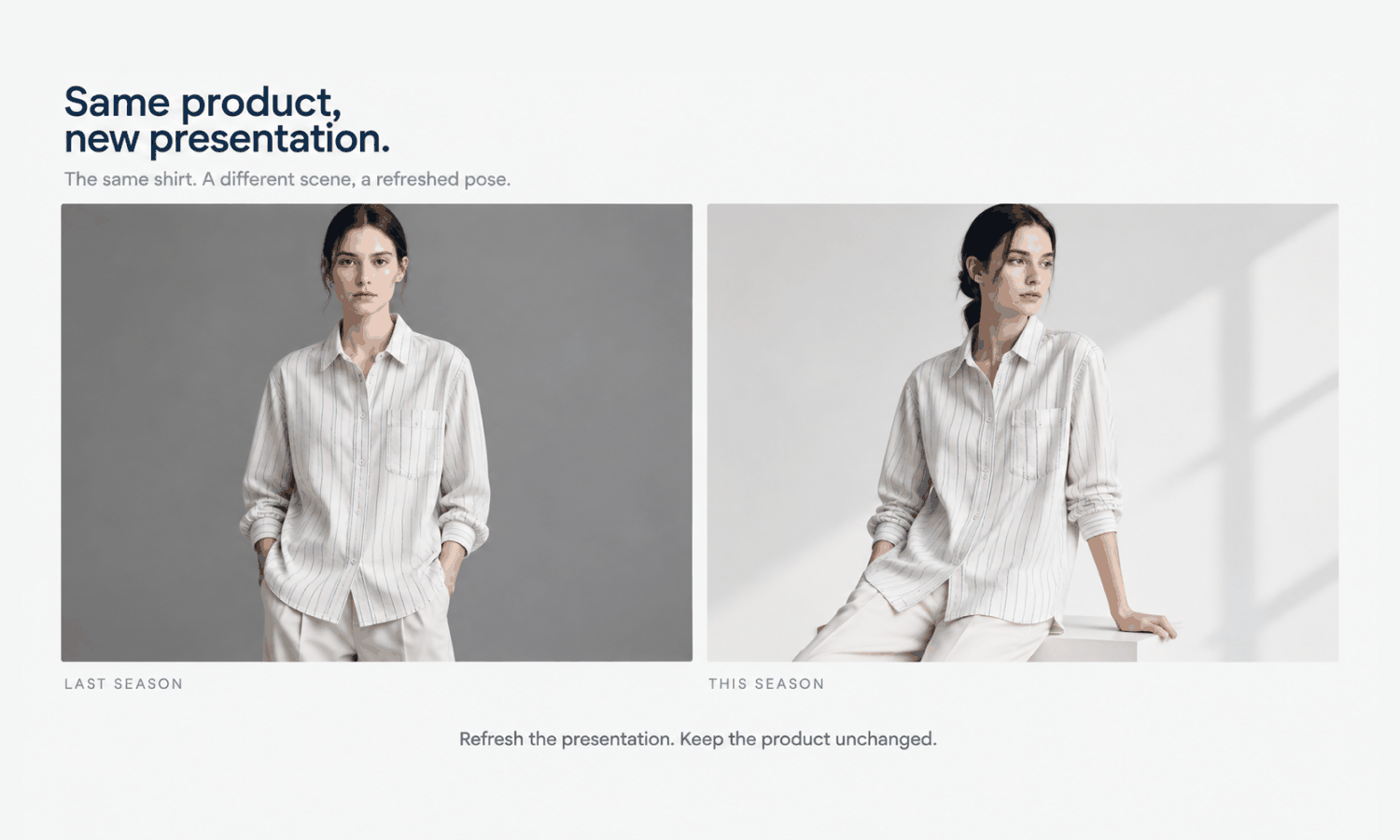
The AI models fashion brands use for product imagery make one common job much easier: refreshing carryover styles. Many brands sell some of their most established pieces season after season, such as a classic shirt, a core pair of trousers or a signature coat. The garment stays the same, but everything around it moves on. Each new season brings a new look for the store: new scenes, new styling, sometimes a new approach to poses and crops. Carryover styles shown in last season's images start to look out of place beside the new collection.
Brands have traditionally faced an awkward choice: reshoot continuing styles every season, which costs time and money for garments that have not changed, or keep the old images, which makes the store look inconsistent. Generated imagery offers a third route. The garment can be placed again on the season's approved model, in the season's scene and styling, so it sits naturally beside the new collection.
That route has its own risks. Refreshing images is an opportunity to introduce new errors into a product that customers already know, and a carryover style that has quietly changed, in fabric, color or trims, is not really the same garment. This article explains what a carryover style is and why its images age, what can change and what must not, how to refresh without reintroducing errors, how to handle models, rights and records across seasons and how to plan a refresh each season.
| Element | Changes with the season? | Action |
|---|---|---|
| Scene and background | Often | Apply the new season's scene |
| Styling and supporting pieces | Often | Apply the new season's styling rules |
| Pose standard | Sometimes | Apply the category's current standard |
| Crops and layouts | Sometimes | Export to the current channel presets |
| Model | Sometimes | Use the season's approved model, with records checked |
| The garment itself | Not if unchanged | Start from the garment source and check again |
| A garment that has been updated | Yes | Capture a new garment source; treat it as a new product |
| Labeling and records | As rules change | Confirm current rules and update records |
What a Carryover Style Is and Why Its Images Age
A carryover style, sometimes called a continuing or core style, is a product that stays in the range from one season to the next with no meaningful change to the garment. It often sells steadily, and customers may return to buy it again.
Its images age for reasons that have nothing to do with the product. A brand's visual identity shifts each season: warmer or cooler light, a new setting, a different styling approach, new crops for new channels. When the season's new products appear in that new look and carryover styles remain in the old one, category pages show two visual languages side by side. The carryover styles look dated, even though they are exactly as current as the day they launched.
Refreshing their images is about consistency, not about changing the product. That distinction is the principle behind everything that follows.
Not every carryover style needs a refresh every season. A style whose images already fit the new look, or whose original photography is strong and still accurate, may be left as it is. The decision is made style by style, based on how far the season's look has moved and how visible the style is. A top-selling carryover that sits on the front page of a category deserves a refresh sooner than one that appears only deep in a search.
What Can Change and What Must Not
A refresh changes the presentation and leaves the product alone.
-
The scene can change. A new background, setting or light direction that matches the season's look.
-
The styling can change. New supporting pieces, following the season's rules, as long as they stay quiet and do not cover the product.
-
The pose and crop can change. The category's current pose standard and the channels' current crops.
-
The model can change. The season's approved model, if the brand has moved to a new one, with the approval and likeness records in place.
-
The garment must not change. Its construction, color, fabric, trims, logos and print placement stay exactly as the product is.
The last point has a corollary. If the carryover style has actually been updated, for example a new fabric supplier, a slightly different color, a replaced trim or an adjusted fit, it is no longer the same garment. Treat it as a new product: capture a new garment source from the updated sample and produce its images from that, rather than editing the old images toward the new version. Check the product record before each refresh to confirm which styles have changed.
Refreshing Without Reintroducing Errors
The safest refresh starts from the garment, not from last season's image. Place the garment again from its approved garment source into the new scene, rather than editing the old image's background or pose. Editing an old image carries forward anything that image got wrong and adds new reconstruction on top, while starting from the source gives each refreshed image one clean step from the garment.
Then check every refreshed image as if it were new, without exception. A carryover style's customers know the product, and some may be buying it again, so a detail that has shifted, such as a pocket moved or a logo reshaped, is more likely to be noticed than on a new style. Where the garment is still in stock, compare the images with a physical piece as well as with the source, especially for color, which is judged against the garment rather than the screen.
A new scene can also change how a garment reads. Warmer light can shift how its color appears; a busier background can make its details harder to see. Choose scenes for carryover styles that keep the product clear, even when the season's campaign imagery is more expressive. Styles with complex prints, lace, sheer fabrics or layered styling remain current weak areas for generated imagery; if they were photographed originally, it may be simpler to keep their photographs or reshoot them than to generate new versions.
Models, Rights and Records Across Seasons
A refresh is a good moment to check the paperwork behind the images.
If the season uses the same generated model as before, confirm that its approval and likeness check are still on record and still reflect the brand's current standards. If it uses a new model, the carryover styles move onto that model with the rest of the range.
If any earlier images involved real people, for example photographs of a booked model, check whether the agreement covers continued use for another season and in the channels where the images will appear. Agreements often have time or channel limits, and a refresh may be the point at which older images should be retired rather than reused.
Labeling rules for AI-generated imagery also change over time and differ by channel. Confirm the current rules before publishing refreshed images, and apply them consistently.
Keep the garment sources themselves up to date too. A flat-lay photographed several seasons ago may have been captured under different light or at a lower resolution than the brand now uses. If it no longer meets the current capture standard, photographing the garment again gives every refreshed image a better starting point.
Finally, update the records. Link each refreshed image to its garment source, model and settings, note the season and retire the old images so they are not accidentally republished.
Planning an AI Models Fashion Refresh Each Season
A refresh is most effective as part of the season's plan rather than an afterthought.
List the carryover styles and confirm from the product record which are unchanged and which have been updated. Decide how deep each refresh should go: a full refresh on the new model and scene, a scene-only refresh or no refresh at all for styles that already fit. Build the season's frame, meaning the approved model, scenes, poses and crops, before the new collection's images are made, and run the carryover styles through the same frame so everything matches. Schedule the refresh before launch, so the whole store changes at once.
In Lightchain AI (apparel AI), carryover styles can be refreshed within the season's frame.
-
AI Virtual Try-On places each carryover garment on the season's saved model directly from its garment source, rather than editing last season's image.
-
Model Studio applies the season's scene, pose and angle, so carryover and new styles share one look.
-
The Image Editor and the Omni-Marketing Workbench prepare the refreshed images for each channel's current crops and layouts.
For brands keeping a whole range consistent across seasons, Scale E-commerce is the Lightchain AI solution built for that work.
Frequently Asked Questions
Can the AI models fashion brands use refresh carryover styles?
Yes. The unchanged garment can be placed on the season's approved model, in the season's scene and styling, so it matches the new collection without a reshoot.
What can change in a carryover refresh?
The scene, styling, pose, crop and, if the brand has moved on, the model. The garment itself must stay exactly as the product is.
What if a carryover style has been updated?
Then it is a new product. Capture a new garment source from the updated sample and produce new images from it, rather than editing the old ones.
Why start from the garment source rather than last season's image?
Because editing an old image carries forward any errors it had and adds new reconstruction. Starting from the source gives each image one clean step from the garment.
Do refreshed images need checking?
Every one, as if new. Customers who know a carryover style may notice a shifted detail more readily than on a new style.
What should be checked beyond the images?
The model's approval and likeness records, any agreements behind earlier images of real people, current labeling rules for each channel and updated records linking each image to its source. A refresh is a natural point to review all of them.
How does Lightchain AI help refresh carryover styles?
AI Virtual Try-On places each carryover garment on the season's saved model from its garment source, Model Studio applies the season's scene and pose and the Image Editor prepares channel crops. Scale E-commerce is the solution to use for keeping a range consistent across seasons.
In Closing
The AI models fashion brands use for product imagery make it practical to refresh carryover styles every season, so continuing products sit naturally beside the new collection. Change the presentation, never the product. Start each refreshed image from the garment source, check it as if it were new and treat any updated garment as a new product. Confirm model records, agreements and labeling rules, update the records, retire old images and plan the refresh into the season so the whole store changes together.
Start Here
If your range carries styles from season to season and you want them to match each new collection, Scale E-commerce is the solution to use. It is built for keeping on-model imagery consistent across many styles: you place each carryover garment on the season's model from its source, apply the season's scene and prepare channel crops. Start with your top carryover styles, confirm which are unchanged and refresh them inside the new season's frame.
**Explore Scale E-commerce → **https://www.lightchainai.com/global/solutions/scaleECommerce