
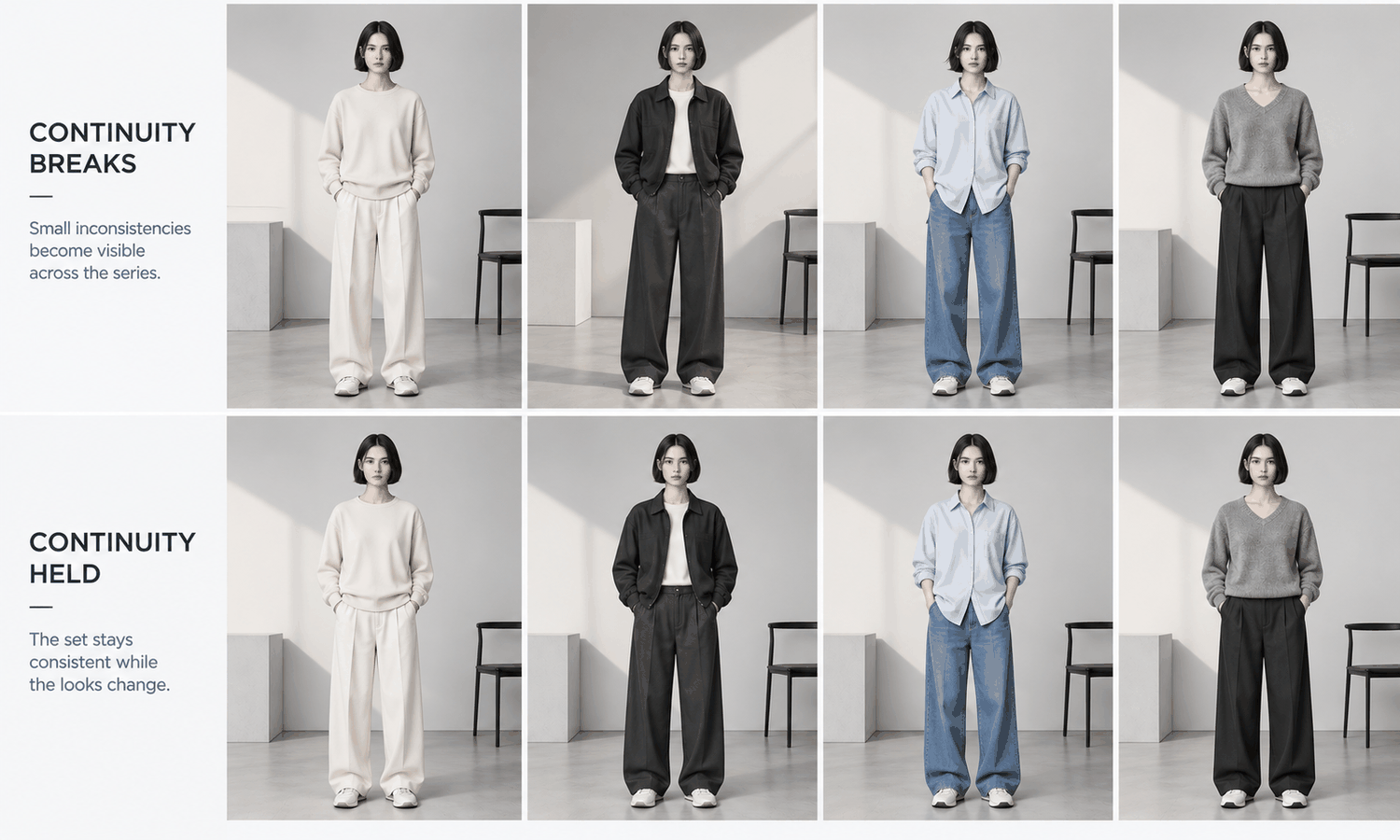
An AI model photoshoot replaces the studio, the photographer and the booked model with a generated model and a set of garment photos, but it still benefits from being planned like a shoot. Brands that treat it as a series of one-off image requests tend to end up with images that do not quite belong together: the light falls from different sides, the model's hair changes between looks, a background prop moves around. Brands that plan it the way a production team plans a real shoot get a set that reads as one session.
Photo production already has good tools for this. Two of them carry over directly. The shot list says exactly which images are needed, so nothing is missed and nothing extra is made. Continuity keeps everything that should stay the same from one image to the next actually the same. Both are simple, and both matter more with generated images than with photographed ones, because nothing on a generated set stays consistent by default.
This article explains how to plan an AI model photoshoot: what to prepare before the shoot, how to write the shot list, how to keep continuity, how to handle production, review and delivery, and how to run it in practice.
| Stage | Real photoshoot | AI model photoshoot | What carries over |
|---|---|---|---|
| Garments | On set, styled on the day | Captured beforehand as flat-lays | Preparation and pressing |
| Model | Booked, fitted, briefed | Created, approved and saved | A clear brief |
| Art direction | Mood board, lighting plan | Reference images, scene and light settings | The same references |
| Shot list | Guides the day | Guides production batches | Exactly as it is |
| Continuity | Watched by the team on set | Checked side by side after production | The same checks |
| Hard garments | Photographed like everything else | Photographed separately | A hybrid plan |
| Review and delivery | Selects, retouching, delivery | Checks against sources, notes, delivery | Records and approvals |
Before the Shoot: Garments, Model and Direction
The biggest difference from a real shoot is that there are no garments on set. Everything the images show of the product comes from the garment sources, so they are prepared first. Photograph each garment as a flat-lay, pressed and evenly lit, with a back view where the back matters and close-ups of logos, printed text, trims and any print. These photographs are both the input and the standard every image will be checked against.
The model comes next. Create a shortlist from a written brief, described in neutral terms such as age range and build, test the shortlist on one real garment, check the face for close resemblance to any real person and approve one model for the shoot. Save it, so every look uses the same person.
Then set the art direction, just as you would for a real shoot. Collect a few reference images for the mood, decide the scene or background, and fix the lighting: which side the light comes from, how soft it is and how warm or cool. Write these down. They become the continuity rules later.
It helps to hold a short kickoff, as a real production would. Put the garment sources, the approved model and the art direction in front of the people who will produce and review the images, and agree the shot list and continuity rules together. Ten minutes spent agreeing what the set should look like prevents hours of correcting images that were each reasonable on their own but do not belong together.
Finally, decide which garments will not be generated. Complex prints, lace and openwork, sheer fabrics and layered styling are current weak areas for generated imagery. Plan to photograph those, so the shoot is a deliberate hybrid rather than a scramble at the end.
The Shot List for an AI Model Photoshoot
The shot list is the backbone of the shoot. For each look, it lists every image the brand needs, so production can be organized, progress can be checked and nothing is forgotten.
-
The look. The product code and colorway, with its garment source.
-
The views. Front, back, side and detail, or whichever set the category needs.
-
The poses. The category's standard pose for product images, and any campaign poses planned for that look.
-
The crops and formats. Each channel's frame, such as square for a marketplace, tall for mobile and wide for a banner.
-
The priority. Which images must be ready first, such as hero products and pieces featured in campaigns.
Writing the list before production changes how the work flows. Images can be produced in batches that share a scene and a pose, which keeps them consistent. Progress becomes a count against the list rather than an impression. And the review has something definite to check: every listed image exists, and no unlisted ones have crept in.
Continuity: Keeping the Set Consistent
On a film set, a continuity supervisor makes sure that a glass half full in one shot is not suddenly empty in the next. Product photography has the same need on a smaller scale, and generated images need it more, because every image is produced separately and nothing ties one to the next unless the workflow does.
Continuity covers a few things. The light should come from the same direction, at the same softness and color temperature, in every image of the set. The model should look like the same person, with the same hair and makeup, from look to look and angle to angle. The scene and any props should stay where they are. The camera height and the sense of distance should match, so a front view of one look sits comfortably beside a front view of the next.
Check continuity side by side, not image by image. Lay out the set, or at least each batch, at the same scale, and look across it. Differences that are invisible in a single image, such as a slightly warmer tone, a parting that moved or a shadow falling the other way, become obvious in a row. Where the images will appear together, such as a category page or a lookbook spread, review them in that arrangement.
Production, Review and Delivery
With the shot list and continuity rules written, production follows them. Work in batches that share a scene, a pose and a lighting setup, since images made under the same settings match more easily. Keep the model, the scene and the light fixed within a batch and change only the garment. Follow the shot list's priority order, so that if time runs short, the images needed first are the ones already finished and checked. Tick each image off the list as it passes review, and the state of the shoot is always visible at a glance.
Review has two parts. The first compares every image with its garment source for construction, logos, printed text, trims, hardware and print placement, without exception, because reconstructed detail tends to come back almost right and images made the same way tend to repeat the same mistake. The second checks continuity across the batch against the written rules. Write notes that name the image, the location, what is wrong compared with which reference and whether to edit or regenerate, so fixes land in one round.
Delivery completes the shoot. Deliver images in the formats the shot list specifies, with a record of which model, garment source and settings produced each one. Follow each channel's rules for labeling AI-generated imagery, and do not add size-worn captions, since a generated model did not wear the garment in any size. Keep the shot list, the continuity rules and the approved model, because the next shoot for the same line can start from them.
Running It in Practice
In Lightchain AI (apparel AI), an AI model photoshoot maps onto a few tools.
-
Model Studio creates the approved model and fixes the pose, scene and angle for each batch, which is where the continuity rules are applied.
-
AI Virtual Try-On places each garment on the saved model from its flat-lay, so every look in the shot list uses the same person.
-
The Omni-Marketing Workbench and the Image Editor prepare each channel's crops and formats from the approved images.
For brands running AI model photoshoots across many styles and seasons, Scale E-commerce is the Lightchain AI solution built for that work.
Frequently Asked Questions
How do you plan an AI model photoshoot?
Prepare the garment sources, approve one model and set the art direction first. Then write a shot list for every look, fix continuity rules for light, model and scene, produce in batches, review against the garment sources and deliver with records.
What is a shot list?
A list of every image the shoot needs, look by look: the views, poses, crops, formats and priority. It keeps production complete and makes progress easy to check.
What does continuity mean in a photoshoot?
Keeping everything that should stay the same actually the same across images: light direction and color, the model's appearance, the scene and props, and camera height. With generated images, it has to be checked side by side.
Why prepare garment sources before the shoot?
Because there are no garments on set. The flat-lays and detail photos are what the images show of the product and the standard every image is checked against.
Which garments should be photographed instead?
Styles with complex prints, lace and openwork, sheer fabrics or layered styling, which are current weak areas for generated imagery. Plan them into the shoot as a hybrid from the start.
What should be delivered at the end?
The images in the formats the shot list specifies, a record of each image's model, garment source and settings, and labeling that follows each channel's rules. Keep the shot list and continuity rules for the next shoot.
How does Lightchain AI support an AI model photoshoot?
Model Studio sets the approved model, pose, scene and angle for each batch, AI Virtual Try-On places every garment on that model from its flat-lay and channel formats are prepared from the approved images. Scale E-commerce is the solution to use for running such shoots across many styles.
In Closing
An AI model photoshoot holds together when it is planned like a real one. Prepare the garment sources, approve a model and fix the art direction before anything is generated. Write a shot list so every image is accounted for, set continuity rules so the set reads as one session and check them side by side. Produce in consistent batches, review every image against its garment source, and deliver with records so the next shoot can start where this one ended.
Start Here
If your brand wants on-model images that look like they came from one planned session, Scale E-commerce is the solution to use. It is built for producing on-model imagery across many styles: you approve a model, set scenes and poses per batch, place each garment from its flat-lay and prepare every channel's formats. Start with one collection, write its shot list and continuity rules, and run the shoot from them, checking each batch side by side before moving to the next.
**Explore Scale E-commerce → **https://www.lightchainai.com/global/solutions/scaleECommerce