
An AI generated model is a person produced by image software to wear your garments in product and campaign imagery. Once a team can generate models instead of booking them, one old constraint disappears. Who appears in the catalog is no longer limited by who was available, who fit the budget or who could be flown in for a shoot. It becomes a planning decision.
Most teams do not treat it as one. Models get chosen image by image, by whoever is producing that day, and the catalog ends up reflecting habits rather than customers. A few styles show a wider range of bodies and ages; most do not. Nobody decided that. It accumulated.
This article explains how to plan body and age across a whole catalog when your models are generated: where to start, how to spread range across styles rather than concentrating it in a few images, what a body shown in an image can and cannot tell a shopper, and how to check the plan once the images exist.
| Question | Chosen image by image | Planned across a catalog |
|---|---|---|
| Who decides who appears | Whoever makes the image that day | A plan agreed before production |
| Where range shows up | A few hero images | Across styles, categories and views |
| What drives the choice | Habit and what the software returns | Who actually buys each line |
| What tends to be missed | Patterns that only appear in aggregate | Less, because the aggregate is reviewed |
| How it is checked | One image at a time | Side by side, by category and line |
What an AI Generated Model Changes About Casting
With photographed models, range was expensive. Each additional model meant another booking, another fitting and often another shoot day, so many catalogs settled on one or two models for everything. Whatever the brand intended, the practical ceiling was set by cost and availability.
Generated models remove most of that cost. Creating a model in a different age range or with a different build takes a change in the brief rather than a new booking. That shifts where the risk sits. The risk is no longer that range is unaffordable. It is that range is unplanned, and that the catalog quietly settles into whatever the defaults produce.
Defaults matter more than they seem, and they rarely announce themselves. When a brief leaves an attribute unstated, the software fills it in, and filled-in attributes tend to repeat. A team that never specifies age or build will often find, a season later, that most of its models look much alike. The fix is not more images. It is deciding in advance what the catalog should show and writing that decision down where everyone producing images can see it.
Start From Who Actually Buys
A useful plan starts from your own customers, not from a general idea of what a catalog ought to look like. Two sources usually hold the answer.
The first is sales by size. If a line sells across a wide size range, with a meaningful share of orders in the larger sizes, the imagery for that line should show the garments on bodies across that range. If a line sells in a narrow range, the imagery can reflect that. The point is agreement between what the catalog shows and who is buying from it.
The second is customer age by line. A brand's lines often draw different age groups. A tailoring line and a festival line from the same brand may have very different buyers. If a line's customers are mostly in their forties and fifties, a catalog showing only models in their twenties is telling those customers the clothes are meant for someone else.
Neither source needs to be precise. Rough shares are enough to set a plan: which lines need range in body, which need range in age, and roughly how that range should be spread. What matters is that the plan comes from evidence about your customers rather than from whoever happens to generate the next image.
Planning Body and Age Across the Catalog
Once the plan exists, the work is distribution. Range that appears only in a handful of hero images reads as a gesture. Range that runs through the product pages shoppers actually browse reads as the brand's normal.
A few rules keep the distribution honest.
-
Spread range across styles, not only campaigns. Product pages are where most shoppers look at garments. If the wider range appears only in campaign imagery, most shoppers never see it.
-
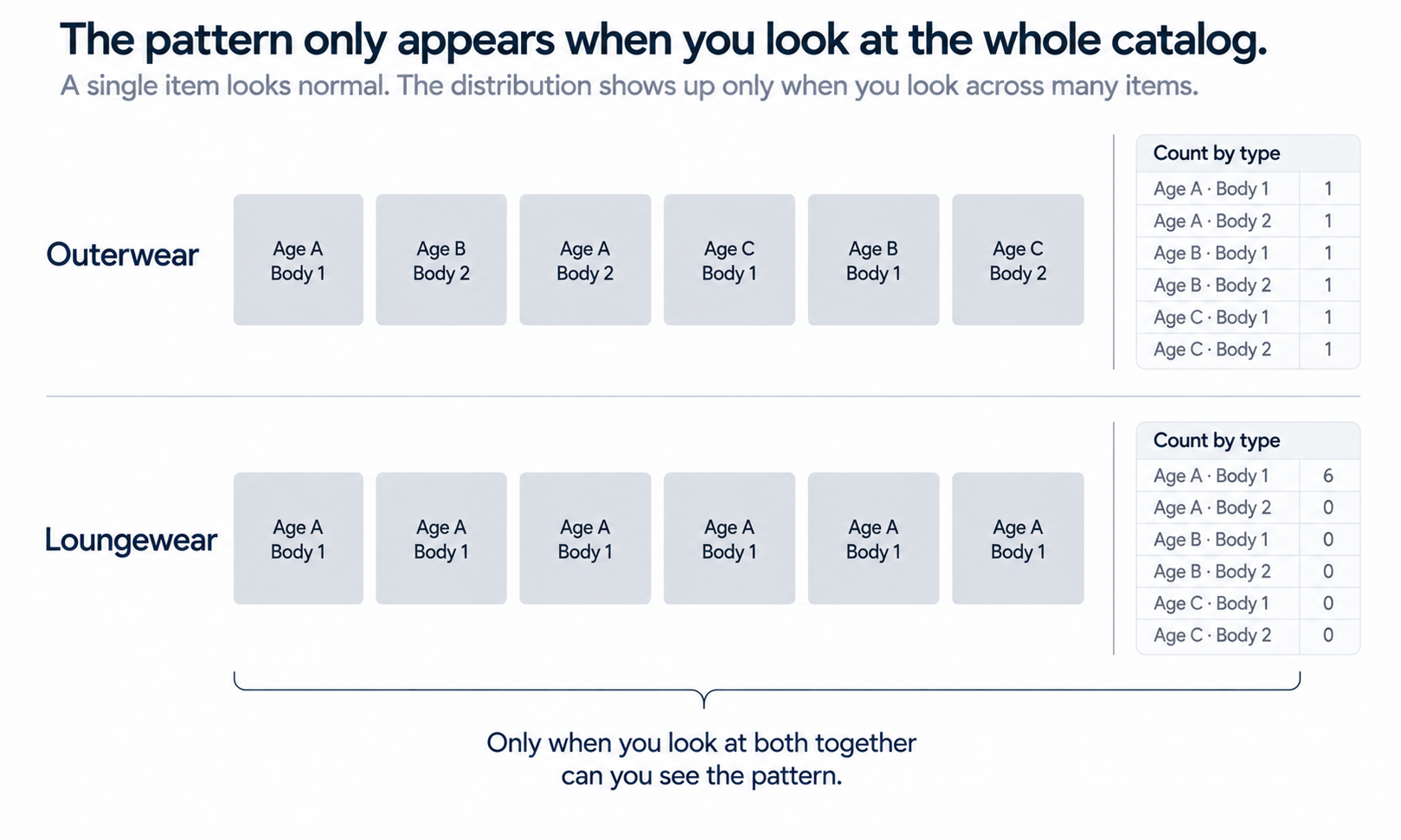
Watch the category pattern. A catalog can show a wide range overall and still pair certain bodies or ages with certain categories only, such as larger bodies appearing mainly in loungewear or older models appearing mainly in outerwear. That pattern is visible only in aggregate, which is why it slips through image-by-image review.
-
Include the secondary views. Range that appears in the first image of a product but disappears in the detail and back views looks like an afterthought. Keep the same model through a product's full image set.
-
Keep the settings neutral. Age and build are parameters, not judgments. The brief should describe them plainly and should never frame any body or age as better suited to a garment than another.
Review the plan the way a shopper experiences it. Lay out the product-page thumbnails for a category, then for a whole line, and look at the range as a set. The question is not whether any single image is well made. It is whether the collection of images says what the plan meant it to say.
A simple count makes that review faster and harder to argue with. For each category, tally how many products show each planned age range and each planned build in their first image, then compare the tally with the plan. The numbers do not need to be exact targets. Their job is to show where the catalog has drifted, such as a category where every first image uses the same model, or a line where the wider size range appears only in the fourth or fifth image. Run the count at the end of each production cycle rather than once a year, because drift builds a few images at a time and is easier to correct while the set is still small.
A Body in an Image Shows Appearance, Not Fit
Showing a garment on a larger or smaller generated body is useful. It lets a shopper see how the garment looks on someone closer to their own build. It does not tell them how it will fit.
The reason is how the image is made. The garment is redrawn onto each generated body so that it looks natural there. No graded pattern was cut in that size, no sample was sewn and no real body wore it. The output is a visual asset. It does not predict fit or determine sizing. Measurements, a graded pattern and a physical sample are what answer the fit question, and product pages should keep that information next to the imagery rather than letting a model's build stand in for it.
This has a practical consequence that is easy to miss. Product pages often carry a caption such as "model is 5 ft 9 in and wears size S." For a photographed model, that caption records a fact about a real person in a real garment. For a generated model, there is no such fact: the garment was not worn in any size. Do not add size-worn captions to generated imagery. If shoppers need size guidance, give it through the size chart and measurements, which describe the garment itself.
Redrawing the garment onto each body also means the garment has to be checked each time. Logos, printed text, stitch lines, trims and print placement should be compared against the source for every image, not a sample. Complex prints, lace and openwork, sheer fabrics and layered styling remain current weak areas for generated imagery, so route those styles to photography and record why.
Age raises one further point. Children's wear involves generated imagery of minors, which carries separate policy and legal questions. Settle those with the people responsible for them before any generation starts.
Putting the Plan to Work
With the plan agreed, production becomes a matter of briefs and review.
In Lightchain AI (apparel AI), the plan translates into a small number of tools.
-
Model Studio creates models and adjusts body, size, pose, scene and angle, so each planned model can be set up with the attributes the plan calls for.
-
AI Virtual Try-On puts garments on those models from flat-lays or garment photos, including on a saved model set, so the same person can carry a product's full image set.
-
Scale E-commerce is the Lightchain AI solution for producing that imagery across many styles and markets.
Whatever tools you use, write the plan into the briefs. A brief that states the model's age range and build, and names which lines and categories that model covers, leaves less to the defaults. Then review in two passes: each image against its garment source, and each category against the plan.
Revisit the plan when the evidence changes. A new line, a shift in sales by size or a new market can each change who the catalog should show. A plan written once and never checked becomes another default.
Frequently Asked Questions
What is an AI generated model?
It is a person produced by image software to wear garments in product and campaign imagery. The person does not exist, which is why the choice of who appears becomes a planning decision rather than a booking constraint.
How should a brand decide which bodies and ages to show?
Start from its own customers: sales by size for each line and the age range of each line's buyers. Rough shares are enough to decide where range is needed and how to spread it across styles.
Does showing a garment on a larger model tell shoppers how it fits?
No. The garment is redrawn onto each generated body, so the image shows appearance rather than fit. Size charts and measurements answer the fit question.
Should generated model images carry a size-worn caption?
No. A size-worn caption records what a real person wore, and a generated model did not wear the garment in any size. Give size guidance through the size chart and garment measurements instead.
How can a team tell whether its catalog matches the plan?
Lay out product-page thumbnails by category and by line and review them as a set. Patterns such as certain bodies or ages appearing only in certain categories are visible only in aggregate.
How often should the plan be revisited?
Whenever the evidence behind it changes, such as a new line, a shift in sales by size or a new market. A plan that is never checked turns back into a default.
Which Lightchain AI solution supports planning models across a catalog?
Scale E-commerce. It is built for on-model imagery across many styles, so you can set up the models your plan calls for, put garments on them through virtual try-on and use saved model sets across each product's image set. The plan itself still comes from your customer data.
In Closing
Generated models make range cheap, and that is exactly why it needs a plan. Without one, the catalog drifts toward whatever the defaults produce. With one, grounded in who actually buys each line, body and age can run through the product pages shoppers really browse rather than a few campaign images. Keep the settings neutral, keep fit claims and size-worn captions out of generated imagery, check every garment against its source, and review the catalog as a set as well as image by image.
Start Here
If you want your catalog to show the range of people who buy from it, Scale E-commerce is the solution to use. It is built for producing on-model imagery with AI-generated models across many styles and markets: you set up the models your plan calls for, put your garments on them through virtual try-on, and use saved model sets across each product's full image set. Start with one line where the gap between customers and imagery is clearest, review it as a set, and extend the plan from there.
**Explore Scale E-commerce → **https://www.lightchainai.com/global/solutions/scaleECommerce