
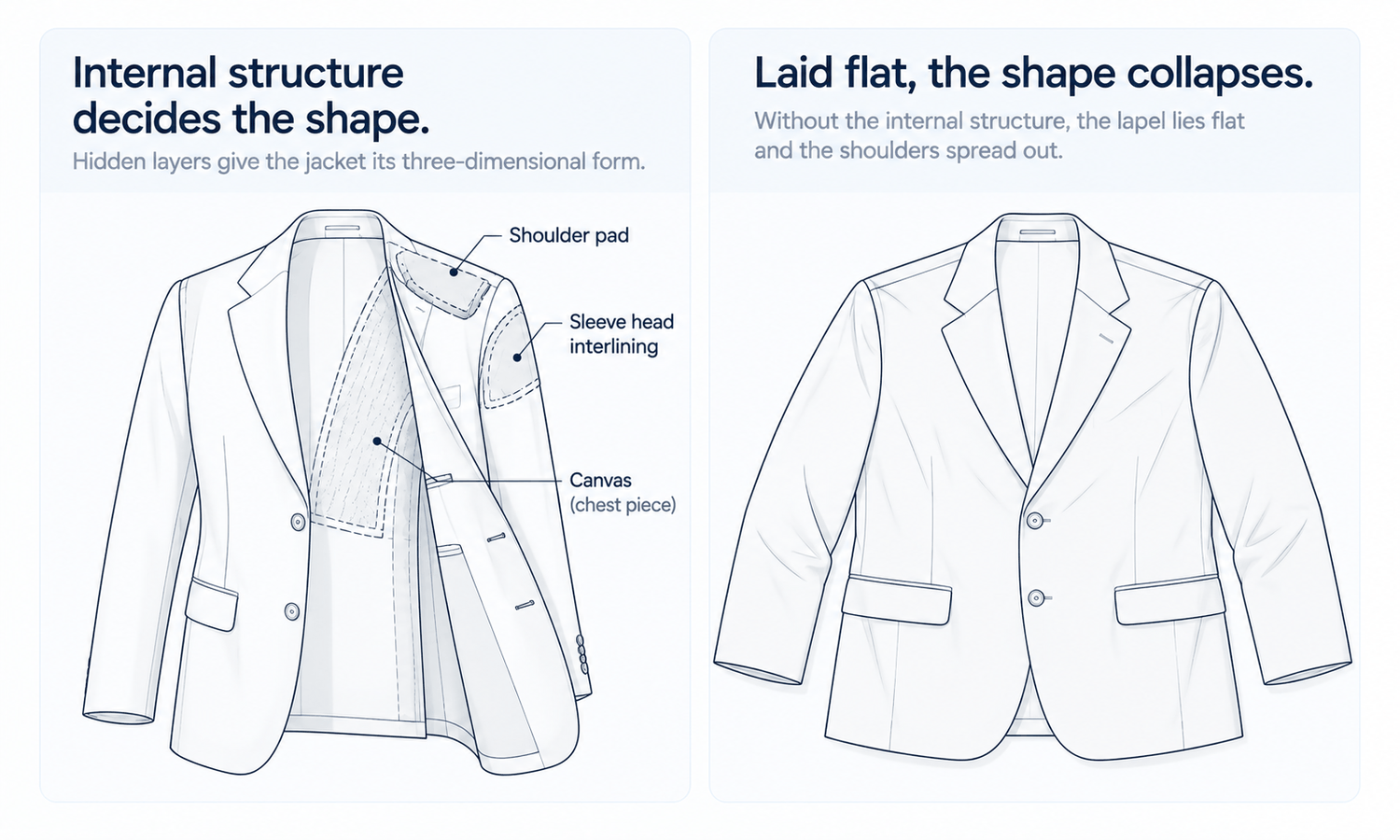
An AI fashion model generator handles a T-shirt and a tailored blazer very differently, even though both start from a garment photo. A T-shirt takes its shape from the body wearing it. A blazer largely brings its own shape: its shoulders, the roll of its lapels and the way its front falls are built into the garment through layers most shoppers never see, such as canvas or fusing, shoulder pads and sleeve heads. Those hidden layers are what make tailoring look tailored, and they are exactly what a flat photo cannot fully show.
That makes tailored garments, including blazers, suit jackets, structured coats and pressed trousers, a category with its own rules for generated imagery. Their selling points are precise: a clean shoulder line, a lapel that rolls rather than folds, the right button stance, pockets and vents that are correct for the style, a sleeve that ends where it should and trousers with a sharp crease and a considered break. Each is easy to get almost right, and almost right is what tailoring customers notice.
This article explains why tailoring is different, what to check in shoulders, lapels and button stance, in sleeves, pockets and vents, and in trousers and coats, and how to use an AI fashion model generator for tailoring well.
| Detail | What it signals | Typical error in a generated image | What to check |
|---|---|---|---|
| Shoulder line | The garment's structure and cut | Shoulders softened, dropped or exaggerated | Shoulder width and shape against the source |
| Lapel roll | Canvas and construction quality | Lapel pressed flat or rolling at the wrong point | Where the lapel turns and how it curves |
| Button stance | The garment's proportions | Buttons moved, added or removed | Number and position of buttons |
| Pockets | The style's formality | Flap pockets drawn as jetted, or the reverse | Pocket type, position and any ticket pocket |
| Sleeve buttons | Finishing detail | Wrong number or spacing | Count and spacing against the source |
| Vents | The back construction | Vents missing or the wrong type | Center, side or no vent, as designed |
| Trouser crease and break | Pressing and length | Crease missing, break inconsistent | Crease line and where the hem meets the shoe |
Why Tailoring Is Different
Most garments are shaped by the body. Tailored garments are shaped partly by their construction. Inside a well-made jacket, a layer of canvas or fusing gives the chest its shape and lets the lapel roll. Shoulder pads and sleeve heads set the line of the shoulder and the way the sleeve hangs. Pressing sets creases and edges. The result is a garment that holds a shape of its own, on or off the body.
That creates a specific challenge for generated imagery. A tailored jacket laid flat for a photo loses some of the three-dimensional shape its structure creates: the chest flattens, the lapel lies down and the shoulders spread. The flat-lay shows the construction details clearly, but not the full shape the garment takes when worn. When the jacket is placed on a model, the image has to rebuild that shape, and a rebuilt shoulder or lapel can easily differ from the real one.
So tailoring needs particular attention in two places: the garment source, which should show the structure as clearly as possible, and the check, which should focus on the structural details that define the style.
Shoulders, Lapels and Button Stance
The front of a tailored jacket carries its most important details.
-
Shoulder line. Natural, padded, extended or roped shoulders each define a style. Check that the image keeps the shoulder's width and shape rather than softening or exaggerating it.
-
Lapel style. Notch, peak and shawl lapels are different garments. Check the lapel type and its width against the source.
-
Lapel roll. A well-constructed lapel rolls smoothly from the collar to the top button rather than lying pressed flat. Check where the roll begins and that it curves rather than creases.
-
Gorge and collar. The seam where collar meets lapel sits at a particular height. Check it has not moved.
-
Button stance. The number of buttons and the height of the top button set the jacket's proportions. Check the count, the spacing and whether the jacket is single- or double-breasted, exactly as designed.
-
Closure state. Decide whether jackets are shown buttoned or open, and keep that consistent across the category.
Sleeves, Pockets and Vents
Details on the sleeves, pockets and back distinguish one tailored style from another.
Sleeves should end where the design intends, typically showing a little of a shirt cuff beneath, and hang cleanly from the shoulder. Sleeve buttons are a small but telling detail: their number, spacing and whether they overlap should match the source exactly.
Pocket type signals formality. Flap pockets, jetted pockets without flaps and patch pockets belong to different styles, and a ticket pocket above the right hip pocket is a distinctive detail of its own. A breast pocket is usually a welt. Check each pocket's type, position and angle against the source, since a pocket drawn as the wrong type changes the garment.
Vents are on the back, where they are easy to overlook. A jacket may have a center vent, side vents or none, and the back view should show exactly what the design has. As with any back view, generate it from a back source rather than from the front.
Trousers and Coats
Tailored trousers have their own marks of quality. A pressed crease should run straight down the center of each leg. The waistband, belt loops and any side adjusters should match the source. The break, meaning how the hem meets the shoe, should be consistent across the category: no break, a slight break or a fuller one, as the brand's styling decides. Pleats, if the style has them, should be the right number and direction.
Structured coats share the jacket's challenges and add weight. A heavy wool overcoat hangs differently from a light trench, and the image should suit the real fabric rather than rendering every coat as if it were the same weight. The drape in an image is rendered, not calculated, so it is a suggestion of how the coat falls. Collars, lapels, belts and closures follow the same checks as jackets, and coats shown open should show the lining as it really is.
Suits add one more consideration: the jacket and trousers are sold as a set, often in the same fabric, and sometimes separately. Images of the jacket, the trousers and the full suit should show the same fabric, color and pattern scale, which means producing them from sources photographed under the same light and checking them side by side. A suit whose jacket and trousers look like slightly different shades on a product page raises doubts a shopper cannot resolve until the parcel arrives.
Tailored garments are strongly associated with fit, and generated images do not show fit. A shoulder that looks right on a generated model says nothing about how the jacket will fit a particular customer. Fit and size guidance come from measurements, size charts and, for tailoring, often detailed fit notes.
Using an AI Fashion Model Generator for Tailoring
Tailoring rewards careful preparation of the source. Press the garment, lay it flat with the lapels rolled as they should sit rather than pressed down, and photograph it evenly lit. Add close-ups of the lapel and collar, the buttons, the pockets, the sleeve buttons and the vents, and a back view. These references guide the image and give the reviewer something precise to check against.
Set a pose standard for the category: jackets buttoned or open, hands kept out of pockets and away from the front so the lapels and buttons stay visible, and a straight-on primary view that shows the shoulders clearly. Check every image against the source, without exception, with the structural details above as the checklist, and view each at full size. Complex patterns such as fine checks and pinstripes need extra care, since pattern matching at seams and lapels is a mark of quality and a current weak area when prints are complex.
In Lightchain AI (apparel AI), tailored garments move through a few tools.
-
AI Virtual Try-On places each tailored garment on a saved model from its flat-lay, keeping the category's model consistent.
-
Model Studio fixes the pose standard for the category, such as buttoned jackets and hands clear of the front.
-
When a lapel, pocket or button comes out wrong in an otherwise good image, Target Revision can correct it in a defined area using a reference close-up, as described on the Partial Redraw page.
For brands producing on-model imagery across tailored ranges, Scale E-commerce is the Lightchain AI solution built for that work.
Frequently Asked Questions
Why does an AI fashion model generator need extra care with tailored garments?
Because much of a tailored garment's shape comes from hidden structure such as canvas, shoulder pads and pressing. A flat photo does not show that shape fully, so the image rebuilds it, and shoulders or lapels can come out different from the real garment.
What details matter most in a tailored jacket image?
The shoulder line, lapel type and roll, the collar height, the button stance and count, pocket types, sleeve buttons and the vents on the back. These define the style, so small changes are noticeable.
How should a tailored jacket be photographed as a source?
Pressed and laid flat with the lapels rolled as they sit, evenly lit, with close-ups of the lapel, buttons, pockets, sleeve buttons and vents, plus a back view. The close-ups are what the check relies on.
Should jackets be shown buttoned or open?
Either, as long as it is consistent across the category. Many brands show jackets buttoned in the primary image and open in a secondary view.
Do generated images show how a suit fits?
No. They show appearance. Fit and size guidance come from measurements, size charts and detailed fit notes.
Are checks and pinstripes harder to show?
Yes. Pattern matching at seams and lapels is a mark of quality, and complex patterns are a current weak area, so they need extra checking at full size.
How does Lightchain AI support tailored garments?
AI Virtual Try-On places each tailored garment on a saved model from its flat-lay, Model Studio keeps the pose standard consistent and Target Revision corrects a lapel, pocket or button from a reference close-up. Scale E-commerce is the solution to use for tailored ranges.
In Closing
An AI fashion model generator can show tailored garments well when their structure is treated as the product. Tailoring's shape comes from canvas, shoulder pads, sleeve heads and pressing, which a flat photo only partly shows. Prepare sources that show the structure clearly, set a pose standard that keeps lapels and buttons visible and check every image for shoulder line, lapel roll, button stance, pockets, sleeve buttons, vents and trouser creases. Keep fit with measurements and size guidance.
Start Here
If your brand sells tailored garments and wants on-model images that respect their structure, Scale E-commerce is the solution to use. It is built for producing on-model imagery across many styles: you place each garment on a saved model from its flat-lay, keep a consistent pose standard and correct structural details locally from reference close-ups. Start with one jacket, prepare its close-ups and back view, and check every image against them.
**Explore Scale E-commerce → **https://www.lightchainai.com/global/solutions/scaleECommerce