
Range planners decide what a collection will be before most of it exists. How many dresses, how many knits, which silhouettes, which colors in which drops, which styles sit at which price: those choices are made while the garments are still sketches, flats, swatches and trend boards. By the time samples arrive, much of the range is already committed.
The difficulty is seeing the range as a whole. A wall of flat sketches shows construction, but it does not show how forty styles will look on a person, next to each other, the way a customer will eventually see them. That is where an AI fashion model generator helps a planner. Candidate styles can be put on generated models at review time, so the range can be judged as a set of garments being worn rather than a set of drawings.
This article explains how range planners can use an AI fashion model generator: what planners actually decide, how to put candidate styles on models so the comparison is fair, what the images help a review see, and what they cannot tell anyone, however convincing they look.
| Range review question | What on-model concept images help with | What still needs other evidence |
|---|---|---|
| Is the silhouette mix balanced? | Seeing proportions side by side on a body | — |
| Are some styles too similar? | Spotting near-duplicates at a glance | — |
| Does each drop tell a coherent story? | Viewing a drop as a set | — |
| Does the color story work? | An early sense of balance across styles | Lab dips and physical samples |
| How will the fabric feel and hang? | Very little | Swatches and samples |
| Will it sell? | Nothing | Sales history, buyer input, market testing |
| Can it be made at the target cost? | Nothing | Development, sourcing and costing |
What Range Planners Actually Decide
A range plan is a set of proportions. It fixes how many options sit in each category, how the range divides between core and fashion styles, how silhouettes and colors are distributed across drops and how styles map to price tiers. It then has to be reconciled with budgets, sourcing capacity and the calendar.
Most of those decisions are comparisons. Is this dress too close to that one? Does the second drop have too many dark colors? Is there a gap at the top of the price range in outerwear? Does the knit story hang together, or does one style look as if it came from a different collection?
Comparisons like these are hard to make from flats alone. A flat sketch is precise about construction and silent about how a garment reads on a body: how long a hem looks against a leg, how a volume sits at the shoulder, how two similar tops differ when worn. Planners fill that gap with experience and imagination, and the gap is widest for newer team members and for categories the brand is entering for the first time.
On-model concept images narrow the gap. They do not replace the planner's judgment. They give it a more realistic view of the thing it is judging.
Putting Candidate Styles on Models
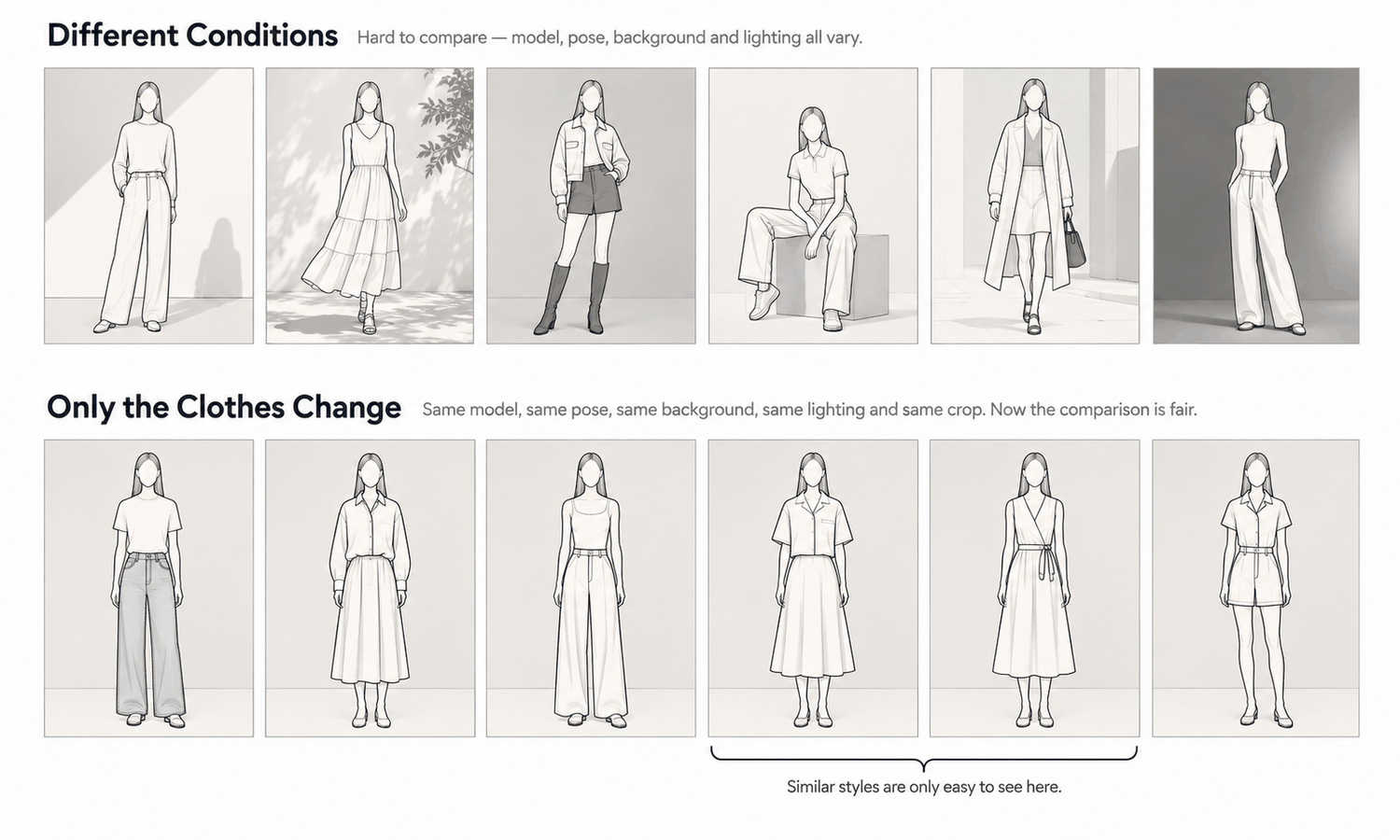
For range review, the purpose of the images is comparison, and comparison is only fair when the garment is the only thing that changes. If one style is shown on a different model, in a different pose, under different light, the review ends up comparing images rather than garments.
A few rules keep the comparison honest.
-
One model, or one small fixed set. Use the same generated model for every style in a category, or a small fixed set of models used consistently across the range, so differences in the images come from the garments.
-
One pose per category. Choose a neutral, front-facing pose that shows each garment's silhouette clearly, and keep it for every style in that category.
-
One scene and one light. A plain setting and even lighting keep attention on the garment and prevent mood from influencing the review.
-
One scale and one crop. Show every style at the same size in the frame, head to hem, so that length and volume can be compared directly.
The route from a flat to an on-model image matters too. The most reliable path starts from the clearest garment source available. If the style exists only as a sketch, turn the sketch into a realistic flat-lay first, review that for construction, and then put it on the model. If a sample or a similar existing garment exists, start from its photo. Each step can then be checked on its own.
Record what each image was made from. A range review moves quickly, and a month later nobody will remember which concept image came from a finished sample and which from a rough sketch. That difference matters when the images are revisited.
What the Images Help a Review See
With the range laid out as on-model images under the same conditions, several things become visible that were hard to see from flats.
Near-duplicates stand out. Two tops that looked distinct as drawings often read as the same garment on a body, and the review can decide to cut one or push them apart. Gaps become visible too: a drop that is all short hemlines, a category with no relaxed silhouette, a price tier where every style looks alike.
Silhouette balance can be judged the way a customer will experience it. A range that looks varied on paper can look repetitive on a body, and one that looks sparse can turn out to be well balanced once each piece is seen worn.
Drop stories can be reviewed as sets. Laying out a drop's images together shows whether they belong to one idea, and which style looks out of place.
Color story balance can be judged early, as a proportion. The images give a first impression of whether a drop leans too dark or too bright, and whether a color is overused. That impression is a starting point for the color decision, not the decision itself, for the reasons in the next section.
Styles cut at this stage never go to sampling. That is the most direct practical value: fewer styles move into development only to be dropped later. How much that saves depends on the brand, the range and the process, and it is worth measuring against your own sampling records rather than assuming.
What the Images Cannot Tell You
On-model concept images are convincing, and that is the risk. A realistic image of an unmade garment looks like evidence. It is evidence about how an idea might look, and nothing more.
The images do not predict demand. They cannot tell a planner which styles will sell, which will become top sellers or how a market will respond. Those questions belong to sales history, buyer input and market testing. A style that looks strong in a review image can still underperform, and a quiet one can surprise.
The images do not settle color. Screen color is not a physical reference. A generated image does not promise an exact match to a color code, and the gap between a display and the fabric does not close with a better display. Colorways are settled by lab dips and samples against the agreed standard, and color values should not be read from concept images and passed on as specifications.
The images do not show fabric. The drape and texture in a concept image are rendered, not calculated, so they are evidence about the picture rather than about the fabric. Weight, hand and how the fabric moves come from swatches and samples. Some materials are also current weak areas for generated imagery: complex prints, lace and openwork, sheer fabrics and layered styling. For styles built on those, the image will say even less about the fabric, and the review should rely on swatches.
The images do not show fit, manufacturability or cost. A concept image does not predict fit or determine sizing. Whether a pattern works, whether the construction is feasible and whether the style can be made at its target price are development and costing questions.
Keep concept images labeled as concepts wherever they travel outside the planning team, including to buyers and senior reviews. The label protects everyone from mistaking an idea for a product.
Running a Range Review With Generated Models
In practice, the review becomes a short cycle: prepare each candidate style's garment source, produce its on-model image under the fixed conditions, lay the range out by category and drop, review, and revise or cut.
In Lightchain AI (apparel AI), that cycle uses a small set of connected tools.
-
The Design & Production Workbench turns line sketches into realistic flat-lays, as described on the Production-Marketing Synergy page, so styles that exist only as drawings can join the review.
-
Model Studio creates the review model and fixes pose, scene and angle, and AI Virtual Try-On puts each candidate style on that model, including on a saved model set.
-
Fabric application and color changes let a planner see an existing style in an alternative fabric or color for discussion, with the final decision still made on physical swatches and lab dips.
For teams that want to review and refine ranges before sampling, Ideas to Reality is the Lightchain AI solution built for that stage.
Whatever tools you use, keep the images inside the review's purpose. They help a team see and compare. The commitments that follow, which styles to sample, which colors to dye and which quantities to buy, still rest on the planner's judgment, the brand's data and the physical evidence that only samples provide.
Frequently Asked Questions
How does an AI fashion model generator help range planners?
It lets candidate styles be seen on models during range review, before samples exist. Seeing the range worn, side by side, makes near-duplicates, gaps and silhouette balance easier to judge than from flat sketches alone.
How should styles be shown for a fair comparison?
Keep everything except the garment the same: one model or a fixed set, one pose per category, one scene and one light, and one scale and crop. Then differences in the images come from the garments.
Can the images tell us which styles will sell?
No. They show how an idea might look, not how a market will respond. Demand questions belong to sales history, buyer input and market testing.
Can we decide colorways from the images?
Use them for an early sense of balance across a drop, then decide on lab dips and physical samples. Screen color is not a physical reference, and color values should not be taken from concept images.
Do concept images reduce sampling?
They can reduce the number of styles that move into sampling, because some are cut at review. They do not replace samples for the styles that go ahead, since fabric, fit and construction are judged physically.
Should concept images be shown to buyers?
They can be, as long as they are clearly labeled as concepts. A realistic image of an unmade garment should never be presented as a product.
Which Lightchain AI solution suits range review?
Ideas to Reality is the one to use. It is built for turning apparel ideas into realistic visuals before sampling, so candidate styles can be seen as garments and on models during review. Final decisions on color, fabric and quantities still rest on samples and your own data.
In Closing
An AI fashion model generator gives range planners something flats never could: a view of the range as it will be worn, early enough to change it. Used for comparison under fixed conditions, it makes duplicates, gaps and imbalances visible and lets some styles be cut before they reach sampling. It does not predict demand, settle color, show fabric or confirm that a style can be made. Keep the images labeled as concepts, keep the commitments on data and samples, and the range review becomes faster to see without becoming easier to fool.
Start Here
If your team plans ranges from sketches and flats and wants to see candidate styles on models before sampling, Ideas to Reality is the solution to use. It is built for turning apparel ideas into realistic visuals early in development: you bring sketches or garment references, see styles as realistic garments and on models, and refine them before committing to samples. Start with one category in one drop, show every style under the same conditions, and extend to the full range once the review format holds.
**Explore Ideas to Reality → **https://www.lightchainai.com/global/solutions/ideasToReality