
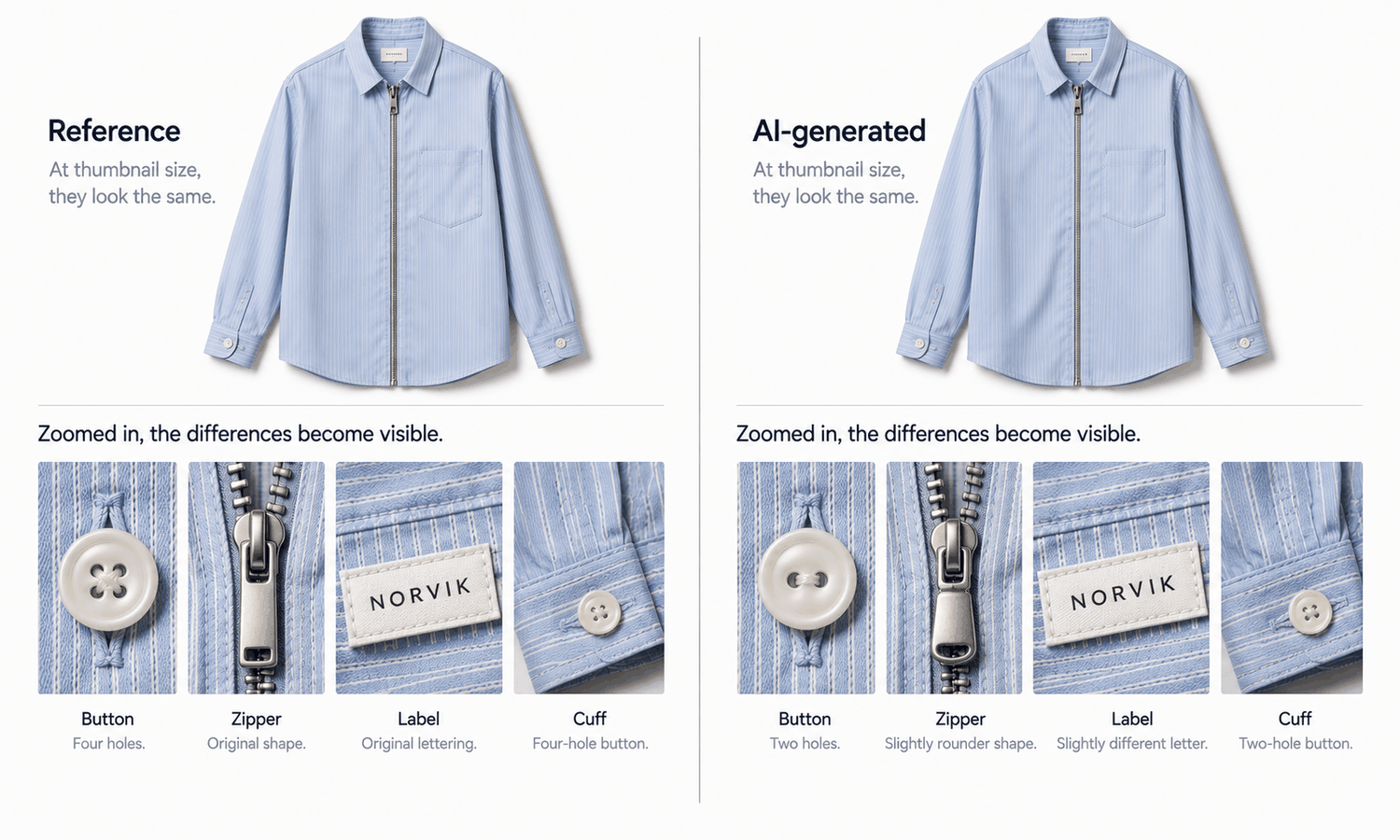
When people talk about an AI clothing model, they usually mean the person: the generated model who wears the garment. There is another model in every on-model image, and it matters more to the shopper. It is the AI's model of the clothing itself: everything the software knows about your garment when it places it on a body. The person can be invented freely. The garment cannot, and what the software knows about it comes entirely from what it was given.
That knowledge is thinnest in two places: trims and materials. A flat-lay shows the shape of a jacket clearly, but its buttons may be a few pixels wide, its zipper pull smaller still, and its fabric texture compressed into a pattern of light and shade. Those are exactly the details that tend to come back almost right in a generated image, and exactly the details a trims and materials team would spot in a second.
This article explains what an AI knows about your garment, why trims and materials slip first, what a trims and materials team should supply before images are made, what they should check afterward and how to bring them into the workflow.
| Element | What tends to go wrong | Reference to supply | Who checks |
|---|---|---|---|
| Buttons | Hole count, size, finish, spacing | Close-up of each button type | Trims team |
| Zippers and pulls | Teeth type, pull shape, tape color | Close-up of pull and tape | Trims team |
| Labels and printed text | Letterforms, spelling, placement | Artwork file or close-up | Trims team |
| Hardware | Buckle shape, rivet stamping, eyelet size | Close-up of each piece | Trims team |
| Stitching | Topstitch rows, stitch length, thread color | Detail shot of seams | Materials or technical team |
| Fabric surface | Texture flattened, sheen changed | Swatch photographed flat with scale | Materials team |
| Knit structure | Rib or cable pattern simplified | Close-up of the knit | Materials team |
| Lace, openwork, sheer | Pattern regularized or smudged | Swatch, and plan for photography | Materials team |
What the AI Knows About Your Garment
A generated on-model image starts from a garment source, usually a flat-lay or garment photo. From that source, the software takes the garment's shape, its colors, its visible construction and whatever surface detail the image resolves. It then places the garment on a body in a pose, which means redrawing it to follow the body's shape and the light in the scene.
Anything the source shows clearly can be carried through faithfully. Anything the source shows poorly, or does not show at all, has to be filled in. The software fills it with whatever is most plausible for a garment of that kind. A button the source rendered as a small light circle becomes a button with some number of holes and some finish. A zipper the source showed as a dark line becomes a zipper with some kind of teeth and some pull. A fabric the source showed as an even tone becomes a fabric with some texture.
This is the AI's model of your clothing: part copied, part filled in. The copied part is only as good as the source. The filled-in part is only as good as the software's guess, and a guess about a trim is rarely exactly your trim.
Why Trims and Materials Slip First
Trims and materials share three properties that make them hard for generated imagery.
They are small. In a full-length flat-lay, a shirt button may cover only a handful of pixels. There is simply not enough information in the source to reproduce its hole count, its rim or its finish, so those are reconstructed.
They are precise. A label's letterforms, a rivet's stamping and a zipper pull's shape are exact designs, often branded. An approximation that would pass for a fold or a shadow is visibly wrong when it is a logo on a button.
They repeat. A placket has several buttons, a zipper has many teeth and a knit has a repeating structure. Reconstruction tends to regularize repetition: every button identical when the design alternates two finishes, a rib pattern evened out, a lace motif simplified into a generic mesh.
The result is the characteristic failure of generated garment imagery: almost right. A four-hole button rendered with two holes, a pull slightly the wrong shape, a label with one letter off, a textured wool rendered smooth. None of these draws the eye at a glance, which is why they survive a quick review, and all of them are differences between the image and the product the customer receives.
What Trims and Materials Teams Should Supply
The most effective way to reduce what the AI fills in is to give it, and the reviewer, better information. Trims and materials teams already hold that information. The task is to package it for image production.
-
Trim close-ups. One clear, evenly lit close-up of each trim on the garment: every button type, every zipper pull, every label, every piece of hardware. Photograph them on the garment where possible, so position and scale are visible.
-
Label and print artwork. The artwork files for labels, printed text and logos, so the reviewer can compare letterforms exactly.
-
Fabric swatches photographed flat. Each fabric shot flat under even light, with a scale reference in the frame, so texture, weave and sheen can be seen at a known size.
-
Construction notes. A short note on stitching details that matter, such as double topstitching, contrast thread or a specific stitch length.
-
A color reference. A color reference card shot under the same light as the swatches, for comparison. The final colorway is still judged physically.
Keep the pack with the garment source, named with the style and color codes, so everyone producing or reviewing images works from the same references. A pack assembled once per style serves every image of that style, in every pose and every channel.
Mark the styles that should not be generated at all. Complex prints, lace and openwork, sheer fabrics and layered styling are current weak areas for generated imagery. The materials team knows which styles fall into those groups, and flagging them at the start routes them to photography before any time is spent generating.
The Check: What to Look For
With references in hand, the check becomes specific rather than general. Every image is compared with the references, without exception. Images produced from the same source and settings tend to repeat the same mistake, so a clean sample says little about the rest.
For trims, count and compare. Count the buttons and their holes. Compare the pull shape, the teeth and the tape color of every zipper. Read every label and every line of printed text against the artwork. Compare the shape and stamping of every buckle, rivet and eyelet. View the image at full size or zoomed; many trim errors are invisible at thumbnail scale and obvious at full resolution.
For materials, compare surface and structure. Does the fabric's texture read as it does in the swatch, or has it been smoothed? Has a matte fabric gained a sheen, or a satin lost one? Does a knit show its real rib or cable structure? Are stitch rows and thread colors as the construction notes describe?
Keep color in proportion. The materials team knows the physical color better than any screen does. Screen color is not a physical reference, generated imagery does not promise an exact color-code match and the gap between a display and the fabric does not close with a better display. The colorway is settled by the lab dip or approved sample, and color values should not be read from images and published as product attributes.
Record the outcome: which images passed, which were corrected and which were routed to photography. The record is what lets the team find every affected image if a trim problem turns up later.
Bringing the Team Into the Workflow
Trims and materials teams do not usually sit in the image workflow. Two touchpoints are enough to bring them in: supplying the reference pack before images are made, and signing off on trims and materials after. The content team keeps ownership of the images; the trims and materials team owns the accuracy of what those images show about trims and fabric.
In Lightchain AI (apparel AI), the workflow supports both touchpoints.
-
AI Virtual Try-On places the garment on a model from its flat-lay or garment photo, so a sharp, complete garment source directly improves what the image can carry through.
-
When a trim comes back wrong in an otherwise good image, Target Revision can replace that element in a defined area using a reference image, as described on the Partial Redraw page, and the result is checked against the reference again.
-
Personal and enterprise libraries give the team a shared place to keep each style's reference pack next to its garment source.
For brands whose on-model imagery starts from garment photos, AI Virtual Try-On is the Lightchain AI solution built around that input. For teams producing across many styles and markets, the same workflow scales through Scale E-commerce.
Frequently Asked Questions
What is an AI clothing model?
Usually the generated person who wears a garment, but every on-model image also contains the AI's model of the clothing itself: what the software knows about the garment from its source. The person can be invented; the garment has to match the product.
Why do trims come out wrong in generated images?
Because they are small, precise and repetitive. A button or pull may cover only a few pixels in the source, so it is reconstructed, and reconstruction tends to come back almost right rather than exact.
What should a trims and materials team supply?
Close-ups of every trim, label and print artwork, fabric swatches photographed flat with a scale reference, construction notes and a color reference card. Keep the pack with the garment source for each style.
How should trims be checked in generated images?
Every image, at full size, against the references: count buttons and holes, compare zipper pulls and teeth, read labels against artwork and compare hardware shapes. Many errors are invisible at thumbnail size.
Which materials should not be generated?
Complex prints, lace and openwork, sheer fabrics and layered styling are current weak areas. Flag those styles at the start and route them to photography.
Who should sign off on trims and materials?
The trims and materials team, as a second touchpoint after the content team's review. The content team owns the images; the trims and materials team owns the accuracy of what they show about trims and fabric.
How does Lightchain AI help get trims and materials right?
AI Virtual Try-On works from your garment source, so a sharp, complete flat-lay carries more detail into the image, and Target Revision can replace a wrong trim in a defined area using a reference image. AI Virtual Try-On is the solution to use when your on-model imagery starts from garment photos.
In Closing
Every on-model image contains two models: the person, who can be invented, and the AI's model of your clothing, which has to match what the customer receives. That second model is thinnest at the trims and in the materials, where details are small, precise and repetitive. Bring the trims and materials team in at two points. Before production, they supply a reference pack. After production, they check every image against it, at full size, and route weak-area styles to photography. The images will carry more of your garment, and the details that slip will be caught.
Start Here
If your on-model imagery starts from garment photos and you want trims and materials shown as they really are, AI Virtual Try-On is the solution to use. It is built around the garment source: you place garments on models from sharp flat-lays, replace a wrong trim locally using a reference image and keep each style's references in a shared library. Start with one style that has distinctive trims, build its reference pack, and check every image against it.
**Explore AI Virtual Try-On → **https://www.lightchainai.com/global/solutions/aiVirtualTryOn