
An AI clothing model generator gives independent designers a way to show a new piece on a model before it has been produced in quantity. For designers who work on pre-order, collecting orders first and producing once enough have come in, that matters. A pre-order page needs on-model images, and a photoshoot for a style that may not reach its minimum is hard to justify.
Pre-order images also carry more weight than ordinary product images. The customer cannot see the garment, cannot read reviews from earlier buyers and may wait weeks for it to arrive. The image and the description are everything they have to go on. If what arrives differs from what was shown, the disappointment is sharper, and the designer has fewer ways to put it right.
This article explains how to make pre-order images that customers can rely on: start from a real sample, use the generator from that sample, say the right things on the pre-order page and check the production pieces when they arrive.
| Pre-order stage | What the customer relies on | What the designer does |
|---|---|---|
| Sample made | Nothing yet | Make at least one sample in the intended fabric and trims |
| Images generated | The images, as the product | Generate from the sample's flat-lay and check every image |
| Pre-order page live | Images, description, size chart | State timing, color confirmation and measurements |
| Production | The promise made on the page | Keep changes to a minimum and record any that happen |
| Production pieces arrive | That the piece matches the images | Compare pieces with images and act on differences |
| Delivery | The garment itself | Tell customers about any meaningful change first |
Why Pre-Order Images Carry More Weight
On an ordinary product page, the garment already exists in stock. A shopper who is unsure can often read reviews, see customer photos or ask about details the images do not show. On a pre-order page, none of that exists yet. The image is the product description in the most literal sense.
That makes the source of the image important. An image of a garment that has been made, photographed and checked shows something real. An image built from a sketch shows a design, with fabric, color, trims and many details filled in by the image rather than decided by the designer. Both can look equally convincing, and a customer cannot tell which one they are looking at.
The honest approach is not complicated, and it works with the tools independent designers already use. It rests on one rule: every pre-order image starts from a real sample.
Start From a Real Sample
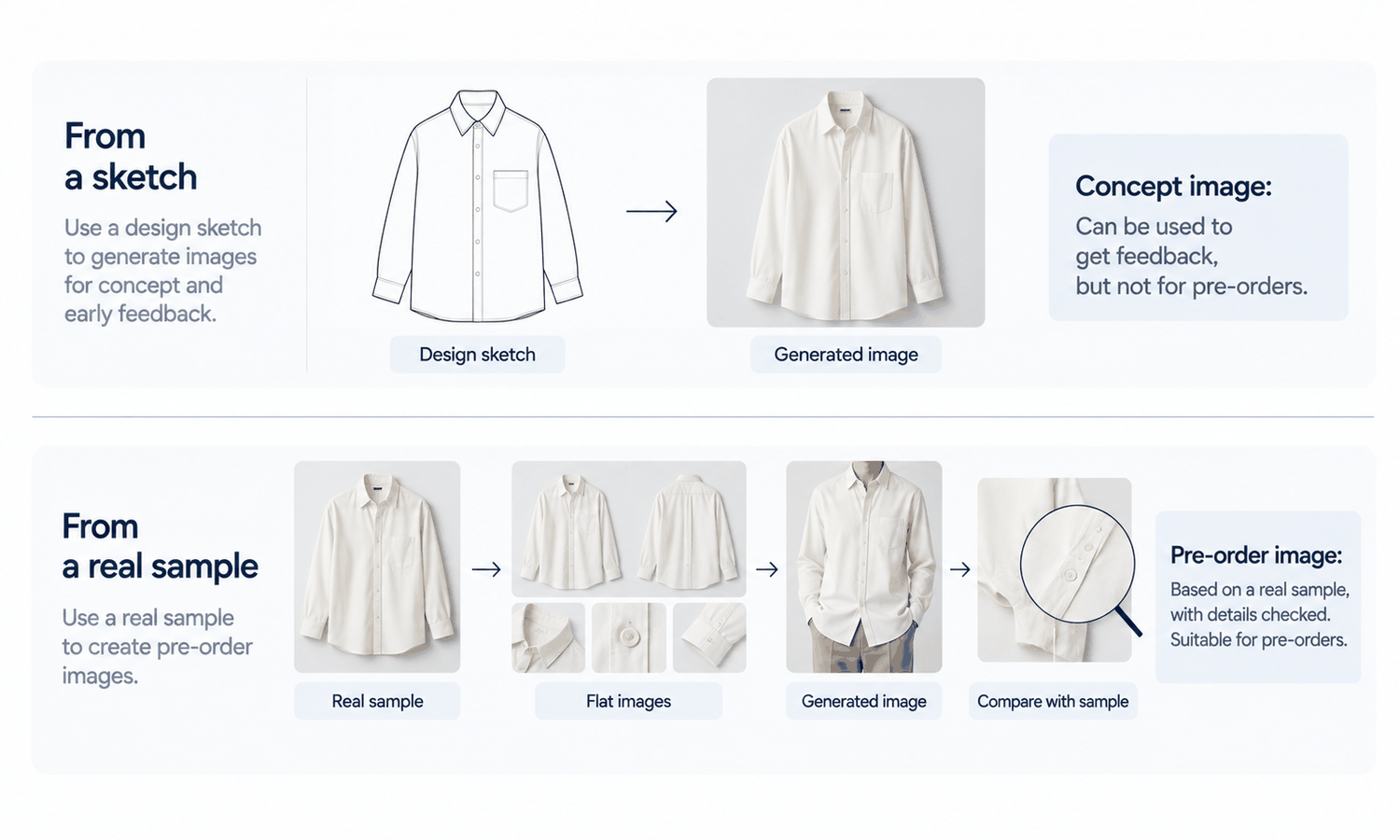
Make at least one sample before opening pre-orders, in the intended fabric, with the intended trims and finishes. It does not need to be in every size or every color. It needs to be the garment the customer will receive, as closely as the designer can make it at this stage.
Then capture it as the garment source. Photograph the sample as a flat-lay, pressed and evenly lit, straight on. Photograph the back if the back matters. Take close-ups of trims, labels, prints and any construction detail that sets the piece apart. These photographs are what the generator will work from, and they are also what every generated image will be checked against.
It helps to decide in advance what the sample must settle before it is photographed. The fabric should be the production fabric or a confirmed match, not a close substitute. The trims should be the ones ordered for production. The key construction details, such as the collar, the closures and any topstitching, should be finished the way production will finish them. If any of these is still undecided, the pre-order page should either wait or say plainly which details may change. A sample that settles these points gives the generator a reliable source, and it gives the designer a physical reference to compare the production pieces against later.
Starting from a sketch is tempting, especially when a design is still being refined. A sketch-based image is useful for deciding whether to make the sample at all, or for asking an audience which direction they prefer, as long as it is clearly labeled as a concept. It is not a pre-order image. Once customers are paying, the image should show a garment that exists.
Using an AI Clothing Model Generator From the Sample
With the sample captured, the generator does the rest of the visual work. A few rules keep the result honest.
-
Use one approved model. Create the model once, check the face for close resemblance to any real person and use the same model for every pre-order piece, so the collection looks consistent.
-
Produce the product-page views. Front, back and one detail or side view are usually enough. Each is produced from the sample's garment source, not from another generated image.
-
Check every image against the sample. Compare construction, logos, printed text, trims, hardware and print placement, without exception. Reconstructed detail tends to come back almost right, and almost right is what a pre-order customer will notice when the piece arrives.
-
Show only the colors that exist. If a style will come in colors that have not been sampled, do not recolor the sampled image into them. Show sampled colors as images, and describe other colors with a swatch or lab-dip reference until they can be captured.
-
Photograph the harder fabrics. Complex prints, lace and openwork, sheer fabrics and layered styling are current weak areas for generated imagery. For those pieces, a simple photograph of the sample is more reliable than a generated image.
Keep a short record for each piece: the sample photographed, the model used, who checked the images and when. It becomes useful when production arrives.
What the Pre-Order Page Should Say
The page around the images matters as much as the images themselves. A few statements set expectations correctly.
State the timeline: when production will start, and roughly when the customer can expect the piece. Pre-order customers are more patient when they know what they are waiting for.
State how color is confirmed. Screen color is not a physical reference, generated imagery does not promise an exact color-code match and every screen shows color differently. Say that color is matched to the approved sample or lab dip, and that the image is a close representation rather than an exact one.
Give size information in measurements. A size chart with garment measurements is what helps a customer choose. Do not add size-worn captions to generated images, because a generated model did not wear the garment in any size.
Mention that production pieces can differ slightly from the sample. Small variations in shade between dye lots, or minor differences in finishing, are normal in garment production. Saying so in advance is better than explaining it afterward.
Label AI-generated images where the channel you sell on expects it, and check the rules that apply to pre-orders in the places where you sell. They vary, and the people responsible for your business's compliance are the right source.
When Production Arrives
The final step is the one most often skipped. When the production pieces arrive, compare them with the pre-order images before shipping: color against the approved standard, trims, labels, prints and construction details against the images.
If they match, ship with confidence. If there is a small, expected variation, such as a shade within the tolerance described on the page, note it in the record. If there is a meaningful difference, such as a substituted trim, a changed detail or a noticeably different color, tell the customers who ordered before they receive the piece, and update the images from a fresh capture of the production garment for anyone ordering later. Customers who hear about a change first are far more understanding than customers who discover it on opening the parcel.
In Lightchain AI (apparel AI), a sample-based pre-order workflow uses a few connected tools.
-
AI Virtual Try-On places the sample on a model directly from its flat-lay, so each pre-order image starts from the real garment.
-
Model Studio creates the approved model once, and a saved model set keeps every pre-order piece on the same person.
-
When production pieces differ from the sample, a fresh flat-lay of the production garment can be placed on the same model, and small details can be corrected locally, as described on the Partial Redraw page.
For independent designers who want pre-order images that start from the real garment, AI Virtual Try-On is the Lightchain AI solution built around that input.
Frequently Asked Questions
Can an AI clothing model generator create pre-order images?
Yes, if the images start from a real sample. Photograph the sample as a flat-lay, generate the on-model views from it and check every image against the sample before the pre-order page goes live.
Why not generate pre-order images from a sketch?
Because a sketch leaves fabric, color, trims and many details for the image to fill in. Sketch-based images are useful as labeled concepts, but a pre-order customer is paying for a garment and should see one that exists.
What if a color has not been sampled yet?
Do not recolor the sampled image. Show the sampled colors as images and describe the others with a swatch or lab-dip reference until they can be captured.
What should the pre-order page say?
The production timeline, how color is confirmed, garment measurements in a size chart and a note that production pieces can vary slightly from the sample. Label AI-generated images where the channel expects it.
What happens if production pieces differ from the images?
Tell the customers who ordered before they receive the piece, and update the images from a fresh capture of the production garment for later orders. Small, expected variations can be noted in the record.
Do pre-order images need a size-worn caption?
No. A generated model did not wear the garment in any size. Give size guidance through measurements instead.
Which Lightchain AI solution suits pre-order images?
AI Virtual Try-On is the one to use. It places the sample on a saved model directly from its flat-lay, so every pre-order image starts from the real garment, and a fresh flat-lay of the production piece can replace it if anything changes.
In Closing
An AI clothing model generator lets independent designers open pre-orders without a photoshoot, and pre-order customers rely on those images more than any other shoppers do. Start every pre-order image from a real sample, generate the views from its flat-lay and check each one against it. Say clearly how color is confirmed, give measurements rather than size-worn captions and mention that production can vary slightly. When production arrives, compare it with the images and tell customers about any meaningful difference before it reaches them.
Start Here
If you are an independent designer selling on pre-order and want images customers can rely on, AI Virtual Try-On is the solution to use. It is built around starting from the garment: you photograph your sample as a flat-lay, place it on your approved model and produce the product-page views from the real piece. Start with one style and its sample, check every image against it, and open the pre-order once the set holds.
**Explore AI Virtual Try-On → **https://www.lightchainai.com/global/solutions/aiVirtualTryOn