
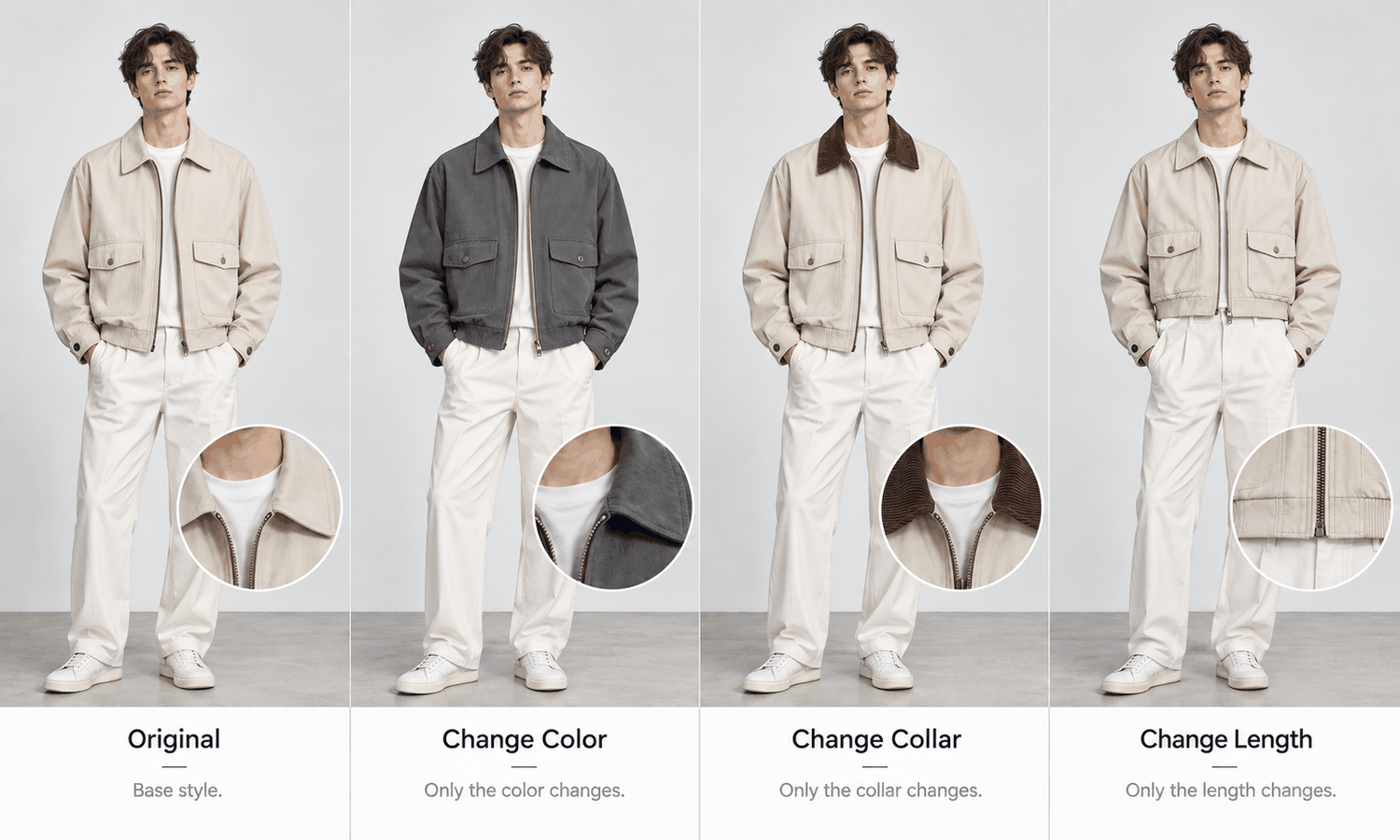
AI clothing design is often imagined as designing from nothing: a blank page, a prompt and a new garment. In practice, much of a design team's work starts from something that already exists. A style sells well, customers ask for it in another color, a buyer wants a version with a different collar, and the next season's range needs fresh options built on what already works. Designing variations from a proven style is one of the most common jobs in apparel, and it is one of the places where AI helps most clearly.
A variation changes one or two things about a garment while keeping the rest. The fabric changes and the cut stays. The color changes and the construction stays. The collar or the length changes and the fabric stays. Because most of the garment is already known, a realistic preview of the variation has far less to invent than an image of a completely new design, and the team can compare options quickly before any sample is made.
This article explains what a variation is, which kinds of change suit a preview, how to keep the proven parts intact, what a preview cannot tell you about a variation and how to run variation work in practice.
| Kind of variation | What changes | What stays | What a preview can show | What still needs a physical check |
|---|---|---|---|---|
| Colorway | Color | Fabric, cut, construction | How the color reads on the style | The exact color, on a lab dip |
| Fabric | Material and surface | Cut, construction | The general look of a different surface | Hand, weight, drape and how the cut behaves |
| Detail | Collar, pocket, closure, trim | Fabric, overall cut | The new detail in place | Construction and cost of the new detail |
| Length or proportion | Hem, sleeve or crop length | Fabric, construction | How the new length reads on a body | The pattern change and fit |
| Silhouette | Overall shape | Some details, fabric | The new shape as an image | Pattern, fabric behavior and fit |
What a Variation Is, and Why It Suits AI Clothing Design
A proven style has already been through the hard part. Its pattern works, its fabric has been tested, its construction is settled and customers have shown they want it. A variation reuses most of that and changes a small, deliberate part.
That structure suits image generation well. The garment source for the original style, a flat-lay or a sample photo, already shows the real garment. When only one aspect changes, the image can carry most of the original through and only has to produce the change. That is very different from a sketch of a new design, where fabric, color, trims and many details all have to be filled in.
It also suits how teams make decisions. Variation work usually means choosing between several options: four colorways, two fabrics, three collar shapes. Seeing them side by side, on the same model in the same pose, makes that choice faster and more concrete than comparing swatches and sketches.
Which Kinds of Change Suit a Preview
Not every change is equally suited to a realistic preview, and the table above sorts them roughly from easiest to hardest.
Colorways are the most straightforward, with one firm limit. A preview shows how a color reads across the style, which helps narrow a palette. It does not settle the exact color, for reasons covered below.
Detail changes also suit previews well. A different collar, pocket or closure is a local change to a known garment, so the rest of the style stays as it was. The team can see the new detail in context and judge the balance of the design.
Length and proportion changes are useful to preview for how they read on a body, especially across the range of builds the style is sold to. They are also where previews say least about the garment itself, because a new length is a pattern change that has to be drafted and fitted.
Fabric changes and silhouette changes are the hardest. A new fabric changes the surface, and it also changes how the cut hangs and moves, which an image renders but does not calculate. A new silhouette changes most of the garment, which brings the variation close to a new design. Use previews for these as a first look, and lean on swatches and samples for the decision.
Keeping the Proven Parts Intact
The value of a variation depends on the unchanged parts staying unchanged. If a colorway preview also shifts the collar shape, or a detail change quietly alters the fabric's texture, the preview no longer shows the variation; it shows a different garment.
A few habits protect the proven parts. Start every variation from the original style's garment source, not from an earlier variation, so changes do not accumulate across a chain of images. Change one thing at a time, so any difference in the image can be traced to the change requested. Keep the model, pose, scene and angle fixed across all the variations being compared, so the only thing that differs is the garment.
Then check each preview against the original. Compare construction, logos, printed text, trims and print placement with the original's source, and confirm that only the intended change appears. Reconstructed detail tends to come back almost right, and in variation work, almost right can look like an intended change when it is not. Check every image, without exception.
Order matters when a variation involves more than one change. If a buyer asks for a new colorway with a shorter hem, preview the colorway on the original length first, then the length change in the original color, and only then the two together. Each step can be checked on its own, and if the combined image looks wrong, the team knows which change caused it.
Some fabrics and details remain harder for generated imagery in any variation: complex prints, lace and openwork, sheer fabrics and layered styling are current weak areas. When a variation introduces one of these, treat the preview as a rough indication and plan to judge it physically.
What a Preview Cannot Tell You About a Variation
Two limits matter most in variation work.
The first is that a proven style's success does not transfer automatically. A style that sells well in navy may not sell well in orange; a jacket that works in cotton may not work in a heavier wool. A preview shows how a variation looks. It does not predict how it will sell, and that decision rests on the team's knowledge of its customers and its sales data.
The second is that the physical questions stay physical. Screen color is not a physical reference, generated imagery does not promise an exact color-code match and the colorway is settled by the lab dip on the actual fabric. A fabric's hand, weight and drape come from swatches and samples, since the drape in an image is rendered rather than calculated. A change of length or silhouette needs a pattern change, and the result is confirmed on a sample worn by a fit model. The image does not predict fit or determine sizing.
A useful way to hold both limits is to treat previews as the way to choose which variations to sample, not as a substitute for sampling them. A team that previews eight colorways and samples the three strongest has used the preview well. A team that approves a colorway from a screen has skipped a step the preview cannot replace.
Running Variation Work in Practice
In practice, variation work is a short loop: start from the proven style's source, change one thing, preview the options side by side, choose which to sample and confirm physically.
In Lightchain AI (apparel AI), that loop runs through a few design tools.
-
Fabric application and color changes show a proven style in alternative fabrics and colors for discussion, with final choices confirmed on swatches and lab dips.
-
Target Revision changes a defined area, such as a collar or pocket, using a reference image or a written instruction, as described on the Partial Redraw page.
-
AI Virtual Try-On places each variation on the same saved model, so options can be compared on equal terms.
For design teams building variations from styles that already work, Design with Purpose is the Lightchain AI solution built for that work.
Keep a record of each variation: the original style it came from, the single change made and the references used. When samples arrive, the record makes it easy to see whether a difference came from the change, the references or the image.
Frequently Asked Questions
What is AI clothing design for variations?
It is using realistic previews to explore changes to a style that already works, such as new colorways, fabrics, details or lengths. Because most of the garment is known, the preview only has to show the change.
Which kinds of variation suit a preview?
Colorways and detail changes, such as a new collar or pocket, suit previews well. Length changes are useful for how they read on a body, while fabric and silhouette changes need more physical checking.
How can the unchanged parts be kept intact?
Start every variation from the original style's garment source, change one thing at a time and keep the model, pose and scene fixed. Then check each preview against the original to confirm only the intended change appears.
Can a preview show whether a variation will sell?
No. It shows how a variation looks, not how customers will respond. Decisions about which variations to make rest on customer knowledge and sales data.
Can colors be approved from a preview?
No. Use previews to narrow a palette, then confirm each colorway on a lab dip of the actual fabric against the agreed standard.
Do variations still need samples?
Yes. Previews help choose which variations to sample. Fabric behavior, pattern changes and fit are confirmed on physical samples.
Which Lightchain AI solution suits designing variations?
Design with Purpose is the one to use. It covers fabric and color changes, local detail changes with Target Revision and side-by-side previews on the same model through AI Virtual Try-On, so variations can be compared before sampling.
In Closing
AI clothing design is at its most practical when it builds on a style that already works. A variation changes one thing and keeps the rest, so a realistic preview has little to invent and many options can be compared quickly. Start from the original's source, change one thing at a time, keep the model and scene fixed and check each preview for unintended changes. Then use the previews to decide what to sample, and let lab dips, swatches, samples and fittings make the final call.
Start Here
If your team builds new options from styles that already sell, Design with Purpose is the solution to use. It is built for variation work: you apply new fabrics and colors, change details in a defined area and compare every option on the same model before sampling. Start with one proven style, preview a handful of variations side by side on the same model, and take the strongest into sampling and fitting.
**Explore Design with Purpose → **https://www.lightchainai.com/global/solutions/designWithPurpose