
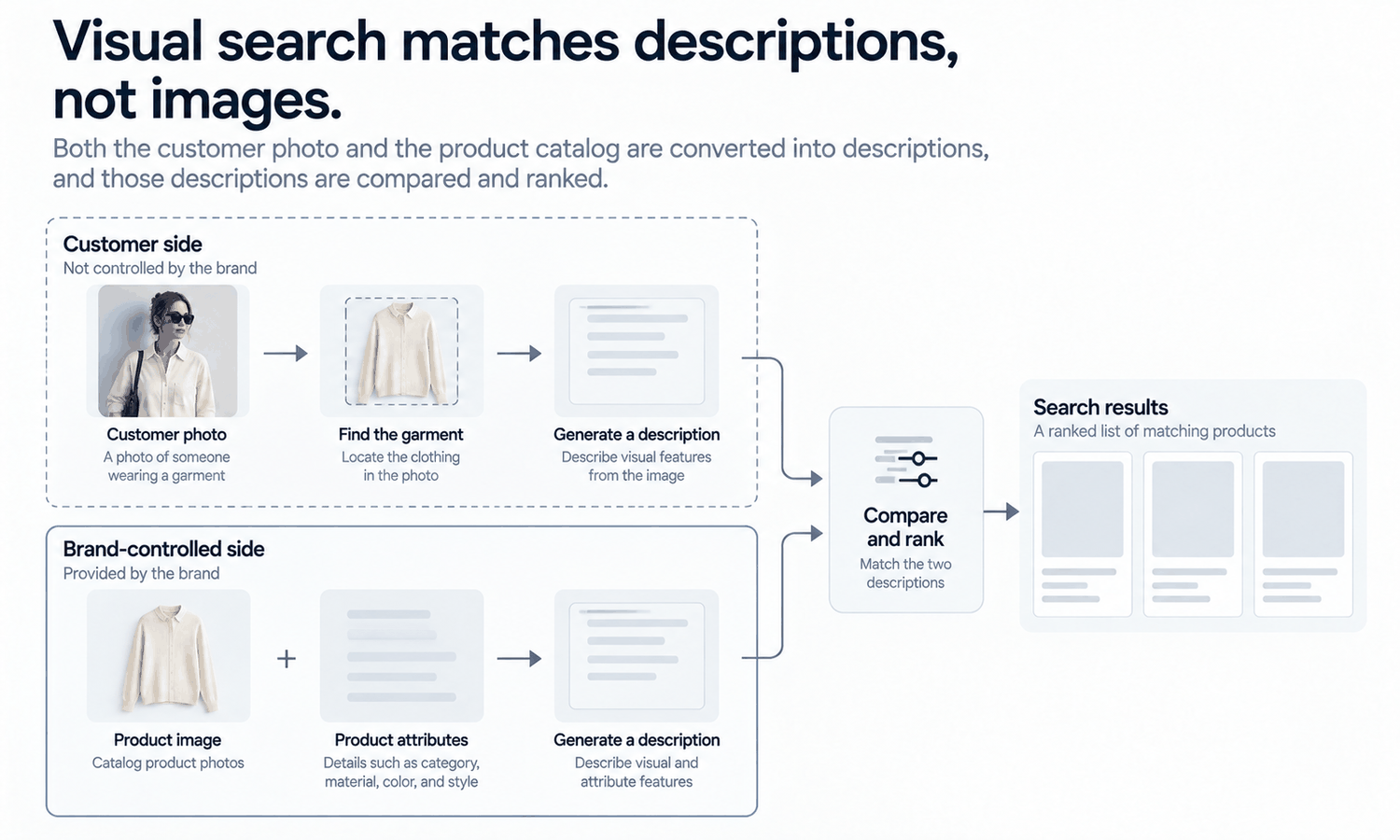
An AI clothes finder lets a shopper start with a picture instead of words. They photograph a jacket they saw on the street, upload a screenshot of an outfit or tap on a garment in an image, and the tool returns products that look similar. For shoppers, it removes the hardest part of searching for clothes: describing them. Few people know whether the collar they like is a band collar or a stand collar, but they know it when they see it.
Behind that simple experience is a chain of steps, each of which can go right or wrong. The system has to find the garment in the photo, describe it in a way a computer can compare, search a catalog for garments with similar descriptions and rank the results. The quality of the shopper's photo matters, and so does the quality of the catalog being searched: the product images and the attribute data the brand provides.
This article explains how visual search works, what makes a match hard, how attributes support images, what an AI clothes finder needs from product images and how brands can prepare images and data in practice.
| Step | What happens | What can go wrong |
|---|---|---|
| Find the garment | The system locates the garment in the photo and separates it from the background | Wrong garment picked when several are visible |
| Describe it | The system turns the garment's appearance into a numerical description | Lighting, angle or blur distort the description |
| Compare | The description is compared with descriptions of catalog products | Catalog images that misrepresent products compare badly |
| Rank | The closest matches are ordered | Similar-looking but different items rank highly |
| Filter | Attributes such as category, color or size narrow the results | Missing or inconsistent attribute data |
How Visual Search Works
Most visual search systems for clothing work through the same broad steps.
First, the system finds the garment. A photo of a person usually contains several garments, a face, hands and a background. The system locates each garment and separates it from everything else, so it can focus on the item the shopper is interested in. When there is more than one garment, it may ask the shopper to choose.
Second, it describes the garment. The system converts the garment's appearance, including its shape, color, pattern and texture, into a numerical description that captures what the garment looks like. Two garments that look alike end up with similar descriptions, even if they are photographed differently.
Third, it compares. The same kind of description has already been calculated for every product in the catalog, usually from the product images. The system looks for catalog products whose descriptions are closest to the shopper's.
Finally, it ranks and filters. The closest matches are ordered, and attributes such as category, size, color or price can narrow the list further.
Text search and visual search often work together. A shopper might start with a photo and then refine by typing "longer" or "in black," or start with words and then ask for items that look like one of the results. In both cases, the images supply what the product looks like and the attribute data supplies the facts, and the two have to agree for the results to make sense.
The key point is that the system never compares the shopper's photo with a product directly. It compares descriptions, and the catalog's descriptions come from the catalog's images and data.
What Makes a Match Hard
Some situations make matching much harder, on both sides of the search.
-
Partial views. A garment half hidden by a bag, an arm or another layer gives the system less to describe.
-
Layering. An outfit with a jacket over a shirt over a top makes it harder to separate one garment from the next.
-
Lighting color. Warm or colored light shifts how a garment's color appears, so a white shirt under evening light may be described as cream.
-
Angle and pose. A garment photographed from an unusual angle, or bent by a strong pose, looks different from the same garment laid flat or seen from the front.
-
Similar-looking items. Two garments with the same shape and color but different fabric or construction can look almost identical in a photo, and visual search may rank one when the shopper wanted the other.
-
Patterns and prints. Small prints can blur into a solid color in a low-resolution photo, while large prints dominate the description.
The shopper's photo is outside the brand's control. Some tools let shoppers crop or tap on the garment they mean, which helps the system focus. The catalog is not, and the same factors apply to product images: partial views, colored light and unusual angles make catalog descriptions less reliable too.
Attributes: The Words Behind the Pictures
Images are only part of what visual search uses. Attributes, meaning structured labels such as category, color, pattern, neckline, sleeve length and fit type, help the system narrow results and correct for what images get wrong. A shopper searching from a photo of a navy V-neck sweater benefits when the catalog knows which products are sweaters, which are navy and which have V-necks.
Attribute data is only as useful as it is consistent. If one product is labeled "crew neck," another "round neck" and a third "crewneck," the system may treat them as different. If colors are named creatively, such as "midnight" or "ocean," without a standard color family alongside, color filters cannot group them. A controlled vocabulary for garment details, with one agreed term for each neckline, collar, sleeve and pocket type, makes attributes far more useful. Writing that vocabulary down, and using it both in product data and in tech packs, keeps the terms consistent from design through to the catalog.
Attributes should also describe the product, not the image. A color attribute should come from the product record and the physical garment, since screen color is not a physical reference and an image's color can shift with lighting. A detail attribute, such as the number of pockets, should come from the design and the sample, not from reading an image that might be wrong.
What an AI Clothes Finder Needs From Product Images
From the catalog's side, visual search works from the same qualities that make product images clear for people.
Clean, uncluttered backgrounds help the system separate the garment from everything else. Consistent views across a category, such as a front view shot the same way for every product, make descriptions comparable. Even, neutral lighting keeps colors close to the garment's own. And multiple views, including front, back and detail, give the system and the shopper more of the garment to work with.
Accuracy matters most of all. A product image that shows the wrong collar, a missing pocket or a reshaped print produces a description of a garment that does not exist. Visual search may then match it to shoppers looking for something else, or fail to match it to shoppers looking for exactly that product. For generated on-model images, this is one more reason to check every image against the garment source, without exception, since reconstructed detail tends to come back almost right.
Keep images and data aligned when products change. If a style is updated with a new trim or a different pocket, update both its images and its attributes. A catalog where the image shows one version and the data describes another gives visual search, and shoppers, contradictory information.
Visual search matches appearance. It does not tell a shopper how a garment fits, which still comes from size charts and measurements.
Preparing Product Images and Data in Practice
For a brand, preparing for visual search is mostly good catalog practice: clear, consistent, accurate images and consistent attribute data from the product record.
In Lightchain AI (apparel AI), consistent product images can be prepared with a few tools.
-
AI Virtual Try-On places each garment on a model from its flat-lay, and saved model sets keep the model, and therefore the view, consistent across a category.
-
The Image Editor provides background removal and cropping, so product images share clean backgrounds and consistent framing.
-
Model Studio fixes the pose, scene and angle for each category, so front views are shot the same way for every product.
For brands producing consistent on-model imagery across many styles, Scale E-commerce is the Lightchain AI solution built for that work. Attribute data still comes from the product record, and every image is checked against its garment source.
Frequently Asked Questions
How does an AI clothes finder work?
It locates the garment in the shopper's photo, turns its appearance into a numerical description, compares that description with descriptions of catalog products and ranks the closest matches. Attributes such as category and color can then narrow the results.
Why does visual search sometimes return the wrong items?
Because partial views, layering, colored light, unusual angles and similar-looking products all affect the descriptions being compared. Inaccurate catalog images and inconsistent attributes add to the problem.
What are product attributes?
Structured labels such as category, color family, pattern, neckline and sleeve length. They help visual search narrow results and correct for what images alone get wrong.
What makes product images work well for visual search?
Clean backgrounds, consistent views across a category, even neutral lighting, multiple views and, above all, images that accurately show the product. The same qualities make images clear for shoppers.
Where should color attributes come from?
From the product record and the physical garment, not from reading an image. Screen color shifts with lighting and display, so it is not a reliable source.
Can visual search show how a garment fits?
No. It matches appearance. Fit and size guidance come from size charts and measurements.
How does Lightchain AI help prepare images for visual search?
It produces consistent on-model images from each garment's flat-lay with AI Virtual Try-On and saved model sets, and the Image Editor gives them clean backgrounds and consistent framing. Scale E-commerce is the solution to use for that work across many styles.
In Closing
An AI clothes finder turns a shopper's photo into a description and searches a catalog for the closest matches. It draws on both sides of the search: the shopper's photo and the catalog's images and data. Brands control the catalog. Clear backgrounds, consistent views, neutral lighting, accurate images checked against every garment and consistent attribute data from the product record give visual search reliable material to work with, and give shoppers results they can trust.
Start Here
If your catalog needs clear, consistent product images that show every garment accurately, Scale E-commerce is the solution to use. It is built for on-model imagery across many styles: you place each garment on a saved model from its flat-lay, keep views consistent by category and prepare clean backgrounds and framing. Start with one category, standardize its views and attributes, check every image against its garment and then extend to the rest of the range.
**Explore Scale E-commerce → **https://www.lightchainai.com/global/solutions/scaleECommerce