
Somebody looking for an ai clothes changer free online is usually working outside a system. No pipeline, no asset manager, no approval workflow — a browser tab, a garment photo, and a deadline.
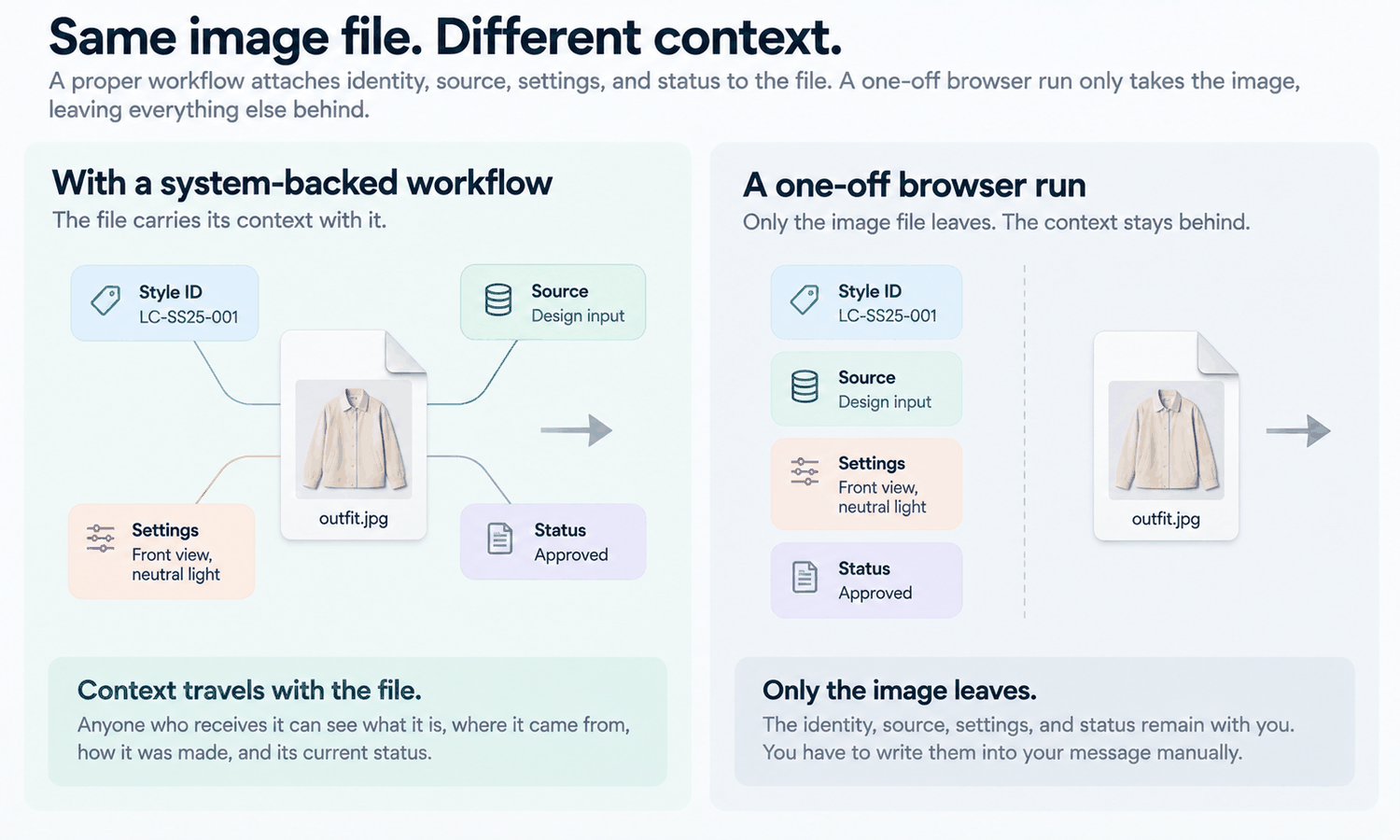
That informality is the appeal and it is also the problem, because a tool embedded in a company workflow attaches things to its output automatically. It knows which style the file belongs to, which source it came from, which settings produced it, and whether anybody has approved it. A casual browser run attaches none of that. The file leaves as a picture and nothing else.
So the handover file matters more here rather than less. In a formal pipeline it is a record of what the system already knows. In an informal one it is the only place that information will ever exist.
Informal tools produce orphaned files
An orphaned file is one that cannot be joined back to anything: not to a style code, not to the photograph it came from, not to a decision. It looks complete, which is what makes it dangerous.
Three things happen to orphans, usually all three across a season. They get re-requested, because nobody can tell whether the version they have is current. They get re-created, because re-requesting felt slower. And they get treated as approved, because a file with no status attached reads as settled to whoever receives it.
None of that is a failure of care by the person who made the file. It is a structural consequence of using something that does not keep a record for you, and the correction is to keep one by hand rather than to be more careful.
What has to travel with the file
| Field | Why it travels | What happens without it |
|---|---|---|
| Style and colorway reference | It is the only way the file joins to anything the receiving side runs on | The file is filed by whoever received it, under whatever made sense to them that day |
| Which source photograph it came from | It is what makes a detail check possible for anyone other than you | Nobody downstream can verify anything, so nobody does |
| Status: proposal, selection, or confirmation | The three carry different permissions and look identical as files | A proposal gets used as a confirmation, which is the expensive direction |
| What any approval was granted against | Approval of a visual direction and approval of a fit are different events | A bare approved is read as full approval by somebody two handovers away |
| What is still open, named individually | An unmarked file reads as fully decided | Open questions get answered silently by whoever needed an answer first |
The fields go in the message rather than in the filename. Filenames get rewritten on the second download, truncated by upload forms, and normalized by whatever tool receives them, so anything that only exists in a filename has a short life.
Keep the list short enough to actually be written every time. Five fields that get filled in beat twelve that get skipped, and a partially filled field marked unknown is more useful than a blank, because a blank reads as an oversight while an explicit unknown reads as a question.
The record you have to keep for yourself
Separately from what travels, there is a record that stays on your side and exists only if you build it.
-
The source photograph, kept alongside the output rather than in a downloads folder, since a comparison against the source is the only way to check details and a comparison you cannot perform will not happen
-
The settings or the description of what produced the result, because a defect shared across several images has one cause and one fix, and you cannot find a shared cause without a record of what was shared
-
How many attempts the accepted output took, which is the only figure that tells you what this actually costs you per usable image
-
Which outputs were rejected and roughly why, so the same unproductive direction is not tried again next month
That first item is the one that separates a workable informal setup from an unworkable one. Working in an environment where the uploaded source stays beside the on-model outputs derived from it removes the need to maintain this by hand, which is a real difference at volume. In Lightchain AI (apparel AI) that link exists by default, so an output made in AI Virtual Try-On can be traced to its input without anybody maintaining a spreadsheet. In a browser tab with a downloads folder it exists only if somebody is disciplined about it every single time.
There is also a check that has to happen before anything leaves, and it has no exceptions. Logos, printed text, care labels, and small hardware get compared against the source image on every single output. Reconstructed detail lands almost right — a letterform slightly off, a stitch count wrong, a zipper pull the wrong shape — and almost right survives an appreciative look at your own work and fails in front of a client or a factory. When one region fails and the rest of the frame is sound, a targeted correction to that region is smaller than starting over.
Status is the field nobody writes
Of all the fields, the one most often left out is the one doing the most work. An image is a proposal, a selection, or a confirmation, and those three carry different permissions.
A proposal should not leave the room it was made in. A selection can go to whoever is building the next thing. A confirmation can go to a channel or a factory. Sending the same file, with the same name, at all three stages destroys the distinction entirely, and the person receiving it has no way to reconstruct which one you meant.
Approval has a second half that costs three words and prevents most of the arguments. Write what the approval was against: approved as a visual direction, approved against the fit session, approved against the strike-off. Six weeks and two handovers later, a line that says only approved will be read as fully approved by somebody who was not in the conversation.
For anything heading toward production, a styled image is not the right carrier anyway. Converting the approved look into a line drawing or tech-sheet draft in the Design & Production Workbench forces the construction decisions that a render lets everyone leave open, and those outputs are drafts that a technical designer still has to review.
What the file cannot make true
A complete handover file makes an image usable. It does not extend what the image is.
The output is a visual asset. It does not predict fit, determine sizing, model how a fabric behaves in motion, or forecast returns. Those come from measurements, a graded pattern, a physical sample, and your own data. That is a property of what the asset is rather than a limitation of any particular result, and no field in a handover file changes it.
Two consequences follow. A fit opinion offered alongside an image is an aesthetic impression, and it becomes dangerous at the moment somebody treats it as a reason to skip a fitting. And a size guide cannot be assembled from imagery, however much of it exists, because a size guide is a measurement document.
Color needs its own field precisely because it cannot be settled in the file. Screen color is not a physical reference, exact code matching is not something to promise, and the gap between a monitor and a roll of cloth stays open regardless of display quality. Colorways get settled by strike-offs against an agreed standard, so any colorway shown travels as a shortlist and must be labeled as one.
Where the informal route stops working
Keeping this record by hand is sustainable at low volume and stops being sustainable at a point most people pass without noticing.
The signal is not the number of files. It is the first time somebody cannot answer which source produced a given output. That question is cheap to answer while the memory is fresh and expensive afterwards, and once it has failed once it will fail regularly.
At that point the choice is to build the discipline properly or to move to something that keeps the record for you. On cost, the platform publishes credit packages, and whatever trial or entry terms apply should be read from the current listing rather than assumed. The listed price is a list price rather than your cost per usable image, which depends on how many attempts each accepted output takes in your categories, and the attempt count you have been recording is the only thing that tells you.
If this is a one-off, none of the above needs building. Write the five fields into the message, check the details against the source, and send it. Whether the work runs through Lightchain AI or a browser tab, the fields are the same fields; only the amount of manual effort differs.
Frequently asked questions
Is there a free version of this kind of tool?
Terms change, so read the current listing rather than relying on any article including this one. What does not change is that the evaluation and the record-keeping cost the same regardless of what the generation costs, and those are usually the larger share of the effort. Budget the attention rather than only the fee.
Which field matters most if we only write one?
Status, because it is the one whose absence causes the most expensive misreadings. A proposal treated as a confirmation produces work that has to be undone; a confirmation treated as a proposal only produces a delay. If a second field is possible, add what the approval was against.
We are a two-person team. Is this over-engineered?
Five lines in a message is not engineering, and two-person teams are where an orphaned file does the most damage, since neither person has a system compensating for the other. The habit takes about thirty seconds per file. Skipping it costs an afternoon the first time somebody cannot tell current from superseded.
What if we do not know a field?
Write unknown rather than leaving it blank, since a blank reads as an oversight and an explicit unknown reads as a question somebody can answer. This applies especially to status and to what an approval was against. A named gap gets closed and a silent one gets assumed.
Can we send the file and follow up with the details?
The details tend not to follow, and the file starts being used the moment it arrives. Write the fields into the same message, even if some of them say unknown. The follow-up version of this workflow is how the same file ends up in three places with three different understandings of what it is.
Does any of this change for a client versus an internal handover?
The fields are identical and the consequences differ, since an internal misunderstanding gets corrected in a corridor and a client one gets corrected in an invoice. For client work, add a line stating what the image does and does not represent, which is easier to hold as a standing practice than as a case-by-case decision.
In closing
An informal workflow gives you speed and gives you nothing else. It does not record which source produced a file, which settings were used, or whether anybody approved it, so all of that has to be written by hand into the message the file travels in. Five fields, a status among them, and a note of what any approval was against. Then keep your own record of the source, the settings, and the attempt count, because that record is the only thing that will later tell you what this costs and where a shared defect came from.
Start here
Take the last file you sent somebody and write the five fields for it now, after the fact. The ones you cannot fill are the ones the receiving side has been filling in on your behalf, and status is usually among them. Then paste those five lines into a note somewhere you can copy from, since the habit only survives if writing it is faster than thinking about it.
**Start with the on-model workflow → **https://www.lightchainai.com/global/solutions/aiVirtualTryOn