
Artificial intelligence and fashion now meet in design studios, sample rooms and content teams, and they bring a vocabulary with them. Words such as prompt, reference image, inpainting, upscaling, segmentation and model appear in briefs, supplier conversations and software menus, often without explanation. Some of them are straightforward. Others mean different things to different people, and a few mean something quite different in fashion than they do in technology.
A shared vocabulary makes working with AI tools easier. A designer who can ask for "a local edit to the collar using this reference" gets a faster, more accurate result than one who asks to "fix the top bit." A content team that understands why "reconstructed detail" needs checking reviews images more carefully. And a brand that knows what "labeling" and "likeness" refer to asks better questions about its own practice.
This glossary explains the terms most often met in apparel work: core generation terms, image editing terms, apparel workflow terms and quality and governance terms, and closes with where these terms meet in practice.
| Term | Plain meaning | Where it shows up in apparel work |
|---|---|---|
| Generative AI | Software that produces new images or text from inputs | Concept images, on-model images, variations |
| Prompt or instruction | Written directions given to the tool | Describing fabric, details, scene or changes |
| Reference image | An image supplied to guide the result | A fabric swatch, a trim, a pose, a style |
| Local edit | Changing one area of an image and leaving the rest | Fixing a collar, a pocket or a hand |
| Expansion | Extending an image beyond its original edges | Adding space for a banner or crop |
| Upscaling | Increasing an image's resolution | Preparing images for print or zoom |
| Segmentation | Separating an image into labeled regions | Finding the garment, skin, hair and background |
| Virtual try-on | Placing a garment on a person in an image | On-model images from flat-lays |
| Reconstruction | Details produced to fit the result rather than copied | Trims, text and prints that need checking |
| Labeling | Marking images as AI-generated or altered | Channel and market disclosure rules |
Core Generation Terms
These terms describe how images are produced.
-
Generative AI. Software that produces new content, here images, from the inputs it is given. In apparel, it produces concept images, on-model images and variations.
-
Model. In technology, the underlying system that produces the output. In fashion, a model is usually a person. When a supplier says "the model," ask which is meant.
-
Prompt or instruction. Written directions given to a tool, such as "mid-weight cotton twill, matte" or "replace the collar with a band collar." Specific, factual instructions produce more predictable results than mood words.
-
Reference image. An image supplied to guide the result: a fabric swatch, a trim close-up, a pose, a garment. References show exactly what words can only approximate.
-
Output or result. What the tool produces. It is a starting point for review, not a finished asset.
-
Iteration. Producing, reviewing and adjusting in rounds until the result is right. Clear notes between rounds make iteration faster. Notes that name the area, the problem and the reference work far better than general impressions.
-
Seed or variation. Many tools can produce several versions from the same inputs. Similar inputs can still give different results, which is why the same settings are reused when consistency matters.
Image Editing Terms
Editing terms describe what can be changed after an image exists.
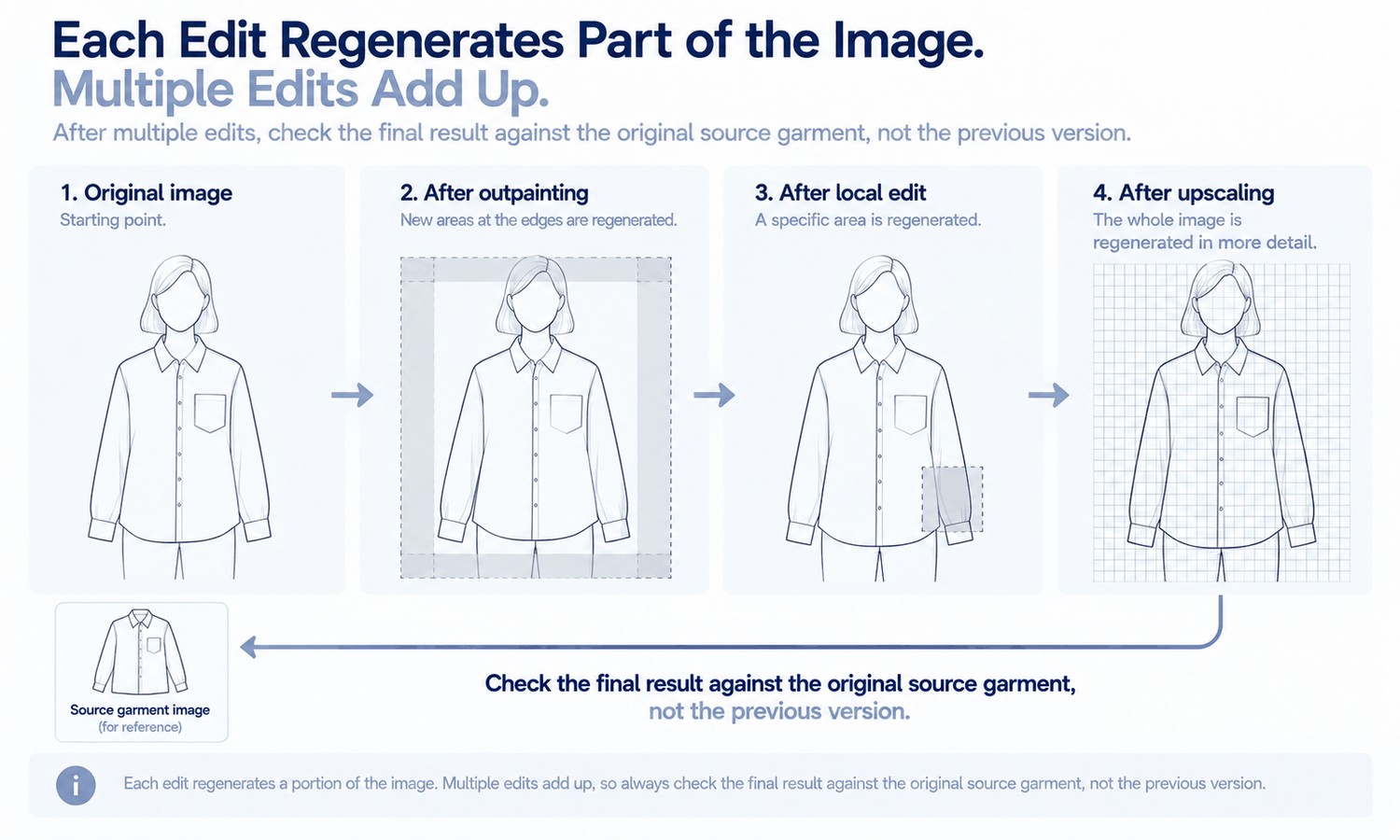
A local edit, sometimes called inpainting, changes one defined area of an image while leaving the rest as it was. In apparel work, it is used to fix a collar, adjust a hand, replace a trim or remove a stray object. The edited area is regenerated so that it blends in, which means its edges can shift slightly and should be checked.
Expansion, sometimes called outpainting, extends an image beyond its original edges by generating new surroundings. It is useful for creating space for text on a banner or for cropping to a different shape.
Upscaling increases an image's resolution so it can be printed or zoomed without looking blurry. It rebuilds fine detail to fill the extra pixels, so trims, text and texture can change slightly and are worth checking at full size afterward.
Segmentation separates an image into labeled regions, such as garment, skin, hair and background. It underlies background removal and cutouts, and it is how a tool knows which area to change when a garment is replaced. Its hardest cases are boundaries, such as hair over a collar or a hand in a pocket.
Background removal and cutouts use segmentation to separate the subject from its background, for clean product images or new scenes. Relighting adjusts shadows, highlights and colors so that an element matches the light of a new scene.
Two practical points apply across these editing terms. First, every edit regenerates part of the image, so an edit is never purely cosmetic if it touches the garment; a local edit near a pocket can change the pocket. Second, edits accumulate. An image that has been expanded, locally edited and upscaled has been reconstructed three times, and the final version should be checked against the garment source rather than against the previous version.
Apparel Workflow Terms
Some terms are specific to how AI is used with garments.
-
Garment source. The photo a garment image starts from, usually a flat-lay. Its quality decides how much of the garment the image can carry through faithfully.
-
Virtual try-on. Placing a garment on a person in an image, usually from a flat-lay or garment photo. It shows how the garment looks worn, not how it fits.
-
Model set or saved model. A generated person kept for reuse, so every product in a range appears on the same model.
-
Sketch to image and image to sketch. Turning a line drawing into a realistic image, or a photo into a line drawing for a tech pack.
-
Fabric and color application. Showing a style in a different fabric or color for discussion. Final colors are confirmed on lab dips, since screen color is not a physical reference.
-
Style blending. Combining elements of two references into new design directions, used with references the brand owns or has the right to use.
-
Weak areas. Categories current tools handle less reliably, such as complex prints, lace and openwork, sheer fabrics and layered styling.
Quality and Governance Terms
These terms describe what to check and what to decide.
Reconstruction refers to details the tool produces to fit the result rather than copying them exactly from a source. Reconstructed detail tends to come back almost right: a logo slightly reshaped, a button with the wrong number of holes. It is why every image is checked against its garment source.
Invented detail, sometimes called hallucination, is the more extreme case: something that appears in the image but has no basis in the inputs, such as a pocket that does not exist. Consistency and drift describe whether a person or garment stays the same across images; drift is the gradual change that creeps in across angles, poses or batches.
Likeness concerns whether a generated face resembles a real, identifiable person, and whether an image depicts a real person at all. A generated face is checked for close resemblance before it is approved, and any image of a real person depends on that person's agreement.
Labeling or disclosure refers to marking images as AI-generated or altered. Expectations differ by market and platform and change over time, so they are confirmed for each channel.
Training data refers to the material an AI system learned from. It matters for questions about rights and use, which belong with whoever handles a brand's agreements and should be asked of any tool provider directly.
Where Artificial Intelligence and Fashion Terms Meet in Practice
Precise terms make everyday requests clearer. "Local edit to the left cuff, using trim reference 3" says exactly what to change and how. "Upscale for print, then check logos at full size" connects a task to its check. "Same saved model, same scene, new garment" asks for consistency in terms anyone can follow. A short internal glossary, using the same words in briefs, notes and reviews, keeps the whole team aligned. It also helps when working with outside producers, who may use different words for the same things.
In Lightchain AI (apparel AI), several of these terms correspond to specific tools.
-
Local edits correspond to Target Revision and Partial Edit, which change a defined area using a reference image or a written instruction, as described on the Partial Redraw page.
-
Expansion, upscaling, background removal and cutouts correspond to tools in the Image Editor.
-
Virtual try-on and saved models correspond to AI Virtual Try-On and model sets, and style blending to Style Fusion.
For teams refining generated images with precise, local changes, Partial Redraw is the Lightchain AI solution built for that work.
Frequently Asked Questions
What terms connect artificial intelligence and fashion?
Core generation terms such as prompt and reference image, editing terms such as local edit, upscaling and segmentation, apparel workflow terms such as garment source and virtual try-on, and governance terms such as reconstruction, likeness and labeling. Knowing them makes briefs and reviews clearer.
What does "model" mean in AI fashion work?
In technology, the system that produces the output; in fashion, usually a person. Clarify which is meant in any brief or conversation.
What is a local edit?
Changing one defined area of an image while leaving the rest, for example fixing a collar or replacing a trim. The edges of the edited area should be checked afterward.
Why does upscaling need checking?
Because it rebuilds fine detail to fill extra pixels, so trims, text and texture can change slightly. Check them at full size.
What is reconstruction?
Details the tool produces to fit the result rather than copying them exactly. They tend to come back almost right, which is why every image is checked against its garment source.
Why does a team need a shared glossary?
Because the same words mean different things to different people. Agreed terms make briefs, notes and reviews clearer and results more predictable.
How do these terms map to Lightchain AI tools?
Local edits map to Target Revision and Partial Edit, expansion and upscaling to the Image Editor, virtual try-on to AI Virtual Try-On and style blending to Style Fusion. Partial Redraw is the solution to use for precise, local refinement.
In Closing
Artificial intelligence and fashion share a growing vocabulary, and using it precisely makes AI tools easier to work with. Know the core generation terms, the editing terms, the apparel workflow terms and the quality and governance terms, and watch for words such as "model" that mean different things in different fields. Agree a short glossary for the team, use it in every brief and review and pair every generated image with the checks the terms point to.
Start Here
If your team refines generated images and wants requests to land precisely, Partial Redraw is the solution to use. It is built for local refinement: you change a defined area using a reference image or a written instruction, and the rest of the image stays as it was. Start by writing your team's glossary, then use its terms in your next round of edits and check each result against its source.
**Explore Partial Redraw → **https://www.lightchainai.com/global/solutions/partialRedraw