
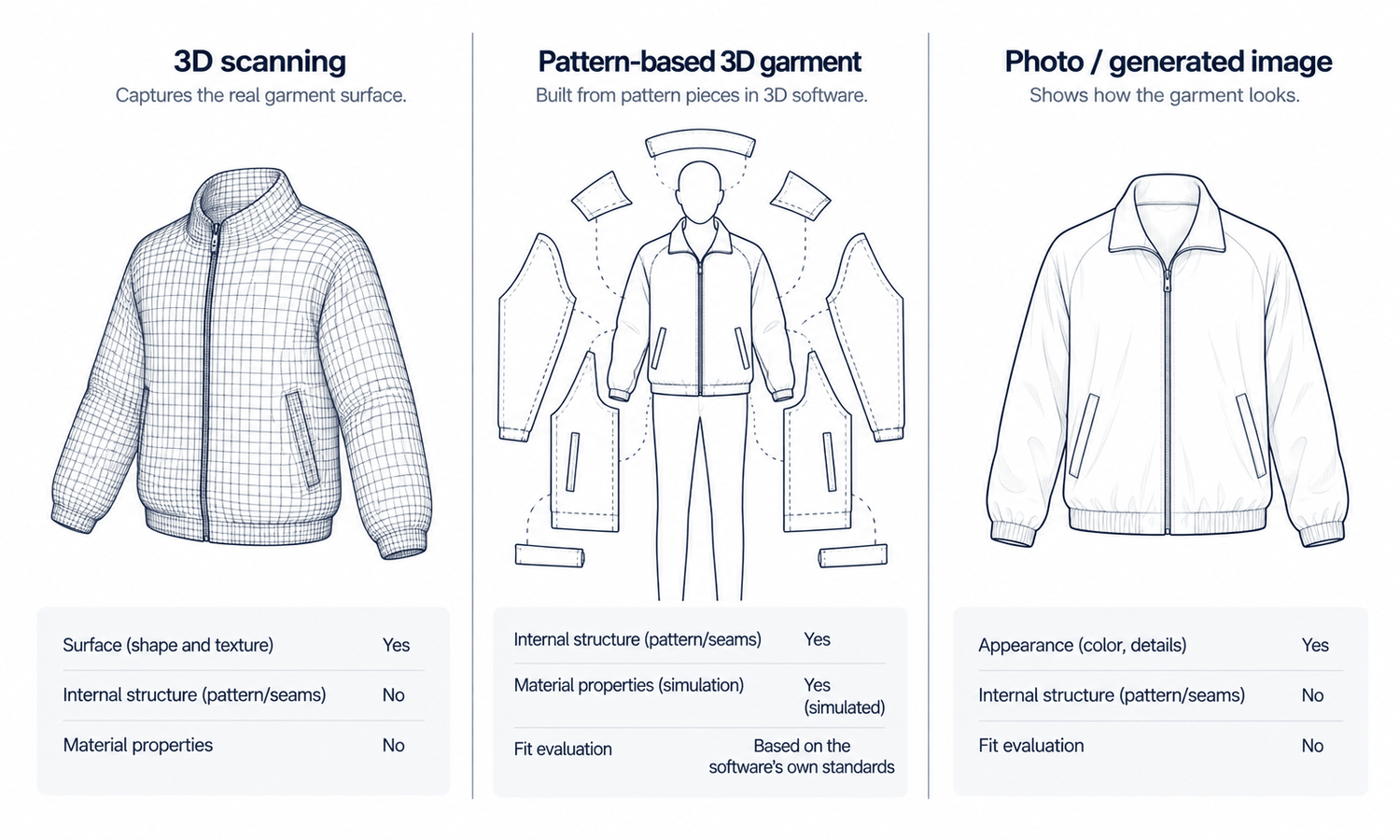
A 3D clothes model sounds like the complete digital version of a garment: something that can be turned, inspected and used for anything a photograph can do and more. In practice, the phrase covers very different things. A garment scanned in three dimensions, a garment built digitally from its pattern pieces and a photograph or generated image of a garment each hold different information. Each is useful, and each is easy to ask the wrong question.
The difference matters most when a team decides what it needs. A scan may look like a finished digital garment and still know nothing about how it was cut. A pattern-based 3D garment may be accurate about fit and still need rendering work before it looks like a product photo. A photograph may be the most convincing of the three and still say nothing about how the garment fits.
This article explains what a 3D scan of a garment captures, what a 3D garment built from patterns knows, what a photo or generated image knows, how to choose the one you actually need and where generated imagery fits alongside 3D.
| What you want to know | 3D scan of a garment | 3D garment built from patterns | Photo or generated image |
|---|---|---|---|
| Surface shape | As it sat during the scan | As simulated on an avatar | Visible sides only |
| Color and texture | Captured from the surface | Assigned from fabric data | Captured or rendered |
| Pattern pieces and construction | No | Yes | No |
| How the fabric behaves | No; the shape is frozen | Simulated from fabric properties | Rendered, not calculated |
| Fit on different bodies | No | Supports fit review, on the software's own terms | No |
| Appearance on a model | Only as posed on the scan form | After rendering on an avatar | Yes, directly |
| What it takes to produce | A scanning setup and cleanup | Digital patterns, fabric data and skills | A garment photo |
What a 3D Scan of a Garment Captures
A 3D scan records the outside of a physical object. For a garment, that usually means dressing it on a form or laying it out, then capturing it from many angles with a scanner or a series of photographs that software combines into a three-dimensional surface. The result can be turned and viewed from any side, with the garment's colors and textures mapped onto it.
What the scan holds is specific.
-
The surface as it was. The scan captures the garment's shape at the moment it was scanned, on that form, in that position. It does not know how the garment would look on a different body or in a different pose.
-
What the cameras could see. Inside surfaces, linings, the underside of collars and anything hidden by folds are missing or guessed.
-
No construction. A scan has no pattern pieces, no seam allowances and no record of how the garment was cut or sewn. Seams are just lines on a surface.
-
No fabric properties. The scan does not know the fabric's weight, stretch or stiffness. The shape is frozen; it cannot be draped again.
That makes scans useful for particular jobs: showing a finished garment that viewers can rotate, archiving a physical piece, or placing a real product in an interactive display. It does not make a scan a digital pattern or a substitute for fit work.
What a 3D Garment Built From Patterns Knows
A pattern-based 3D garment starts from the opposite end. Instead of recording a finished garment, it builds one. Digital pattern pieces are arranged around a 3D avatar, joined virtually along their seams and given fabric properties such as weight, stretch and bending stiffness. The software then simulates how that fabric settles on the avatar.
Because it is built from the pattern, this kind of 3D garment knows things a scan cannot. It knows the construction, because the construction is its input. It can be placed on avatars of different sizes, re-draped in a different pose and changed at the pattern level. Technical designers use it to review fit and proportion during development, often before a physical sample is made.
It is also the most demanding of the three. It needs accurate digital patterns, reliable fabric data and people skilled in the software, and making it look like a product photograph takes rendering work on top. Fit evaluation in these tools carries its own validation requirements and should be judged by those standards, by people who know the software, rather than by the standards of any image tool.
What a Photo or Generated Image Knows
A photograph of a garment, or a generated image of it on a model, is the most direct of the three. It shows what the garment looks like: its color as captured, its surface, its details, its silhouette from one angle. A generated image can place that garment on a person in a chosen pose and scene without a shoot.
What an image does not know follows from what it is. It has no geometry, so it cannot be turned to show a side it never saw. It has no pattern and no fabric properties. The drape in a generated image is rendered, not calculated, so it is evidence about the picture rather than about the fabric. And because generated garments are reconstructed from their source photos, details that the source did not show clearly are filled in and must be checked. The output is a visual asset: it does not predict fit, determine sizing or model how a fabric behaves in motion.
Its advantage is practicality. A garment photo takes minutes, and on-model images can follow from it quickly, which is why images remain the backbone of product pages.
Choosing the 3D Clothes Model You Actually Need
The right choice follows from the question the team is trying to answer.
If viewers need to rotate a finished product, a scan is the direct route. It shows the real garment from every visible side, as it was when scanned.
If the team needs to develop the garment, review its fit or test pattern changes before sampling, a pattern-based 3D garment is the tool built for that question, used on its own terms and validated by people who know it.
If the team needs product and campaign images of the garment on a person, an image is the practical route: a good photograph of the garment, placed on a model where on-model images are needed, and checked against the garment itself.
The three can also work together. A garment that already exists as a pattern-based 3D model can be rendered as a flat-lay and used as the input for on-model imagery. That is a handoff between two workflows, not a merger of them: the 3D software keeps doing the simulation and fit review, and the image workflow keeps producing pictures.
The effort involved differs just as much as the answers. A scan needs a scanning setup, time to capture each garment and cleanup of the resulting surface. A pattern-based 3D garment needs digital patterns, which many brands already have from their pattern-making software, plus reliable fabric data and trained staff. An image needs a well-lit garment photo. A small brand with no 3D pipeline can usually get the images it needs today, while a brand that already develops in 3D may find that its renders are the most useful garment source it has.
What does not work is asking one to do another's job. A scan cannot show fit on other sizes. A generated image cannot answer a fit question. A pattern-based 3D garment answers development questions well and still needs rendering before it becomes product imagery.
Working on the Image Side
Lightchain AI (apparel AI) works on the image side of this picture. It does not scan garments, build 3D garments or simulate fabric. It produces on-model images from garment photos.
-
AI Virtual Try-On places a garment on a model directly from its flat-lay or garment photo, including on a saved model set.
-
A 3D-to-flat-lay conversion tool turns an existing 3D garment render into a flat-lay input, so teams that develop in 3D can hand garments into the image workflow.
-
Model Studio sets the model, pose, scene and angle for each image.
For teams that need on-model images of garments they have already photographed or rendered, AI Virtual Try-On is the Lightchain AI solution built around that input. Scans and pattern-based 3D work stay with the tools and people built for them, and product imagery for many styles can scale through Scale E-commerce.
Frequently Asked Questions
What is a 3D clothes model?
The phrase covers different things: a 3D scan of a physical garment, a 3D garment built digitally from its pattern pieces, and sometimes simply an image of a garment on a model. Each holds different information about the garment.
Can a 3D scan of a garment be used as a digital pattern?
No. A scan records the outside surface as it sat during scanning. It has no pattern pieces, seam allowances or fabric properties, so it cannot be re-draped or graded.
Which kind of 3D garment can support fit review?
A 3D garment built from digital patterns and fabric data, simulated on an avatar. Its fit evaluation follows the software's own validation standards and belongs with people who know it.
What does a generated image know about a garment?
Its appearance from the source photo: color, surface, details and silhouette. It does not know the pattern, the fabric's properties or the fit, and details the source did not show are filled in.
Can a 3D garment be used to make on-model images?
Yes, as an input. A 3D garment can be rendered as a flat-lay and passed to an image workflow, while the 3D software keeps handling simulation and fit review.
Which should a brand start with?
Start from the question. Rotatable product views suggest a scan, development and fit review suggest pattern-based 3D, and product and campaign images suggest photographs and generated on-model images.
Where does Lightchain AI fit among 3D clothes models?
On the image side. Lightchain AI does not scan or simulate garments, but AI Virtual Try-On turns garment photos, or 3D renders converted to flat-lays, into on-model images. AI Virtual Try-On is the solution to use for that work.
In Closing
A 3D clothes model can mean a scan, a pattern-based 3D garment or, loosely, an image of a garment on a model, and each knows something different. A scan knows the surface as it was. A pattern-based 3D garment knows the construction and can support fit review on its own terms. An image knows the appearance and can put it on a model quickly. Choose by the question you are asking, let each hand over to the next where it helps and do not ask any one of them to do another's job.
Start Here
If your team needs on-model images of garments you have photographed or already developed in 3D, AI Virtual Try-On is the solution to use. It is built around the garment source: you place a flat-lay, or a 3D render converted to a flat-lay, on a saved model and produce product and campaign images from it. Start with a few styles, check every image against its garment source, and keep fit review with the tools built for it.
**Explore AI Virtual Try-On → **https://www.lightchainai.com/global/solutions/aiVirtualTryOn